
AI tools now help Instagram users post at the best times for engagement by analyzing account data, audience behavior, and content performance. Instead of relying on generic advice like "post at 11 AM on Tuesday", these tools identify the exact moments your followers are most active. Here's why this matters:
- Organic reach is shrinking: In 2026, Instagram's average organic reach is just 3.5%, down 18% from previous years.
- AI boosts results: Posts scheduled with AI-recommended times can increase reach by 2–3x.
- Key metrics matter: Saves and shares are more important than likes, as Instagram prioritizes meaningful engagement.
AI considers factors like follower demographics, historical post performance, and content type to optimize timing. For example, Reels perform better in the evening, while carousels see success in the morning. Tools like Outfame simplify this process with real-time insights and scheduling features, ensuring your posts reach the right audience at the right time.
Bottom line: Timing is critical on Instagram. With AI, you can align your schedule with audience habits, maximize engagement, and stay ahead of platform trends.
How AI Reads Instagram Audience Behavior
AI uses your Instagram account data to uncover patterns in audience behavior, helping pinpoint the best times to post for maximum engagement. Here's a closer look at how it works.
Instagram Analytics Inputs
AI taps into Instagram Insights to analyze follower demographics - such as location, age, gender, and device preferences - and key performance metrics. These include Reach, Impressions, and Engagement Rate (calculated as Likes, Comments, Saves, and Shares divided by Reach). Among these, Saves stand out as a critical indicator. When someone saves your content, it signals strong interest and trust, suggesting they plan to revisit it later.
For Reels, AI focuses on specific metrics like total plays, average watch time, and completion rate. These numbers help gauge how well your content resonates with viewers.
Historical Post Performance
AI doesn't just rely on real-time data; it also looks back at your posting history. By reviewing the past three months of engagement data, it identifies trends in content performance. This includes determining which days, times, and formats - Reels, carousels, or standard feed posts - consistently drive interaction.
Timing recommendations differ based on the type of post. For example:
- Reels: Typically have a 24–48 hour discovery window.
- Feed posts: See their most critical engagement within the first 60 minutes.
AI also monitors something called engagement velocity - how quickly a post gains traction in the first 15–20 minutes. This helps align posting times with moments when your audience is most active and ready to interact.
Behavioral and Contextual Insights
AI goes beyond your personal account data by factoring in broader audience behaviors and routines. For instance:
- A fitness-focused audience often engages early in the morning (5–7 AM) before workouts.
- A tech-savvy audience might be more active during mid-morning work breaks (9–11 AM).
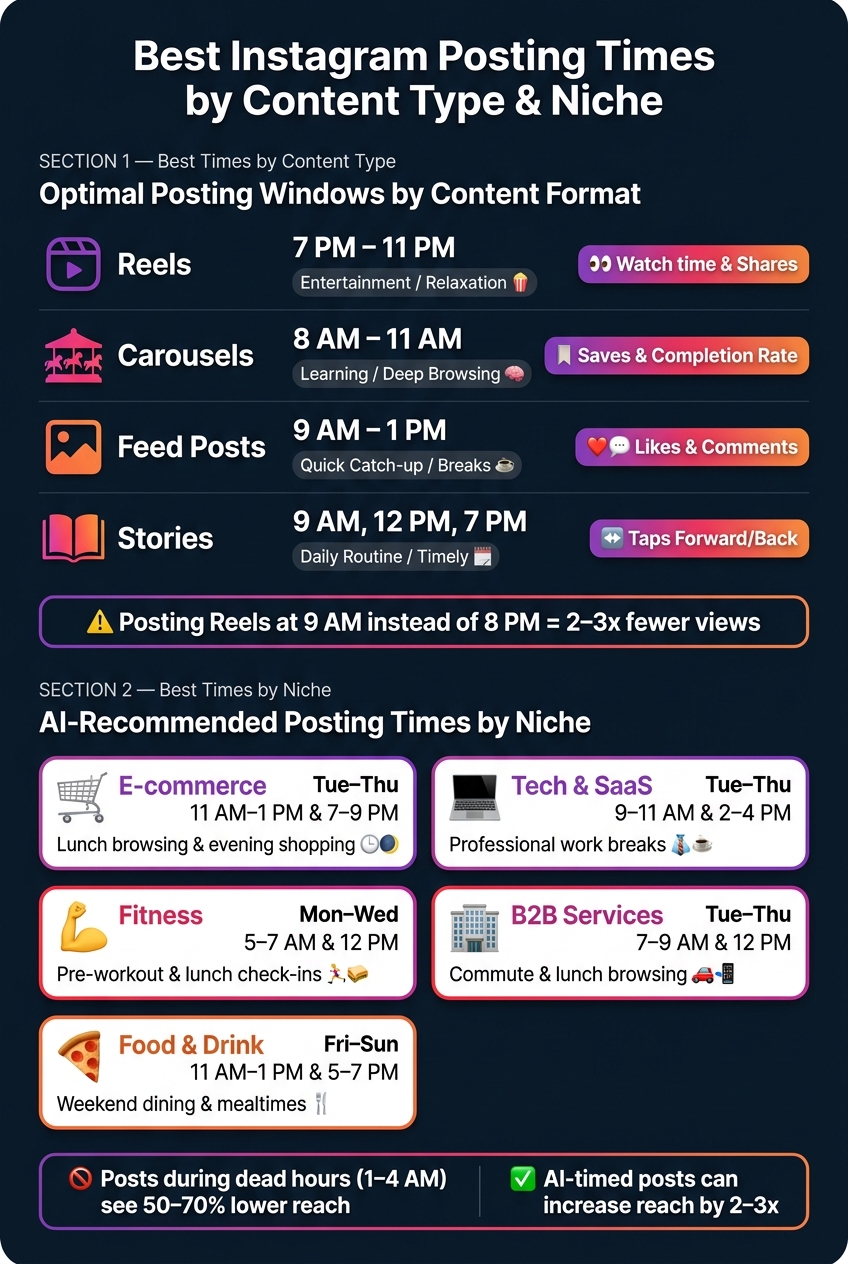
It also considers niche-specific trends, as shown in the table below:
| Niche | Best Days | Best Times (Local) | Behavioral Context |
|---|---|---|---|
| E-commerce | Tue, Wed, Thu | 11 AM–1 PM, 7–9 PM | Lunch-break browsing and evening shopping |
| Fitness | Mon, Tue, Wed | 5–7 AM, 12 PM | Pre-workout motivation and lunch check-ins |
| Tech & SaaS | Tue, Wed, Thu | 9–11 AM, 2–4 PM | Professional breaks during work hours |
| Food & Drink | Fri, Sat, Sun | 11 AM–1 PM, 5–7 PM | Weekend dining planning and mealtimes |
| B2B Services | Tue, Wed, Thu | 7–9 AM, 12 PM | Decision-makers browsing during commutes/lunch |
AI also adapts to platform-wide changes. For example, since 2026, Instagram has emphasized Shares per Reach as a key factor for promoting content on the Explore page. This means AI considers when your audience is most likely to share a post, not just like it.
Timing matters. Content posted during "dead hours" (1–4 AM) sees 50–70% lower reach compared to posts shared during peak times. These insights ensure AI can fine-tune posting schedules to maximize visibility and engagement.
sbb-itb-3b12fba
AI Methods Used to Predict the Best Posting Times
Once AI gathers insights on audience behavior, the next step is turning that raw data into practical posting schedules. This involves analyzing historical posting patterns and audience activity through advanced methods. Here's how it works:
Data Aggregation and Cleaning
AI collects data from a variety of sources, including engagement metrics, audience activity, content details, and relationship signals like direct messages and Story interactions. It then organizes this data into structured categories that feed directly into scheduling algorithms. Here's a snapshot of the process:
| Data Category | Specific Data Points | Purpose |
|---|---|---|
| Engagement | Likes, Comments, Saves, Sends | Tracks interaction speed and quality |
| Audience | Location, Time Zone, Age, Active Hours | Aligns posting times with peak local activity |
| Content | Format (Reel/Carousel), Keywords, Visuals | Matches timing to content type preferences |
| Relationship | DMs, Story Replies, Profile Visits | Predicts connected reach for Feed posts |
To ensure accuracy, AI removes outliers and focuses on data from the past 30–90 days. For best results, consistent posting over four to six weeks is essential for the AI to identify meaningful patterns. Once the data is cleaned and organized, predictive models can step in to determine optimal posting times.
Engagement Prediction Models
With clean data in hand, machine learning models predict the best times for peak engagement. These models analyze over 1,000 variables to forecast when your audience is most likely to interact with your posts.
A key focus is on engagement velocity - how quickly interactions like likes, comments, and shares occur within the first 30–60 minutes. Instagram's algorithm in 2026 heavily prioritizes this initial burst of activity, with shares (via DM) carrying 3–5 times more weight than likes when it comes to expanding your reach. AI identifies the times when your followers are most likely to share content, maximizing exposure.
"The algorithm predicts which content will engage each user and surfaces that content when they open the app - not when you posted it." - Tim Eisenhauer, Apaya
To fine-tune these predictions further, AI groups your audience into segments based on their unique behaviors and locations.
Audience Segmentation and Clustering
AI divides your followers into distinct groups by analyzing their behavior, demographics, and geographic location. By clustering these groups, AI identifies consistent high-activity periods across multiple days, avoiding reliance on one-off spikes. This makes its recommendations far more dependable.
For accounts with followers spread across the globe, AI prioritizes the largest geographic segment for the primary posting schedule. Evergreen content can then be used to fill in gaps for other time zones. Relying on a single, generic posting time can cost you 30–40% of potential engagement.
"Averaging your audience into a single posting time is the scheduling equivalent of sending one email to your whole list with no personalization. You already know better. Apply it." - Ava Patterson, Marketing Tech Writer
Step-by-Step Guide: Using AI to Find Your Best Posting Times
With AI insights at your fingertips, here’s how to incorporate them into your posting strategy effectively.
Setting Up AI-Powered Scheduling
First things first: you’ll need a Professional Instagram account - either a Business or Creator profile. Without it, AI tools won’t be able to access the engagement data they rely on to generate accurate recommendations.
Once your account is ready, connect it to the AI tool. This can be done through public profile analysis or via API access, which provides deeper metrics like Story views and DM interactions. Ideally, you should have at least 30 days of posting history available, but a range of 90–180 days will give more precise insights. To ensure accuracy, compare the AI’s suggestions with Instagram’s native Insights (Profile > Insights > Total Followers > Most Active Times).
Reading AI Posting Recommendations
AI tools typically provide two types of timing data: general peak windows (when your audience is broadly active) and specific best times (when engagement is likely to spike). When reviewing heatmaps, pay attention to the darkest cells - they indicate periods of highest activity.
Interestingly, early morning slots, like 5–6 AM, can serve as “indexing windows.” These allow your content to be processed by the algorithm before peak engagement hours.
"5 AM posts allow the algorithm to index content before the 9 AM rush." - Iconosquare 2026 Research
When analyzing the data, focus less on likes and more on Shares and Saves - these are now stronger indicators of meaningful engagement than likes.
Once you’ve gathered these insights, start experimenting with a controlled approach to refine your posting times.
Testing and Refining Your Schedule
AI recommendations are a great starting point, but they’re not the final word. Test them out with a 4-week trial, keeping your content consistent while only adjusting posting times.
For example, pick one slot within your peak window each week - start at 9 AM one week, then shift to 10 AM the next, and so on. After the test, identify which time slot generated the most Shares and Saves. Additionally, review your top and bottom-performing posts monthly, and conduct a full audit of your schedule every quarter to stay in tune with audience behavior changes.
"If you post when your audience isn't online, you've already lost the battle!" - Sophie Gonçalves, Content Manager, Iconosquare
Finally, here’s a pro tip: stay active on Instagram for 30 minutes after posting. Engaging with early comments boosts the post’s engagement velocity, which can help the algorithm distribute your content more widely.
Advanced AI Scheduling Strategies
Best Instagram Posting Times by Content Type & Niche (AI-Driven Guide)
Take your scheduling to the next level by incorporating advanced AI-driven strategies tailored to your audience and content. These methods work alongside your existing schedule to boost engagement and reach.
Managing Audiences Across Time Zones
When your audience spans multiple countries, there’s no such thing as a universal "best time" to post. AI tackles this challenge by analyzing your audience’s geographical distribution and pinpointing overlap windows - those key hours when the largest segments of your audience are online simultaneously. For example, posting between 9–10 AM EST can catch U.S. followers during their morning routine while engaging UK followers in their afternoon hours.
"If half your audience is in Australia and you're posting for US timezones, you're optimizing for the wrong people. '11 AM' means nothing without a timezone." - Tim Eisenhauer, Apaya
To make this work, ensure your scheduling tool supports local time publishing. This feature ensures posts go live at 9 AM in each follower's respective time zone, not just yours. Additionally, running a quarterly geography audit through AI analytics can help you stay ahead. If a new regional audience starts growing, your AI should adjust the optimal posting times automatically.
Matching Post Timing to Content Type
Different types of content resonate best at specific times of the day. AI takes this into account by aligning content formats with the user mindset most likely to engage during particular hours.
| Content Type | Optimal AI Window | User Mindset | Primary Metric |
|---|---|---|---|
| Reels | 7 PM – 11 PM | Entertainment / Relaxation | Watch time & Shares |
| Carousels | 8 AM – 11 AM | Learning / Deep Browsing | Saves & Completion rate |
| Feed Posts | 9 AM – 1 PM | Quick Catch-up / Breaks | Likes & Comments |
| Stories | 9 AM, 12 PM, 7 PM | Daily Routine / Timely | Taps forward/back |
Timing matters. For instance, posting Reels at 9 AM instead of 8 PM could result in 2–3x fewer views because users aren’t in "entertainment mode" during work hours. Stories, on the other hand, benefit from being spread across multiple times throughout the day. This keeps your content visible at the top of the Stories bar rather than flooding it all at once.
Another tip? Avoid posting on the hour, as these times often see platform congestion. Opt for less conventional times like 12:13 PM or 6:41 PM to give your posts a better chance of standing out.
Real-Time Schedule Adjustments
A static posting schedule can quickly become outdated. AI timing engines solve this by monitoring engagement velocity - tracking how quickly likes, comments, and shares accumulate in the first 1, 3, and 6 hours after a post goes live. If a post underperforms, the AI recalibrates future recommendations to improve results.
"The system is constantly learning, updating predictions in near real-time as users interact with content." - PostEverywhere
This adaptability is crucial because audience behavior is always shifting. Seasonal trends, platform updates, and even cultural events can all influence when your audience is most active. Brands that rely solely on manual scheduling risk missing out on 30–40% of potential engagement, according to studies. Real-time adjustments allow AI to treat your schedule as a dynamic, evolving system rather than a rigid calendar, ensuring your strategy stays aligned with audience behavior.
Measuring the Results of AI-Driven Scheduling
Once you've set up your AI-powered schedule, the next step is to measure how well it's working.
Key Metrics to Track
Not all metrics carry the same weight. While it's tempting to focus on views across Feed, Reels, and Stories, these alone don't provide the full picture. Instead, prioritize the metrics that the algorithm values most:
- Sends per reach (DM shares): Instagram places 3–5 times more importance on this metric compared to likes when deciding whether to promote your content to non-followers. A like is passive, but a DM share signals active, intentional interest.
- Watch time: For Reels, aim for users to stick around for at least 60% of the video after the first 3 seconds. Most viewers decide whether to keep watching in just 1.7 seconds.
- Saves: Content with high save rates indicates lasting value, which can lead to broader algorithmic reach.
- Likes per reach: Instead of focusing on the total number of likes, consider likes as a percentage of your content's reach.
To maximize impact, schedule posts 30 minutes before your AI-recommended peak engagement window. This gives the algorithm time to index your content before the main traffic hits. Early engagement is especially important, as the first hour plays a major role in determining organic reach.
"Sends per reach is one of the strongest signals the algorithm has... A like is cheap. A send is a person stopping to say 'you specifically need to see this.'" - Adam Mosseri, Head of Instagram
By tracking these metrics, you can refine your posting strategy to better align with audience behavior.
Keeping Your Schedule Updated
AI-driven recommendations aren't static. Audience behavior can shift by 20–30% seasonally, so your schedule needs regular updates to stay effective.
Review your schedule on a weekly, monthly, and quarterly basis to account for these changes. However, avoid making adjustments too quickly - test for at least 4–6 weeks before altering your strategy. This ensures you can accurately identify whether timing or other factors are influencing performance.
If you're launching a major campaign or shifting your content focus, reassess immediately. New followers often have different engagement patterns, and updating your AI tool with fresh data will help recalibrate your schedule.
Using Outfame for Ongoing Growth
Outfame simplifies tracking with its follower tracker, which monitors daily gains and losses. This feature helps you identify which posts and posting times are driving growth - or causing unfollows.
The platform's AI-powered "Best Time to Post" tool uses real-time audience activity from your account to pinpoint the exact hours when your followers are most likely to engage. With a reported 98% accuracy rate, Outfame is trusted by over 50,000 creators.
Additional tools, like an engagement calculator and competitor performance benchmarks, allow you to compare your timing results against similar accounts. For creators looking for even more precision, the Outfame Max™ AI tool provides 24/7 monitoring, ensuring your scheduling decisions are always backed by the latest data. These insights help keep your AI-driven scheduling strategy sharp and focused on achieving maximum engagement.
Conclusion: What AI Means for Instagram Scheduling Going Forward
AI is transforming how creators and brands approach Instagram scheduling. Instead of sticking to broad, one-size-fits-all recommendations, AI tools now analyze your specific follower behavior, past post performance, and content type to pinpoint the best times for your audience. This shift to personalized, data-driven timing is changing the game for social media strategies.
Posting consistently at AI-recommended times can amplify engagement over time. Daily, well-timed posts outperform sporadic efforts, even if those sporadic posts align with so-called "perfect" times. As Tim Eisenhauer of Apaya explains:
"The algorithm rewards consistency. AI gives you consistency. The timing takes care of itself."
Instagram’s algorithm has also evolved, prioritizing engagement metrics like saves and shares over traditional likes. AI tools schedule posts for moments when your audience is most likely to interact in meaningful ways, aligning perfectly with these new priorities.
Platforms like Outfame integrate these AI capabilities seamlessly through features like its "Best Time to Post" tool and Outfame Max™, which tracks followers in real time. These tools empower creators with actionable data, helping them align their strategies with how Instagram’s algorithm actually operates.
FAQs
How much Instagram data do I need for AI timing to work?
AI doesn’t need a long posting history to start fine-tuning your posting schedule. By analyzing performance metrics like Instagram Insights’ “Most Active Times”, it pinpoints the best times to share content. If your account lacks sufficient history, AI can lean on broader global or industry trends to make recommendations. However, the more posts you have, the better the AI can understand and adapt to your specific engagement patterns over time.
Do best posting times change for Reels vs carousels vs Stories?
The best times to post depend on the content format because user behavior varies. Reels tend to shine in the evening (6–11 p.m.) when people are winding down and looking for entertainment. Carousels perform better during the morning or work hours (8 a.m.–12 p.m.), as users are more likely to engage with detailed content during these times. For Stories, posting several times throughout the day helps keep them visible at the top of feeds.
How often should I update my AI posting schedule?
It's important to regularly tweak your AI posting schedule by reviewing your analytics. Instead of sticking to a rigid timing, adapt to shifts in your audience's behavior. This approach can help you boost engagement and improve how well your posts perform with algorithms.


