
Instagram doesn't notify users when you screenshot Stories, posts, Reels, or regular Direct Messages. However, disappearing content is an exception. If you screenshot "View Once" photos, videos, or messages in Vanish Mode, the sender gets an immediate alert. These rules have been consistent since 2018.
Key Points:
- No notifications for screenshots of Stories, posts, Reels, or regular DMs.
- Notifications sent for disappearing content (e.g., "View Once" media or Vanish Mode messages).
- Screen recordings follow the same rules as screenshots.
If privacy is a concern, use Instagram's "View Once" or Vanish Mode features to ensure alerts for sensitive content. For public content, Instagram's built-in "Save" option offers a discreet way to keep posts organized.
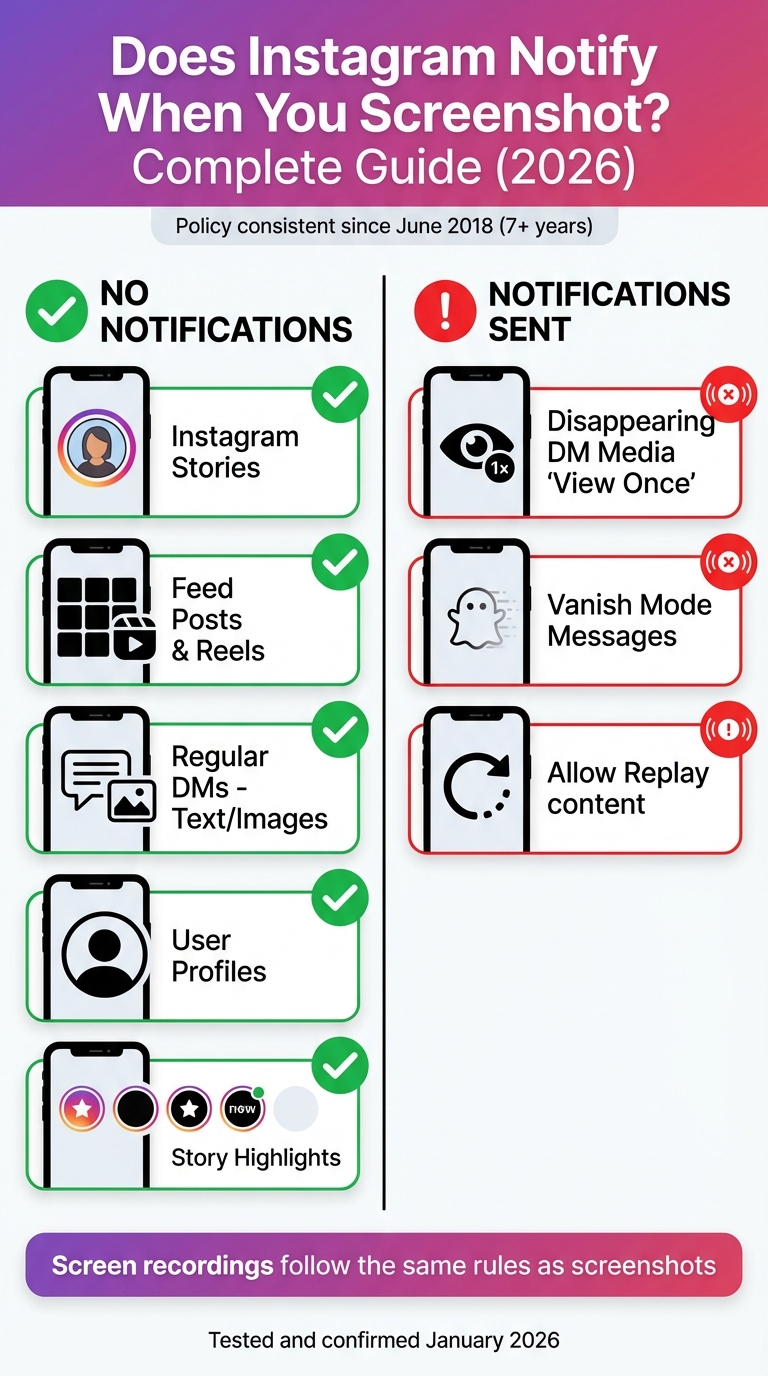
Instagram Screenshot Notification Rules by Content Type 2026
Does Instagram notify when you take a screenshot?
Does Instagram Notify When You Screenshot? The Direct Answer
Instagram does not send notifications when you screenshot Stories, feed posts, Reels, or regular Direct Messages. So, you can take screenshots of these without worrying about the other person finding out.
However, there’s an important exception: disappearing content. If you screenshot a "View Once" photo or video - or anything sent in Vanish Mode - Instagram immediately notifies the sender. This rule has been in place since June 2018.
Testing conducted on January 1, 2026 confirmed that capturing Stories, posts, Reels, or regular DMs does not send any notifications. But when it comes to disappearing content, Instagram consistently alerts the sender.
"Instagram's detection works consistently and accurately for disappearing content only. All other content types can be captured without any notification to the original poster." - SocialRails Team
The same rules apply to screen recordings: recording a Story won’t notify anyone, but recording disappearing content in Direct Messages will trigger an alert just like a screenshot. Here's a quick overview of these notification rules:
Summary of Notification Rules
| Content Type | Screenshot Notification? |
|---|---|
| Instagram Stories | ❌ No |
| Feed Posts & Reels | ❌ No |
| Regular DMs (Text/Images) | ❌ No |
| User Profiles | ❌ No |
| Disappearing DM Media (View Once) | ✅ Yes |
| Vanish Mode Messages | ✅ Yes |
If you want to save public content without taking a screenshot, try Instagram's built-in "Save" feature. This lets you organize posts and Reels into collections without alerting the creator. For sensitive conversations, use Vanish Mode or "View Once" settings to ensure you’re notified if someone attempts to capture the content.
Instagram's Screenshot Rules by Content Type
Instagram handles screenshot notifications differently depending on the type of content you're interacting with. Knowing these distinctions can help you use the platform's privacy features without unexpected alerts.
Stories, Posts, and Reels
Feel free to screenshot Instagram Stories without worrying about notifications - even if they're shared with Close Friends. This applies to all story formats, whether they’re photos, videos, or text-based. The same goes for story Highlights on user profiles.
The same freedom applies to feed posts, Reels, and user profiles. Whether you're capturing a single image, a carousel post, or someone's bio, Instagram won't notify the creator.
Regular DMs
For standard direct messages, screenshots remain private. Whether you're saving text conversations, voice notes, shared posts, or photos and videos from your gallery, Instagram does not send alerts.
The key here is that these are permanent messages that stay in your chat history unless deleted. As long as you're not dealing with disappearing content, you're free to screenshot without any concerns.
Now, let’s look at how disappearing content and Vanish Mode differ from standard messages.
Disappearing Content and Vanish Mode
Here’s where Instagram does send notifications. If you take a screenshot of a "View Once" photo or video - content sent using Instagram's in-app camera - the sender gets an immediate alert. The same applies to "Allow Replay" media.
Vanish Mode takes it up a notch. When this mode is active (you'll notice a dark screen), any screenshot triggers an inline notification that says, "[Username] took a screenshot", visible to everyone in the conversation. In tests conducted in 2026, every screenshot of disappearing messages or Vanish Mode content resulted in instant notifications.
"The only time Instagram notifies users when someone takes a screenshot is when someone takes a screenshot of a disappearing message, photo, or video sent in a direct message (DM)." - Kapwing
Want to avoid triggering alerts? Use the "Keep in Chat" feature when sending photos. This keeps the content in the chat history without screenshot notifications.
2026 Policies and Historical Changes
Instagram's approach to screenshot notifications has seen significant shifts over the years, stabilizing after 2018. A closer look at these changes explains why only disappearing content now triggers alerts. Here's a breakdown of how these policies evolved from early tests to the rules confirmed in 2026.
Early Testing of Story Screenshot Alerts
From 2016 to 2017, Instagram experimented with notifying users when someone took a screenshot of their Stories, mirroring Snapchat's practices at the time. However, this feature was discontinued in June 2018. Instagram concluded that Stories, despite their temporary nature, are public-facing and don't require the same privacy safeguards as private messages.
Emphasis on Disappearing DM Content
After ending Story screenshot alerts in 2018, Instagram shifted its attention to protecting private, temporary content in direct messages. By 2019, the platform prioritized notifications for disappearing messages, introducing features like Vanish Mode, which includes built-in screenshot detection. This focus laid the groundwork for the policies that remain in place today.
The 2026 Policy Landscape
As of January 2026, Instagram's screenshot policy has stayed consistent for over seven years. Current testing confirms that notifications are triggered only for disappearing content, while Stories and regular posts remain unaffected.
"Instagram has maintained its current screenshot policy for 7+ years, suggesting this is their long-term approach." - SocialRails Team
This consistency reflects Instagram's effort to balance user privacy with freedom of content sharing. The platform draws a clear line between public, permanent content (which doesn’t trigger alerts) and private, temporary content (which does).
| Content Type | 2016–2017 Policy | 2018–2026 Policy |
|---|---|---|
| Instagram Stories | ✅ Notified | ❌ Not notified |
| Disappearing DMs | ✅ Notified | ✅ Notified |
| Vanish Mode | N/A | ✅ Notified |
| Reels | N/A | ❌ Not notified |
Common Screenshot Scenarios Explained
Instagram’s screenshot rules can vary depending on the situation. Let’s break down the most common scenarios to clarify what’s allowed and what might notify others.
Story Scenarios
You can freely screenshot any Instagram Story without worrying about triggering a notification. This includes regular Stories, Close Friends Stories, and even Story Highlights. Whether it’s a photo, video, or text-based Story, the creator won’t be alerted if you capture it. Tests have consistently shown that Instagram doesn’t send notifications for Story screenshots.
DM Scenarios
The rules for Direct Messages (DMs) depend on the type of content being shared. You can screenshot standard text messages, conversation history, or photos and videos shared from your gallery without notifying the other person. However, disappearing content - like View Once messages, Allow Replay messages, or anything in Vanish Mode - works differently. In these cases, taking a screenshot will immediately notify the sender. Instagram marks this action with a hatched circle icon next to the message.
"If you take a screenshot in Vanish mode, the message '[your username] took a screenshot' will appear inline with the conversation." - Dave Johnson, Tech Journalist
Screen Recording vs. Screenshots
Screen recordings follow the same rules as screenshots. If you record disappearing content, such as messages in Vanish Mode or View Once content, Instagram will send a notification just like it does for screenshots. However, recording Stories, Reels, or regular DMs remains private and won’t alert anyone. Testing in January 2026 confirmed this: all screen recordings of disappearing messages (8 out of 8) and Vanish Mode messages (5 out of 5) triggered instant notifications.
Privacy and Growth Considerations for Instagram Users
Impact of Screenshot Behavior on Creators
Instagram’s lack of notifications when someone screenshots your Stories, Posts, or Reels can leave creators in the dark about how their content is being used. Instead of relying on alerts, creators turn to measurable engagement metrics like Saves, which reveal when users find content worth keeping. Interestingly, posts with multiple images drive 2.14x more engagement than single-photo posts.
For businesses and influencers, this gap in transparency can lead to risks, especially with exclusive or time-sensitive Stories being redistributed without permission. If you're sharing unique designs, infographics, or other proprietary material, watermarking your images can help ensure your brand stays attributed - even if screenshots are taken. This makes tools like Saves and watermarks essential for protecting your content while tracking its impact.
Using Disappearing Messages for Sensitive Content
When privacy is a priority, Instagram’s Vanish Mode and "View Once" features offer added protection by notifying you if someone screenshots a message.
"Vanish Mode is supposed to be more private... The other person you're chatting with is supposed to have a reasonable expectation that their messages won't stick around for long." - Lindsey Ellefson, Features Editor, Lifehacker
These features aren’t just about privacy - they can also create urgency. For example, brands can use disappearing messages to share limited-time offers, combining exclusivity with an extra layer of security. Whether for personal or professional use, these tools strike a balance between protecting sensitive content and driving meaningful engagement.
How Outfame Supports Responsible Growth
Outfame takes Instagram’s privacy features a step further, helping users grow their audience while keeping their content secure. With AI-powered targeting, Outfame connects you with genuine followers who engage through views, likes, and saves. Automated growth tools and real-time analytics give you a clear picture of what resonates with your audience - all without requiring your account password, thanks to secure API-based operations.
Outfame’s Growth-Guarantee ensures you gain real, engaged followers - or you get your money back. Starting at just $39/month, the platform supports creators and businesses alike, whether you’re watermarking intellectual property or using disappearing messages for sensitive communications. With Outfame, you can build an authentic audience while safeguarding your privacy and content.
Conclusion
As of 2026, Instagram’s screenshot policy remains straightforward: taking screenshots of Stories, Feed posts, Reels, or regular DMs doesn’t trigger any notifications. This approach has stayed consistent since Instagram removed Story screenshot alerts back in June 2018. However, if you screenshot disappearing content - such as "View Once" photos, videos, or messages sent in Vanish Mode - the sender will be notified.
To make the most of Instagram, focus on actionable engagement metrics like Saves, and rely on disappearing features when handling sensitive content. These guidelines align with the broader strategies outlined earlier to help safeguard your activity and content on the platform.
FAQs
Does Instagram notify you if someone screenshots or records your Story or Reel?
No, Instagram does not alert users if someone takes a screenshot or records their Stories or Reels. As of the most recent updates in 2026, these actions are entirely private, and no notifications are sent out.
That said, Instagram’s features and policies can evolve over time. It’s wise to keep an eye on any changes to the platform’s privacy settings to stay up to date.
How can I stop people from taking screenshots of my Instagram content without being notified?
If you're looking to keep your Instagram content safe from being screenshotted without your consent, you'll need to make use of the platform's privacy tools. Instagram only alerts you when someone screenshots view-once photos or videos sent through direct messages or when you're using Vanish Mode. Since late 2024, they’ve also added a screenshot-prevention feature for media marked as “one-time view,” which blocks screenshots entirely.
Here’s how you can protect your content:
- View-once media: Use this option in direct messages to ensure recipients can only see the content once. If they attempt a screenshot, you’ll be notified.
- Vanish Mode: Turn this on in chats for disappearing messages. Any screenshots taken in this mode will alert you.
- One-time view setting: Activate this for photos or videos to completely disable screenshot attempts.
For other types of content like regular posts, Stories, Reels, or permanent DMs, Instagram doesn’t provide screenshot notifications or blocking. If you’re sharing public content, consider adding watermarks or copyright notices to discourage misuse.
What’s the difference between Instagram’s 'View Once' and 'Vanish Mode' features?
Both View Once and Vanish Mode are designed to keep your content temporary, but they serve different purposes. With View Once, you can send a single photo or video in a direct message that can be viewed only one time - or twice if you enable the 'Allow Replay' option. Screenshots of this content are completely blocked, so there’s no need for notifications.
Vanish Mode, however, covers an entire chat. In this mode, messages, photos, and videos disappear after being viewed or when the chat is closed. If someone takes a screenshot while in Vanish Mode, Instagram will notify you right away.
To sum it up, View Once is perfect for single-use media with screenshot blocking, while Vanish Mode is ideal for temporary conversations where screenshots are allowed but come with alerts.


