
If you're trying to hide your Instagram following list, here's the deal: Instagram doesn’t allow you to hide it from people who already follow you. However, switching to a private account ensures only approved followers can see your posts, stories, and follower lists.
Here’s what you can do to manage your privacy:
- Switch to a private account: Only approved followers can see your content and lists.
- Block followers: Completely restrict someone from viewing your profile.
- Restrict followers: Limit their interactions without notifying them.
- Remove followers: Stop someone from accessing your content without blocking them.
Even with these steps, followers you approve will still see your following list. To maintain more privacy, consider carefully managing your followers and avoiding third-party apps that claim to hide this information - they could risk your account's safety.
How to Hide Instagram Following and Followers List
How to Make Your Instagram Account Private
Switching your Instagram account to private ensures that only approved followers can see your posts, stories, and follower lists. It’s a simple way to take control of your online visibility.
Steps to Switch to a Private Account
If you’re using a business account, you’ll need to switch to a personal account first. To do this, go to Settings > Account Type and Tools > Switch to Personal Account.
Here’s how to make the change:
On the mobile app:
- Open your profile and tap the menu (three horizontal lines).
- Select Settings > Account privacy.
- Toggle the Private account option on and confirm your choice.
On a computer:
- Click More (three dots), then go to Settings.
- Select Account privacy.
- Toggle the Private account option on and confirm.
For users under 18, Instagram applies default privacy settings. Those under 16 need parental approval to switch to a public profile.
Once your account is private, take a moment to review how this impacts your visibility.
What Changes When Your Account Is Private
Switching to a private account gives you more control over who interacts with your content. Only followers you approve can see your posts, stories, and your follower and following lists. New followers must send a request, which you can accept or ignore through your Activity feed.
That said, some parts of your profile - like your profile photo, name, username, and bio - remain visible to everyone on Instagram, even if they don’t follow you. Existing followers won’t be removed automatically, so you’ll need to manually remove anyone you no longer want to share content with.
Additionally, your posts will no longer appear on Search, Explore, or hashtag pages. While others won’t be able to download or remix your reels, they can still send you direct messages, which will usually appear as requests.
Managing Individual Follower Access
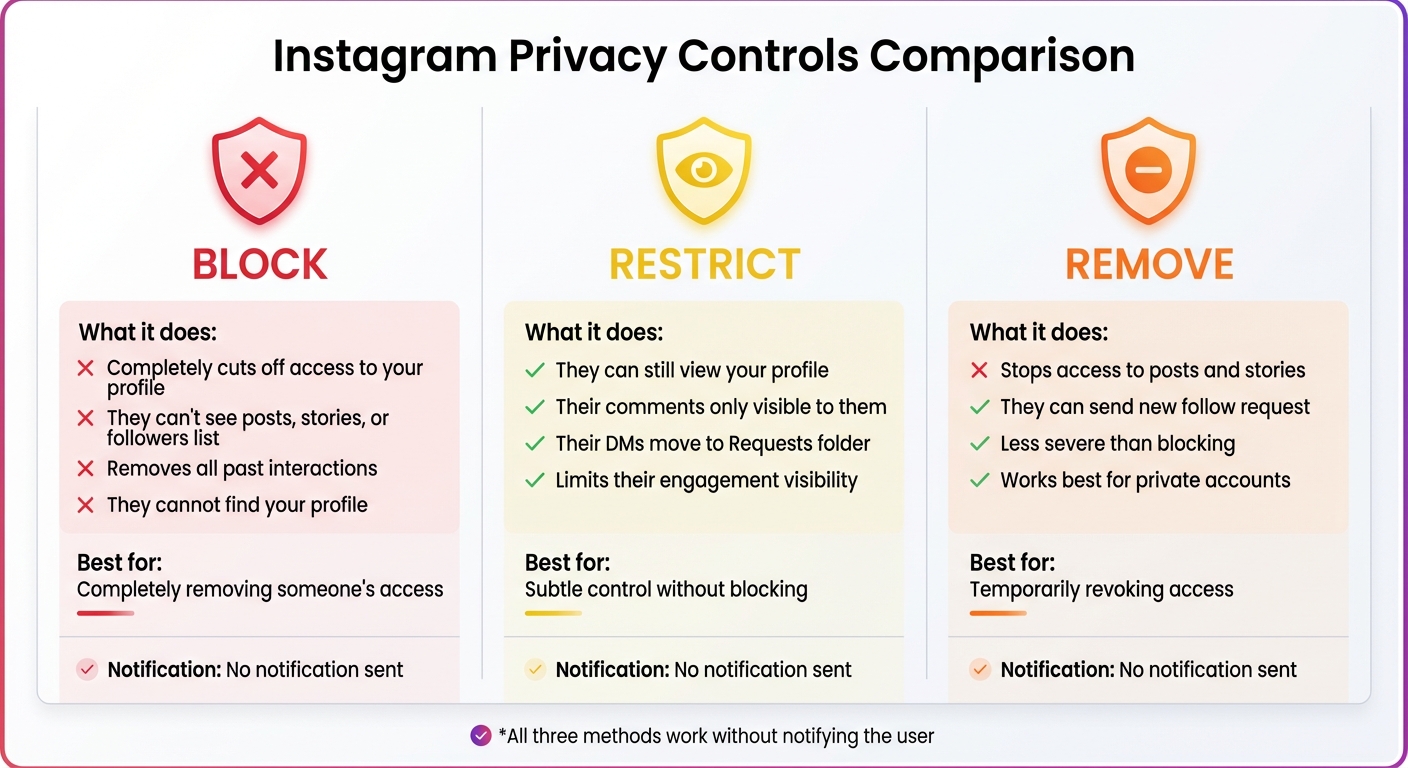
Instagram Privacy Controls: Block vs Restrict vs Remove Followers
Setting your account to private is a great step for limiting who sees your content, but Instagram also gives you tools to manage access for individual followers. These options let you control what specific people can view or how they interact with your profile - without them ever knowing.
How to Block Followers
Blocking someone is the most effective way to completely cut off their access to your Instagram profile. Once blocked, they won’t be able to see your posts, stories, or even your followers list. Any past interactions they’ve had with your account will also be removed. The best part? Instagram won’t notify them about the block .
To block a user, go to their profile, tap the menu icon (three dots) in the top-right corner, and select Block. You’ll get the option to block just that account or extend the block to any new accounts they might create. If you ever want to review or manage your blocked accounts, head to Settings > Blocked under the "Who can see your content" section.
How to Restrict Followers
If blocking feels too harsh, restricting is a more subtle way to control interactions. When you restrict someone, they can still view your profile, but their comments on your posts will be visible only to them. Additionally, their direct messages will be moved to your Requests folder instead of your main inbox .
This is a good option if you want to keep someone on your follower list but limit their visibility and engagement. The restricted user won’t be notified, so they won’t know you’ve made any changes.
How to Remove Followers
Removing a follower is a simple way to stop someone from seeing your posts and stories - without fully blocking them. This option works especially well for private accounts. Once removed, the person will no longer have access to your content unless they send a new follow request and you approve it .
To remove someone, go to your profile, tap Followers, find the person you want to remove, and hit Remove. Instagram won’t notify them about this action . If you notice a Flagged for review notification in your Followers list, you can use it to quickly remove spam or bot accounts in bulk by selecting Remove all.
These individual controls work hand-in-hand with Instagram’s broader privacy settings, giving you flexibility in managing your audience.
Instagram Privacy Limitations You Should Know
What You Cannot Hide from Followers
Instagram doesn't give you the option to hide your "Following" list from people who already follow you. Once someone is an approved follower, they can simply click on your "Following" or "Followers" count to view the entire list. Unfortunately, there’s no built-in feature to block specific users from seeing this information. If you’re using a Business or Creator account, the situation is even more open - these accounts are public by nature, making their lists accessible to anyone.
Even if you take steps like turning off your Activity Status, your likes and comments can still give away clues about who you’re following.
These limitations mean you’ll need to think outside the box if you want to maintain more privacy.
Alternative Methods for More Privacy
If you’re serious about privacy, start by approving only trusted followers and keeping your follower list small and manageable. Another option is to create a secondary account with a username that doesn’t reveal your identity, which allows you to follow accounts more discreetly.
It’s also a good idea to periodically review your followers and remove anyone you don’t feel comfortable sharing your profile with. And one important tip: steer clear of third-party apps that promise to hide your followers list. Not only do these violate Instagram’s Terms of Service, but using them could also get your account suspended.
Additional Privacy Settings to Use
Instagram provides a range of privacy settings that go beyond simply managing your followers. These tools allow you to decide who can view your content and control how others interact with your profile. While your initial adjustments to follower access are a great start, these additional options help you fine-tune your privacy even further. Let’s dive into how you can manage tags, mentions, and content visibility to keep your profile secure.
How to Control Tags and Mentions
To avoid unwanted tags, head to Settings > Privacy > Tags and switch on Manually Approve Tags. This ensures that tagged photos or videos won't appear on your profile until you’ve reviewed and approved them. If needed, you can also remove tags from older posts.
For extra peace of mind, Instagram blocks anyone you've restricted or blocked from tagging or mentioning your username. This means you have full control over whether someone can associate their content with your account.
Post and Story Privacy Options
Instagram also offers features to limit who can see your posts and stories, giving you more control over your audience.
- Close Friends: This feature lets you share stories, posts, and reels with a handpicked group of people. To set it up, go to Settings > Close Friends, add the users you trust, and select Close Friends whenever you post. A green ring will appear around your profile photo for those on your list, but Instagram won’t notify them if they’re added or removed.
- Hide Story From: If you want to block specific followers from viewing your stories, use the Hide Story From option. Additionally, to prevent others from resharing your stories, go to Settings > Privacy > Story and toggle off Allow Resharing to Stories.
These settings give you the flexibility to decide exactly how and with whom your content is shared, keeping your Instagram experience tailored to your preferences.
Keeping your lists private doesn't have to slow your growth. See how Outfame brings real Instagram followers without needing your password.
Summary
Keeping your Instagram account private requires a multi-step strategy. The most effective way to block public access to your following list is by switching to a private account. This ensures that only people you approve as followers can see who you follow.
In addition to making your account private, managing your followers individually gives you more control over who can view your profile details. However, this approach doesn’t address all of Instagram’s built-in limitations.
It’s worth noting that even with a private account, your approved followers can still view your following list - Instagram currently doesn’t offer a feature to hide it from them. Moreover, your follower and following counts remain visible to everyone, regardless of your account’s privacy settings.
To further protect your profile, you can make use of other privacy tools. For example, enabling manual tag approval helps you avoid unwanted content appearing on your profile. Features like Close Friends and Hide Story From also allow you to decide who gets to see your temporary updates.
FAQs
Can I keep my Instagram following list private from my followers?
Unfortunately, Instagram doesn't offer a way to hide your following list from people who already follow you. While you can set your account to private to prevent non-followers from seeing this information, or block specific users to limit their access, anyone you've approved as a follower will still be able to view the list of accounts you follow.
If maintaining privacy is important, you might want to fine-tune your account settings or be more selective about who you allow to follow you.
What are the risks of using third-party apps to hide my Instagram following list?
Using third-party apps to hide your Instagram following list can pose serious risks. These apps often request access to your login details or other permissions, which opens the door to account hacking, unauthorized actions, or even theft of personal information. Since Instagram doesn’t provide a built-in option to hide your following list, these apps work around restrictions in ways that Instagram doesn’t officially endorse.
On top of that, using such tools could violate Instagram’s Terms of Service, putting your account at risk of suspension or even a permanent ban. These apps aren’t always dependable either - Instagram’s updates can easily disrupt their functionality, leaving your privacy exposed.
To keep your account safe, it’s best to rely on Instagram’s own privacy settings. Options like setting your profile to private, blocking certain users, or managing your followers directly are far more secure and reliable.
How can I manage who can see my Instagram posts and stories?
To manage who can view your Instagram posts and stories, take advantage of the platform's privacy settings to maintain control over your content. One of the simplest steps is to switch your account to private - this ensures that only followers you've approved can see your posts and stories. If necessary, you can also review follow requests or remove followers to refine your audience.
Looking for even more control? You can block specific users, preventing them from accessing your content altogether. Additionally, Instagram allows you to hide your stories from certain followers by tweaking your story privacy settings. These tools give you the flexibility to decide exactly who gets to engage with your content.


