
Ever lost a Reel on Instagram and couldn’t find it again? Instagram’s Watch History feature, introduced in October 2025, makes it simple to revisit Reels you’ve watched over the last 30 days. Here’s how:
- Access Watch History: Go to Your Activity in the app, then tap Watch History to see a grid of Reels you’ve viewed.
- Filter Options: Sort by date, author, or viewing order to narrow your search.
- Beyond 30 Days: Check Liked, Commented, or Saved Reels for older content.
- Search Tools: Use Instagram’s search bar for keywords, hashtags, or audio tracks.
- Full Data Export: Download your account data to retrieve timestamps and profiles of all watched videos.
To avoid losing Reels in the future, save them to Collections for easy access. This feature isn’t just about convenience - it’s a helpful tool for organizing content and improving your own Instagram strategy.
How to See Your Instagram Reels Watch History (New Feature)
How to View Your Instagram Reels Watch History
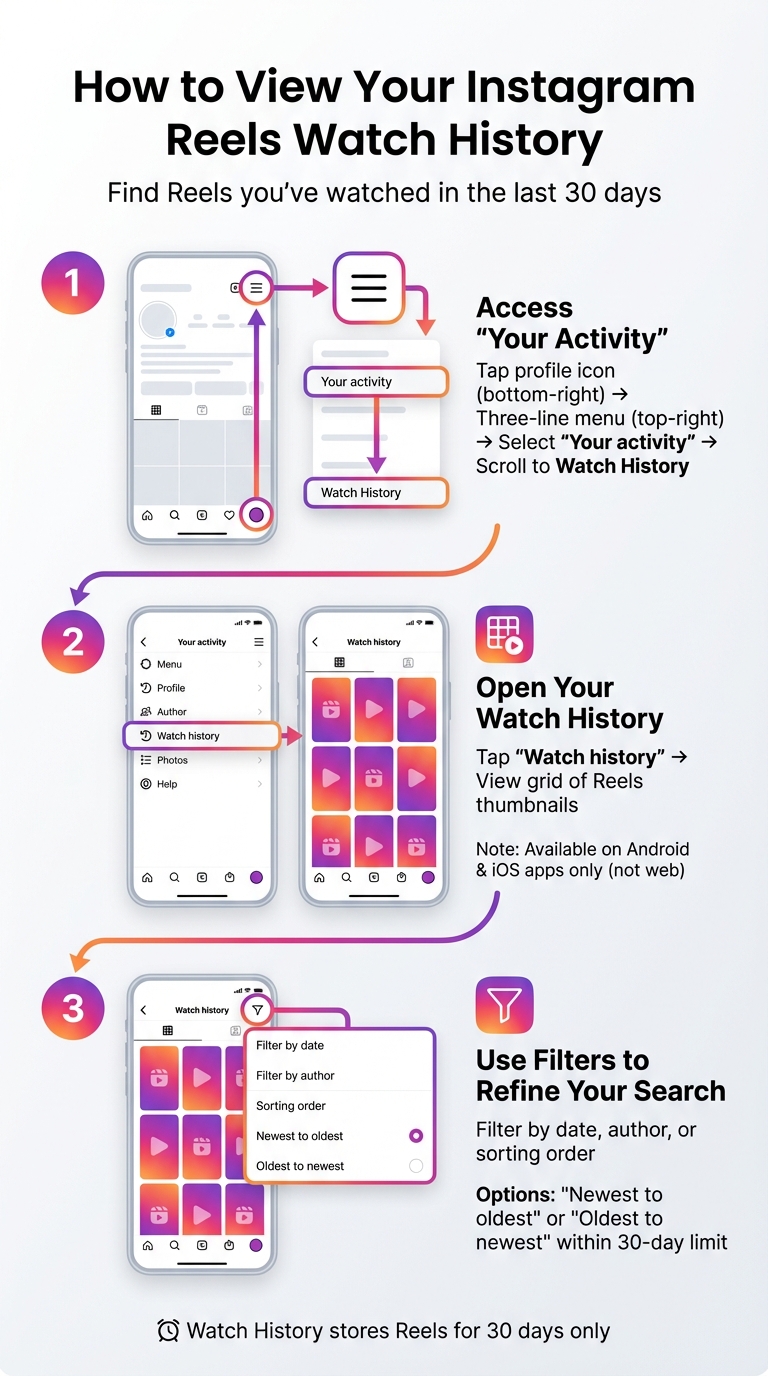
How to Access Instagram Reels Watch History in 3 Steps
Instagram makes it simple to revisit the Reels you've watched over the past 30 days with its Watch History feature. Here’s how you can find and use it:
Step 1: Access "Your Activity"
Start by opening the Instagram app on your phone. Tap the profile icon in the bottom-right corner to go to your profile. From there, tap the three-line menu icon in the top-right corner and choose "Your activity" from the list. Scroll down to locate the Watch History option.
Step 2: Open Your Watch History
In the "Your activity" menu, scroll down until you find "Watch history" and tap on it. This will open a grid-style layout displaying thumbnails of the Reels you've viewed. As Adam Mosseri, Head of Instagram, shared:
"If you go to 'Profile' and under 'Settings,' under 'Your activity,' there's Watch History now, so you can see every reel that you've ever watched."
This feature is available on both Android and iOS apps but isn't accessible through Instagram's web version.
Step 3: Use Filters to Refine Your Search
At the top of the Watch History screen, you'll find options to filter your results. You can refine your search by date, author, or sorting order. For example, you can toggle between "Newest to oldest" and "Oldest to newest" or set a custom date range within the 30-day limit to find specific Reels more efficiently.
Other Ways to Find Lost Instagram Reels
If a Reel is no longer within Instagram's 30-day recovery window or you didn’t directly interact with it, there are still options to track it down.
Review Your Liked or Commented Reels
If the Watch History doesn’t help, take a look at your past interactions. To do this, go to your profile, tap the three-line menu, and navigate to Your activity > Interactions. From there, check either Likes or Comments and filter specifically for Reels.
You can refine your search by using the All content types filter at the top of the screen and selecting Reels. To narrow it down further, sort the results by either "Newest to oldest" or "Oldest to newest." However, as Colleen Christison, Brand Communications Specialist at Hootsuite, explains:
"You must have previously interacted with the reel to see it [in the Interactions tab]. If you simply watched it without liking, commenting, or sharing, it will not show up."
Check Your Saved Reels
If you saved the Reel for later, it will be in your Saved section. To access it, go to your profile menu and select Saved. Once there, switch to the Reels tab or browse through your custom Collections if you’ve organized your saved content. Creating specific Collections for Reels can save you time compared to scrolling through a general folder.
Search Using Keywords and Hashtags
Instagram’s search function can help you locate Reels even if you didn’t interact with them. Tap the Search tab (magnifying glass icon) and type in any keywords, phrases, or hashtags you remember from the Reel’s caption or text overlay. If you recall the creator’s username, you can search their profile and browse their Reels tab directly.
Another option is to search by audio. Enter the name of the track in the Audio section to view all Reels that use the same sound. If Instagram’s internal search doesn’t yield results, try using Google. Type site:www.instagram.com along with your keywords to limit the search to Instagram’s platform.
Download Your Instagram Data to Access Watch History
If you're looking for a way to see every Reel you've watched on Instagram - beyond the 30-day limit - you can download your full account data. This data export includes a file that lists account names and timestamps for all the videos you've viewed. It's a reliable way to access your complete viewing history.
Request Your Account Data
To get started, open Instagram and navigate to Settings > Accounts Center > Your Information and Permissions > Export Your Information. Select "Export to device", choose your profile, and opt for the HTML format for easier navigation. Instagram will email you a download link, which can take anywhere from a few hours to up to 30 days to arrive. Remember, this link expires after 4 days, so make sure to download it promptly. You'll need about 2.5GB of free storage space on your device. Once you've received the file, you're ready to locate your Watch History.
Locate the Watch History File
After downloading the ZIP file, extract its contents to access the folders inside. To find your Watch History, follow this path:
ads_information > ads_and_topics > videos_watched.html
This file provides a chronological list of the accounts whose videos you've watched, along with the exact dates and times. However, it only includes Reels and doesn't cover other types of videos.
Understand the Data Export Limitations
Keep in mind that the exported file won't include direct links to the Reels themselves - only the account names and timestamps. To revisit a specific Reel, you'll need to manually search for the creator's profile using the provided information. Additionally, Instagram only allows you to request this data once every 30 days, and any content you've deleted from your profile won't be part of the export.
Tips for Managing Your Reels and Watch History
Save and Organize Reels Into Collections
If you stumble upon a Reel that feels too good to lose, hit the bookmark icon right away. This saves the video and lets you organize it into a collection. Instead of dumping everything into "All Posts", take a few seconds to create custom collections like Inspiration, Tutorials, or Trends. These categories make it much easier to find what you need later without endless scrolling.
Keep in mind, Instagram’s watch history only lasts for 30 days. To stay on top of things, set aside time each week to review your history and save any valuable Reels into your custom collections. This way, you won’t have to frantically search for that amazing video you saw weeks ago. Plus, having your favorite Reels neatly saved gives you a treasure trove of ideas to improve your own content.
Use Watch History to Improve Your Content
Your watch history isn’t just a list of videos - it’s a goldmine for content inspiration. Revisit the Reels you’ve watched to break down what worked well. Pay attention to details like the opening hook, pacing, visuals, or even the background music. Instagram also lets you filter by "Author", so you can study trends from creators in your niche. Look for patterns in their posting habits, styles, and formats over the past month.
Adam Mosseri, Head of Instagram, summed it up perfectly:
"Have you ever tried to get back to a reel that you'd seen on Instagram and you just can't find it? Well, there is a new feature that should help... you can see every reel that you've ever watched".
This makes watch history more than just a convenience - it’s a powerful tool for creators who want to understand what connects with their audience.
Grow Your Instagram with Outfame
Once you’ve identified trends and strategies from your watch history, the next step is reaching the right audience. That’s where Outfame comes in. This platform uses AI to match your content with users who are genuinely interested in your niche. With automated growth features running 24/7 and real-time analytics, you’ll know exactly which Reels are driving engagement and follower growth.
Starting at $39/month, Outfame even offers a growth guarantee, saving you from the grind of manual outreach. By combining insights from your watch history with Outfame’s targeting tools, you can focus on creating content that resonates while building a real, engaged audience.
Conclusion
Finding a lost Instagram Reel doesn’t have to be a hassle. Thanks to Instagram’s watch history feature, you can review your last 30 days of viewing activity by navigating to Your Activity > Watch History. You can filter by date, sort videos chronologically, or even search for specific creators to locate the Reel you missed. If the Reel you’re looking for is older than 30 days, try checking your Interactions or Saved Collections for clues.
To avoid losing valuable Reels in the future, make it a habit to bookmark them right away. Use Instagram’s collection feature to organize saved Reels into custom folders, so you won’t have to sift through a sea of random videos later. Since watch history only covers 30 days, saving Reels is the best way to keep them accessible long-term.
Beyond just finding lost videos, your watch history can also be a tool for growth. By analyzing the Reels you engage with, you can uncover patterns - what grabs your attention, which formats resonate, and which trends are thriving in your niche. Apply these insights to fine-tune your own content and better connect with your audience.
For creators looking to grow their reach, tools like Outfame offer AI-powered targeting and automated growth starting at $39/month. Pairing a smart content strategy with effective growth tools can help you build a loyal, engaged audience more efficiently.
FAQs
How can I view my Instagram Reels watch history for videos older than 30 days?
Instagram’s built-in Watch History lets you see Reels you’ve viewed in the past 30 days. If you want to go further back, you’ll need to download your account data. Here’s how: head to Settings, navigate to Your Activity, and select Download Your Information. Request the data, and once it’s ready, download and review it. This will give you access to your activity history, including older Reels you’ve watched, even if they’re no longer accessible within the app.
What can I do if I can’t find a Reel I recently watched on Instagram?
If you’re having trouble finding a Reel in your watch history, don’t worry - there are a few ways to track it down. Start by checking the Watch History section under Your Activity in the app. To make sure you’re not missing anything, adjust the date filters to cover a wider range, like "All Time."
Still no luck? Try searching for the Reel using any keywords, hashtags, or sounds you can remember. Another option is to look under Interactions in Your Activity to see if you liked, commented on, or saved the Reel. If you remember the creator’s account, you can also visit their profile and browse their Reels tab.
As a final step, you can request a data export from Instagram. Go to Settings > Security > Download Data, and you’ll get a detailed log of your past activity. However, keep in mind that if the Reel has been deleted by the creator or is no longer available, it may not be recoverable.
How can I use my Instagram Reels watch history to improve my content strategy?
Instagram's Watch History feature keeps a record of all the Reels you've viewed over the past 30 days. You can find it by navigating to Settings → Your Activity → Watch history. This tool gives you a snapshot of the content that grabs your attention, making it easier to spot trends, formats, and styles that might resonate with your audience.
To sharpen your content strategy, look for patterns in the Reels you keep coming back to. Notice recurring themes, trending audio tracks, or specific creators whose work stands out to you. These observations can inspire your own Reels - whether it’s adopting similar pacing, visual styles, or music. By regularly checking your watch history, you can stay in sync with current trends and adjust your strategy to match your audience’s shifting interests. This way, your content can become more engaging, shareable, and easier to discover.


