
If you're looking to clean up your Instagram following list without risking your account, here's what you need to know:
-
Unfollowing too quickly can get you banned. Instagram monitors how fast you unfollow accounts. Stick to the safe limits:
- New accounts (<6 months): 50–150 unfollows per day, 10–20 per hour.
- Older accounts: 200–400 unfollows per day, 20–30 per hour.
- Wait 10–15 seconds between actions and take breaks between sessions.
- Use Instagram's built-in tools like the "Least Interacted With" filter or sort by "Date Followed" to identify inactive or irrelevant accounts.
- Avoid third-party tools that require your password. Instead, consider safe options like Outfame, which uses Instagram’s official API.
- If you get blocked, stop all activity for 24–48 hours to avoid further penalties.
How To Mass Unfollow on Instagram Without Getting Blocked (2025) - Quick Fix
Instagram's Unfollow Limits and What Happens If You Break Them
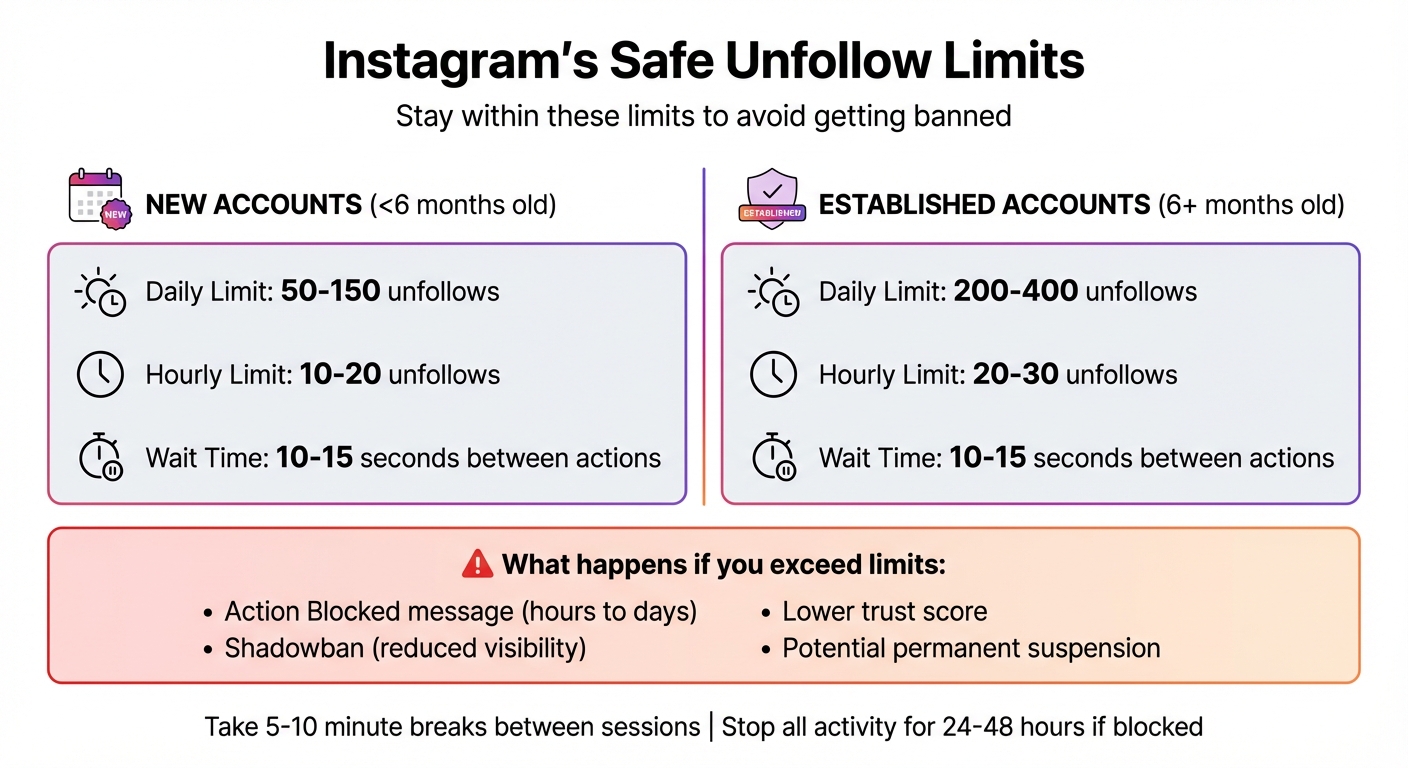
Instagram Unfollow Limits by Account Age - Safe Daily and Hourly Limits
Daily and Hourly Unfollow Caps
While Instagram doesn’t publicly share its specific unfollow limits, it enforces restrictions based on factors like account age, activity levels, and trust metrics. For new accounts (those less than six months old), the daily unfollow limit usually ranges between 50 and 150 actions, whereas established accounts can manage between 200 and 400 unfollows per day. These limitations are designed to discourage spammy or bot-like behavior.
Hourly limits are even stricter. To stay safe, manual unfollowing should be limited to 10–30 accounts per hour, with at least 10–15 seconds between each action. This helps avoid Instagram’s spam detection filters, which are sensitive to repetitive patterns - even when actions are performed manually.
| Account Type | Estimated Daily Limit | Estimated Hourly Limit |
|---|---|---|
| New Accounts (<6 months) | 50–150 | 10–20 |
| Established Accounts | 200–400 | 20–30 |
Knowing these limits can help you avoid triggering Instagram’s algorithm, which is quick to penalize accounts that exhibit suspicious activity.
What Can Go Wrong with Mass Unfollowing
If you exceed Instagram’s unfollow limits, the consequences can be swift and severe. For starters, you might encounter the dreaded "Action Blocked" message, which temporarily halts your ability to follow, unfollow, or like posts. These blocks can last anywhere from a few hours to several days. Worse, you might face a shadowban, where your posts stop appearing in hashtag searches or on the Explore page - without any notification. Additionally, your account’s trust score can take a hit, leading to reduced reach for months.
"Excessive bulk actions can lead to a shadowban, where your content visibility is reduced without warning." – Iris Dawson, Editor in Chief, SocialBoosting
Using third-party automation tools that require your Instagram credentials is another risky move. These tools not only violate Instagram’s terms but also expose your account to potential theft, unauthorized actions, or even permanent suspension.
If you receive an "Action Blocked" warning, the best course of action is to immediately pause all activity for 24–48 hours. Ignoring the warning and continuing to unfollow can result in longer penalties - or even permanent bans.
3 Ways to Unfollow Accounts on Instagram
Once you’re familiar with Instagram’s limits, you can start clearing out your following list in ways that won’t raise any red flags. Choose the method that suits your preferences and comfort level.
Method 1: Use the "Least Interacted With" Filter
Instagram includes a handy "Least Interacted With" filter that highlights accounts you’ve barely engaged with over the past 90 days [4, 11, 12]. You can find this feature by going to your profile, tapping Following, and selecting Least Interacted With [4, 12].
"The 'Least Interacted With' feature is the best way to unfollow people as it is from Instagram themselves." – Lim How Wei, Founder, Followchain
This filter shows up to 50 accounts at a time [11, 12]. After unfollowing that group, refresh your profile to load another batch. To stay under Instagram’s radar, unfollow only 10–20 accounts per session, waiting 10–15 seconds between each action [4, 5]. Spread these sessions throughout the day, taking 5–10 minute breaks to avoid exceeding Instagram's hourly limits. Before you hit that unfollow button, double-check that the account isn’t someone valuable who just hasn’t been active lately.
Method 2: Sort by Following Date and Remove Inactive Accounts
Another built-in Instagram tool allows you to sort your following list by the date you followed each account [4, 13]. To use it, go to your profile, tap Following, and then click the Sort by Default icon (or the up/down arrows) in the top-right corner [4, 13]. Choosing Date followed: Earliest helps you spot older accounts - like giveaway pages, outdated connections, or people you no longer engage with. Alternatively, selecting Date followed: Latest lets you evaluate recent follows to see if they’re worth keeping.
Instagram also makes it easier to identify inactive or deactivated profiles by grouping them under a Deactivated Accounts section. Removing these accounts can help boost your engagement rate by giving Instagram’s algorithm a clearer picture of your audience [4, 15]. Stick to the same pacing as Method 1, and aim to unfollow no more than 50–100 accounts per day.
"Your following list should reflect your community, not random or inactive accounts." – Sociosight
Method 3: Use Outfame for Safe, Automated Unfollowing
If you’d rather automate the process, Outfame might be worth considering. This tool uses Instagram’s official Graph API to safely unfollow accounts without requiring your password, keeping your credentials secure.
Outfame’s AI-driven filters identify ghost followers, inactive accounts, and users who don’t engage with your content, ensuring you only remove low-value connections. The platform mimics human behavior by pacing actions naturally and adhering to Instagram’s daily unfollow limits of 50–100 accounts. Plus, it provides real-time analytics through a dashboard that tracks follower retention, engagement trends, and the effects of your unfollowing activity. By using Outfame, you can save over six hours a week on manual cleanup while maintaining a focused and engaged audience.
How to Unfollow Safely Without Getting Banned
Protecting your Instagram account while unfollowing requires a careful approach to avoid triggering spam filters. Instagram keeps a close eye on how quickly and frequently you unfollow accounts, flagging any behavior that seems automated or unnatural. Even if you're unfollowing manually, moving too fast or following predictable patterns can lead to restrictions.
Take Breaks Between Unfollowing Sessions
Instagram’s algorithm is designed to detect bot-like behavior, such as unfollowing dozens of accounts in just a few minutes. To avoid this, limit yourself to unfollowing 10–20 accounts per hour, and take 10–15 second pauses between each action. Spread your unfollowing sessions throughout the day instead of trying to do it all at once. For example, pause for 5–10 minutes after every small batch of unfollows. If your account is well-established (over six months old), you can safely unfollow 200–400 accounts over the course of a day. However, newer accounts should stay under 50 unfollows per day to avoid raising any red flags.
"Instagram monitors rapid, repetitive actions, even when done manually. Pacing yourself reduces the risk of being action-blocked." – Sociosight
Once you've established a safe pace, the next step is deciding which accounts to remove and which to keep.
Create a List of Accounts to Keep
Before diving into your unfollowing spree, take a moment to identify the accounts you want to keep. This might include friends, family, collaborators, industry leaders, or brands you love. Having a list ensures you don’t accidentally unfollow someone important. Double-check profiles before hitting that unfollow button to avoid any regrets later.
Rebuild Your Following with Outfame's Tools
After safely cleaning up your following list, you can focus on growing your network with more engaged and relevant users. This is where Outfame’s AI-driven tools come in handy. Outfame helps you connect with genuine users in your niche while steering clear of risky follow-for-follow tactics. The platform offers a real-time analytics dashboard to monitor engagement and follower retention, giving you a clear view of how your efforts are paying off. Plus, since Outfame uses Instagram’s official Graph API, it ensures your account growth stays secure and compliant with Instagram’s guidelines. It’s a smart way to rebuild your audience with purpose and precision.
Conclusion
Cleaning up your Instagram following doesn’t have to put your account at risk. By sticking to Instagram's limits - tailored to your account's age and activity - you can avoid unnecessary penalties while streamlining your follower list.
Instagram’s built-in tools make this process easier and safer. Features like the "Least Interacted With" filter or sorting by the earliest followed accounts let you pinpoint which profiles to unfollow without raising any red flags. And remember, steer clear of sharing your credentials with unverified third-party apps to keep your account secure.
Once your follower list is trimmed, it’s time to rebuild with purpose. Focus on connecting with genuine, engaged users in your niche. Tools like Outfame, powered by AI and Instagram's official Graph API, can help you grow strategically. With features like real-time analytics, you can monitor follower retention and engagement, ensuring your efforts lead to meaningful growth.
FAQs
How can I unfollow a large number of accounts on Instagram without risking a ban?
To unfollow a large number of accounts on Instagram without risking restrictions, here’s what you should do:
- Head to your Following list on your profile and manually unfollow accounts by tapping the Following button beside each account.
- Stick to small batches - unfollow 150–200 accounts per hour - and leave a few seconds between actions to make it look natural.
- Take breaks of at least 60 minutes between these batches to avoid triggering temporary blocks.
- Stay away from third-party tools or apps, as Instagram may flag them as bots, which could result in penalties for your account.
If Instagram issues a warning or temporarily blocks your actions, pause your activity and wait several hours before trying again. These steps will help you trim down your following list while staying on the platform’s good side.
What are the dangers of using third-party tools to unfollow people on Instagram?
Using third-party tools to mass unfollow people on Instagram comes with serious risks. These tools often imitate automated actions, which can set off Instagram's security systems. The result? You might face temporary restrictions, hit unfollow limits, or, in the worst-case scenario, get your account permanently banned. On top of that, many of these tools ask for your login details, which opens the door to potential password theft or unauthorized access to your account.
To keep your account secure, steer clear of these tools. Stick to Instagram’s built-in features or adopt safe, manual methods that align with the platform’s rules.
How can I safely unfollow accounts on Instagram without risking my account?
To unfollow accounts on Instagram safely, focus on profiles that are either inactive or no longer relevant to you. Start by checking your Following list and look for accounts that haven’t posted in the last 3–6 months or those you rarely interact with. Be mindful of accounts that might be bots or spam - these often have generic usernames or an odd follower-to-following ratio.
To keep your account secure and avoid triggering Instagram’s activity limits, unfollow in small batches. Stick to under 200 accounts per hour and take breaks between sessions. This gradual approach helps ensure your account stays safe while you tidy up your following list.


