
Restrict and Block are Instagram features designed to control interactions on your account. Here's the key difference: Restrict quietly limits someone's actions (like hiding their comments or messages without them knowing), while Block completely cuts off their ability to see or contact you.
Quick Overview:
-
Restrict:
- The person can still view your profile/posts.
- Their comments are hidden unless you approve them.
- Messages go to your "Requests" folder without read receipts.
- They can't tag, mention, or remix your content (since May 2024).
- Ideal for subtle control without confrontation.
-
Block:
- The person cannot find your profile or interact with you.
- Removes their likes/comments from your posts.
- Prevents them from messaging or tagging you.
- Blocks all current and future accounts they create.
- Best for cutting off contact entirely in cases like harassment.
Quick Comparison Table
| Feature | Restrict | Block |
|---|---|---|
| Profile Visibility | Visible | Hidden |
| Follower Status | Remains a follower | Removed as a follower |
| Comments | Hidden unless approved | Cannot comment |
| Messages | Sent to "Requests" with no read receipts | Cannot send messages |
| Tags/Mentions | Prohibited (since May 2024) | Fully blocked |
| Awareness | Subtle, no notifications | Noticeable, profile disappears |
How to Choose:
- Use Restrict for minor annoyances or to avoid conflict.
- Use Block for serious issues like harassment or safety concerns.
Start with Restrict if you're unsure, as you can escalate to Block later. Both tools help maintain a positive and controlled Instagram experience.
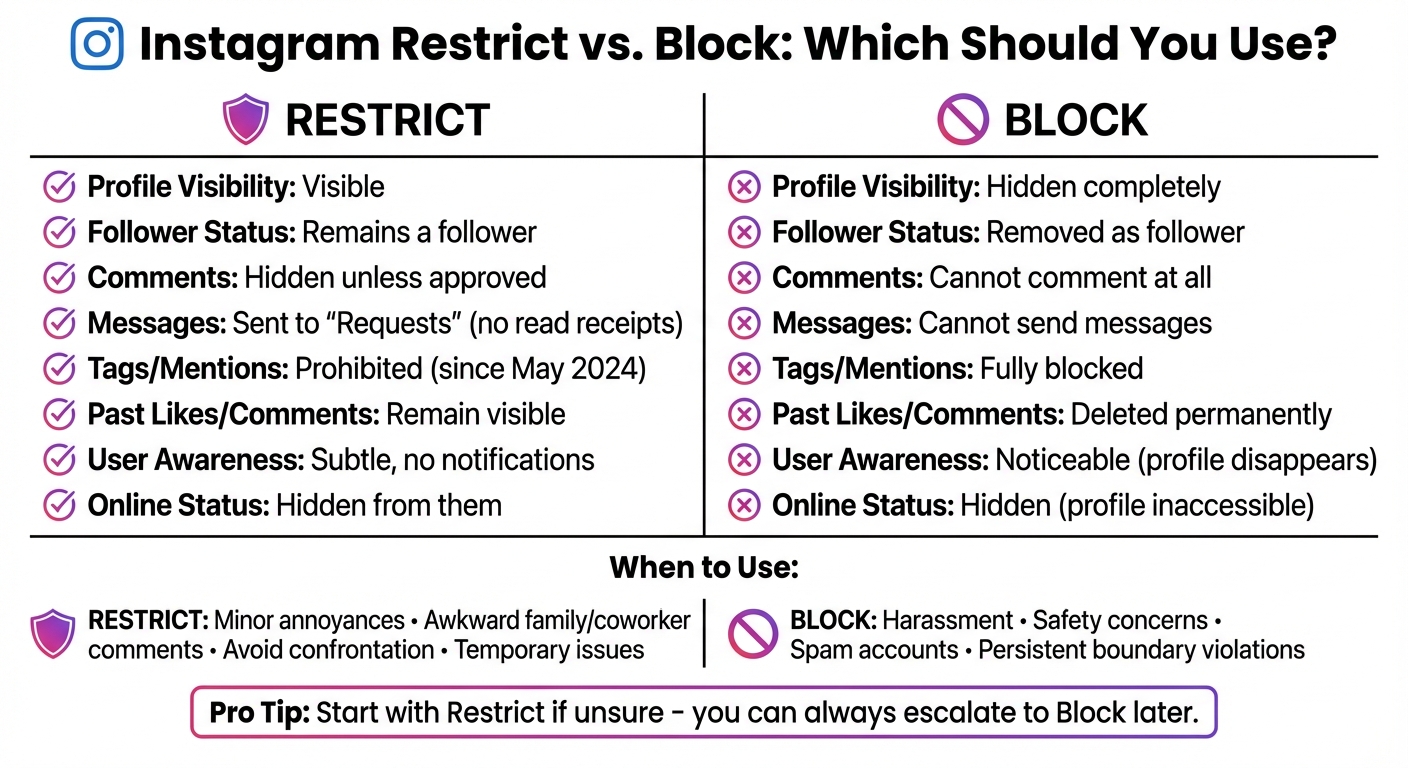
Instagram Restrict vs Block Feature Comparison Chart
How Instagram Restrict Works
What Restrict Does
Restrict works quietly in the background, giving you control over interactions without the other person knowing. When you restrict someone, their comments on your posts become visible only to them. You'll get a notification allowing you to tap "See Comment" and choose whether to approve it (making it public), delete it, or ignore it altogether. This way, you decide which comments stay visible without the restricted person realizing their comments are being filtered.
Messages from restricted accounts are sent to your "Message Requests" folder instead of your main inbox. You can read these messages without triggering a "read" receipt, and the sender won't know when you're active on Instagram. Plus, you won't receive notifications for their comments or messages, giving you fewer interruptions.
Since May 30, 2024, Instagram has added even more features to Restrict. Restricted users can no longer tag or mention you in their posts or remix your Reels. If you join a group chat that includes someone you've restricted, Instagram will notify you and let you choose whether to stay in or leave the conversation. While restricted users can still view your profile, posts, and stories, their ability to interact with you is limited in ways that protect your peace of mind and public image.
These features make Restrict a handy tool for managing interactions in both personal and professional contexts.
When to Use Restrict
Restrict is ideal for situations where you want to manage unwanted interactions without creating conflict. As Katelyn Sorensen, CEO of PLANOLY, puts it:
"Oftentimes users don't want to escalate the situation or cause unnecessary confrontation if they interact with the person offline. This makes the restrict feature a perfect solution".
This tool is helpful for dealing with family members who leave awkward comments, coworkers who overstep boundaries, or acquaintances who send too many messages. It’s also a great way to keep tabs on someone’s attempts to contact you without engaging directly. For business accounts, Restrict can help filter out spam, inappropriate comments, or offensive language while maintaining a professional appearance. And if things improve, you can always unrestrict someone, making it a practical option for temporary issues.
How Instagram Block Works
What Block Does
Blocking someone on Instagram essentially makes your profile and content invisible to them. Once you block a user, they can’t search for your profile or view your posts, stories, or reels anymore.
Any likes or comments they’ve left on your photos or videos are automatically removed and won’t reappear if you decide to unblock them later. While old message threads with the blocked user remain visible, no new messages will be delivered.
Blocked users also lose the ability to tag or mention you in posts. Plus, Instagram lets you block not just their current account, but also any additional accounts they create in the future . This is especially helpful if someone tries to bypass the block using alternate profiles.
However, there are a few exceptions. If you and the blocked person are part of the same group chat, you’ll still see each other’s messages within that group . Additionally, blocked users can still see your likes and comments on posts from public accounts or mutual connections. Instagram doesn’t notify users when they’re blocked, but they may figure it out if they notice they can’t find your profile anymore .
These features provide a solid foundation for managing interactions and maintaining boundaries on the platform.
When to Use Block
Blocking is the go-to option when you need to completely cut off interaction - whether it’s due to harassment, spam, blackmail, or threats to your safety or reputation .
This feature is particularly effective against persistent harassers, as it prevents them from contacting you through multiple accounts . For business accounts, blocking can help protect your community by removing users who post offensive comments or engage in bullying.
Unlike the Restrict feature, blocking makes it obvious that the connection has been severed. The person you block will eventually notice they can’t find your profile anymore. If you’re looking to avoid confrontation or awkwardness, especially with people you know offline, Restrict might be a more subtle choice. But when your main focus is complete disconnection and safety, Block is the best tool for the job.
Restrict vs. Block: Side-by-Side Comparison
Feature Comparison Table
When deciding between Restrict and Block on Instagram, the key difference lies in how each feature controls interactions. Restrict works like a one-way mirror - everything appears normal to the other person, but you quietly filter their interactions behind the scenes. On the other hand, Block completely removes your presence from their Instagram experience, cutting off all forms of contact.
Here’s a detailed breakdown:
| Feature | Restrict | Block |
|---|---|---|
| Profile Visibility | They can still view your profile and posts | Your profile is hidden and won’t appear in search |
| Follower Status | They remain a follower unless you manually unfollow them | Automatically unfollowed and removed as a follower |
| New Comments | Only visible to them unless you approve | They cannot post comments at all |
| Past Likes/Comments | Remain visible on your posts | Deleted permanently |
| Direct Messages | Messages are sent to your Message Requests, with no read receipts | They cannot send messages |
| Online Status | Hidden from the restricted user | Hidden, as your profile is inaccessible |
| Tags & Mentions | Restricted as of 2024 | Fully prohibited |
| User Awareness | Subtle - no notifications, and they see no obvious changes | Not notified, but they’ll notice if they search for you |
The main takeaway: Restrict allows for subtle control, while Block creates an immediate and noticeable barrier. This table can help you decide which option better suits your situation.
How to Choose Between Restrict and Block
With the comparison in mind, your choice between Restrict and Block depends on the severity of the issue and how discreet you want to be.
- Restrict is ideal for minor annoyances. Think of scenarios like a coworker leaving awkward comments, a classmate oversharing, or someone you don’t want to offend by blocking them. As Instagram designer Francesco Fogu explained:
"The goal here is basically put some space between you and them".
- Block is the right choice for more serious cases. It’s best for situations involving persistent harassment, safety concerns, or individuals who refuse to respect boundaries. Blocking ensures they can no longer interact with you or access your profile.
If you’re unsure, start with Restrict. It’s a less drastic step and can be escalated to Block if the situation doesn’t improve. Just keep in mind that once you block someone, they’ll likely notice, and it’s not possible to return to a more subtle approach afterward.
Restrict Vs Block on Instagram | What Does It Mean? 2022
Using Restrict and Block With Your Growth Strategy
Growing on Instagram is all about cultivating a vibrant, engaged community. Tools like Restrict and Block play a key role in safeguarding that environment while supporting your growth efforts. When used alongside Instagram's suite of safety features, these tools help you maintain meaningful interactions without jeopardizing your follower count. Here's how you can incorporate them into your growth strategy.
Other Instagram Safety Features to Use
Pair Restrict and Block with Instagram's moderation features to create a safer space for your audience. For instance, the Hidden Words feature lets you automatically filter out specific keywords, phrases, or emojis from comments and direct message requests. This is especially helpful for keeping spam or offensive language out of your content, which is crucial for maintaining a professional brand presence.
The Limits feature is another handy tool, particularly during viral moments or unexpected spikes in activity. It temporarily restricts comments from non-followers or new followers, helping you manage sudden waves of attention while still welcoming genuine engagement. Additionally, Pinned Comments allow you to highlight positive interactions at the top of your posts, fostering a welcoming and supportive community vibe.
For added control, tweak your tag and mention settings to manage how others interact with your account. When combined with Restrict and Block, these tools create a multi-layered defense. While Restrict addresses subtle issues, Block is your go-to for handling more severe problems.
Account Management Best Practices
Smart account management is essential for both protecting your community and fueling consistent growth. Make it a habit to review your Restricted and Blocked Accounts lists regularly in your Instagram settings. People's behavior can change over time, so someone you restricted months ago might no longer pose a problem. Removing restrictions when appropriate can help reintroduce valuable members back into your community.
Use Restrict for minor infractions and save Block for cases of serious harassment. This approach ensures you're safeguarding your space without unnecessarily cutting off engagement. Michelle Krasniak, author of Social Media Marketing All-in-One for Dummies, sums it up well:
"Restricting someone is perfect for those times when you don't necessarily want to block, unfollow or kick them off as a follower, but you also don't want them to have unfettered access to you".
To see how these moderation choices impact your growth and engagement, tools like Outfame can be incredibly useful. With features like real-time analytics, automated growth monitoring, and detailed dashboards, you can track how your strategies are working. This ensures your moderation efforts protect your engagement rates while keeping genuine followers in the loop.
Restrict and block keep your community clean; to keep it growing, see how Outfame brings real Instagram followers instead of bots.
Conclusion
Taking a thoughtful approach to Instagram safety can help you maintain secure interactions while supporting your account's growth. The choice between using Restrict or Block depends on the level of engagement you're comfortable allowing. Restrict offers a subtle way to manage interactions, while Block provides a more definitive separation.
These options give you the flexibility to adjust as needed. You can unrestrict someone if the situation improves or escalate to blocking if necessary. Both tools are designed to protect your online space and ensure your community remains positive and engaging.
By keeping your comment section clean and managing interactions effectively, you signal strong community management. This not only enhances your brand reputation but also attracts genuine followers, keeping your engagement metrics on track.
To make these practices part of your routine, regularly review your moderation settings. Check restricted comments to see if any should be approved, and revisit your blocked accounts to ensure they still align with your current needs. This helps you stay aligned with your growth goals while safeguarding your mental health and digital environment.
Use Restrict for subtle control, Block for stronger boundaries, and always aim to create a safe, supportive space for your community. As Teresa Day, COO of PLANOLY, explains:
"It's a more subtle way to limit unwanted interactions without completely removing them from seeing your content".
FAQs
How can you tell if someone has restricted you on Instagram?
It's tricky to know if someone has restricted you on Instagram since the platform doesn’t send out any notifications or provide clear signs. However, there are a few subtle hints you can look for. For instance, your comments on their posts might only be visible to you, and you won’t be able to see their online status or whether they’ve read your direct messages.
While these changes in interaction can raise suspicions, there’s no guaranteed way to confirm if you’ve been restricted.
What happens to past interactions if I block someone on Instagram?
When you block someone on Instagram, all their previous likes and comments on your posts are deleted and won’t come back, even if you decide to unblock them later. While the Direct Message thread with that person remains in your inbox, you won’t be able to send or receive new messages from them. Blocking guarantees they can’t interact with your content or reach out to you on the platform.
Can I unblock someone on Instagram and then restrict them later?
Yes, you can unblock someone on Instagram and then decide to restrict them afterward. These are two independent actions, so after unblocking, you can use the Restrict feature to control how they interact with you.
Blocking completely stops all interactions, while restricting subtly limits their engagement without notifying them. It all depends on what works best for your privacy and how you want to manage interactions.


