
Your TikTok For You Page (FYP) is built around your interactions, but just one video can drastically skew your recommendations. If your FYP feels repetitive or irrelevant, TikTok now offers tools to reset or fine-tune it. Here's how you can fix your feed:
- Clear Cache: Speeds up the app and helps TikTok process new engagement better.
- Use the 'Refresh Your For You Feed' Tool: Resets your FYP to start over with new recommendations.
- Clear Watch History: Removes past viewing data that may be influencing your feed.
- Unfollow Old Accounts: Stops outdated interests from affecting your recommendations.
- Engage with Preferred Content: Actively like, comment on, and watch videos to completion to guide the algorithm.
These steps allow you to regain control of your FYP, ensuring it matches your current interests without losing your profile or Following list. Start with the reset tool for a clean slate, or tweak settings and interactions for a more gradual fix.
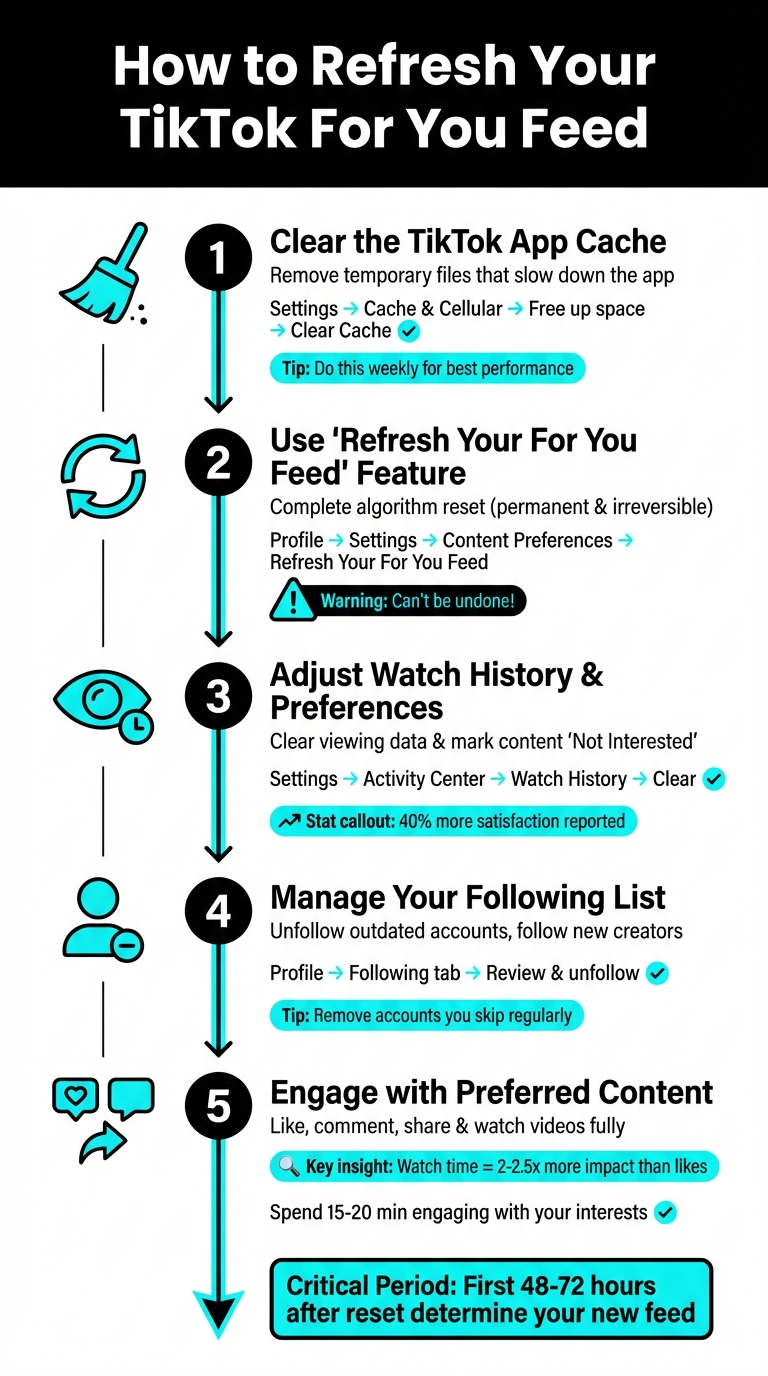
5 Steps to Reset Your TikTok For You Page Feed
How To Reset TikTok FYP (Easy Guide 2026)
Step 1: Clear the TikTok App Cache
Clearing your TikTok app cache is a simple but important step to refresh your For You Page. The cache holds temporary files that help the app load faster. However, over time, this data can pile up, slowing things down and potentially affecting how well TikTok picks up on your latest interactions. While clearing the cache doesn’t reset TikTok’s recommendation algorithm (your preferences are stored on their servers), it eliminates technical hiccups that might prevent the app from processing your new engagement patterns effectively.
The main perk? A smoother app experience, which allows TikTok to better capture your watch time, shares, and other interactions - laying the groundwork for resetting your feed.
How to Clear Cache on TikTok
Whether you’re using an iPhone or an Android, the steps are the same:
- Open the TikTok app and go to your Profile (bottom-right corner).
- Tap the three-line menu (☰) in the top-right corner, then choose Settings and Privacy.
- Scroll down to Cache & Cellular, and tap Free up space.
- Select Clear next to Cache, then confirm by tapping Clear again.
Don’t worry - this won’t erase your personal data. It simply clears out temporary files. For the best performance, consider clearing your cache once a week.
Once you’ve optimized the app’s performance by clearing the cache, you’re ready to refresh your For You Page using TikTok’s built-in tools.
Step 2: Use TikTok's 'Refresh Your For You Feed' Feature
After clearing your cache, the next step is to reset your TikTok algorithm using the platform's built-in 'Refresh Your For You Feed' tool. Introduced in early 2023, this feature was created to help users escape repetitive content cycles and start over with a clean slate. Unlike clearing your cache, which only removes temporary data, this tool directly resets how TikTok understands your preferences. Keep in mind, though - once you hit refresh, the change is permanent and can’t be undone.
It’s worth noting that this reset only affects your For You feed. Your Following feed, profile, followers, inbox, and even the ads you encounter will remain untouched. As Jake Peterson, Senior Technology Editor at Lifehacker, puts it:
Once you hit it, you'll be treated like a new user - a blank canvas ready to teach the algorithm the things you want to see (and quickly decry the things you don't).
How to Access the 'Refresh Your For You Feed' Tool
To find this feature, open the TikTok app and tap on your Profile icon in the bottom-right corner. From there, tap the three-line menu (☰) in the top-right corner, go to Settings and Privacy, scroll down to Content Preferences, and select Refresh Your For You Feed. Tap Continue, then Refresh to confirm the reset.
In some regions, there’s an alternative shortcut. While on your For You feed, long-press any video or tap the Share button, choose Why This Video, then select Adjust Your For You and tap Refresh Your For You Feed. After confirming, TikTok might prompt you with a quick survey asking why you chose to refresh - answering it helps them better understand user preferences.
Once the process is complete, you’ll notice your feed starts evolving right away.
What Happens After Refreshing Your Feed
Right after the reset, TikTok will display trending and popular content, treating you like a brand-new user. From that point on, the algorithm begins gathering fresh data based on your activity - such as likes, comments, shares, and especially your watch time - to rebuild your personalized recommendations. Interestingly, watching videos to completion has 2 to 2.5 times more influence on the algorithm than simply liking them.
The first 48 to 72 hours are crucial. During this period, actively engaging with niche content can make a big difference. Users who interact with specific hashtags or creators they enjoy often see a noticeable improvement in relevant recommendations within the first week. If you want to speed things up, search for your favorite topics or creators and watch their videos all the way through - this helps TikTok quickly learn what you’re into and tailor your feed accordingly.
Step 3: Adjust Watch History and Preferences
If completely resetting your TikTok feed feels too drastic, there are other ways to tweak it. TikTok provides tools to fine-tune your feed without starting from scratch. Your watch history plays a key role here - it’s like a digital breadcrumb trail that guides TikTok’s algorithm. Every video you watch, even briefly or accidentally, becomes part of the system’s data to predict what you’ll enjoy next. But sometimes, the algorithm gets it wrong. Eric Griffith from PCMag points out:
"Algorithms are far from perfect... sometimes, they pick up on the wrong signals and start to stuff your feed with things you don't care about (or outright hate)."
For example, watching one cooking video out of curiosity could lead to a flood of recipe content. Or a quick glance at an emotional clip might result in an endless stream of similar videos. Clearing your watch history can help break these repetitive patterns without erasing all your personalization.
According to The Washington Post, the time you spend watching a video has more influence on the algorithm than likes or comments. By clearing your watch history and using tools like the "Not Interested" button, you can guide TikTok toward content that better aligns with your current interests.
How to Clear Watch History on TikTok
To clear your watch history, follow these steps:
- Open TikTok and tap your Profile icon in the bottom-right corner.
- Tap the three-line menu (☰) in the top-right corner and select Settings and Privacy.
- Scroll to Activity Center, tap Watch History, and choose Clear.
This action removes the data TikTok uses to recommend content, helping to reset your feed without wiping out all personalization. Interestingly, users who regularly clear their watch history report being 40% more satisfied with their feed recommendations.
Mark Content as "Not Interested"
The "Not Interested" option is another powerful tool for shaping your feed. It sends a clear signal to TikTok to stop showing similar videos. Think of it as a mini-reset that lets you fine-tune your content without losing everything you’ve customized so far. Keith Kakadia, Founder of Sociallyin, notes that users who frequently use this feature see a 60% improvement in feed relevance.
Here’s how to use it:
- Option 1: Long-press a video in your For You feed until a pop-up menu appears, then select "Not Interested".
- Option 2: Tap the Share button on a video and choose "Not Interested" from the menu.
Providing this kind of feedback can adjust your feed up to twice as fast. Use it wisely to eliminate content that no longer resonates with you - whether it’s a hobby you’ve moved past or trends you’re tired of seeing. Because TikTok’s algorithm is particularly sensitive to your most recent activity (usually within the last 24 to 72 hours), these adjustments can have an almost immediate impact.
Step 4: Manage Your Following List
Your following list plays a big role in shaping TikTok's algorithm and, ultimately, your For You Page. If you're still following old accounts - like gaming or beauty creators you no longer watch - it can confuse the system and flood your feed with content that doesn’t align with your current interests. Even skipping irrelevant videos won’t fully fix this. As Julian McAuley, Professor of Computer Science at the University of California San Diego, explains:
"There seems to be some perception that they've cracked some magic code for recommendation, but most of what I've seen seems pretty normal... they have fantastic volumes of data, highly engaged users, and a setting where users are amenable to consuming algorithmically recommended content".
To ensure your feed reflects what you actually enjoy, it’s time to clean up your following list.
How to Unfollow Accounts
Start by reviewing your following list. Head to your TikTok profile, tap the "Following" tab, and scroll through the accounts you’ve followed. Look for creators whose content you skip or no longer find interesting. These are the accounts you should unfollow. Even if you’re not watching their videos, their presence in your list might still send mixed signals to the algorithm.
If your feed has become overly repetitive - like showing nothing but gaming clips or beauty tutorials - consider unfollowing some creators in that niche to add more variety. This step not only declutters your feed but also helps TikTok understand that your interests have evolved. Once you’ve removed outdated follows, you’re ready to explore new creators that align with your current tastes.
Follow Creators in Your Niche
After the cleanup, it’s time to rebuild your following list with creators who match your current interests. Use TikTok’s search bar to find relevant keywords or hashtags and discover top-performing creators in your preferred categories. TikTok’s "Suggested Accounts" feature can also point you toward profiles that align with your updated preferences.
When you follow new creators, take the extra step to engage with their content. Like, comment on, or share their videos right away. These interactions act as strong signals to TikTok’s algorithm, encouraging it to show you more content from similar creators. Kirsti Lang, Senior Content Writer at Buffer, emphasizes:
"TikTok's system rewards genuinely interesting videos, so focusing on quality content is the most direct path to success".
Step 5: Engage with Content You Want to See
Once your following list is cleaned up, it’s time to actively guide TikTok’s algorithm by engaging with the content you enjoy. Every action you take - whether it’s liking a video, leaving a comment, sharing, or even how long you watch - sends a clear signal to TikTok about your preferences. These interactions heavily influence what appears on your For You Page, with the platform adjusting recommendations in real time based on your activity.
The more you interact with specific creators, themes, or sounds, the more TikTok will prioritize similar content for you. Keith Kakadia, Founder of Sociallyin, explains:
"Watch time serves as a critical performance indicator in TikTok's evaluation process. Videos that capture sustained attention receive preferential treatment in the distribution system".
Like, Comment, and Share Videos
While liking videos is a good start, comments and shares have a much larger impact - up to three times more. Thoughtful comments or sharing a video with friends signal to TikTok that the content aligns strongly with your interests.
To make the most of this, focus your engagement on content that fits your preferences. For example, if you’re into fitness, don’t just scroll past workout videos - like them, leave comments asking questions, or share them with others. These actions help TikTok’s algorithm understand your preferences better and recommend similar videos from other creators. Additionally, saving videos sends a strong signal that you find the content valuable and want to revisit it, further refining your feed.
Watch Your Preferred Content Longer
How long you watch a video plays a huge role in shaping your recommendations. Videos that are watched for at least four seconds tend to reach five times more users. Watching a video to the end - or even rewatching it - tells TikTok that this is exactly the type of content you’re interested in.
To fine-tune your feed quickly, dedicate 15–20 minutes to watching videos related to your interests. Use keywords to search for specific topics, then watch the top results all the way through. Spend extra time reading captions or browsing comments on videos you enjoy, as this signals strong interest. On the flip side, if a video isn’t your style, swipe away immediately. Skipping a video within the first second is the most effective way to tell TikTok to stop showing similar content.
| Interaction Type | Algorithmic Weight | Primary Impact |
|---|---|---|
| Watch Time / Completion | Highest | Signals deep interest and content quality |
| Shares & Saves | High | Indicates high-value, "bookmarkable" content |
| Comments | Medium-High | Encourages community interaction; 3x more impact than likes |
| Likes | Medium | Provides feedback on content preference |
| Device/Settings | Low | Used for initial language and regional filtering |
Conclusion
Getting your TikTok For You Page back on track doesn’t take much - just a few thoughtful actions like clearing your app cache, using the refresh tool, tweaking your watch history, managing your following list, and interacting with content you enjoy.
Here’s the thing: these steps go beyond just improving your personal feed. They’re a way to keep TikTok working for you. Since the platform’s algorithm thrives on delivering relevant content, a well-curated feed helps you stay connected to your interests, recognize quality content, and avoid falling into repetitive loops that might block out fresh trends.
FAQs
How often should I clear my TikTok cache to keep the app running smoothly?
If you're wondering how often to clear your TikTok cache, there's no hard-and-fast rule. However, it’s smart to do it when the app starts feeling slow, behaving oddly, or hogging too much storage on your phone.
Clearing the cache doesn’t affect your account or saved videos. It simply wipes temporary data, which can boost the app’s performance and free up some space. If problems persist, this simple step can often resolve them quickly.
What happens when you use the 'Refresh Your For You Feed' option on TikTok?
When you choose the 'Refresh Your For You Feed' option on TikTok, your recommendations will reset, making your feed feel as though you've just created a new account. Instead of being tailored to your past activity, the content you see will be based on general trends and broader suggestions. Importantly, this won't affect your followers, the accounts you follow, or any of your other settings. Just be aware that this reset is permanent, so use it only if you're ready to start fresh with your TikTok experience.
How can I adjust my TikTok recommendations after resetting my For You feed?
To tailor your TikTok recommendations after resetting your For You feed, start engaging with content that resonates with your current interests. Like, comment, and share videos that catch your eye, and follow creators and hashtags that align with what you enjoy. These actions help guide the algorithm toward delivering content you’ll love.
If you come across videos that don’t appeal to you, mark them as Not Interested by pressing and holding on the video, then selecting the option. This will help filter out similar content from your feed. For a cleaner slate, you can also remove old likes from your profile to prevent the algorithm from focusing on outdated preferences. Allow the system a few days to recalibrate, and you’ll soon notice your feed reflecting your current tastes more accurately.


