
Switching your Instagram account from business to personal is simple and takes just a few minutes. Here’s what you need to know:
- Why Switch? Personal accounts allow for privacy (you can make your profile private), access to more music and stickers, and a less data-driven experience. However, you’ll lose business tools like analytics, ads, and contact buttons.
- What You’ll Keep: Followers, posts, stories, highlights, and DMs remain intact.
- What You’ll Lose: Instagram Insights, ad tools, and your business category label are permanently deleted.
- Before You Switch: Back up your data, pause active ads, and save important business details like your bio or contact info.
Quick Steps to Switch:
- Open Instagram and go to your profile.
- Tap the menu (three lines) and select Settings and Privacy.
- Navigate to Account Type and Tools.
- Tap Switch Account Type and choose Switch to Personal Account.
- Confirm your choice.
Switching is instant, but your analytics data cannot be recovered. If needed, you can always switch back to a business account later.
How to Switch back to Personal Account on Instagram (Quick & Easy)
Business vs. Personal Instagram Accounts: What's Different
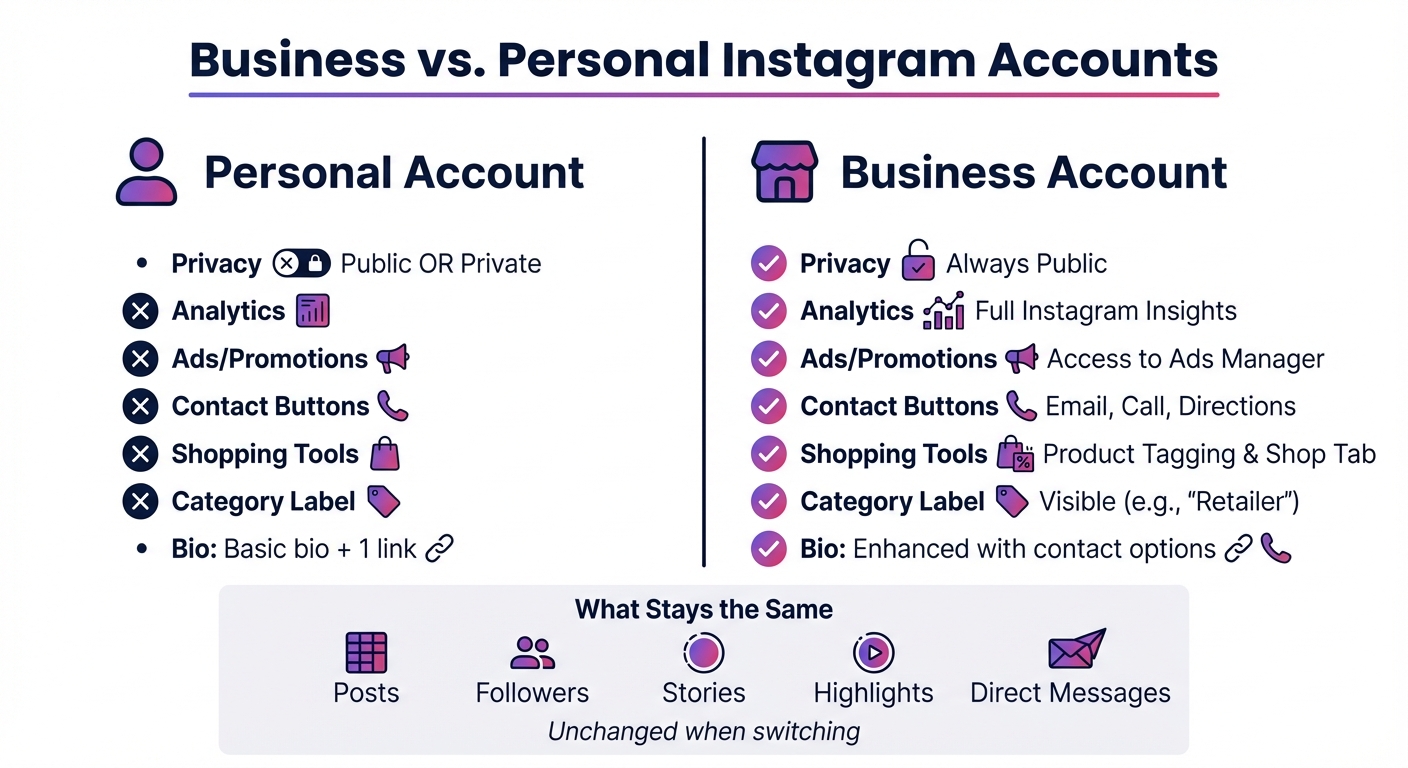
Instagram Business vs Personal Account Features Comparison
Let’s dive deeper into how business and personal Instagram accounts differ, especially when it comes to features and what happens if you decide to switch. Business accounts are built for performance tracking and advertising, while personal accounts prioritize simplicity and privacy.
Feature Comparison
Personal accounts give you the flexibility to choose between public or private settings, while business accounts are always public. Business accounts come with Instagram Insights, which provide detailed analytics like follower demographics (age, gender, location), as well as metrics like reach and impressions. Personal accounts, on the other hand, don’t offer any analytics.
Business profiles also include contact buttons (such as email, call, or directions) and display a category label (e.g., "Retailer"), making it easier for customers to connect and identify your business. Personal accounts are limited to a basic bio and one external link. Additionally, tools like product tagging, the Shop tab, and the ability to run ads or boost posts through Meta Ads Manager are exclusive to business accounts.
| Feature | Personal Account | Business Account |
|---|---|---|
| Privacy | Public or Private | Always Public |
| Analytics | None | Full Instagram Insights |
| Ads/Promotions | Not available | Access to Ads Manager |
| Contact Buttons | Not available | Email, Call, Directions |
| Shopping Tools | Not available | Product Tagging & Shop Tab |
| Category Label | None | Visible (e.g., "Retailer") |
These features highlight the key differences between the two account types and the tools available to business users.
What You'll Lose When You Switch
If you switch from a business account back to a personal one, you’ll lose access to several tools, including Meta Business Suite and Meta Ads Manager. You’ll also lose all Instagram Insights, such as follower demographics, reach, impressions, and story metrics. Be sure to export any important data before making the switch.
"When you switch back to a personal account, you'll lose access to Meta business tools like Meta Business Suite and Meta Ads Manager. You'll also lose access to in-app insights, including ads." - Meta
In addition, your contact buttons and business category label will disappear from your profile. You’ll no longer be able to boost posts, run ads, tag products, or use third-party scheduling tools. If your business account is connected to a Facebook Page, that connection will be severed, and you might even lose a verified badge since verification requirements differ between account types.
The good news? Your posts, followers, stories, highlights, and direct messages won’t be affected. However, you’ll lose all professional tools and metadata. While you can switch back to a business account at any time, any previously collected insights data will be gone for good.
What to Do Before Switching to a Personal Account
Before making the switch from a business to a personal Instagram account, it's essential to protect your data, settings, and content. Once you convert, business insights and certain features will no longer be accessible. To avoid losing anything important, take these three key steps.
Download Your Data and Insights
Start by exporting your Instagram data through the Accounts Center. Navigate to Settings > Accounts Center > Your Information and Permissions > Export Your Information. Instagram may take up to 30 days to email you a download link, which will stay active for 4 days. Save this data to your device or send it to an external storage service for safekeeping.
Keep in mind that some analytics, like follower growth trends, post engagement times, audience demographics, and ad performance, aren’t included in the general export. To retain these, take screenshots of the key metrics you want to reference later. If you’re running active ad campaigns, make sure to pause or complete them before switching. Once you convert, those campaigns will stop permanently, and you won’t be able to manage them through Instagram anymore.
Check Your Connected Facebook Pages
Switching to a personal profile will automatically disconnect any Facebook Pages linked to your business account. To prepare, go to Settings > Linked Accounts and review the connected pages. Make sure you have alternative administrative access to these pages, as the connection will be severed during the transition.
"If you switch from a professional account to a personal profile, you'll no longer have access to professional tools, and any Facebook Page connected to your professional account will be disconnected." - Instagram Help Center
Save Important Content
Before switching, save details like your profile bio, category label, and contact information, along with any auto-reply settings in your DMs. These features are specific to business accounts and will be lost after the change. Although your posts, followers, stories, highlights, and direct messages will remain intact, it’s a good idea to document any business-related details you might need in the future.
How to Switch Back to a Personal Account
Switching your Instagram account back to a personal one is quick and simple once you're ready. The process takes just a few minutes and goes into effect immediately after confirmation. Here's how to do it step by step:
Step 1: Open the Instagram App
Start by launching the Instagram app on your iPhone or Android device. Tap the profile icon in the bottom-right corner to navigate to your profile page. Double-check that you're logged into the correct account before proceeding.
Step 2: Access Settings
In the top-right corner of your profile page, tap the three horizontal lines (menu icon). From the menu that appears, select Settings and Privacy. Depending on your app version, you might only see Settings. Once there, move on to the next step.
Step 3: Locate Account Tools
Scroll through the menu to find Business Tools and Controls. If you're using a creator account instead of a business account, look for Creator Tools and Controls. If neither option appears, check under Account, Preferences, or Account Type and Tools - Instagram's layout can vary depending on the version you're using.
Step 4: Select Switch Account Type
Tap on Switch Account Type in the menu. This option allows you to change your account type, whether it's personal, business, or creator.
Step 5: Confirm Your Choice
Choose Switch to Personal Account. Instagram will display a warning message explaining the change. Take a moment to read it carefully. When you're ready, tap Switch to Personal to finalize the process. The switch happens instantly. To confirm the change, go back to your settings. If your account is now personal, you'll see the option to "Switch to a professional account" instead of "Switch account type."
Fixing Common Problems During the Switch
Once you've secured your settings and data, you might still run into a few bumps while switching to a personal account. While the process is generally simple, technical issues can crop up - often tied to Facebook connections or outdated app versions. Here's how to tackle some of the most frequent problems.
Facebook Account Connection Errors
Running into a "Page is already linked" error or an unresponsive switch button? This usually happens when a linked Facebook Page is blocking the process. To fix this, go to Settings and Privacy > Account Center, and manually disconnect any linked Facebook Pages. Also, check your Instagram profile and Facebook Page names - remove any emojis or special characters, as these can cause connection issues. If you're running promotions or using shopping tools, disable them first, as they keep your account locked in professional mode.
App Crashes or Update Issues
App crashes during the switch are often caused by outdated software or session glitches. Start by updating Instagram via your app store. If the app still crashes or freezes, log out and back in to refresh your session. No luck? Try uninstalling and reinstalling the app to clear any corrupted cache files. If the mobile app continues to act up, switch to a desktop browser and complete the process on Instagram.com - the web version tends to handle account changes more smoothly.
| Common Error | Recommended Solution |
|---|---|
| "Switch Account Type" option missing | Update the app, log out and log in, ensure you're 18+ |
| "Page is already linked" error | Remove emojis/special characters from profile and page names |
| App crashes or freezes during switch | Reinstall Instagram or use a desktop browser |
| Connection timeout or "Try again later" | Check your internet or unlink Facebook via Account Center |
If none of these steps work, it's worth checking if Instagram is experiencing a platform-wide outage. If that's the case, give it a few hours and try again once the platform is back to normal.
How to Switch Back to a Business Account
If you've tried switching to a personal account and now need to return to a business account, the process is quick and straightforward. The best part? None of your posts, reels, stories, followers, or direct messages will be deleted during the switch - it takes just about 30 seconds to complete.
Here’s how to do it: Open the Instagram app and tap the profile icon in the bottom-right corner. Then, tap the menu icon (three horizontal lines) at the top-right and select Settings and privacy. Scroll down to Account type and tools and choose Switch to Professional Account. Follow the steps to pick a business category, and when prompted, select Business instead of Creator. Afterward, confirm your contact details (email, phone number, or address) and tap Next. You’ll also have the option to connect a Facebook Page here or skip it and set it up later. This simple process ensures you regain access to the professional features essential for managing your business.
One important note: Business accounts must be public. If your personal account was private, Instagram will automatically make it public during the switch. Once you’re back on a business account, you’ll instantly regain access to tools like Instagram Insights, contact buttons, and advertising features. However, any analytics data from the time your account was personal won’t be recovered. That data gap is permanent, so your insights will start fresh from the moment you switch.
There’s no fee to create or maintain a business account on Instagram - costs only come into play if you decide to run ads or promotions. Plus, you can manage up to five professional accounts simultaneously.
Conclusion
Switching back to a personal account on Instagram is quick and takes about 30 seconds. However, before making the change, it's a good idea to download or screenshot your analytics data since Instagram will permanently erase all Insights data once the switch is made.
Keep in mind that you’ll lose access to features like contact buttons, product tagging, and ads. That said, your followers, posts, reels, stories, and direct messages will remain untouched. Plus, switching to a personal account gives you the option to set your profile to private.
The good news? You can switch back anytime without any penalties. The process is immediate and reversible, though Instagram won’t recover any previously collected analytics data.
Weighing the benefits and trade-offs can help you decide which account type works best for your Instagram goals.
FAQs
What’s the difference between personal and business Instagram accounts?
A personal Instagram account is perfect for individuals who want to share their daily moments - photos, videos, and stories - with friends or followers in a straightforward and private way. It’s all about keeping things simple. If you switch to a personal account, everything like your posts, followers, highlights, and messages will stay intact. However, you’ll lose access to features like insights, advertising tools, and shopping capabilities.
On the other hand, a business account is geared toward brands, creators, and retailers aiming to expand their reach. It comes packed with tools like post analytics, follower demographics, ad management, contact buttons (like email or phone), and product tagging for selling directly on the platform. If you decide to switch back to a personal account, these features will be turned off, and any saved insights will only stick around for 90 days.
To sum it up, personal accounts prioritize simplicity and privacy, while business accounts offer tools designed to help you grow and engage with a broader audience.
How can I save my data before switching from a business account to a personal account on Instagram?
When you switch back to a personal account on Instagram, the platform keeps your account’s analytics, including ad data, for 90 days. If you decide you need access to this information later, you can simply switch back to a professional account within that time to retrieve it.
The good news? Your photos, videos, Stories, Highlights, and follower details stay intact on your profile after the switch. There's no need to manually export or back up your content. Just keep the 90-day window for insights in mind, and the transition should be hassle-free.
Will I lose my analytics data if I switch back to a personal account on Instagram?
No, you won’t lose your analytics data right away. Instagram holds onto your insights for 90 days, even if you switch to a personal account. If you decide to return to a business account within that period, your analytics data will be fully restored. But once the 90 days are up, the data will no longer be available.


