
Wondering why your TikTok views have plummeted? You might be dealing with a shadowban. A shadowban limits your content's visibility on TikTok, making it nearly impossible for your videos to appear on the For You Page (FYP) or in hashtag searches. This can slash your views by up to 90%, leaving creators and businesses scrambling for answers.
Key Takeaways:
- Signs of a Shadowban: Sudden drops in views (50–90%), no FYP traffic, hashtag invisibility, or videos stuck "Under Review."
- Common Causes: Violating TikTok's guidelines (e.g., sensitive content, copyright issues, or misinformation) or engaging in spam-like behaviors (e.g., mass following or repetitive hashtags).
- Recovery Steps: Pause posting for 48–72 hours, clean up flagged content, and post fresh, original videos using TikTok's tools. Most shadowbans clear within 14 days.
- Prevention: Follow TikTok's guidelines, avoid spammy actions, and monitor analytics regularly to spot issues early.
Whether you're a creator or business, understanding shadowbans is essential to maintaining your reach and engagement. Let’s dive deeper into how to identify, recover from, and prevent TikTok shadowbans.
Fix TikTok shadow ban the right way.
How to Tell If You're Shadowbanned on TikTok
TikTok Shadowban Warning Signs: Normal vs Shadowbanned Account Metrics
Warning Signs of a Shadowban
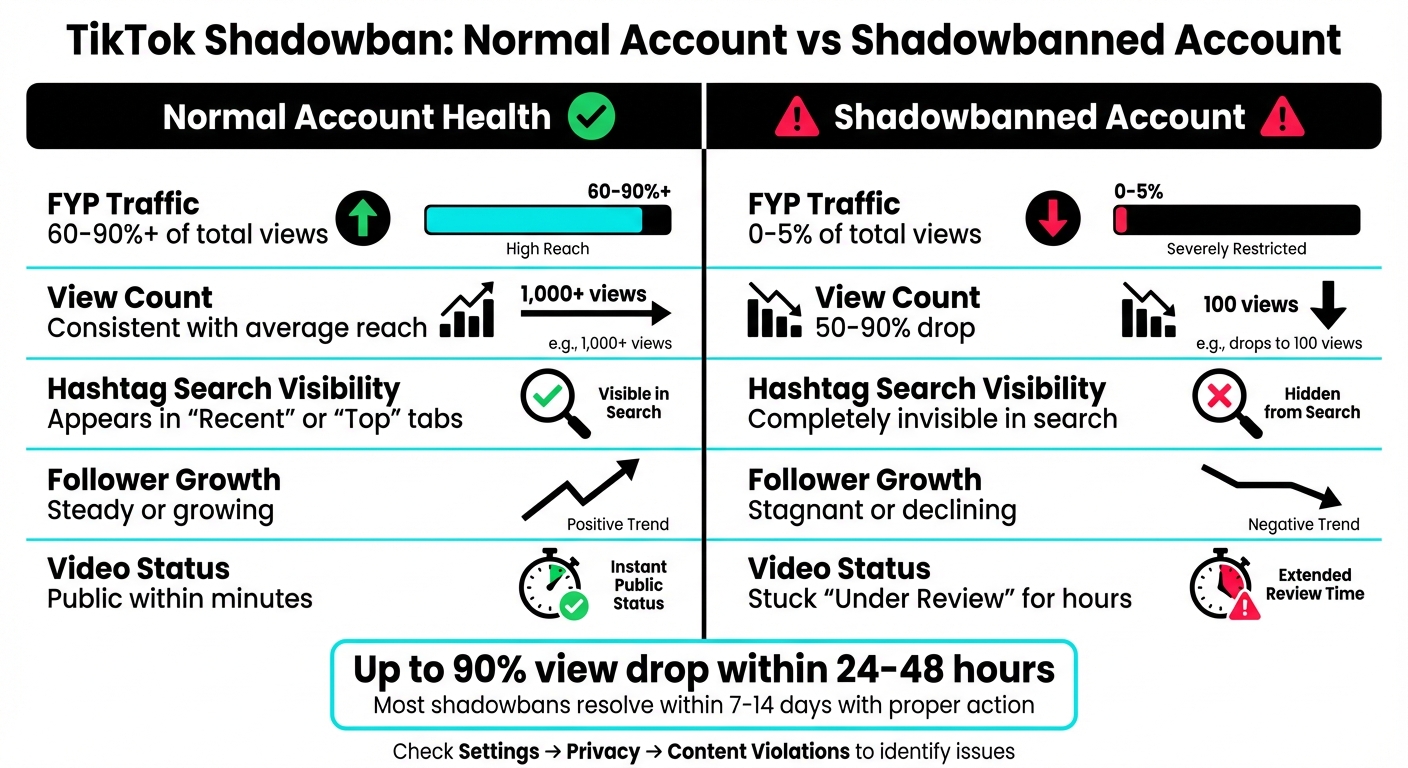
If you notice your TikTok views take a sudden nosedive - like an 80–90% drop within 24 to 48 hours - it could be a sign of a shadowban. For instance, if your videos usually get over 1,000 views but your latest post barely hits 100, that’s a big red flag.
Another clue is a lack of traffic from the "For You Page" (FYP). If your analytics show that views are only coming from "Profile" or "Following" feeds, with little to no FYP activity, it suggests TikTok may no longer be promoting your content on its main discovery platform.
Hashtag invisibility can also signal trouble. To test this, post a video with a unique hashtag (like #MyTestTag2026), wait an hour or two, and then search for that hashtag from an account that doesn’t follow you. If your video doesn’t show up under the "Recent" tab, it might be shadowbanned. Similarly, if searching for your username from a secondary account doesn’t bring up your profile in the "Users" tab, that could confirm restrictions.
Another warning: if your new videos stay stuck on "Processing" or "Under Review" for hours, it might indicate a problem. To check if a video is under review, tap the three dots on the video, select "Copy link", and see if a banner pops up with the review status.
Once you’ve spotted these signs, dive into your analytics for further confirmation.
Using TikTok Analytics to Confirm a Shadowban
Head to Profile > Menu > Creator Tools > Analytics. The key metric to examine is the traffic source breakdown for your videos. Select a specific video and check the "Reach" data. If the "For You" traffic source is missing or accounts for less than 1% of your views, it’s a strong indicator that TikTok isn’t promoting your content on the FYP.
"Check your recent traffic source analytics and see if For You is less than 1%. If it's more than 1%, you're not shadowbanned."
– Samantha Vlasceaunu, The Unicorn Marketer
Compare the performance of your last 5 to 10 videos against your usual averages. Use the "Last 7 days" or "Last 60 days" views to look for sharp drops in likes, comments, shares, or follower growth - all signs of reduced visibility.
Before jumping to conclusions, clear your app cache by navigating to Settings → Free up space → Clear cache. Sometimes, technical glitches or server delays can mimic the symptoms of a shadowban.
Tracking Metrics to Spot Shadowbans
To keep a closer eye on your account’s health, maintain a simple spreadsheet to track key metrics over time. Log views, engagement rates, FYP traffic percentages, and follower growth for each video. Use US number formatting (e.g., 1,000; 1.5) for clarity.
| Metric | Normal Account Health | Potential Shadowban Sign |
|---|---|---|
| FYP Traffic | 60% to 90%+ of total views | 0% to 5% of total views |
| View Count | Consistent with average reach | 50% to 90% drop |
| Hashtag Search | Appears in "Recent" or "Top" | Completely invisible in search |
| Follower Growth | Steady or growing | Stagnant or declining |
| Video Status | Public within minutes | Stuck "Under Review" for hours |
Pay special attention to how your videos perform in the first hour after posting. Shadowbanned content often sees little to no traction during this critical window. Lastly, check Settings → Privacy → Content Violations to see if any recent moderation actions have been logged. These actions are often a precursor to a shadowban.
Why TikTok Shadowbans Happen
Shadowbans on TikTok often stem from content or behavioral issues, beyond just technical glitches. Knowing the causes can help you understand how violations might be affecting your account's visibility.
Content Violations and Policy Breaches
TikTok's algorithm actively limits content that goes against its community guidelines, even for minor infractions. For example, adult or suggestive content - like nudity, explicit material, or suggestive language - can immediately make your videos ineligible for the For You Page (FYP). Similarly, posts that promote self-harm, dangerous challenges, disordered eating, or violent extremism are swiftly removed, with reach drastically reduced.
Hate speech and harassment are treated with zero tolerance. Videos involving bullying, discrimination, or hateful actions against protected groups are automatically flagged and demoted by TikTok's AI moderation. Intellectual property violations are another frequent issue - using copyrighted music not included in TikTok's library, reposting content without credit, or uploading videos with watermarks from platforms like Instagram or YouTube can lead to muted audio or restricted reach.
"We remove content - whether posted publicly or privately - when we find that it violates our rules." – TikTok
TikTok also targets misinformation and low-quality content. Videos with false claims, misleading information, or poor resolution are often flagged as spam. The algorithm prioritizes high-quality, original visuals, so using banned hashtags - such as those linked to nudity, violence, or spammy trends like #followme - can quietly limit your visibility without any notification.
Here’s a breakdown of common violations, triggers, and their outcomes:
| Violation Category | Specific Triggers | Typical Outcome |
|---|---|---|
| Safety & Civility | Bullying, hate speech, harassment | Content removal & shadowban |
| Sensitive Content | Nudity, drugs, graphic violence | FYP ineligibility |
| Integrity | Misinformation, fake engagement, bots | Reach suppression |
| Intellectual Property | Copyrighted music, watermarks | Muted audio or shadowban |
| Dangerous Acts | Self-harm, unsafe challenges | Immediate removal & strike |
Spam-like or Suspicious Activity
TikTok's AI is designed to spot suspicious behavior patterns in real time. For example, mass following or unfollowing - more than 100 actions per hour - raises red flags and triggers automated bot detection. Similarly, excessive liking or commenting within short periods is seen as engagement manipulation.
Using repetitive or irrelevant hashtags is another common mistake. If you use the same hashtags across every post or overload a video with more than 5–7 tags, the algorithm may interpret it as an attempt to game the system. TikTok also monitors technical signals like device IDs, IP addresses, and browser fingerprints. Managing multiple accounts on one device, frequently switching VPNs, or using third-party tools to automate engagement can all mark your activity as suspicious.
"TikTok employs sophisticated pattern recognition to monitor account behavior and content compliance." – Keith Kakadia, Founder, Sociallyin
Reposting content from other platforms is particularly risky. TikTok's algorithm uses tools like audio fingerprinting and visual object detection to identify unoriginal or watermarked videos, which often results in reduced reach. Accounts that post the same content repeatedly or suddenly change their posting frequency are also flagged. When combined with content violations, these behaviors significantly increase the likelihood of a shadowban.
Finding Out Why You Were Shadowbanned
To figure out why your account might be shadowbanned, start by reviewing your last 15 posts for possible violations. Look for videos that use questionable audio, banned hashtags, or content that could breach TikTok's guidelines. Check your Settings → Privacy → Content Violations to see if there are any logged strikes or moderation actions against your account. Keep in mind, strikes typically expire after 90 days, but active violations are a clear sign of why your reach has dropped.
Use your analytics to match performance drops with specific posts. If your views plummeted after uploading a certain video, that post is likely the issue. Look for recurring patterns - did you use the same hashtags, audio, or style in flagged videos? Also, check for in-app warnings or notifications that may have appeared when you uploaded content. If a video stayed "Under Review" for an extended period, it’s a sign TikTok’s moderation flagged something.
While content violations are a major cause, technical issues account for about 35% of perceived shadowbans. To rule out glitches, try clearing your app cache under Settings → Free up space and ensure your app is updated to the latest version. These steps can often resolve problems that mimic a shadowban.
How to Recover from a TikTok Shadowban
Recovering from a shadowban requires a step-by-step approach: stabilizing your account, addressing guideline violations, and demonstrating authenticity to TikTok's algorithm. Most shadowbans clear up within 14 days, but in more severe cases, it can take up to 30 days.
First Steps to Stabilize Your Account
Start with a cooling-off period of 48 to 72 hours. During this time, avoid posting, mass following or unfollowing, and bulk-liking. This pause allows the algorithm to reset and reduces the chances of your account being flagged for suspicious activity. Many users find that this break is an effective first step toward recovery.
"Most shadowbans resolve within 14 days when addressed properly." – Keith Kakadia, Founder, Sociallyin
While taking this break, clear your app cache (go to Settings → Free up space), ensure your app is updated to the latest version, and log out of any secondary devices. If you're using a VPN or proxy, disconnect it, as these can trigger TikTok's bot-detection systems. Instead of posting, focus on engaging naturally with other creators' content. By day three, review your last 15 posts and remove or set to private any videos containing copyrighted music, banned hashtags, watermarks from other platforms, or content that received warnings.
Once you've stabilized your account, the next step is to clean up your content to further establish credibility with TikTok's algorithm.
Cleaning Up Your Account Activity
After stabilizing your account, shift your focus to cleaning up your content. Start by reviewing your posting history for material that TikTok might penalize - videos with watermarks from other platforms are a common issue. Use only TikTok-approved audio tracks and make sure to remove any third-party automation tools or follower-growth apps that could flag your activity as suspicious.
Reevaluate your hashtag strategy as well. If you've been overusing the same hashtags or including banned or spammy ones, scale back and replace them with niche-specific, relevant tags. By day four or five, you can begin posting again. Start with one original video created using TikTok's native tools and compliant hashtags. This not only signals authenticity but also serves as a test to gauge if your reach is improving.
Once your content is cleaned up, you can move on to formally appealing any restrictions still in place.
Submitting an Appeal and Monitoring Results
To appeal flagged videos, go to the analytics page. Tap "More insights" or the "..." button, select Analytics, and then click on the ineligibility notification to choose "Appeal." If your visibility issues are more widespread, use Settings > Report a Problem to describe the sudden drop in reach, and include screenshots of your analytics.
If you have a business account, you can access specialized support through the TikTok for Business Center, which provides options like live chat and email assistance. After submitting your appeal, monitor your Traffic Source Types in TikTok Analytics. If traffic from the For You Page remains close to zero, your shadowban may still be active. You can also conduct a manual search test by using another account to search for your username or a unique hashtag from your latest video. If your content doesn’t appear, it’s likely the restriction is ongoing. Appeals are typically reviewed within 24 to 48 hours, but full recovery might take up to two weeks.
| Recovery Phase | Duration | Key Actions |
|---|---|---|
| Stabilization | 48–72 Hours | Pause posting, clear app cache, and log out of secondary devices. |
| Cleanup | Day 3 | Remove flagged content and delete posts that might trigger further issues. |
| Re-Entry | Days 4–7 | Post one high-quality original video using TikTok's native tools. |
| Monitoring | Week 2 | Check TikTok Analytics and perform manual search tests to assess progress. |
How to Avoid Future Shadowbans
Preventing future shadowbans starts with adopting consistent, effective practices. Building on recovery strategies, this section focuses on proactive measures to keep your TikTok account in good standing. Following platform guidelines not only safeguards your content but also enhances engagement and conversions significantly.
Setting Up Content Guidelines
Once you've resolved a shadowban, it's essential to establish clear content guidelines to maintain steady growth. Create a checklist that aligns with TikTok's community standards and current U.S. regulations. Here are some key points to include:
- Posting Frequency: Aim for 1–3 videos per day, with 4–6 hours between each post.
- Engagement Limits: Limit your daily follows to 100–150 accounts.
- Hashtag Strategy: Use 5–10 relevant hashtags per post, steering clear of overused tags like #fyp or #foryou.
If your account is monetized or used for brand promotions, you'll be held to stricter standards for platform compliance and safety. To stay ahead, maintain a log of any violations, such as removed sounds, flagged hashtags, or edited media that triggered warnings. This documentation helps you refine your approach over time. Additionally, for business-related posts, rely exclusively on TikTok's Commercial Music Library to avoid issues like automatic muting or copyright strikes.
Regular Monitoring and Analytics Reviews
Make it a habit to review your analytics weekly to identify and address performance issues early. Pay close attention to your Traffic Source data - if traffic from the For You page drops below 1% or remains at zero across multiple posts, this is a warning sign. Monitor Video Views by Source within the first 3–6 hours after posting to spot potential problems.
TikTok Studio's Account Check feature can help you identify issues before they escalate, allowing you to remove problematic content and avoid further penalties. Dive into the More Insights tab on individual videos to understand why certain posts might not qualify for the For You page. While minor engagement shifts of 10–15% are normal, a drop of 30% or more is a strong indicator of a shadowban.
Using Outfame for Growth and Compliance
Outfame offers AI-powered tools designed to help you grow your TikTok presence while staying within the platform's rules. These tools provide real-time analytics and profile optimization to ensure compliance with TikTok's content standards. Outfame's automated audience targeting avoids spam-like behaviors that TikTok's algorithm flags, such as following more than 100 accounts per hour or engaging in systematic liking and unliking.
With 24/7 monitoring, Outfame helps you catch early signs of content suppression. Plus, its AI-generated posts are tailored to meet TikTok's originality requirements, which favor unique visual content over recycled clips. Growth plans start at $39 per month and include a Growth-Guarantee, giving you an added layer of confidence in your account's performance.
Conclusion: What to Remember About TikTok Shadowbans
The tactics outlined above are key to identifying and addressing TikTok shadowbans effectively.
A TikTok shadowban - sometimes called "content ineligibility" - can drastically cut your views, often by as much as 90% within just 24 hours. This limits your reach on the For You Page. Statistics show that up to 40% of active accounts encounter this issue at some point, though most restrictions are lifted within 7 to 14 days if you take appropriate action.
Spotting the problem is your first step. If your For You Page traffic drops below 1% or your content stops appearing in hashtag searches when checked from another account, it's a strong sign you might be shadowbanned. To recover, take a brief break from posting, clean up your content, and then return to consistent posting habits.
Preventing shadowbans is just as important as dealing with them. Accounts that consistently follow TikTok's guidelines enjoy significantly higher engagement - 4.1 times more, to be exact - and see 3.2 times better conversion rates than accounts that face restrictions. Use TikTok's Commercial Music Library and steer clear of spammy behaviors like mass-following or overloading hashtags such as #fyp.
"According to Samantha Vlasceaunu, most perceived shadowbans result from minor errors rather than true restrictions."
FAQs
How do I know if my TikTok account has been shadowbanned?
If your TikTok account is shadowbanned, you’ll probably notice a huge drop in video views - sometimes as much as 50–90%. Other telltale signs include a lack of traffic from the For You Page, your videos not showing up in hashtag searches, and a noticeable dip in likes, comments, and shares, even if you’re posting regularly. These changes often come out of nowhere and can stick around until the issue is addressed.
To figure out if this is happening, dive into your TikTok analytics. Look for unusual patterns, like a sudden drop in engagement or visibility stats. If you spot these red flags, there’s a good chance your account might be shadowbanned.
What should I avoid doing to prevent getting shadowbanned on TikTok?
To keep your TikTok account safe from a shadowban, stick to community guidelines and avoid posting anything that could be flagged, like copyrighted content or inappropriate material. Stay away from spam-like actions - using bots, mass-liking, or overloading posts with comments can hurt your account. Misusing hashtags, especially banned or irrelevant ones, can also impact your visibility. Be mindful of your posting frequency and avoid juggling multiple accounts in ways that might trigger TikTok's algorithm. The best approach? Stay genuine and play by the rules to keep your reach and engagement intact.
How long does it take to recover from a TikTok shadowban?
Most creators bounce back from a TikTok shadowban within 7 to 14 days, though some might see progress in just a few days. The recovery timeline depends on factors like how serious the shadowban is and how quickly any issues are resolved.
If you want to recover faster, stick closely to TikTok's community guidelines, create engaging, high-quality content, and steer clear of the behaviors that may have led to the shadowban. Staying consistent and patient is essential during this period.


