
AI has transformed visual content creation for platforms like Instagram and TikTok, making it faster, cheaper, and scalable. By 2026, 30% of commercial images on Instagram are AI-assisted, and creators can now produce 40–60 pieces of content weekly for as little as $30/month. This shift simplifies workflows, reduces costs, and helps meet demanding platform algorithms.
Key takeaways:
- AI tools like Midjourney, Canva, and CapCut streamline image and video creation.
- Best practices: Use platform-specific formats (e.g., 9:16 for TikTok) and maintain brand consistency with prompts and assets.
- Top metrics: Completion rates (80%+), saves, and shares drive engagement and growth.
- AI workflow: Plan with ChatGPT, create visuals with tools like Midjourney, and repurpose content across platforms.
AI enables creators to focus on storytelling while automating production, making it easier to keep up with platform trends and audience expectations.
Core Principles of Effective AI Visual Content
Platform-Specific Visual Requirements
Getting the technical details right is non-negotiable when it comes to visual content. A simple mistake, like using the wrong dimensions, can lead to awkward cropping or reduced visibility.
For 2026, the 9:16 vertical format (1080×1920px) is the go-to for Instagram Stories, Reels, and TikTok videos. This format fills the entire screen, avoiding unwanted letterboxing and keeping your content in good standing with platform algorithms. On Instagram's feed, the 4:5 portrait ratio (1080×1350px) is the best performer. Why? It takes up about 33% more screen space than the traditional square format, giving your content a visibility boost.
When creating TikTok videos, avoid placing critical elements in the top 150px and bottom 450px to steer clear of overlapping with UI elements. Also, remember that 60–85% of TikTok and Instagram Reels viewers watch without sound. This makes on-screen captions a must-have for delivering your message effectively.
| Platform Format | Aspect Ratio | Resolution | Note |
|---|---|---|---|
| Instagram Feed (Portrait) | 4:5 | 1080×1350px | Best for feed engagement |
| Instagram Stories/Reels | 9:16 | 1080×1920px | Full-screen vertical standard |
| TikTok Video | 9:16 | 1080×1920px | Standard vertical format |
| Instagram Feed (New Grid) | 3:4 | 1080×1440px | Optimized for feed and profile grid |
To avoid compression artifacts, always upload visuals in the exact dimensions recommended by the platform. Once the technical side is covered, focus on making sure your visuals align with your brand identity.
Keeping Brand Consistency with AI
AI-generated visuals can be a double-edged sword. If not managed carefully, you could end up with content that looks mismatched, as though it came from multiple creators. The fix? Stick to a "Base Style" prompt that includes 4–5 consistent elements - such as a specific color palette, lighting style, mood, or texture - for every campaign. This approach ensures that, while the subject of your visuals might change, the overall style remains cohesive.
A handy tip is to use "image-to-prompt" tools to analyze your top-performing content. These tools can help you reverse-engineer the elements that work best. Additionally, upload key brand assets - like hex codes, fonts, logos, and a set of reference images (10–20 photos of products or team members) - into your AI platform. This gives the generator a solid foundation to draw from and ensures your visuals stay on-brand.
"Consistency beats novelty." - PostNitro
Consistency isn’t just about aesthetics; it has a measurable impact. Studies show that maintaining a consistent brand identity can increase revenue by 33% and improve brand recognition by 80%. In a crowded digital space, this can make the difference between being memorable or overlooked.
Balancing AI Output with Real Content
Even with technical precision and consistent branding, your content needs an authentic story to truly connect with your audience. While AI can handle large-scale production, the creative vision, voice, and storytelling must still come from you.
"AI removes production bottlenecks, letting you focus on creative decisions while it scales execution." - Influverse
On TikTok, audiences favor content that feels raw, quick, and relatable. This style - sometimes called "authentic-looking professional" - blends a polished feel with a personal touch. AI tools can help by mimicking human imperfections, like introducing a slight blur or a less-than-perfect frame, to make content feel more genuine.
A smart strategy blends AI and human creativity. Use AI for high-volume tasks and standout visuals, but keep human-created content for formats that require trust, like testimonials or behind-the-scenes clips.
Transparency is key when using AI. Always label AI-generated content, especially on TikTok, where undisclosed AI visuals can face a -73% reach penalty within just 48 hours. Platforms are becoming increasingly skilled at identifying AI-generated material, so being upfront is not just ethical - it’s necessary.
sbb-itb-3b12fba
How To Create AI Visual Effects In Minutes (In Depth Guide)
Best AI Tools for Instagram and TikTok Visuals
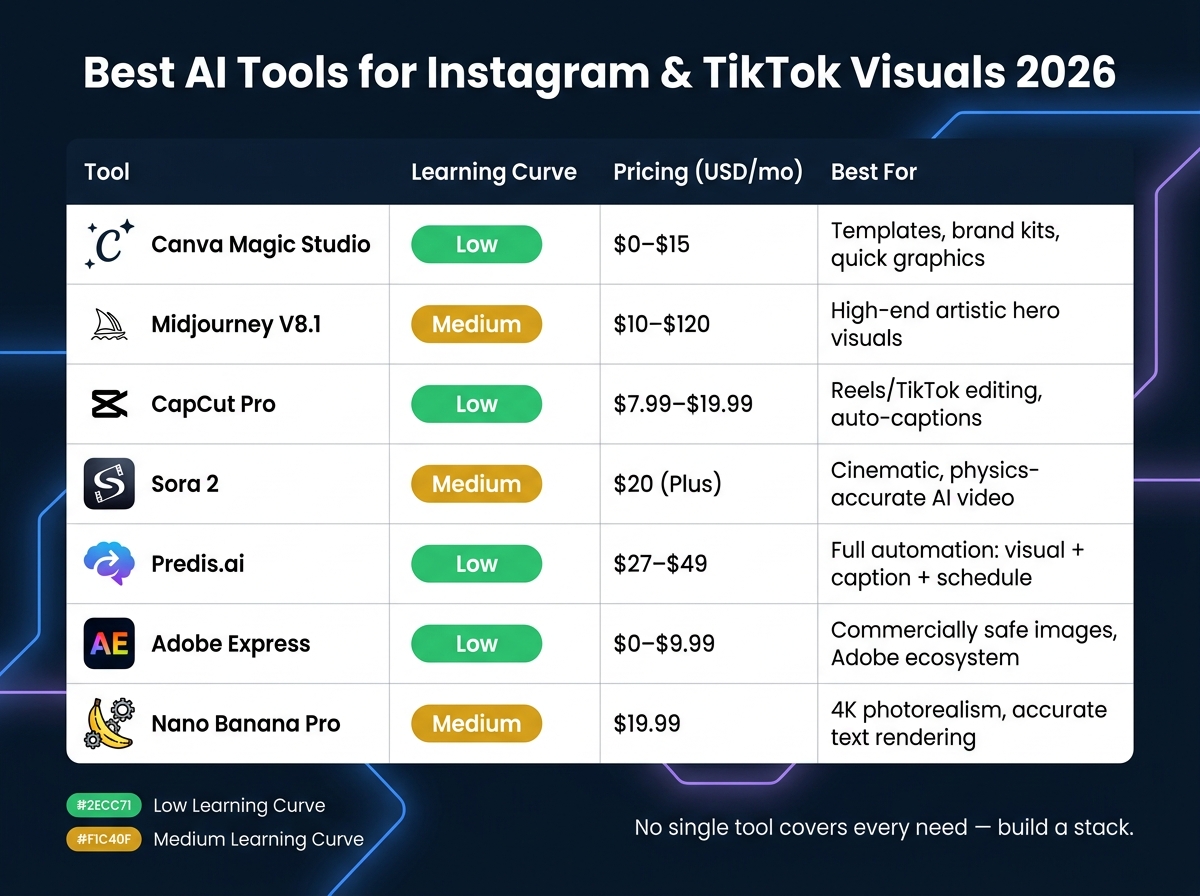
Best AI Tools for Instagram & TikTok Visuals 2026: Side-by-Side Comparison
AI Tools for Image and Video Creation
The AI tools available in 2026 cater to specific needs, whether you're working with still images or videos.
For still images, Midjourney V8.1 stands out for its ability to produce high-quality artistic visuals. It’s fast - generating images 4–5 times quicker - and delivers polished, editorial-level results. If your content requires text, Ideogram 3.0 or GPT Image 2 are excellent choices. These tools are ideal for creating quote cards, stat graphics, and carousels, with GPT Image 2 achieving nearly 99% text accuracy. For photorealistic images and 4K resolution, Nano Banana Pro (Gemini 3 Pro Image) leads the pack.
On the video side, CapCut Pro (priced between $7.99 and $19.99 per month) is a go-to for creating Reels and TikToks. It offers trending templates and AI-powered auto-captions, which are essential since 82% of viewers watch videos without sound. For cinematic vertical videos, Sora 2 (OpenAI) and Veo 3.1 (Google) deliver impressive results with physics-accurate motion. If you’re repurposing long-form content, OpusClip simplifies the process by automatically extracting the most shareable moments from YouTube videos or podcasts.
"Midjourney remains the highest-ceiling option for 'make this look beautiful' prompts." - Creative AI News
For creators looking for versatility, Canva Magic Studio ($15/month) and Adobe Express ($9.99/month) are excellent all-in-one solutions. These tools handle image generation, background removal, and branding tasks without requiring design expertise. Adobe Express is particularly noteworthy for commercial projects, as its Firefly 5 model is trained exclusively on licensed content, minimizing copyright risks.
How to Choose the Right AI Tool
Selecting the right AI tool depends on your specific needs and workflow priorities.
Start with ease of use. Tools like Canva and CapCut are beginner-friendly, making them great entry points. On the other hand, Midjourney and open-source platforms like FLUX (Black Forest Labs) require more experience with prompts and setup. A smart approach is to focus on mastering one tool at a time - begin with ideation or editing, and gradually expand your toolkit.
If you need mobile-friendly solutions, Picsart and CapCut are optimized for on-the-go editing. However, tools like Midjourney and Nano Banana Pro are better suited for web or desktop use.
Commercial licensing is another critical factor. For client projects or paid ads, stick with tools like Adobe Firefly or Canva, which offer licensed assets to avoid copyright issues.
"The tools aren't the bottleneck anymore. Knowing what to ask for is." - Tamilore Oladipo, Sr. Content Creator @ Buffer
Finally, consider how well a tool fits into your workflow. If you want a seamless process from creation to scheduling, platforms like Predis.ai ($27–$49/month) or PostEverywhere ($19–$79/month) integrate image generation, captions, and scheduling in one place. For example, a skincare brand used Predis.ai in Q1 2026 to create a complete 5-slide carousel - including visuals, captions, and hashtags - in under four minutes.
Side-by-Side Comparison of Popular AI Tools
| Tool | Learning Curve | Pricing (USD) | Best Fit for Instagram/TikTok |
|---|---|---|---|
| Canva Magic Studio | Low | $0–$15/mo | Templates, brand kits, quick graphics |
| Midjourney V8.1 | Medium | $10–$120/mo | High-end artistic "hero" visuals |
| CapCut Pro | Low | $7.99–$19.99/mo | Reels/TikTok editing, auto-captions |
| Sora 2 | Medium | $20/mo (Plus) | Cinematic, physics-accurate AI video |
| Predis.ai | Low | $27–$49/mo | Full automation: visual + caption + schedule |
| Adobe Express | Low | $0–$9.99/mo | Commercially safe images, Adobe ecosystem |
| Nano Banana Pro | Medium | $19.99/mo | 4K photorealism, accurate text rendering |
No single tool can handle every need. The most effective creators build a stack of tools tailored to different tasks. For example, you might use ChatGPT for brainstorming, Midjourney or Canva for visuals, CapCut for video editing, and a scheduling tool for distribution. This layered approach is the key to efficient content creation and sets the foundation for seamless workflows, which will be explored further in the next section.
Step-by-Step AI Visual Workflows for Instagram and TikTok
Planning Content with AI
Before diving into any AI tools, take time to plan your content. Tools like ChatGPT Plus ($20/month) or Claude can help you brainstorm 10 concise hook ideas to grab attention in the first 1–3 seconds. From there, test the top two or three to see what resonates most.
Next, define your visual identity. Think about your brand’s colors, lighting preferences, and whether you want to feature a recurring character or persona. If you’re using a character, Midjourney’s --cref (character reference) and --cw (character weight) parameters can ensure they look consistent across all your visuals. This preparation upfront will save you countless hours of revisions later.
When crafting prompts, go for cinematic detail. For example, instead of something generic, try: "a woman walking through a sunlit New York street, golden hour, 35mm, shallow depth of field, Dolly Zoom, 9:16 vertical."
"The creator's role has elevated from a technician operating a physical camera to a digital director orchestrating multiple neural networks simultaneously." - Vidwave
Once you’ve nailed your hooks and visual identity, you’re ready to move on to creating and refining your visuals.
Creating and Editing Visuals with AI
A great approach is the Image-to-Video (I2V) workflow. Start by generating a high-quality anchor frame using tools like Midjourney or Photoroom. Then, bring it to life with animation models like Kling 2.6, Veo 3.1, or Sora 2. This gives you more control over the outcome compared to relying solely on text-to-video generation.
Don’t forget captions - over 80% of Instagram users watch Reels without sound, and TikTok follows a similar trend. Many AI editing tools now offer auto-captioning, making this step easier. If your clip feels too short, features like "Generative Extend" in various AI editors can add frames seamlessly without the need for reshooting.
When posting on Instagram feeds, stick to 1080×1350 pixels (4:5 ratio). By 2026, Instagram’s profile grid displays images at a 3:4 ratio, so anything outside the 4:5 frame risks awkward cropping. For Reels and TikTok, always use 9:16 vertical. Sticking to these dimensions ensures your content looks polished and avoids cropping issues.
| Platform | Format | Aspect Ratio | Prompt Flag |
|---|---|---|---|
| Instagram Feed | Portrait | 4:5 | --ar 4:5 |
| Instagram Reels | Vertical | 9:16 | --ar 9:16 |
| TikTok | Vertical | 9:16 | --ar 9:16 |
For example, the UK-based brand No Biscuits used Google Veo 3 to create a full marketing campaign featuring "Hector the Hare", completing it in record time.
Repurposing Content Across Formats
Once your visuals are ready, focus on repurposing them to maximize their reach. Smart creators build pillar content - a long-form video, blog post, or podcast - and then use AI to break it down into platform-specific assets. For instance, a single 10-minute YouTube video can be transformed into three TikTok clips, two Instagram carousels, and a set of quote graphics - all in one session.
Batch creation is key. Dedicate one afternoon each week to building a visual library around a specific theme, and schedule your posts to roll out daily. Creator Jacob Burke (@make_today_yours) used a HeyGen digital twin for daily "talking head" posts, which helped him grow his TikTok following quickly.
One critical rule: never cross-post with a TikTok watermark. Instagram and YouTube Shorts penalize videos with competitor watermarks. Always export a clean file before sharing across platforms. When done correctly - using native ratios, platform-specific captions, and clean exports - repurposed content can generate up to three times the engagement of single-platform posts.
"Repurposing isn't just about efficiency. It's about reach. Your audience isn't on one platform - they're on five or six." - Jamie Partridge, Founder & CEO of PostEverywhere
Using AI for Growth and Optimization
Using Data to Test and Improve Visuals
Creating great visuals is just the start; figuring out what resonates with your audience is where the real magic happens. AI analytics tools help pinpoint the metrics that drive success on platforms like Instagram.
For example, in 2026, DM shares have become the top ranking factor for Instagram Reels, showing that your content is engaging enough to be shared privately. An 80%+ completion rate can increase your Reel’s distribution by 5x. Instagram also prioritizes saves over likes - content with 1,000 saves and 500 likes will outrank one with 2,000 likes but only 100 saves. To improve retention, consider adding quick camera angle changes, text flashes, or sound effects every 3–5 seconds. These tweaks can increase viewer retention to 58%, compared to 41% for slower or static content.
Here’s a quick breakdown of key metrics to aim for:
| Metric | 2026 Target | Why It Matters |
|---|---|---|
| Completion Rate | 80%+ | Increases distribution by 5x |
| Save Rate | 5–8% of reach | Shows the content has lasting value |
| Share-to-Save Ratio | 1:3 | Indicates viral potential |
| Profile Visits | 2–3% of reach | Converts viewers into followers |
By focusing on these metrics, you can systematically test and refine your content for better results.
Building a Feedback Loop with AI
Testing is everything when it comes to refining your content. Use AI to A/B test the first 3 seconds of your video with 3–5 different hook variations. This helps determine which version keeps viewers engaged the longest. For instance, comparing outputs from AI tools like SeedDream 4.5 and Flux 2 Pro can reveal which aesthetic draws more profile visits.
"The fastest way to grow is to scale what already works by 20–30% and stop what consistently underperforms." - Gabriela Holthausen, Traffic Manager and Digital Strategist
Once you identify what works, use the data to fine-tune elements like color schemes, lighting, and overall visual style. Track metrics such as your Visual Novelty Score and Initial Engagement Velocity to adapt quickly as algorithms finalize distribution decisions. This iterative process not only improves individual posts but also sets the foundation for consistent growth.
Using Outfame to Support Growth
After optimizing your visuals, the next step is ensuring they reach the right audience. This is where Outfame steps in. Outfame is an AI-powered growth platform tailored for Instagram and TikTok, designed to complement your visual strategy. It uses automated audience targeting to connect your content with users who are already interested in your niche, maximizing engagement.
Outfame’s real-time analytics dashboard and 24/7 growth monitoring let you track how your optimized visuals convert viewers into followers. Their Outfame Max™ AI tool takes it a step further with advanced targeting capabilities. Plans start at $39/month, and they even offer a growth guarantee - if you don’t see results, you get your money back.
Building a Long-Term AI Visual Content Strategy
Key Points Recap
Creating a sustainable visual content strategy hinges on having a structured approach. This approach works hand-in-hand with streamlined workflows to maintain consistency and efficiency. The essentials include sticking to native formats for platform-specific content (like 4:5 portrait for Instagram feeds and 9:16 vertical for Reels and TikTok), establishing a consistent visual identity by anchoring your brand to a single seed image, and organizing your content around 3–5 key pillars, such as education, lifestyle, or product showcases.
Your workflow is just as important as the tools you use. Transitioning to weekly batch production sessions instead of creating content daily can help reduce decision fatigue and ensure steady output. Structured AI workflows can boost posting frequency by 3–5 times while cutting production time by as much as 60–70%. Instead of focusing solely on likes, aim to create content that drives saves and shares - these metrics indicate long-term value and engagement.
These principles provide a strong foundation for creating consistent and impactful content.
Next Steps for Creators and Brands
With the basics in place, it’s time to turn these ideas into actionable strategies. Start by creating a 1,024×1,024px seed image with even lighting and a plain background. Build a prompt library that clearly defines your subject, composition, brand style, lighting, and the platform you’re targeting. This ensures every piece of content you generate aligns with your brand without requiring you to start from scratch.
Once your workflow is established, use performance data to fine-tune your strategy. Set up a 30-day feedback loop to refine your prompts based on what’s working. Combine this with tools like Outfame for automated audience targeting and real-time analytics to make sure your visuals are reaching the right audience. As your content improves and your audience grows, this system will work in a cycle, reinforcing itself over time.
"Good AI content doesn't hide that technology was involved. It proves that someone with taste and judgment was still in charge." - PhotoMaxi
FAQs
How do I keep AI visuals consistent with my brand?
To make sure AI-generated visuals match your brand's identity, start by putting together a Brand Kit. This should include your hex color codes, typography, logo, and a clear description of your preferred photography style. Many platforms allow you to upload these assets so they can be automatically applied to your visuals.
Next, create reusable prompt templates. These should outline specifics like lighting, composition, and mood. Including style reference images in your templates can also help guide the AI in producing visuals that align with your vision.
Finally, don’t skip the review process. Check the AI outputs carefully and adjust colors or details as needed. You can also combine AI visuals with real photography to create a polished and cohesive look that feels authentically yours.
Which AI tools should I start with for Instagram and TikTok?
To make content creation smoother for Instagram and TikTok, focus on using one tool for images and another for videos. Canva is a solid choice for image and carousel designs, thanks to its AI-driven templates that simplify the process. For video content, CapCut is highly effective, offering features like auto-captions, popular effects, and even direct publishing options.
Once you've established a consistent workflow, you can explore additional tools like ChatGPT for crafting scripts or specialized generators to meet more specific creative demands.
What metrics matter most to grow Reels and TikToks in 2026?
To thrive on Instagram Reels and TikTok in 2026, you need to zero in on metrics that truly measure audience engagement. One of the most important? Completion rate. Aiming for a rate between 70% and 80% can significantly boost your chances of going viral.
But don’t stop there - shares and saves now carry more weight than likes. Plus, metrics like rewatches and watch time are still critical indicators of how well your content is performing.
Here’s how to improve these numbers:
- Start with a strong 3-second hook to immediately grab attention.
- Post consistently to stay on your audience’s radar.
- Use tools like Outfame to fine-tune your audience targeting and monitor growth in real time.
By focusing on these strategies, you’ll be better positioned to capture engagement and maximize your reach on these platforms.


