
"Active Today" on Instagram means the user opened the app at some point in the last 8 to 24 hours. It’s less precise than statuses like "Active Now" or "Active 2h ago" and is designed to balance providing activity insights with respecting privacy. Here's what you need to know:
- Timeframe: Indicates activity between 8 and 24 hours ago.
- Purpose: Helps gauge when someone was last online without exact timestamps.
- Accuracy: Not perfect; background activity or delays can cause discrepancies.
- Visibility: You and the other user must have activity status enabled, and you need to follow or have messaged each other.
While it’s a useful tool for timing interactions, it’s not always reliable for pinpointing exact activity. For immediate responses, look for "Active Now."
What Does 'Active Today' Mean on Instagram?
What 'Active Today' Means
When you see "Active Today" next to someone's name in your Instagram DMs, it means they opened the app sometime between 8 and 24 hours ago. This doesn’t mean they’re currently using the app - if they were, you’d see "Active Now" or a more specific timestamp like "Active 2h ago". This status appears in your Direct Message inbox, right next to their profile picture and username.
Instagram updates this status automatically based on user activity. Actions like sending messages, liking posts, scrolling the feed, or even just having the app open in the background count as being "active". After 8 hours of inactivity, Instagram stops showing precise timestamps and replaces them with the more general "Active Today" label. This shift to vagueness is intentional and serves a purpose.
Why Instagram Uses a Time Range Instead of Exact Times
Instagram opts for broader timeframes like "Active Today" instead of exact timestamps after 8 hours of inactivity for one key reason: privacy. As Iyanuoluwa Taiwo, an Online Marketing Specialist, explains:
"Signaling exactly when someone scanned their Instagram 19 hours ago grants pretty intimate lifelogging visibility".
Providing an exact timestamp, like "Active at 3:47 PM yesterday", could reveal personal routines - something many users would find intrusive. Instagram’s data suggests most people check activity status to see if someone’s available for real-time conversations. Once someone has been offline for over 8 hours, the exact timing becomes less relevant. Using a simplified label also minimizes confusion from potential technical glitches that might affect timestamp accuracy.
Requirements to See 'Active Today'
Not everyone’s activity status is visible to you; certain conditions need to be met. First, both you and the other person must have the "Show Activity Status" feature enabled in your privacy settings. If either party disables this feature, activity information won’t be visible to either of you. Second, you need to either follow each other or have exchanged direct messages before. Profiles you’ve never interacted with won’t display any activity labels.
It’s also worth noting that activity status indicators are typically available only on the Instagram mobile app, not on the desktop version. If you’ve turned off your own activity status to maintain privacy, you won’t be able to see anyone else’s status either.
How Instagram Tracks and Shows Activity Status
Different Activity Status Labels
Instagram uses four labels to indicate how recently someone has been active. If someone opened the app within the last 0 to 5 minutes, you'll see "Active Now". For timeframes between 5 minutes and 8 hours, Instagram shows timestamps like "Active 25m ago" or "Active 2h ago". When it's been 8 to 24 hours since the last activity, the label changes to "Active Today". Lastly, if someone hasn't used the app in 24 to 48 hours, it will display "Active Yesterday".
Interestingly, the "Active Now" label can stick around for 2–5 minutes after someone has left the app. As Iyanuoluwa Taiwo, an Online Marketing Specialist, explains:
"Active Now tends to be far less instantaneous than its name suggests".
This slight delay can sometimes make it seem like someone is still online even when they've already stepped away. Let’s dive into how Instagram gathers the data to determine these statuses.
How Instagram Monitors Activity
Instagram keeps tabs on user activity through various in-app actions - like sending messages, scrolling, liking posts, or watching videos. Even background activity can trigger the "Active Now" status. The platform also uses metadata to timestamp activity based on your time zone. Additionally, Instagram syncs with other Meta apps like Facebook, which can occasionally influence your status. Peter Keszegh from Business and Power sheds light on this, stating:
"Instagram determines a user's 'Active Now' status based on several indicators... [including] recent activity on the platform [and] interactions with other users, such as liking or commenting on posts".
Where You Can See Activity Status
There are three main places where Instagram displays activity status. The most common is in your Direct Message inbox, where status labels appear under usernames in the message list. When you open a specific chat, the status shows up at the top of the conversation, sometimes indicating live actions like "In the chat" or "In the camera". Additionally, a green dot appears next to profile pictures of users you follow or have messaged, visible in various parts of the app.
Keep in mind that activity status is only visible on the mobile app. Both users must have the "Show Activity Status" setting enabled to view each other's status.
How Does Activity Status Work On Instagram?
Is 'Active Today' Accurate?
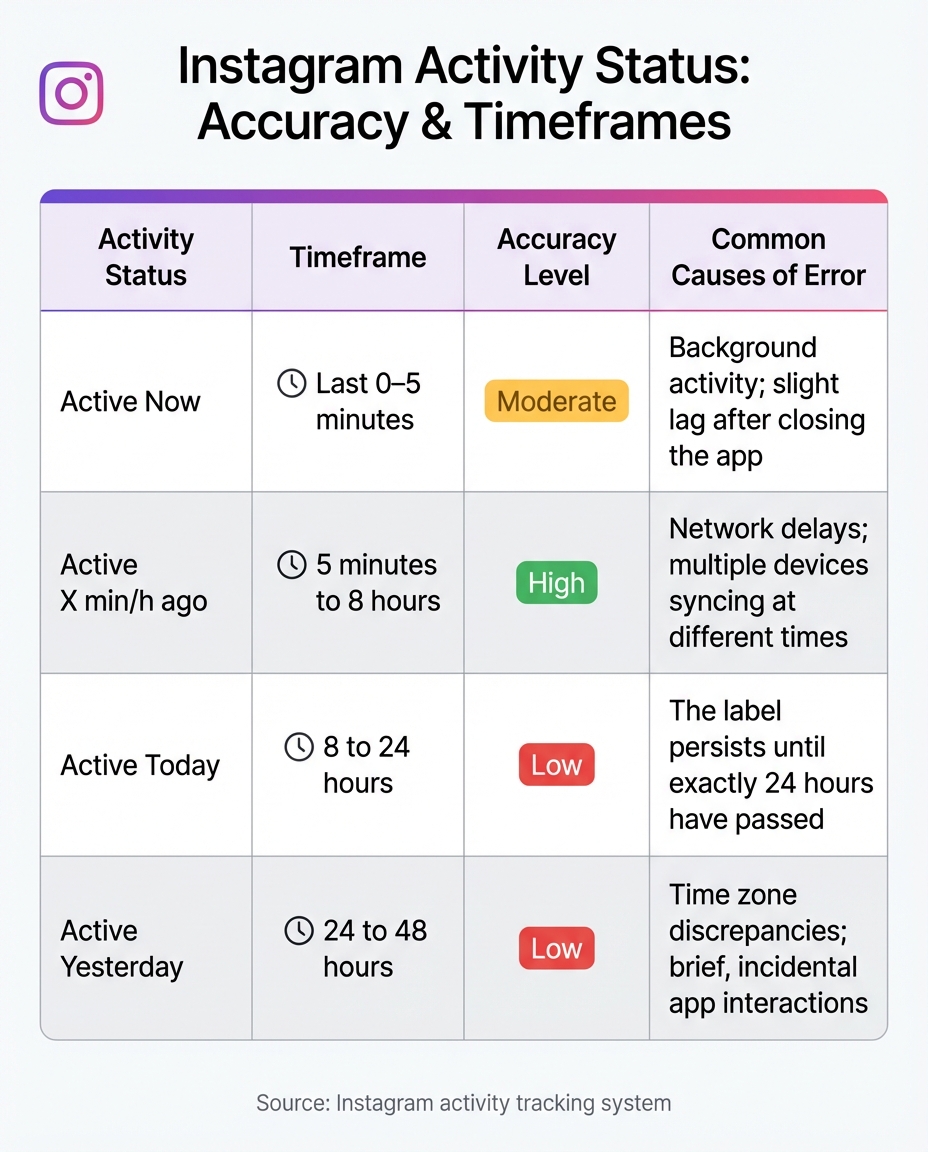
Instagram Activity Status Timeframes and Accuracy Levels
Known Accuracy Issues
Instagram's "Active Today" label isn't as precise as it might seem. The platform uses a broad 8-to-24-hour window to determine this status, meaning it simply indicates that a user was active at some point during that timeframe. However, several factors can interfere with its accuracy. For instance, background activity, delays in connectivity, or switching between multiple devices can keep the status marked as active, even when the user isn't actively using the app. These quirks often lead to situations where the label feels misleading.
Muhid Suleman, a Content Expert at PurePrivacy, sheds light on this:
"Instagram displays your online status anywhere from a few to 10 minutes after you log in."
Why 'Active Today' Might Seem Wrong
Beyond technical limitations, user settings and behaviors can further distort the accuracy of the "Active Today" label. For example, users who disable their activity status or limit interactions may not see updates to their status as expected. Additionally, time zone changes - whether due to travel or VPN usage - can skew the displayed activity times. These inaccuracies can be especially frustrating for those who rely on the label to gauge engagement or plan interactions.
Activity Status Comparison Table
The table below highlights the accuracy levels and common error sources for Instagram's various activity statuses:
| Activity Status | Timeframe | Accuracy Level | Common Causes of Error |
|---|---|---|---|
| Active Now | Last 0–5 minutes | Moderate | Background activity; slight lag after closing the app |
| Active X min/h ago | 5 minutes to 8 hours | High | Network delays; multiple devices syncing at different times |
| Active Today | 8 to 24 hours | Low | The label persists until exactly 24 hours have passed |
| Active Yesterday | 24 to 48 hours | Low | Time zone discrepancies; brief, incidental app interactions |
How to Use 'Active Today' to Grow on Instagram
Timing Your Direct Messages
The "Active Now" status is your go-to for immediate engagement. It highlights users who have been active in the last 5 minutes, making it the perfect time to send a direct message if you're aiming for a quick response. On the other hand, "Active Today" indicates activity sometime within the last 8 to 24 hours. While the green dot of "Active Now" signals urgency, the broader window of "Active Today" isn't ideal for time-sensitive outreach. Why? Your message could easily get buried under newer notifications.
Here's a key fact: 65% of Instagram users aged 18–29 check their DM activity statuses frequently or even daily. That means timing is everything. Use the "Active Now" status to your advantage for instant interactions, but also pay attention to how your followers' activity patterns shift over time. Watching for transitions from "Active Today" to more specific markers can help you uncover your audience's regular login habits. This insight not only improves your DM timing but also helps you plan when to engage with your followers more effectively.
Scheduling Posts Based on Activity
By observing when your followers move from "Active Today" to more precise statuses, you can pinpoint their most active times. Once you identify these daily engagement windows, schedule your posts about 15–30 minutes before peak activity to ensure your content appears at the top of their feed. This approach increases the chances of your posts being seen and interacted with.
Lim How Wei, Founder of Followchain, explains:
"Active Today shows if the person has not been on Instagram for 8 to 24 hours".
Tracking activity patterns over several days helps you build a reliable posting schedule. This not only enhances your content's visibility but also reinforces the importance of syncing your strategy with your audience's behavior.
How Outfame Improves Your Timing

Manual tracking of activity patterns can be effective, but automated tools like Outfame take it a step further. With its 24/7 real-time analytics, Outfame eliminates the guesswork, offering precise data on when your followers are most active. Its proprietary Outfame Max™ AI analyzes activity trends and provides tailored recommendations for the best posting times.
Outfame doesn’t just stop at scheduling. Its AI-powered audience targeting ensures you're reaching users when they’re most engaged. By automating growth and connecting with followers during their peak activity hours, Outfame increases the chances of meaningful interactions and follow-backs. Plus, with secure API-based operations, you can grow your account organically without spending hours monitoring activity statuses. This combination of strategic timing and automation makes engaging with your audience easier and more effective.
Timing your DMs helps you keep the followers you have. To add more, see how Outfame brings real Instagram followers from the accounts and hashtags you target.
Conclusion
The "Active Today" status on Instagram indicates that a user was active on the platform between 8 and 24 hours ago, but it doesn’t provide an exact timestamp. Instagram implemented this broader label after the 8-hour mark to prioritize user privacy. Even the "Active Now" label, which seems more precise, can have a delay of up to 5 minutes due to background activity or technical factors. These nuances mean the activity indicators aren’t always perfectly accurate.
Still, these statuses can be useful for timing your engagement. The "Active Now" label is the best indicator for expecting immediate responses to direct messages. Observing user activity patterns over time can also help identify when your audience is most likely to be online. As Rachel Murphy and Lara Walsh from Elite Daily advise: "Take that green dot with a grain of salt". It’s meant to give a general idea of availability, not a precise guarantee.
For a more strategic approach, tools like Outfame's 24/7 real-time analytics and Outfame Max™ AI take the guesswork out of timing. These tools analyze user activity trends and recommend the best times to post, ensuring your content reaches followers during their most active hours. With secure API-based operations and automated features, Outfame allows you to focus on creating content while it handles the timing and targeting strategy. This data-driven approach can significantly boost the effectiveness of your engagement efforts.
Understanding the limitations of the "Active Today" status can help you fine-tune your Instagram strategy. By aligning your outreach with user activity patterns and leveraging advanced tools, you can maximize engagement and connect with your audience when it matters most.
FAQs
How can I make sure others can see my activity status on Instagram?
To make sure others can see your activity status, navigate to Settings → Messages and story replies, and switch on the Show Activity Status toggle. This will activate the green dot or a timestamp indicating your last activity. Remember, for this to function, both you and the other person need to have this feature turned on. If one of you disables it, the activity status won’t appear.
Why does the 'Active Today' status on Instagram sometimes seem inaccurate?
The 'Active Today' status on Instagram can sometimes feel inaccurate because it doesn't update instantly. It often takes a few minutes for activity to register, meaning the status might still show even if someone has already logged off or closed the app. On top of that, background processes - like push notifications or location services - can activate the status, even when the user isn't directly engaging with the app.
Other issues, such as network delays or server hiccups, can also make timestamps appear outdated. And if someone has turned off the Activity Status feature, they won't see precise updates for others, which can add to the confusion. Essentially, the 'Active Today' status serves as a general indicator of activity rather than a precise, real-time log.
How can I use Instagram activity statuses to boost engagement?
Instagram’s activity statuses, like “Active Now” and “Active Today,” offer valuable clues for timing your interactions to maximize engagement. If someone is marked as “Active Now,” it means they’re currently on the app - an ideal moment to send a DM, leave a comment, or tag them in a story to grab their attention. On the other hand, “Active Today” indicates they’ve been online within the past 8 to 24 hours, making it a good window to follow up or engage without being too forward.
Here’s how you can make the most of these statuses:
- Engage when they’re active: Send messages, create polls, or invite them to join live sessions while they’re online to increase the likelihood of a quick response.
- Time your posts strategically: Pay attention to when your followers are typically marked “Active Today” and schedule posts or reels a few hours before they’re likely to log in.
- Show your activity: Turn on your activity status so others know when you’re online, encouraging them to engage with you. You can also briefly open the app before posting to appear “Active Now” and boost visibility.
By syncing your interactions with these activity indicators, you can make your content stand out and encourage better engagement from your audience.


