
Ever wanted to see someone’s Instagram profile picture in full size but couldn’t? Instagram limits profile photos to small, circular thumbnails - 110x110 pixels on mobile and 180x180 pixels on desktop. However, the original image can be up to 1080x1080 pixels, and with the right tools, you can access and download these higher-resolution versions.
Here’s what you need to know:
- Instagram stores profile pictures as 320x320px squares but applies a circular crop.
- You can download your own profile picture using Instagram’s "Download Your Information" feature.
- For public accounts, third-party tools like Pictame or Pikory allow you to view and save full-size images.
- Manual methods like browser developer tools let you grab high-res profile pictures directly from Instagram’s servers.
Important: Always use downloaded images responsibly. Avoid using them for impersonation, harassment, or commercial purposes without permission, as this violates Instagram’s rules and copyright laws.
This guide explains safe and effective methods to view and download Instagram profile pictures for personal or professional use.
How Instagram Profile Pictures Work in 2026
Instagram Profile Picture Resolution and Display Explained
Instagram handles profile pictures in a specific way to balance quality and efficiency. While it stores these images as 320x320 pixel square JPEGs, they’re displayed at smaller sizes depending on the platform. On mobile, profile pictures appear at 110x110 pixels, while the desktop version renders them slightly larger at 180x180 pixels. For the sharpest results, Instagram recommends uploading images at 1080x1080 pixels, ensuring they look crisp on high-density retina screens.
Here’s a breakdown of how Instagram processes and displays profile pictures:
| Placement / Context | Aspect Ratio | Resolution |
|---|---|---|
| Recommended Upload | 1:1 | 1,080 x 1,080 px |
| Internal Storage | 1:1 | 320 x 320 px |
| Mobile App Display | Circular | 110 x 110 px |
| Desktop Web Display | Circular | 180 x 180 px |
| Minimum Upload Requirement | 1:1 | 110 x 110 px |
Keep in mind, Instagram always stores profile pictures as squares, but applies a circular mask to crop out the corners. This means the full square image still exists behind the scenes, even though only the circular version is visible to users.
Profile pictures are served through Instagram’s content delivery network (CDN). These CDN URLs often include parameters like s150x150 or s320x320, which determine the resolution of the image being retrieved. Some third-party tools exploit these parameters to access higher-resolution versions of profile pictures. Understanding how these URLs work can be useful for retrieving full-sized images, though Instagram’s design limits downloading or enlarging profile pictures to maintain control over user content.
What Instagram Lets You Do and What It Blocks
Instagram gives users full control over their own profile pictures. You can upload, change, or delete your avatar anytime through the app or desktop. However, when it comes to viewing someone else’s profile picture, your options are intentionally restricted. Clicking on another user’s photo won’t enlarge it; instead, it redirects you to their profile or current Stories. There’s no built-in feature for zooming in or downloading someone else’s profile picture.
This limitation isn’t just about privacy. With 2.4 billion users, displaying small thumbnails significantly reduces bandwidth and infrastructure costs. Even saving a few kilobytes per image adds up to massive savings at this scale. For private accounts, profile pictures are still visible in search results, direct messages, and follower requests, showing that these restrictions are more about platform efficiency than protecting individual privacy.
These design choices highlight the balance Instagram strikes between functionality, cost efficiency, and user experience, while also paving the way for creative workarounds to bypass these restrictions.
sbb-itb-3b12fba
How to download any Instagram Profile Picture [Full Size]
How to View and Download Your Own Instagram Profile Picture
Getting your Instagram profile picture in its full resolution is key if you're focused on maintaining image quality for branding or verification. While Instagram displays your profile picture at just 150x150 pixels in the app, the platform actually stores it at up to 1,080x1,080 pixels. However, since Instagram doesn’t provide a one-click download option, you’ll need to follow a simple workaround to retrieve the full-size image.
Downloading via the Instagram Mobile App
Instagram’s "Export Your Information" feature lets you download a copy of your data, including your profile picture. Here’s how to do it:
- Open your profile, tap the menu icon (three horizontal lines), and go to Settings → Account → Download Your Information.
- Enter your email address and choose either "Download All" or just your profile data. Then, submit the request.
- Once you receive the email from Instagram, download the provided ZIP file. Extract the archive, and inside the
profile_photosfolder, you’ll find your profile picture saved as a high-resolution square JPEG, including any parts hidden by Instagram’s circular crop.
The process is straightforward and works the same way on desktop, giving you access to the full image regardless of the device.
Downloading via Desktop Browser
If you prefer using a browser, the steps are nearly identical:
- Log in to instagram.com, go to Settings → Privacy and Security → Download Your Information, and follow the prompts.
- After downloading the ZIP file, extract it using your computer’s default tools (e.g., File Explorer on Windows or double-clicking on macOS). Your profile picture will be stored in the
profile_photosfolder.
Keep in mind that the resolution of your profile picture depends on when it was uploaded. Photos uploaded before 2018 are capped at 320x320 pixels, those from 2018–2020 at 640x640 pixels, and anything uploaded after 2021 is stored at 1,080x1,080 pixels.
Why Keeping a Local High-Quality Copy Matters
Having a high-resolution version of your profile picture isn’t just convenient - it’s essential for both personal and professional purposes. For example, a 2025 CareerBuilder survey found that 70% of employers screen candidates on social media before making hiring decisions. A blurry or low-quality profile picture can leave a poor impression, especially when only the compressed circular version is visible on Instagram.
For creators and marketers, having the original 1,080x1,080-pixel square image is a huge advantage. It allows you to repurpose the image across various platforms without needing to re-upload or crop it again. Additionally, high-resolution images are crucial for reverse image searches, which rely on detailed source files for accurate results. The small 150x150-pixel thumbnail displayed in the app simply doesn’t cut it for these tasks.
Using Online Tools to View and Download Any Public Instagram Profile Picture
Expanding on ways to save your own images, online tools make it possible to view and download any public Instagram profile picture in full size. The best part? No need for a login or software installation.
Pictame is a standout option in 2026, known for its speed and reliability. It’s completely free, requires no login, and pulls profile pictures directly from Instagram’s servers at up to 1,080x1,080 pixels. Another solid choice is Pikory (v2.5 Stable), which fetches original images from Instagram’s CDN while maintaining user anonymity. Both tools work smoothly on mobile and desktop browsers.
Step-by-Step Workflow for Online PFP Tools
Using these tools is simple:
- Find the username: Open Instagram, navigate to the desired profile, and copy the username (e.g.,
@natgeo) or use the "Copy Profile URL" option from the three-dot menu (⋮). - Open the tool: Go to a site like Pictame.com in your browser.
- Paste and search: Enter the username or URL in the search bar, then click "Search" or "Download."
- Save the image: Once the full-size version appears, right-click (on desktop) or long-press (on mobile) and select "Save Image As."
Keep in mind, if someone recently updated their profile picture, it might take 2 to 6 hours for the new image to show up due to CDN propagation delays.
While these tools provide convenience, it’s essential to prioritize safety and privacy during the process.
Safety and Privacy Tips for Online Tools
When selecting a tool, always be cautious. A major warning sign is any request for your Instagram login credentials - legitimate tools will never ask for your password.
"Legitimate tools never need your Instagram password... if there's no privacy policy page, your data is being sold." - James Mitchell
Before using any site, check for HTTPS in the address bar (look for the padlock icon) and ensure the site has a clear privacy policy stating it doesn’t store your download history. Web-based tools are generally safer than mobile apps, which may ask for unnecessary permissions like access to your contacts or location.
Beyond privacy concerns, high-resolution profile pictures can also be a valuable resource for professionals.
How Marketers and Creators Can Use Downloaded PFPs
Downloading full-size profile pictures isn’t just about curiosity - it can serve strategic purposes. For marketers and creators, these images are helpful for brand audits, offering a closer look at a competitor’s visual identity, including their color schemes and logo design. They also support influencer vetting by enabling more accurate reverse image searches, which can reveal fake accounts or inconsistencies in someone’s online presence.
Interestingly, 70% of employers now screen candidates on social media before hiring, making these tools useful for verifying professional identities. For marketers, integrating these insights into your strategy can lead to better branding and smarter content creation decisions.
Advanced Methods: Manually Downloading Profile Pictures via Desktop Browser
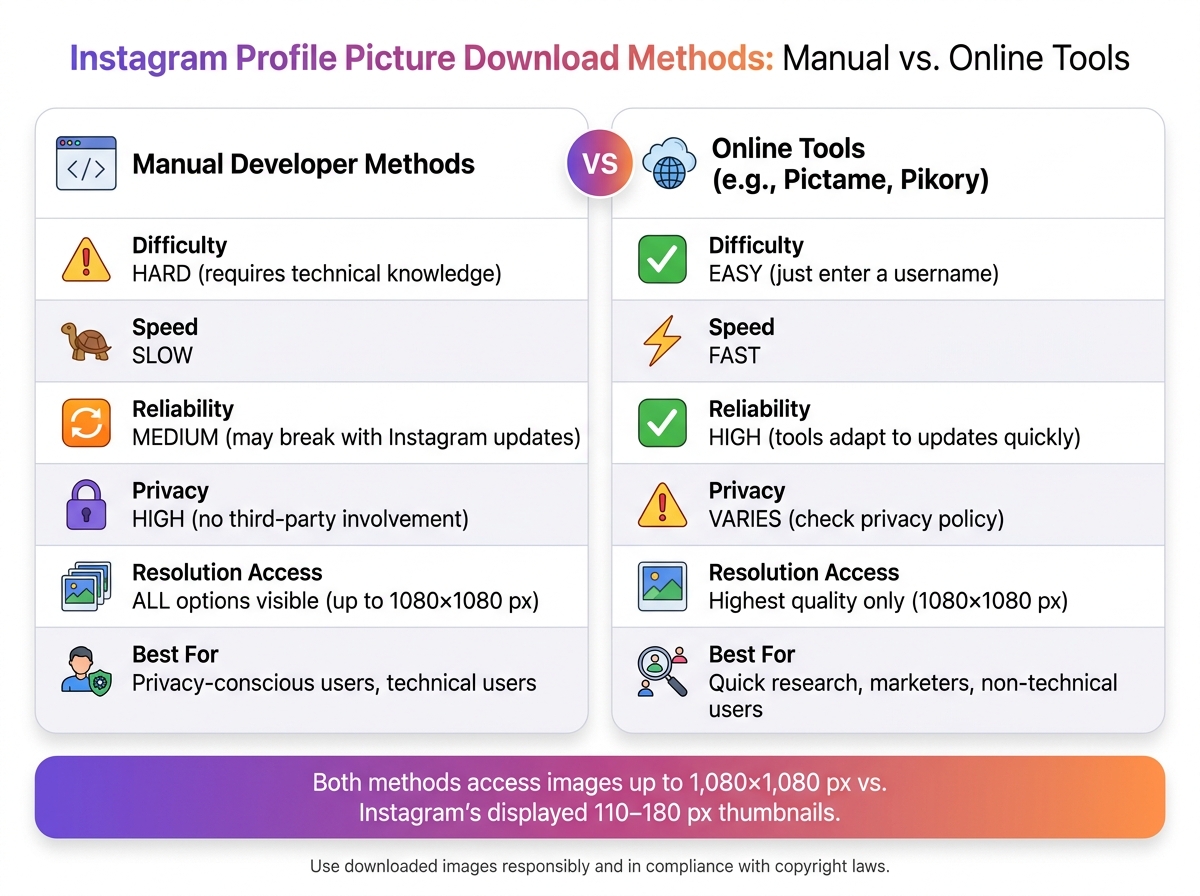
Instagram Profile Picture Download Methods: Manual vs. Online Tools
Online tools might be convenient, but manual methods give you more privacy and control. Your desktop browser - whether it’s Chrome, Firefox, Edge, or Safari - comes equipped with developer tools that let you grab the original image URL directly from Instagram's servers, no third-party tools required.
How to Use Browser Developer Tools to Download a Profile Picture
There are two main approaches: the Inspect Element method and the Network tab method.
The Inspect Element method: Start by opening the Instagram profile in your browser. Right-click on the profile picture and select "Inspect" (or press Ctrl+Shift+I on Windows or Cmd+Option+I on Mac). This opens the HTML panel, where you’ll see a highlighted <img> tag. To confirm it’s the correct image, check the alt text - it usually includes the account's username. Next, look for the srcset attribute, which lists multiple resolution options, including the highest-quality version (often 1,080×1,080 pixels). Copy the URL for the best resolution, paste it into a new tab, and save the image.
The Network tab method: Open the developer tools and switch to the Network tab. Filter by "Img" to show only image files. Refresh the Instagram profile page to reload all images. Sorting by file size can help you find the high-resolution profile picture quickly. Click on the image request to verify it in the "Preview" tab, then copy the URL from the "Headers" tab. Open the URL in a new tab and save the image.
Keep in mind that these URLs often include security tokens that expire quickly, so download the image as soon as possible. Also, Instagram sometimes loads a low-resolution placeholder before displaying the full image - make sure the profile picture is fully loaded before you inspect it.
Pros and Cons of Manual Download Methods
Manual methods offer distinct benefits but also come with challenges. One major advantage is privacy - you’re working entirely within your browser, so no data is shared with third-party tools. Plus, you can see all resolution options Instagram provides, ensuring you get the highest quality.
On the flip side, Instagram’s use of React makes its DOM (Document Object Model) complex and tricky to navigate if you’re not comfortable with HTML. Additionally, Instagram updates can render these methods ineffective, which is why many users rely on online tools for routine tasks and save manual methods for when privacy is a top priority.
| Feature | Manual Developer Methods | Online Tools |
|---|---|---|
| Difficulty | Hard - requires technical knowledge | Easy - just a username search |
| Speed | Slow | Fast |
| Reliability | Medium - may break with updates | High - tools adapt quickly |
| Privacy | High - no third-party involvement | Varies - check privacy policy |
| Resolution Access | Shows all resolution options | Only pulls the highest quality |
Best Practices and Ethical Guidelines for Using Downloaded Profile Pictures
Downloading a profile picture might be simple, but using it responsibly is where the real challenge lies. Whether you're a marketer, content creator, or social media manager, knowing the legal and ethical boundaries is essential to protect yourself professionally and legally.
Legal and Ethical Guidelines
The golden rule is straightforward: the person who took the photo owns the rights to it. Instagram grants display rights, but not usage rights.
Even if a profile picture is publicly visible, it’s still protected by copyright laws. Courts have made distinctions between embedding and downloading. For example, in the Stephanie Sinclair v. Mashable case, the court ruled that embedding an Instagram image via Instagram’s HTML code was allowed under Instagram’s sub-licensing terms. However, downloading and redistributing the image without permission violated usage rights. If there’s any doubt, always get permission before using an image in a context where others will see it.
| Activity | Status | What to Do |
|---|---|---|
| Identity verification | Acceptable | Keep internal only |
| Personal reference/mood boards | Acceptable | Save for private use |
| Commercial advertising | Prohibited | Obtain a legal license from the owner |
| Reposting to your feed | Prohibited | Request permission and credit creator |
| Impersonation | Illegal | Never use another person’s likeness |
Now, let’s look at legitimate marketing scenarios where downloading profile pictures is justified.
Acceptable Marketing Use Cases
There are valid reasons for downloading profile pictures in a professional setting. Influencer vetting and internal competitive research are two common examples. Downloading a high-resolution profile picture allows you to verify whether a profile belongs to a real person or a bot through reverse image search. It also helps analyze competitors’ visual branding, such as their color schemes and overall aesthetic.
Employers often verify social media profiles during hiring decisions, and the same principle applies when evaluating potential brand partnerships. However, it’s important to ensure these images are used internally and are never published or shared without explicit consent.
How to Store and Organize Downloaded Images Safely
Once you’ve determined an acceptable use, proper storage and organization are key to avoiding misuse or accidental exposure. A cluttered downloads folder can lead to errors, such as using an image inappropriately or losing track of its original purpose. To avoid this, create a clear folder system. For example:
- Influencer Research
- Competitor Analysis
- Personal Reference
This structure minimizes the chances of accidentally sharing an image intended for private use.
Keep files organized to prevent misuse.
Another important tip is to save the actual image file locally, rather than just the URL. Instagram’s CDN links are temporary and can expire quickly. For larger-scale projects, avoid bulk-downloading images from multiple accounts simultaneously, as Instagram’s servers may flag this activity and impose IP restrictions. Additionally, steer clear of using tools to enhance or upscale low-resolution images. If a higher-quality version is needed, download the original 1080×1080 pixel file directly from the source.
Conclusion: How Downloading Instagram PFPs Supports Your Marketing Efforts
Downloading full-size Instagram profile pictures isn’t just a neat trick - it’s a practical tool for marketers. This guide covered two main ways to do it: using web-based tools like Pictame and Pikory (v2.5 Stable) for quick access, and browser developer tools for those who prefer more control. Both approaches help streamline the process of getting high-resolution images for marketing tasks.
Each option serves a specific purpose. Web-based tools are perfect for quick influencer research or competitor analysis, while browser developer tools let you bypass third-party services for added control.
For marketers, having access to the original 1,080×1,080 pixel image - compared to Instagram’s compressed ~150×150 thumbnail - can make a big difference. Whether it’s verifying an influencer’s identity, enhancing pitch decks, or keeping CRM contact lists organized, the higher resolution is invaluable. According to a 2025 Pew Research study, 62% of Instagram’s 2.4 billion monthly users have expressed frustration over not being able to zoom into profile pictures.
"A full-size Instadp is much more useful than a tiny screenshot, especially if you're building moodboards or pitch decks." - INDownloader.app
When used responsibly for tasks like internal research, identity verification, or brand analysis, downloading Instagram profile pictures becomes a smart marketing strategy. Combine this tactic with tools like Outfame, which provides AI-driven audience targeting and real-time analytics, to gain deeper insights and uncover new opportunities for partnerships or growth.
FAQs
Can I download a private account’s profile picture?
Downloading a profile picture from a private account usually isn't possible unless you're already granted access to that account. While some tools claim to get around these restrictions, using them can breach privacy policies and lead to ethical issues. It's always important to respect people's privacy when viewing or saving their content.
Will downloading someone’s IG PFP get my account flagged?
Downloading an Instagram profile picture with trusted tools is generally safe and unlikely to raise any red flags with your account. These tools work by accessing images that are publicly available and comply with Instagram's privacy guidelines. That said, it's important to stick to reliable methods and always consider ethical boundaries when saving someone else's content.
Why is the “full-size” PFP sometimes still blurry?
Instagram's "full-size" profile pictures often appear blurry because the platform caps image resolution at 1080x1080 pixels. On top of that, Instagram applies a circular crop, which can further impact how the image looks. Even if you view or download the profile picture at its maximum size, these limitations mean it likely won't match the original quality.


