
Want to keep your live stream viewers watching longer? Here’s the secret: engagement is everything. Streams that actively involve viewers can hold attention up to three times longer, boosting watch time and improving visibility on platforms like YouTube, TikTok, and Instagram.
Here’s a quick breakdown of how to make your live streams engaging:
- Start strong: Hook viewers in the first 30–60 seconds with a clear value statement.
- Structure matters: Break your stream into segments (intro, main content, Q&A) to keep things organized.
- Get interactive: Use polls, Q&A, or giveaways to encourage participation.
- Acknowledge your audience: Respond to comments and call out viewers by name to build a connection.
- Keep it polished: Good audio, lighting, and visuals are non-negotiable for a professional feel.
- Analyze and improve: Use post-stream data to identify what worked and refine your approach for next time.
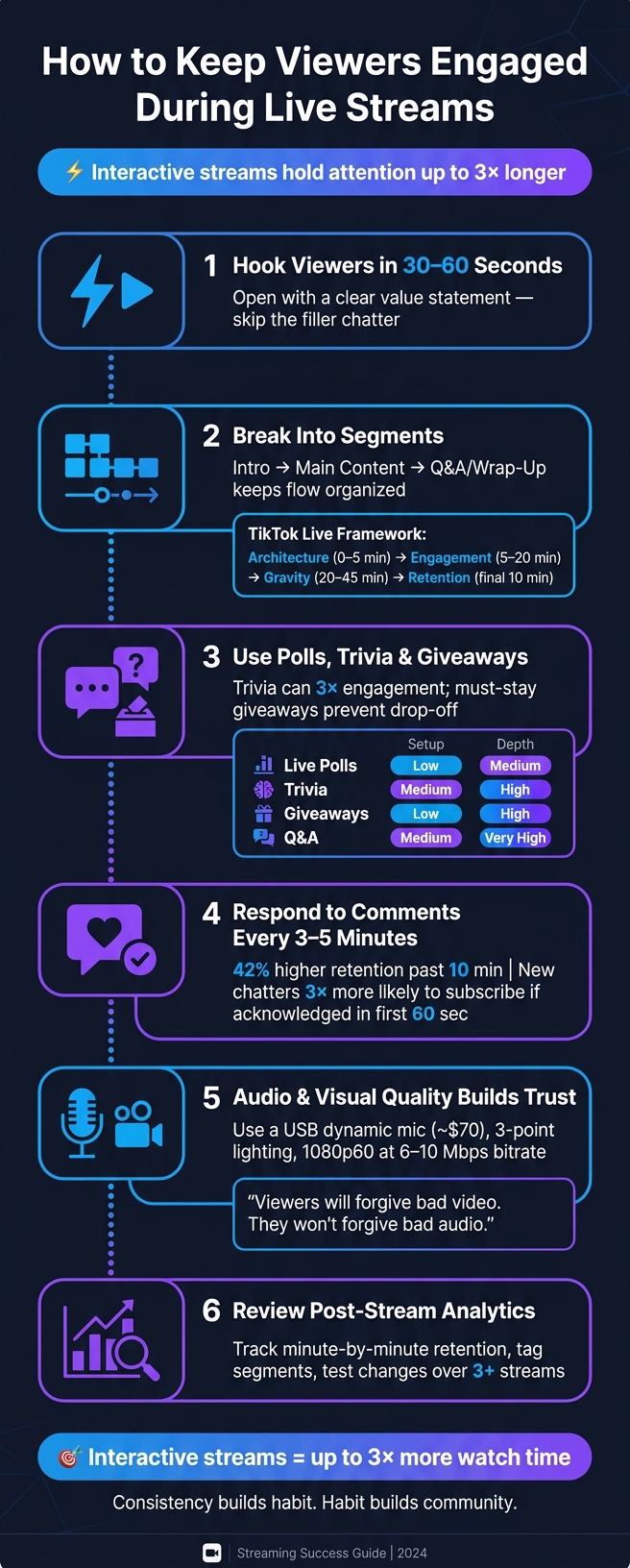
How to Keep Viewers Engaged During Live Streams
How to Boost Viewer Engagement During Your Livestream | RaffertyWeiss Media
Prepare Your Live Stream Before Going Live
Creating a live stream that captures and holds your audience's attention takes planning. The most engaging streams don’t just happen - they’re carefully thought out before the creator hits "Go Live."
Define a Clear Purpose for Your Live Stream
Every successful live stream starts with a clear purpose. Without one, your content can feel scattered, leaving your audience unsure of what to expect.
Your purpose will also guide how you present your content. For example, if you're streaming for beginners, you’ll want to slow down and explain the basics. On the other hand, an advanced audience will expect you to skip the intro and dive right into the details. Trying to cater to both groups at once often leads to a disorganized stream that doesn’t fully connect with anyone.
"Viewer drop-off is not a verdict on your content. It is feedback about your structure. Fix the structure and the same content performs completely differently." - Vince Dwayne, Influencer Marketing Consultant, Searchlight Social
Here’s a quick tip: ditch vague titles like "Going LIVE." Instead, use specific, descriptive ones like “Quick Q&A on skincare routines” or “Behind the scenes of today’s shoot.” These titles tell viewers exactly what to expect. And whatever your goal is, make it measurable. For example, instead of saying you want “growth,” aim for something like “earn 10 returning viewers over the next 5 streams”.
Plan a Strong Opening Hook
You’ve got 30 to 60 seconds to convince new viewers to stick around. That’s not much time, so how you use it is critical.
Avoid starting with filler like "Hey guys, just waiting for more people to join." This kind of idle chatter often pushes viewers away in seconds. Instead, kick things off with a strong, clear value statement. For instance: "Today, I’m sharing three quick tips for better skincare - stick around to learn how to simplify your routine." This approach immediately shows viewers why they should stay.
Bring energy right from the start - your tone sets the mood for the entire stream, even for those joining later. Once you’ve grabbed their attention, keep the momentum going with a well-structured flow.
Break Your Live Stream into Segments
A segmented structure keeps your audience engaged. Divide your stream into clear parts - an introduction, the main content, and a Q&A or wrap-up - to create a sense of direction.
For platforms like TikTok, a four-phase structure works particularly well: Architecture (0–5 mins) to set the stage, Engagement (5–20 mins) to interact with viewers, Gravity (20–45 mins) to deliver deeper content, and Retention/Conversion (final 10 mins) to wrap up and encourage future participation. This kind of pacing prevents your stream from feeling like an aimless conversation.
"A TikTok Live without structure is a conversation that nobody knows when to join, how long to stay for, or why they should come back. The Live Architecture System answers all three questions before the session begins." - Searchlight Social
Pick the Right Time and Length
Timing can make or break your stream’s visibility. Use tools like Instagram Insights or TikTok Analytics to find out when your audience is most active. While general advice is helpful, data specific to your followers will always be more effective. For Instagram and TikTok creators, Outfame’s real-time analytics can also help you zero in on the best moments to go live.
Still, there are some general benchmarks to consider. Instagram engagement typically peaks between 12:00 PM–3:00 PM and 7:00 PM–9:00 PM, with Mondays and Fridays often performing best. As for stream length, aim for at least 30 minutes to 2 hours. This gives the platform’s algorithm time to surface your stream and gives viewers plenty of opportunities to join.
As Simon Leung wisely notes: "Consistency builds habit, and habit builds community". Once you find a schedule that works, stick to it.
Use Storytelling to Hold Viewer Attention
Once you've set up your structure and timing, the next step is to create an emotional connection. A well-planned schedule may bring viewers in, but storytelling is what keeps them engaged.
"Storytelling is attention architecture - a promise, escalation, and payoff - that keeps viewers watching past the first critical 30–120 seconds." - Jane Mercer, Senior Editor, socialmedia.live
Follow a Simple Story Arc
Think of your live stream as a three-act story. Act 1 (0–15 minutes) is your hook - this is where you clearly outline what viewers will gain by sticking around. Act 2 (15–45 minutes) is where you introduce tension. This could be a challenge, a problem, or a goal that resonates with your audience. Act 3 (the final 15–30 minutes) delivers the payoff - whether it's a big reveal, a solution, or an actionable takeaway, this is the moment that rewards viewers for their time.
While scripting key transitions is important, leave room for improvisation. This balance ensures that your delivery feels natural while keeping the flow of your stream intact.
Share Personal Stories
Real, unscripted moments resonate deeply. Sharing your own setbacks or achievements makes your content relatable and helps build trust with your audience.
"Vulnerability is not a gimmick - it's a trust shortcut. Stories that show failure, redemption, or deeply-felt goals invite viewers to root for you." - Avery Langford, Senior Editor, powerful.live
For example, comedy streamers who weave personal anecdotes into their content have been shown to boost average watch time by 25%. You don’t need a dramatic tale - just something authentic that your audience can connect with.
Tease What's Coming Next
To reduce viewer drop-off, give people a compelling reason to stay. Before transitioning to a new segment, drop a specific hint about what’s coming next. This creates a "curiosity gap" - an open question in your viewer's mind that they’ll want answered.
Be as specific as possible. Saying "something cool is coming up" is too vague to hold attention. Instead, try something like: "In 10 minutes, I’ll reveal the one tool that doubled my engagement overnight." This kind of concrete teaser keeps viewers intrigued. Refresh these "promise loops" every 10–15 minutes to maintain their interest, and whenever possible, make the payoff something exclusive to the live stream - something they won’t find in the replay.
Get Your Audience Actively Involved
Once you've hooked your audience with compelling storytelling, the next step is to draw them into the action. Storytelling grabs attention, but active participation builds a sense of loyalty. When viewers engage - whether by typing in the chat, answering a poll, or hearing their name mentioned - they shift from being passive spectators to feeling like part of the experience.
Tell Viewers How to Participate
To get people involved, you need to be direct. Start your stream with a clear, engaging prompt. For example, saying something like, "What's the one question you’ve always wanted answered? Drop it in the chat, and I’ll answer live!" grabs attention early and encourages immediate interaction.
For those who join later, use Chat Checkpoints every 15–30 minutes. A quick, "Just tuning in? Here’s what we’re up to - type your answer in the chat" helps new viewers feel included and gives them a reason to jump in. Tools like Nightbot or StreamElements can automate these reminders, so you can focus on delivering great content without constantly repeating instructions.
"At StreamYard, we think of engagement as something you design into the show, not something you bolt on later." - Will Tucker, Author, StreamYard
Once you've set the tone, interactive elements can take engagement to the next level.
Add Interactive Elements to Your Stream
Interactive features are a great way to keep your audience engaged. Live polls are simple to set up and perfect for quick feedback or letting viewers shape the conversation. For something more involved, trivia games can boost retention and create a fun, competitive atmosphere. For instance, InfinitePay used live trivia during a broadcast and saw 900 players join in, with 12,000 views in just one hour - tripling their usual engagement.
Giveaways are another effective tactic, especially if viewers need to stick around to win. By requiring winners to be present during the draw, you can keep your audience engaged for longer. Betclic France used this strategy and saw over 100,900 comments and 22,000 shares during a single broadcast. Here’s a quick comparison of popular interaction types:
| Interaction Type | Setup Difficulty | Engagement Depth | Best For |
|---|---|---|---|
| Live Polls | Low | Medium | Quick feedback, topic selection |
| Trivia Games | Medium | High | Retention, competitive spirit |
| "Must-Stay" Giveaways | Low | High | Preventing mid-stream drop-off |
| Structured Q&A | Medium | Very High | Community building, authority |
Streams with interactive elements like these can achieve three times the watch time of passive broadcasts.
Respond to Comments as They Come In
Engagement doesn’t stop with setting up interactive tools - it’s also about how you respond. Acknowledging comments in real time is one of the easiest ways to make viewers feel valued. When you read a viewer’s name or answer their question live, it creates a personal connection that keeps them coming back.
Take time every 3–5 minutes to read and respond to comments. Use a simple formula: mention their name, reference their comment, and ask a follow-up question to keep the conversation going. Streams that actively engage with chat see 42% higher viewer retention beyond the 10-minute mark, and new chatters are three times more likely to subscribe if acknowledged within their first 60 seconds.
"You wouldn't ignore a guest walking in. Why ignore @RetroFan99?" - Maya Rodriguez, Streamer
If chat gets overwhelming, enable slow mode for 10–15 seconds to ensure quieter voices aren’t drowned out. And if trolls appear, don’t give them attention - let your moderators handle it so you can stay focused on the positive energy of your stream.
Improve the Technical and Visual Quality of Your Stream
Great interaction hinges on solid audio and visuals. While engaging content keeps viewers tuned in, poor sound or lighting can quickly push them away. Let’s break down how to refine your audio and lighting setup for a seamless streaming experience.
Set Up Good Audio and Video
Start with a USB dynamic microphone, such as the Samson Q2U, which costs about $70. Dynamic microphones are ideal for untreated spaces because they effectively block out background noise. Once you’ve got your mic set up, enhance your audio quality through your streaming software by applying these filters in order: noise suppression, a compressor, and finally, a limiter. These adjustments ensure your voice stays clear and consistent throughout the stream.
"Viewers will forgive bad video. They won't forgive bad audio."
For video, lighting is more important than having an expensive camera. A simple three-point lighting setup can make even a budget-friendly $70 webcam look polished. This setup includes:
- Key light: Your main light source.
- Fill light: Softens harsh shadows.
- Backlight: Helps separate you from the background.
Good lighting not only keeps your stream visually appealing but also conveys professionalism. Additionally, tweak your camera’s focus, white balance, and exposure manually to avoid sudden shifts mid-stream. For a 1080p60 stream, use a wired Ethernet connection and maintain a bitrate of 6–10 Mbps to prevent the packet loss that can come with unpredictable Wi-Fi.
Keep the Visuals Dynamic
Add subtle enhancements like lower-third text overlays, branded transitions, and on-screen graphics to give your stream a professional edge without overwhelming viewers. These elements should complement your content, not distract from it.
Since many viewers watch streams on their phones, design your visuals with mobile users in mind. Use larger text, tighter framing, and clean overlays that are easy to read on smaller screens. If you’re streaming on platforms like Instagram or TikTok, adjust your canvas to 1080×1920 (vertical) in OBS or your encoder to avoid the dreaded "postage stamp" effect.
Once your visuals are polished, it’s important to monitor and maintain quality throughout the stream.
Track Metrics and Adjust During the Stream
Use a second monitor to keep an eye on essential live metrics like Concurrent Viewers (CCV), chat activity (messages per minute), and bitrate stability. If you notice a drop in viewership, check for technical issues first - problems like rebuffering or bitrate drops are often mistaken for content issues.
"Technical issues often masquerade as content problems - if viewers leave at scale at 22:03 and your CDN logs show a spike in rebuffering, it's a delivery problem, not a creative one." - Avery Collins, Senior Editor & Content Strategist
To keep viewers engaged, introduce a visual change, poll, or new segment every 3–7 minutes to refocus their attention. For instance, in May 2026, a music creator noticed a 20% viewer drop at the 12-minute mark across five episodes. The issue? A lengthy ad read combined with an abrupt lighting change. By splitting the ad into two shorter segments and smoothing out the lighting transitions, they boosted minute-by-minute retention by 12%.
Use Post-Stream Analytics to Improve Future Streams
Post-stream analytics are a powerful way to understand what worked during your stream and what didn’t. By diving into this data, you can refine your future planning and engagement strategies. These insights help you adapt and grow with each stream.
Review Viewer Retention and Interaction Data
One of the most revealing metrics is minute-by-minute retention. This shows when viewers were engaged and when they dropped off. If you notice a sudden dip, it could point to issues like awkward transitions, a dull topic, or even technical glitches.
"Retention is the closest thing streamers have to a truth serum." - Jordan Vale, Senior SEO Editor
To get the most out of this data, tag key moments on your retention graph. Label parts like "Intro", "Q&A", or "Demo" to connect viewer behavior with specific segments of your stream. This makes it easier to identify which parts resonated and which didn’t.
Another useful approach is keeping a scorecard. Rate important sections such as your opening hook, average view duration, and audience interaction on a scale of 1–5. Over time, patterns will emerge, showing what consistently engages your audience.
"Don't ask, 'How was the stream?' Ask, 'Which three moments caused retention to rise, and which two caused it to fall?' That one question moves your team from opinion to evidence." - Jordan Mercer, Senior SEO Content Strategist
Test Different Interaction Formats
Once you’ve identified weaker areas, experiment with changes one at a time, and test them over at least three streams before making conclusions. For instance, if chat activity spikes during personal anecdotes but drops during tutorials, consider reworking your format. Similarly, if polls boost engagement midway through, try moving them earlier in the stream to capture attention before viewers tune out.
| Retention Pattern | Likely Cause | Recommended Test |
|---|---|---|
| Sharp drop in first 5–10 mins | Intro too long or title mismatch | Shorten intro; start with promised content |
| Midstream dip during transitions | Pacing slowdown or dead air | Eliminate downtime; narrate transitions |
| Drop during CTAs | Poorly timed interruptions | Place CTAs during high-interest moments |
| Retention spike | Clear stakes or suspense | Add goals or countdown timers |
Use AI Tools to Get Audience Insights
While manual analysis is helpful, AI tools can uncover patterns you might miss. These platforms can track sentiment in chat, highlight high-energy moments for clipping, or predict when viewers are likely to leave.
For example, Outfame offers creators on platforms like Instagram and TikTok real-time analytics combined with audience targeting data. This helps you understand who’s watching and what content resonates most. Armed with this information, you can make smarter decisions about topics, timing, and formats for future streams.
Incorporating these AI-driven insights alongside your own adjustments can help you fine-tune pacing, interactions, and overall structure. By continuously analyzing and adapting, you’ll create streams that keep your audience engaged from start to finish.
Conclusion: Key Steps to a More Engaging Live Stream
Making your live stream captivating isn’t about having a magnetic personality or investing in fancy equipment. The real magic lies in structure, intention, and consistency. Interestingly, many streamers lose their audience within the first 10 minutes simply because their stream lacks a solid framework.
Let’s recap the essentials: thorough preparation keeps awkward silences at bay, compelling storytelling keeps your content meaningful, engagement turns passive viewers into active participants, good technical quality builds trust, and reviewing your performance after each stream helps you improve.
"The best live streamers do not just 'perform.' They iterate. Every stream is a rehearsal for a stronger next one." - Jordan Mercer, Senior SEO Content Strategist
Interactive streams have been shown to increase watch time by up to three times. This can be a game-changer for gaining favor with algorithms on platforms like YouTube and Twitch. These platforms reward sustained engagement over sheer viewer numbers, meaning a small, loyal audience that sticks around is worth far more than a fleeting crowd.
Don’t forget about the potential of your content after the live session. High-retention moments can be repurposed into bite-sized clips for TikTok or Reels, helping new audiences discover your streams and fueling your growth over time .
FAQs
What should I do if viewers leave in the first minute?
If your viewers are leaving early, it might be time to rethink your opening hook. Starting with administrative details - like tweaking audio or diving into long-winded explanations - can lose your audience right out of the gate. Instead, craft a scripted opening that immediately captures attention. Start by delivering value upfront, clearly stating what’s coming next, and explaining why it’s worth sticking around for.
To take it a step further, tools like Outfame’s automated targeting and real-time analytics can give you deeper insights into your audience. These insights can help you refine your approach and ensure steady, natural growth over time.
How do I keep chat active without losing my flow?
To keep your chat lively while staying on task, try scheduling regular "chat check-ins" every 3–5 minutes. During these moments, engage with viewers directly by name to make the interaction personal. Incorporate planned segments like polls or Q&A sessions to encourage natural conversations.
Automated bots can be a big help, managing FAQs and welcoming new viewers, while AI tools can assist during transitions to keep things smooth. If chat activity starts to dip, set up automated prompts to trigger questions or polls. This way, you can maintain focus on your content without constant interruptions.
Which metrics matter most after a live stream?
To get a clear picture of how your live stream is performing, pay attention to metrics that highlight viewer engagement. Start with average watch time to see how long people stick around. Look at audience retention trends, like where viewers tend to drop off, and note your peak concurrent viewers to identify your stream's high points.
Don’t forget to dive into chat activity - track how often messages are sent, how many unique participants are involved, and the density of reactions. On top of that, keep an eye on monetization events, such as tips or subscriptions. These can help you pinpoint which parts of your stream resonate most, giving you insights to improve your future broadcasts.


