
Instagram Story Highlights let you save and showcase your best Stories permanently on your profile, right below your bio. They act as a mini navigation menu for visitors and help create a great first impression. Each Highlight can include up to 100 Stories, and you can organize them into categories like "FAQs", "Testimonials", or "Products."
Key Takeaways:
- Why Highlights Matter: With 200M users visiting business profiles daily, Highlights help explain your brand, build trust, and drive engagement.
- Setup Basics: Save Stories in your archive, create Highlights from active or archived Stories, and use short, clear titles (max 15 characters).
- Design Tips: Use consistent, high-quality cover designs (1080x1920 px) to strengthen your profile’s look.
- Performance Metrics: Focus on completion rates, taps forward/back, and exits to refine your content.
- Best Practices: Keep Highlights updated, limit them to 6–8 categories, and review every 90 days.
Use tools like Outfame for analytics and insights to optimize your Highlights for retention and conversions. Start by auditing your current Highlights, removing outdated ones, and aligning new ones with your audience’s needs.
Setting Up and Managing Instagram Story Highlights
How to Set Up Your Highlights
First, make sure your Stories are saved for future use by enabling the Story Archive feature. You can find this option under Settings and Privacy > Archiving and Downloading. This step ensures you always have access to past Stories when creating Highlights.
Once that's done, you can create a Highlight in two ways: by adding an active Story or selecting from your archive. To add an active Story, simply tap the heart (Highlight) icon at the bottom of the Story, give it a name, and tap "Add." If you want to use archived Stories, go to your profile, tap the "New" or "+" button below your bio, browse your archive, and select up to 100 Stories. Afterward, choose a cover image and give your Highlight a name.
Pro Tip: Highlight titles have a 15-character limit, but only about 9 characters are visible. Use short, impactful titles like single words, acronyms, or even emojis to keep it concise.
How to Edit and Organize Highlights
Editing a Highlight is simple. Just long-press the Highlight on your profile and choose "Edit Highlight." From there, you can rename it, update the cover image, or add and remove Stories.
While Highlights are automatically arranged by the most recent update, you can "bump" a Highlight to the front by adding a new Story to it. As Therese Nguyen, Content Writer at Rival IQ, explains:
"Because the arrangement can change often, avoid names or covers that require your Highlights to be in a certain order."
Keep in mind that only 4–7 Highlights are visible on your profile without scrolling. Use these spots wisely for your most important categories, such as "New Arrivals", current promotions, or FAQs.
With your Highlights in place, it’s time to focus on creating eye-catching cover designs.
Design Tips for Highlight Covers
Your Highlight covers are often the first thing visitors notice, so they need to make an impact. A consistent design style strengthens your brand identity and creates a polished look for your profile. To achieve this, design all your covers at once using a single template. This ensures uniformity in icon sizes, stroke weights, and color choices.
Start with a canvas size of 1080 x 1920 pixels (a 9:16 aspect ratio) and export your designs as PNG files for optimal clarity. Since Instagram crops covers into circles, keep critical elements like text or icons centered within the safe zone. High-contrast colors work best for visibility on mobile screens and in both light and dark modes.
| Specification | Requirement |
|---|---|
| Dimensions | 1080 x 1920 pixels |
| Aspect Ratio | 9:16 |
| File Format | PNG (preferred) or JPG |
| Resolution | Minimum 72 DPI |
| Color Mode | RGB |
Upload your designs by going to Edit Highlight > Edit Cover. Tools like Canva, Adobe Express, Unfold, and StoryArt are popular for creating custom covers. For inspiration, look at brands like Hermès, which use their signature orange and logo to create a recognizable and cohesive look.
Using Highlights to Grow Your Profile
Creating Highlights with Clear Goals
Highlights work best when they serve a single, clear purpose. Each one should focus on a specific goal: building trust, driving conversions, or showcasing your authority in your niche.
Think of it this way: "About" establishes authority, "Testimonials" builds trust, and "Offers" encourages conversions. When each Highlight has a distinct role, visitors can navigate your profile more effectively and with purpose.
"Treat Highlights as a permanent menu for your profile." - Campground Dispatch
Keep it simple with 6–8 Highlights at most. Adding more than that can overwhelm visitors and decrease engagement. Pay extra attention to the first three slots - these are the most prominent and the first thing people see when they visit your profile.
Highlight Categories That Perform Well
Some Highlight categories consistently stand out because they address key questions visitors have. These categories tend to deliver the best results:
| Category | Purpose |
|---|---|
| About / Start Here | Explains who you are, who you serve, and what you do |
| Social Proof | Showcases testimonials, reviews, and success stories |
| Services / Products | Highlights demos and details that encourage action |
| Tips / Free Value | Offers educational content that positions you as an expert |
| FAQ | Answers common questions to reduce direct messages |
| Behind the Scenes | Shares day-to-day moments that make your brand relatable |
"Highlights are primarily a profile optimization tool, not a reach tool." - HubSpot (via TheAnonyViewer)
This is an important distinction. Unlike Stories, Highlights aren’t visible in the feed or on the Explore page. They’re designed to engage people who are already on your profile, making them a tool for retention and conversions, not discovery. Once you've chosen your categories, focus on structuring content that keeps people engaged.
How to Structure Content Inside Highlights
The way you organize Stories within a Highlight matters just as much as the category itself. A clear structure helps keep viewers interested.
Follow a three-act structure: start with a hook to grab attention, provide valuable core content, and finish with a strong call to action. This approach mirrors what works well with short-form content across platforms. Keep in mind that interactive stickers like polls and question boxes turn into static visuals once the Story expires. Use them strategically to enhance your brand style, but don’t rely on them for interaction within Highlights.
Lastly, be selective. Only include Stories that align with the Highlight’s purpose and have long-term relevance. Outdated information, expired promotions, or content that doesn’t match your brand can quietly harm your credibility over time.
Advanced Ways to Use Highlights for Growth
Building Highlights That Drive Conversions
Crafting Highlights that convert starts with a clear three-step formula: hook, substance, and call-to-action. Your first Story should grab attention and answer the question, "Why should I keep watching?" The following Stories should deliver the main value - this could be a demo, a customer success story, or a compelling transformation. Finally, wrap it up with a direct call-to-action, like encouraging viewers to send a DM, click a link, or save the post.
Another effective strategy is to create a Story-to-DM funnel. Archive Stories designed to spark curiosity in a dedicated Highlight and invite viewers to DM a specific keyword for more details. This approach not only keeps your inbox active but also creates an organic way to start conversations with potential customers or followers.
Tailoring Highlights to Your Niche
Conversion-focused Highlights need to reflect the unique needs of your niche. A one-size-fits-all approach doesn’t work - what engages a fitness coach’s audience won’t necessarily resonate with a local bakery’s customers or an e-commerce brand’s shoppers.
| Creator Type | Priority Highlights |
|---|---|
| E-commerce | Product demos, reviews, limited-time offers |
| Coaches & Educators | Tips/tutorials, client results, FAQ |
| Local Businesses | Behind the scenes, events, milestones |
| Lead Generation | Time-sensitive offers, seasonal sales, events |
The key is to focus on what your audience values most. For coaches, this might mean showcasing expertise through tutorials or testimonials. E-commerce brands should emphasize product transparency through demos and reviews. Local businesses can build trust by highlighting their connection to the community with behind-the-scenes content or event recaps. Tailor your Highlight content to meet these specific expectations.
Keeping Highlights Fresh and Relevant
Setting up Highlights is only the beginning - regular updates are crucial to maintaining their effectiveness. Outdated Highlights, like a months-old promotion or an irrelevant "About" section, can give the impression of neglect.
Commit to a quarterly audit to keep your Highlights fresh. Every three months, review your content, remove expired promotions, update any outdated information, and replace underperforming categories with content that’s currently resonating. For seasonal campaigns, rotate in timely content and remove it once the campaign ends.
Don’t overlook the small details. Keep Highlight names 12 characters or fewer - Instagram cuts off longer labels. Also, make sure your Highlight covers align with your brand’s current colors and fonts. Consistent visuals not only look professional but also make a strong first impression on new visitors.
sbb-itb-3b12fba
How To Create Instagram Story Highlights - Full Guide
Tracking and Improving Highlight Performance
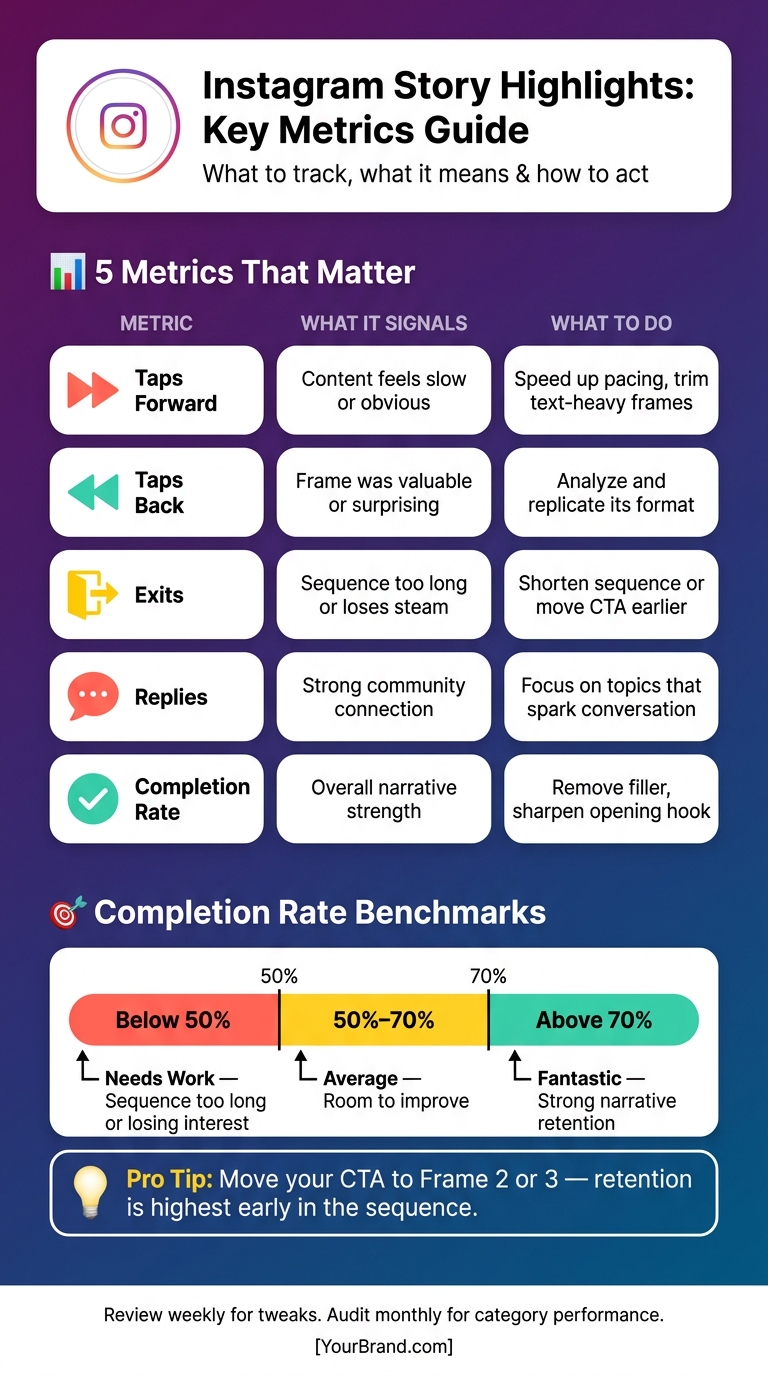
Instagram Story Highlights: Key Metrics & Best Practices
Keeping an eye on your Highlights' performance is just as important as setting them up. Regular monitoring helps ensure your strategy stays aligned with your growth goals. But once your Highlights are live, which metrics should you focus on? Let’s break it down.
Key Metrics to Watch
There are three main types of metrics to track: discovery (Reach, Impressions), navigation (Taps Forward, Taps Back, Exits), and interaction (Replies, Link Clicks, Sticker Taps).
- Taps Forward: A high rate here means viewers are skipping ahead, likely because the content feels too slow or overloaded with text.
- Taps Back: This is a good sign - it shows a frame was engaging enough for someone to rewatch.
- Completion Rate: This is the big one. A rate above 70% is fantastic, but anything below 50% signals your sequence might be too long or losing interest midway.
"Navigation metrics show you what's working and what isn't. If a lot of viewers exit or skip to the next story, it's a not-so-great sign that your content isn't capturing attention." - Stacey McLachlan, Hootsuite
Here’s a quick guide to what these metrics mean and how to act on them:
| Metric | What It Signals | What to Do |
|---|---|---|
| Taps Forward | Content feels slow or obvious | Speed up pacing, trim text-heavy frames |
| Taps Back | Frame was valuable or surprising | Analyze and replicate its format |
| Exits | Sequence is too long or loses steam | Shorten the sequence or move your CTA earlier |
| Replies | Strong community connection | Focus on topics that spark conversation |
| Completion Rate | Overall narrative strength | Remove filler and sharpen your opening hook |
These metrics provide a solid foundation for refining your content. For deeper insights, advanced tools can take your analytics to the next level.
Using Outfame for Data-Driven Decisions
Instagram’s native Insights are helpful, but they only retain audience-level data for 90 days, which isn’t ideal for spotting long-term trends or comparing performance over time. That’s where Outfame steps in.
Outfame offers features like extended data retention and a real-time analytics dashboard, bringing all your key metrics together in one place. Its AI-driven tools highlight which content formats consistently boost profile visits, follower growth, and engagement. This allows you to make decisions based on trends rather than reacting to short-term shifts. Plus, its 24/7 growth monitoring ensures you catch performance dips as they happen, not weeks later.
How to Act on Your Performance Data
Use these insights to adjust your Highlights strategy quickly and effectively. A good rule of thumb is to schedule weekly check-ins for small tweaks - like refining a CTA, replacing a weak opening frame, or resizing a link sticker - and monthly reviews to identify which categories and formats are consistently performing well.
"If a metric doesn't change your next content, publishing, or reporting decision, it isn't useful yet." - Hasan Cagli, PostPlanify
Focus on metrics that influence your decisions. For example, if you notice a spike in exits at a particular frame, review the sequence around it. Is the narrative losing momentum? Is your CTA buried too late in the sequence? A quick fix could be moving your link sticker from the final frame to Frame 2 or 3, where retention rates are higher, to capture more clicks before viewers drop off.
Struggling with low Replies? Swap generic prompts like "What do you think?" for specific questions like "Which of these would you try first?" Making it easier for viewers to respond often leads to higher engagement. Small changes like these can make a big difference in keeping your audience engaged.
Conclusion
Key Points to Remember
Instagram Story Highlights act as a permanent, curated section right below your bio, making them a crucial tool for creating a strong first impression. To make the most of them, keep titles short (only the first 9 characters are visible), stick to 6–8 Highlights, and place your most important ones on the left. Each Highlight should have a clear focus: start with an engaging hook, include useful information, and finish with a direct call to action.
When evaluating performance, focus on metrics like completion rate, tap-back rate, and exit rate - these often give more actionable insights than just view counts. Since Instagram's built-in Insights only store detailed data for a short time, platforms like Outfame can help you track trends over the long term with extended analytics and real-time updates. Use this data to refine your approach and make informed decisions.
Next Steps
To optimize your Instagram Highlights, start by auditing your current ones. Remove anything outdated, off-brand, or no longer relevant. Make it a habit to review your Highlights every 90 days, ensuring the first 3–5 Highlights are always the most relevant and engaging.
Then, tackle one category at a time. Build each Highlight with a strong hook, concise and meaningful content, and a clear call to action. Keep an eye on performance metrics to see what resonates with your audience. Over time, these small adjustments can create a more polished and impactful Highlights section.
FAQs
How many Instagram Highlights should I have?
When it comes to Instagram Highlights, there’s no hard limit, but keeping them organized is key to a clean and easy-to-navigate profile. Most devices display 4–7 Highlights under your bio before users need to scroll. To make the best impression, stick to your most essential categories and aim for 6–8 Highlights. This keeps your profile visually appealing while ensuring your audience stays engaged without feeling overwhelmed.
What should my first three Highlights be?
Your first three Instagram Highlights should focus on presenting content that grabs attention and aligns with your brand's purpose or objectives:
- Showcase Your Brand: Use this Highlight to introduce your mission, showcase your core offerings, and let visitors know what you're all about. Think of it as your digital elevator pitch.
- Share Helpful Content: Include tutorials, tips, or how-to guides that provide real value to your audience. This not only helps them but also positions you as a go-to resource in your niche.
- Highlight Your Products or Services: Dedicate a Highlight to product demos, promotions, or showcasing your best offerings. Make it easy for visitors to explore what you bring to the table.
What’s the best way to improve Highlight completion rate?
To increase Highlight completion rates, focus on keeping them fresh and visually engaging. Regularly update the content and analyze where viewers tend to drop off. This can help you figure out what works and what doesn’t. Experiment with different covers or story arrangements to see what grabs attention.
Keep your Highlights limited to 6–8 for simplicity, and ensure they follow a consistent branding style. Use clear, concise titles that make navigation straightforward and encourage viewers to explore all the content.


