
Instagram Live collabs are one of the best ways to grow your audience and boost engagement in 2026. Why? They combine two creators' audiences, driving higher visibility and trust. Here’s what you need to know:
- Why it works: Engagement rates for collabs hit 8–12% (compared to 3–5% for solo streams). Plus, follower growth increases by 15–25%.
- Key features: Instagram Live Rooms allow up to 4 participants, merging audiences and comments into one feed.
- Requirements: Public accounts with 1,000+ followers, strong Wi-Fi (10+ Mbps), and at least 50% battery.
- Steps to success:
- Set clear goals (e.g., follower growth, engagement).
- Pick a collaborator with overlapping or complementary audiences.
- Promote 72 hours in advance and use Instagram tools like polls and Q&A stickers.
- Save and repurpose the content into Reels or blog posts within 48 hours.
Collaborations are a simple, effective way to stand out in a crowded platform. Let’s dive into the details!
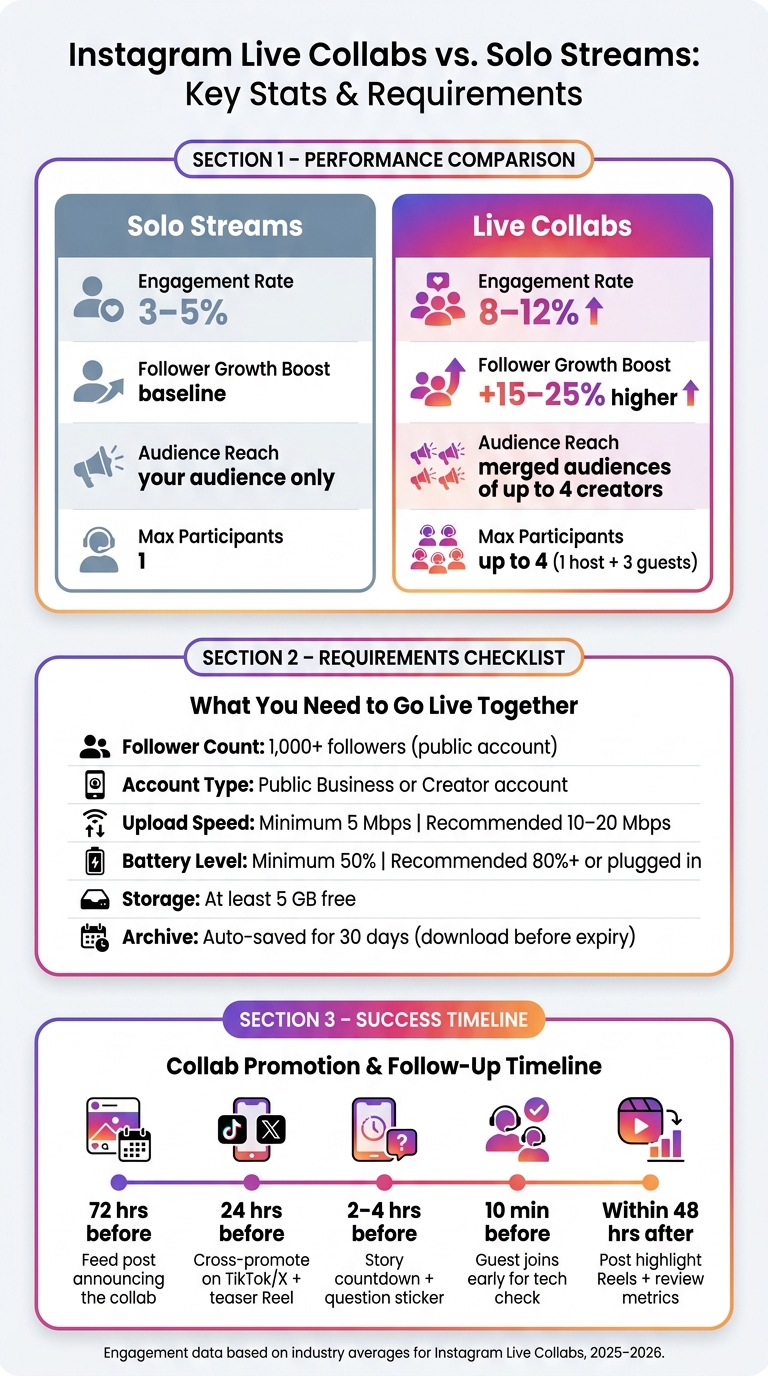
Instagram Live Collabs vs. Solo Streams: Key Stats & Requirements
What You Need to Know About Instagram Live Collabs
What Instagram Live Collabs Are
Instagram Live Collabs utilize Live Rooms, allowing up to four creators to join a split-screen broadcast simultaneously. Unlike solo live streams, these sessions merge comments from all participants into a single feed, creating a shared space for interaction. Popular formats include co-hosted Q&A sessions, panel discussions, joint product launches, and collaborative tutorials.
Key Benefits of Instagram Live Collabs
One of the standout advantages is the ability to expand your reach. When a guest joins your Instagram Live, the platform notifies both your audience and theirs. This means your content can reach an entirely new group of viewers instantly - no ad spend required.
Another major benefit is the trust factor. When a creator introduces you to their audience during a live session, their established credibility rubs off on you. As creator Laurise Irl explains:
"When two creators collaborate you're really allowing yourself to grow your audience... exposing you and them to each other's audiences, opening up so many doors for you to find new people to love your stuff."
The data supports this: engagement rates for collaborative live sessions typically range from 8–12%, compared to 3–5% for solo streams. Even better, follower growth during live collabs is often 15–25% higher than what you'd see with solo content over the same time frame. These benefits make Instagram Live Collabs a powerful tool for creators looking to grow their audience and boost engagement.
Requirements and Limitations
To participate in Instagram Live Collabs, there are some essential requirements. As of August 2025, both the host and all guests must have public accounts with at least 1,000 followers. However, smaller accounts can still join as guests if invited by a qualifying host.
Here’s a breakdown of the technical and account requirements:
| Requirement | Minimum | Recommended |
|---|---|---|
| Follower Count | 1,000 followers | - |
| Account Type | Public (Business or Creator) | - |
| Max Participants | 4 (1 host + 3 guests) | - |
| Upload Speed | 5 Mbps | 10+ Mbps |
| Battery Level | 50% | 80%+ or plugged in |
| Live Archive | 30-day auto-save | Download before expiry |
Keep in mind: The guest invite feature is only available on mobile devices. Additionally, guests and hosts need to coordinate to save the broadcast before the archive expires.
How to Plan an Instagram Live Collab
Setting Goals and Success Metrics
Before you even think about sending invites, you need to nail down your goal for the session. Are you trying to grow your follower count, boost engagement, drive traffic to a product page, or educate your audience? Your objective will guide every decision you make - like who to invite and how long the live session should be.
Make your goal measurable. For example, aim for a specific follower increase that matches industry averages or target a 50% higher comments-per-minute rate to gauge engagement. Share these targets with your collaborator in a brief so you're both on the same page about what success looks like.
And don’t stop analyzing once the stream ends. Metrics such as profile visits and new follows can continue climbing for 48–72 hours after the broadcast, especially as replay viewers decide to follow you. Use UTM parameters to track clicks from any links mentioned during the session, giving you a clear picture of how much traffic the collab generated.
| Metric Category | What to Track | Target Benchmark |
|---|---|---|
| Audience Reach | Peak concurrent viewers, unique accounts reached | 2x your individual account average |
| Engagement | Comments per minute, reactions, shares | 50% above your solo live average |
| Retention | Average watch time, drop-off points | 60%+ of total session duration |
| Growth | New followers, profile visits (48–72 hr window) | 15–25% increase over baseline |
| Conversion | Link clicks, sign-ups, purchases | Varies by campaign objective |
How to Choose the Right Collaborator
Once your goals are set, the next step is finding a collaborator who aligns with them. Don’t just go for the person with the biggest audience. Look for someone whose followers overlap with yours and who brings value to the session. For instance, a fitness coach teaming up with a registered dietitian offers both audiences content that’s immediately relevant. Engagement rate matters more than follower count - aim for partners with communities that actively comment and share, ideally with engagement rates between 3% and 8%.
Check audience demographics to make sure at least 30% match your target profile in terms of age, interests, and location. Also, think about audience adjacency. Teaming up with someone in a complementary niche - like a travel creator pairing with a personal finance expert - can introduce you to entirely new audiences instead of just reinforcing the one you already have.
Tools like Outfame can simplify this process by using AI to match you with potential collaborators whose audience aligns with your goals. Once you’ve shortlisted candidates, take a close look at the quality of their comments. Genuine conversations and thoughtful questions are signs of an engaged community. If they seem slow or unresponsive during planning, that could signal trouble when it’s time to go live.
Choosing a Format and Building a Promotion Timeline
Your session format should reflect your goals and what your audience expects. Here are some ideas:
- Q&As or AMAs: Great for personal branding because they feel authentic and interactive.
- Joint tutorials: Perfect for educational content where two experts can offer unique insights.
- Live demonstrations: Ideal for product-focused collabs, showing real-world use in a natural way.
- Panel discussions: If you’re teaming up with three or four people, this format adds a lively, talk-show vibe.
Once you’ve picked a format, plan your promotion timeline, starting 72 hours before the event. Begin with a feed post announcing the guest and what viewers will gain from tuning in. At the 24-hour mark, cross-promote on platforms like TikTok or X and share a teaser Reel to catch viewers who don’t log into Instagram daily. In the final 2–4 hours, post a Story countdown and use a question sticker to gather viewer submissions. This not only promotes the event but also gives you pre-loaded questions for a Q&A segment.
Make sure your guest joins the session 10 minutes early to check audio and lighting before you go live. These steps set the stage for a smooth broadcast and keep things running without a hitch. The next section will dive into the technical details to ensure everything goes off without a glitch.
Technical Setup for Instagram Live Collabs
Preparing Your Account and App Settings
To get started with Instagram Live Collabs, make sure your account and settings are ready to go. Both you and your collaborator need public accounts with at least 1,000 followers to meet Instagram's requirements for Live Collabs. Double-check that your app is updated to the latest version and that camera and microphone permissions are enabled. Once that's done, schedule your Live session. This step automatically generates a reminder link for your audience. If you're planning to use Instagram Live Producer with OBS Studio, you'll need to switch to a Business or Creator account.
Audio, Video, and Connection Tips
A smooth broadcast hinges on a strong internet connection. Aim to use a stable Wi-Fi network, preferably a 5 GHz one, instead of relying on cellular data. Keep other network activity to a minimum. While 5 Mbps is the minimum upload speed required for streaming, it's better to aim for 10–20 Mbps to ensure consistent quality.
Prepare your device by charging it to at least 80% and freeing up 5 GB of storage space. For a more polished look, mount your phone on a tripod to avoid shaky visuals. Adding a ring light or soft key light can significantly improve lighting, though natural light from a window also works well. For audio, using earbuds or a headset can help eliminate echoes when collaborating with a guest.
Before going live, schedule a quick 10-minute practice call with your guest 24–48 hours in advance. This gives you a chance to test audio levels, camera framing, and connection stability. It's also smart to have a backup communication method, like WhatsApp, ready in case any issues arise during the broadcast. Once your technical setup is dialed in, you can shift your focus to engaging with your audience during the event. For more expert advice on scaling your presence, check out our Instagram growth blog.
Moderation and Safety During the Broadcast
Managing the combined audience is crucial for a successful Instagram Live Collab. With two audiences merging into one comment feed, things can get hectic. To keep everything under control, assign a dedicated moderator before you go live. The moderator must use a separate account from your co-host and needs to join the Live as a viewer before you can assign them by tapping "Options" and selecting "Add moderator".
"When you start a live broadcast, you can assign one moderator to manage your viewers and comments. The moderator must be a different account than a co-host and must be tuned into the live in order to be assigned." - Instagram Help Centre
Your moderator plays a key role in maintaining order. They can report inappropriate comments, remove disruptive viewers, and even silently disable comments for specific users - meaning flagged users will see their own comments, but others won’t. As the host, you still have the ultimate control, including the option to disable all comments if necessary.
| Action | Host | Moderator |
|---|---|---|
| Assign or remove moderator | Yes | No |
| Disable all comments | Yes | No |
| Remove a viewer from the Live | Yes | Yes |
| Turn off comments for one user | Yes | Yes |
| Report or remove a comment | Yes | Yes |
| Review actions after the broadcast | Yes | No |
How to Run a Successful Instagram Live Collab
Once you've nailed the preparation, it's time to focus on execution. Success here hinges on clarity, engagement, and handling the unexpected with confidence.
How to Start the Session Strong
The opening minute can make or break your session. Skip the small talk and dive straight into the essentials. Use the first 20 seconds to introduce the topic and your guest. Then, between 20 seconds and one minute, welcome viewers and post a poll to prompt interaction.
Within the first two to three minutes, outline what viewers can expect - how long the session will last, the topics you'll cover, and when the Q&A segment will happen. This clarity reassures your audience and helps keep them engaged. To assist latecomers, pin a comment summarizing the session's topic or the first question being discussed.
Instead of delivering a formal bio for your guest, share a personal or behind-the-scenes tidbit about them. This approach feels more genuine and helps create a warm, inviting atmosphere.
Once you've established a strong start, keep the energy high and the interaction flowing throughout the session.
Keeping the Collab Dynamic and Interactive
Instagram Live collabs often see engagement rates between 8% and 12%, significantly higher than the 3% to 5% typical of solo streams. The key to maintaining this advantage is active energy and interaction.
"Interaction is the real hero here. Ask questions, respond to comments, and call out usernames. It makes viewers feel seen and slightly famous, even if it is only for 10 seconds." - Boss Wallah Media
Keep the session lively by alternating between guest shoutouts and real-time polls. Instagram's built-in tools, like polls, question stickers, and quizzes, are perfect for creating an interactive experience. Instead of just talking at your audience, use these tools to foster a two-way conversation. Plan a structured turn-taking system with your collaborator to ensure both participants - and their audiences - feel equally involved.
To reward early engagement, offer something tangible. This could be a shoutout, a discount code, or a direct answer to one of the first comments. These small gestures can encourage more participation and make the experience memorable.
Handling Technical Issues and Unexpected Moments
Even the most polished sessions can hit snags, so it’s important to be ready for anything. If your guest disconnects unexpectedly, avoid dead air. Use a pre-planned bridge question to engage your audience, asking for their thoughts on the current topic while your guest reconnects. Having a clear rejoin plan and a fully charged backup device logged in and ready to go can save the day.
If background noise becomes an issue, mute your guest instead of removing them. This keeps the session flowing with minimal disruption. And if technical problems are visible to the audience, address them directly. A quick acknowledgment like, "We’re sorting out a quick audio issue - hang tight", is far better than letting awkward silence take over.
What to Do After Your Instagram Live Collab
Wrapping up your Instagram Live collab doesn't mean the work is done. The next 24 to 72 hours are crucial for turning a single event into long-term growth. Here's how to make the most of it.
Saving and Repurposing Your Live Content
First things first - save your broadcast. If you've enabled "Save Live to Archive", Instagram will keep the video for 30 days. However, downloading it immediately to your device ensures you won't lose it.
Now, it's time to repurpose. Take the most engaging moments - like a funny exchange, a big reveal, or a standout insight - and turn them into bite-sized content. For example:
- Reels: Trim highlights into 15-60 second clips to grab attention from non-followers.
- Stories: Use clips to direct your audience to the full replay.
- Podcasts or Blogs: Extract the audio for a podcast or use the transcript to craft a blog post or email newsletter.
Timing is everything - try to post highlight Reels within 48 hours to ride the wave of engagement. After that, review your performance metrics to see what worked and where you can improve.
Reviewing Your Performance Metrics
Don’t wait too long to analyze your session’s performance. Take screenshots of real-time analytics like peak viewers and drop-off points right after the session, as these details can become harder to access later. These metrics help you understand what connected with your audience.
| Metric | Why It Matters |
|---|---|
| Peak Concurrent Viewers | Shows when your content was most engaging. |
| Total Reach | Tells you how many unique accounts saw the broadcast. |
| Comment Spikes | Highlights moments worth turning into Reels. |
| Watch-Time Curve | Reveals when viewers dropped off, helping you improve pacing. |
| New Followers (72-hr window) | Tracks audience growth after the session ends. |
If the metrics don’t meet your expectations, focus on the watch-time curve to identify weak spots. For a deeper dive into how the collab impacted your overall audience, tools like Outfame’s analytics dashboard can monitor follower trends in real time.
Use these insights to sharpen your strategy for future collaborations.
Planning Your Next Collab
Your performance data is a goldmine for planning better collaborations. Start with a quick debrief with your collaborator - this could be as simple as exchanging voice notes. Discuss what worked, assess audience overlap, and decide if a recurring series makes sense. To measure the collab’s impact, calculate your incremental reach by subtracting your average solo reach from the total reach.
When scheduling your next session, look at your Insights to find overlapping peak activity times for both audiences. Regular collaborations can build momentum over time. As Campground Social puts it:
"Growing Instagram alone in 2026 is like trying to build a business with no referrals. You can do it - but it is significantly slower and harder than it needs to be." - Campground Social
Finally, don’t forget to thank your audience. Within 24 hours, post a grid update that thanks attendees and recaps the top three takeaways. This simple gesture can turn casual viewers into loyal followers and boost your account’s activity in the algorithm’s eyes.
Conclusion: Growing With Instagram Live Collabs
Instagram Live collabs aren't a quick fix - they're a way to amplify your efforts. When you team up with the right partner, set clear goals, and plan effectively, the results can exceed expectations. Collaborative Lives often see engagement rates between 8–12%, compared to just 3–5% for solo streams. Plus, creators typically experience a 15–25% boost in follower growth from well-executed sessions.
The real key to success is consistency. While one collab might create a temporary spike, building a network of three to five regular collaborators can create lasting momentum that grows over time.
As Robert Portillo, CEO & Co-Founder of 12AM Agency, explains:
"Instagram Live isn't just a broadcast tool; it's a trust-building engine. It places you, the expert, directly in front of your audience without the safety net of edits or filters."
To make the most of Instagram Live collabs, focus on these steps: choose partners with complementary audiences, promote your session 48–72 hours in advance, keep broadcasts short and engaging (20–45 minutes), repurpose key moments within two days, and closely track follower growth.
For those looking to take it further, tools like Outfame provide real-time analytics to measure follower responses and fine-tune future sessions. This eliminates guesswork, helping you make each collaboration even more effective.
FAQs
How do I find the best Live collab partner?
When choosing creators to collaborate with, it’s more important to focus on how well their audience matches your target demographic than on the size of their follower count. Look for influencers who align with your audience in terms of age, location, and interests. However, make sure they aren’t direct competitors.
To double-check compatibility, use tools like Instagram Insights to verify that at least 30% of their audience overlaps with yours. As for engagement, aim for creators with a solid engagement rate - somewhere between 3% and 8% - and who consistently interact with their followers.
Once you’ve identified a good fit, reach out with a clear proposal. Highlight how the partnership can benefit both sides to create a compelling pitch.
What should I do if my guest drops mid-Live?
If your guest unexpectedly drops out during a Live session, ask them to send you a direct message (DM) to coordinate their return. Quickly re-invite them to minimize downtime. To avoid major interruptions, it’s smart to have a backup communication plan in place before going live - this could be through WhatsApp or text messaging in case Instagram’s tools don’t cooperate. While you manage any technical hiccups, Outfame can help keep your audience engaged, ensuring your Live session stays on track and your connection with viewers remains steady.
How do I turn one Live collab into more followers afterward?
To make an Instagram Live collaboration work for you long-term, repurpose the content immediately after the stream. Save the broadcast and use it to create Reels, carousel posts, or short, attention-grabbing clips (15–45 seconds) that showcase the best moments. Share the session on your Stories to give it extra visibility. Tools like Outfame can also help you grow by using automated audience targeting and real-time analytics, making it easier to turn those engaged viewers into dedicated followers.


