
Your Instagram bio is more than just a few lines of text - it's a powerful tool to attract followers, drive clicks, and convert visitors into customers. With only 150 characters, you need to clearly communicate who you are, what you offer, and what action you want users to take. Here's what you need to know:
- Why It Matters: Users spend just 3–5 seconds scanning a bio before deciding to follow. Over 62.8% of Instagram users use the platform to research brands, making your bio a critical conversion tool.
- Key Elements: Your bio includes your profile photo, username, name field, bio text, website link, and contact buttons. Each serves a unique purpose, from improving searchability to driving specific actions.
- Optimization Tips:
- Use a clear profile photo (1080x1080 pixels) that represents your brand.
- Include keywords in your username and name field to boost discoverability.
- Structure your bio text into three parts: identity, value, and a call to action (CTA).
- Take advantage of Instagram's feature to add up to 5 native links for driving traffic.
- Regularly update your bio and links to match current campaigns or seasonal offers.
- Framework for Success: The "Identity + Value + CTA" framework ensures your bio is specific, impactful, and action-oriented.
Your bio isn't just decoration - it's a strategic tool to turn profile visits into meaningful actions. Keep it concise, goal-focused, and regularly updated for the best results.
How to optimize your Instagram Bio for Growth (Yes It Works)
sbb-itb-3b12fba
Step-by-Step Guide to Optimizing Each Bio Element
Want to make your Instagram bio stand out? Here's a breakdown of how to fine-tune every part of it to reflect your brand and boost visibility.
Optimizing Your Profile Photo
Your profile photo is the first thing people notice, and it needs to look sharp even at small sizes. Instagram displays profile photos at 320x320 pixels, but they often appear even smaller in feeds and search results. To ensure clarity, upload a 1080x1080 pixel square image.
For personal brands, go with a clean headshot. For businesses, stick to a simple logo. According to PostPlanify:
"For creator and founder-led brands, a clean headshot often beats a complex logo because people process faces faster."
If you're using a logo, keep it bold and simple so it remains recognizable even when reduced to a thumbnail. When uploading, center your image and use the move tool to ensure nothing important gets cropped by Instagram's circular frame. Running a seasonal campaign? Small tweaks, like adding a Santa hat to your logo (as Kylie Cosmetics did), can make your profile feel relevant without overhauling your brand.
Once your profile photo is set, focus on refining your username and name field for better searchability.
Writing a Search-Friendly Username and Name Field
Instagram uses both your username and name field for search rankings, giving you two chances to show up in search results.
- Username: Keep it short, easy to spell, and consistent across all platforms.
- Name field: This is where you can shine. Use the 30-character limit to highlight your specialty, service, or location instead of repeating your username.
A good format to follow is "Brand Name | Keyword" or "Name | Profession | Location". For example, in a search for "bakery", four of the top five results included the keyword "bakery" in both their username and display name.
"Your display name and @username are the two most important places to put your primary keyword. When users type their intention into the search bar, you'll match, bringing you closer to that coveted top-of-search position." - Justina Thompson, HubSpot
Structuring Your Bio Text for Maximum Impact
With only 150 characters, your bio text needs to pack a punch. A three-line structure works best: identity, value or social proof, and a call to action.
- Who you are and what you do: Be specific. Skip vague phrases like "helping dreams come true." Instead, say something concrete like "Pest control for Bucks County homes".
- Why you’re credible: Use metrics, awards, or specialties. For example, "Featured in Forbes" or "12 years coaching."
- Call to action (CTA): Place a clear instruction at the bottom, closest to your clickable link. Example: "Book a free consultation today".
Formatting matters, too. Draft your bio in a Notes app to preserve line breaks and avoid extra spaces. Stick to 2–3 emojis max and skip decorative fonts - they’re not indexed by Instagram search and can’t be read by screen readers.
Once your bio text is polished, make sure your external links and contact options match your CTA.
Using the Website Link and Contact Options Effectively
The website field is prime real estate for driving action. Instagram now lets you add up to 5 native links directly on your profile, eliminating the need for third-party tools. Use this feature to guide visitors to specific destinations, like a product page, booking form, or free resource.
If you have a Business or Creator account, take advantage of contact and action buttons below your bio. These make it easier for people to get in touch or take immediate action, especially for local businesses. Switching to a professional account also unlocks a category label, which can boost your visibility on Instagram’s recommendation engine.
Make sure your link aligns with your CTA. For instance, if your bio says "Book a free call", your link should take users directly to a scheduling page - not your homepage. Reducing unnecessary clicks can improve your conversion rates.
Instagram Bio Frameworks That Work
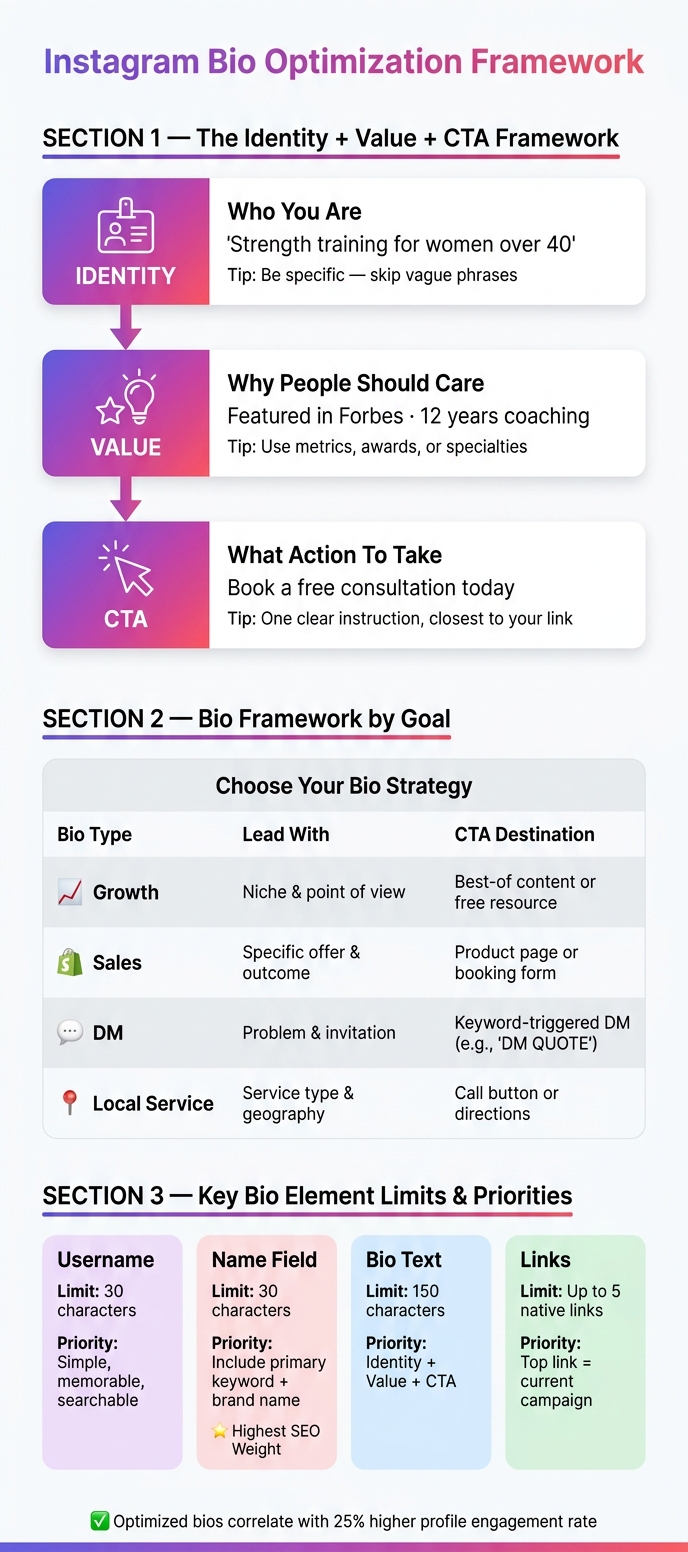
Instagram Bio Optimization Framework: Identity + Value + CTA
Crafting a well-structured Instagram bio is like giving your profile a clear mission. Whether you're aiming to attract followers, generate leads, or secure local bookings, a solid framework ensures your bio works effectively. For more advanced Instagram growth strategies, staying updated on platform trends is essential.
The Bio Framework: Identity + Value + Call to Action
A top-performing Instagram bio hits three key points: who you are, why people should care, and what action they should take next. This is the Identity + Value + CTA framework.
- Identity: Use the Name field and the first line of your bio to define your niche. For example, "Strength training for women over 40" is much more specific (and impactful) than "Fitness coach."
- Value: This is your elevator pitch. What problem do you solve, and who do you solve it for?
- CTA: End with one clear instruction aligned with your goal, like "Book below" for service businesses or a keyword-triggered DM prompt for lead generation.
"The best bio usually wins by removing choices, not adding them." - Simon Kemp, Digital Analyst
The framework adjusts based on your objectives. Here's how it aligns with different goals:
| Bio Type | Lead With | CTA Destination |
|---|---|---|
| Growth | Niche & point of view | Best-of content or free resource |
| Sales | Specific offer & outcome | Product page or booking form |
| DM | Problem & invitation | Keyword-triggered DM (e.g., "DM 'QUOTE'") |
| Local Service | Service type & geography | Call button or directions |
Adding Social Proof and Location Details
Trust is built quickly with concise social proof. Specific numbers are more persuasive than vague claims - for instance, "10K+ students enrolled" packs more punch than "thousands of happy clients." Similarly, media mentions like "Featured in Forbes" or "As seen in Vogue" can boost credibility instantly. If you’ve got a milestone, put it in numbers.
For local businesses, location is key. Include it in your Name field (e.g., "Sarah | NYC Realtor") to improve search visibility and in your bio text to clearly outline your service area. A simple line like "Serving NJ, NYC & PA" takes up little space but helps local visitors know they’re in the right place. Research shows that pairing a clear CTA with trust signals like these can boost click-through rates by 25% or more.
How to Audit and Rewrite Your Bio
Revising your bio doesn’t have to be overwhelming. Approach it as if you're a first-time visitor who has no prior knowledge of your brand. Ask yourself:
- Is it immediately clear who this bio is for?
- Does the CTA match the link destination?
- Are the numbers and media mentions up to date?
Check for broken links, ensure your CTA reflects your current campaign, and update any outdated figures or milestones. Also, confirm that your Name field includes your primary keyword for search optimization. If your brand is fast-paced, consider auditing monthly; for more stable accounts, quarterly checks are sufficient.
"A bio that tries to appeal to everyone appeals to no one. Define your audience and speak directly to them." - Campground Dispatch
When rewriting, start with the Name field since it carries the most weight in Instagram's search algorithm. Then, work through the rest of your bio, focusing on identity, value, CTA, and links. Combine overlapping ideas into one clear next step. A concise bio with one well-defined CTA will always outperform one that's cluttered with multiple calls to action.
Advanced Bio Optimization and Analytics
Once you've set up the basics of your bio, it's time to fine-tune it with advanced techniques to maximize its impact.
Using Keywords to Improve Discoverability
Your bio plays a crucial role in signaling its focus to Instagram's algorithm. Among all the text on your profile, the Name field (limited to 30 characters) carries the most weight in search rankings.
To make the most of this, incorporate your main keyword directly into the Name field. For example, if you're a wedding photographer in Austin, you could use "Wedding Photographer · Austin" in the Name field and "Austin wedding photography" in the bio text. This repetition reinforces relevance and boosts your visibility.
"Instagram SEO is no longer a nice-to-have. It's how you compete for visibility in a feed that gets more crowded every year." - Talar Mazloumian, Content Marketing Manager, Later
One important note: avoid using decorative Unicode fonts in your bio. While they may look appealing, screen readers can't interpret them, and Instagram won't index them, making your keywords effectively invisible.
Using Analytics to Improve Your Bio
Think of your bio as a landing page. If you're seeing high profile visits but not many follows or link clicks, something might be off. To analyze performance, Instagram's Professional Dashboard provides metrics like profile visits, link taps, and follows from profile views.
If your reach is high but followers aren't increasing, there could be a mismatch between your content and audience expectations. As Lizzie Davey from Shopify explains:
"If you've reached many accounts but your follow count stayed the same, there might be a disconnect with the content you're posting."
This principle applies to your bio as well. Test changes one at a time - such as tweaking the CTA, opening line, or link destination - and allow at least 30 days before evaluating the results. To track visitor behavior, append UTM parameters to your bio link (e.g., ?utm_source=instagram&utm_medium=social&utm_content=bio-link) and monitor the data in Google Analytics 4.
| Tracking Method | Sees Clicks | Sees On-Site Behavior | Setup Time |
|---|---|---|---|
| Instagram Insights | Yes (Aggregate) | No | 0 min |
| UTM + GA4 | Yes | Yes | 10–30 min |
| Link-in-bio Tool | Yes (Per link) | No | 10–15 min |
These insights help you refine your bio to maintain strong performance over time.
Keeping Your Bio Current
An up-to-date bio link can boost click-through rates by as much as 50%, while optimized bios correlate with a 25% higher profile engagement rate. Treat your bio as a dynamic asset rather than a static description.
A good practice is to spend 20 minutes each month reviewing your bio. Check for broken links, ensure your CTA aligns with current campaigns, and update any milestones or seasonal offers. Additionally, schedule a quarterly audit to reassess keywords and highlights.
"Review quarterly at minimum. Update immediately when you have new offers, achievements, or link destinations." - Jamie Partridge, Founder & CEO, PostEverywhere
For businesses, especially in eCommerce or services, seasonal updates can make a big difference. Replace generic links with seasonal ones, like "Spring AC Tune-ups - Book Now", to keep your profile fresh and relevant. Regular updates ensure your bio remains an effective tool for engaging your audience.
How Outfame Supports Bio Optimization
Optimizing your bio isn't just about knowing what to change - it's also about understanding your audience. This is where Outfame shines. Its AI-driven audience targeting identifies the follower segments most likely to engage with your content, allowing you to align your bio's messaging - your niche statement, CTA, and link - with the audience that converts.
Outfame's 24/7 real-time growth monitoring adds another layer of insight. Instead of waiting until the end of the month to spot performance drops, its growth dashboard tracks follower trends continuously. This makes it easier to connect bio updates with actual growth. For instance, if you tweak your CTA and see a rise in followers in the weeks following, you'll know the change worked. With Outfame's optimization tools and real-time feedback loop, creators and brands can remove much of the guesswork from bio testing and focus on what drives results.
Key Takeaways for Instagram Bio Optimization
How your Instagram bio is set up can make or break whether a profile visit leads to a follow, a click, or even a direct message. Joey Pedras, Digital Marketing Strategist at TrueFuture Media, sums it up perfectly:
"Your Instagram bio is not decoration. Instagram bio optimization is the work of turning profile visits into follows, clicks, sales, and DMs with a few lines of clear copy."
To get it right, start with the basics: focus on one primary goal and build your bio around it. Keep it clean by cutting out anything unnecessary. For maximum visibility, use the Name field to feature your most important keyword - this is the field Instagram’s search algorithm prioritizes the most. The best bios follow the Identity + Value + CTA framework, guiding visitors from understanding who you are to taking action.
A few practical tips can help refine your bio even further. Stick to 2–3 emojis to keep it visually appealing but not overwhelming. Use direct calls-to-action (CTAs) like "DM START for a meal plan" instead of vague phrases like "Check my link." And with Instagram now allowing up to 5 native bio links as of 2026, make sure the top link highlights what you’re promoting at the moment.
Keeping your bio fresh is key. Think of it as a living, breathing part of your profile. Update your top link with new content, tweak your CTA when campaigns shift, and conduct a full audit at least every three months.
Here’s a quick breakdown of the key profile elements and how to prioritize them:
| Element | Character Limit | Priority |
|---|---|---|
| Username | 30 | Simple, memorable, and searchable |
| Name Field | 30 | Include your primary keyword + brand name |
| Bio Text | 150 | Explain who you help, what you do, and add a clear CTA |
| Links | Up to 5 | Highlight your top link based on current campaigns |
FAQs
What should I put in my Instagram Name field?
Your Instagram Name field should mix your brand name with a keyword or a brief description of what you offer. This makes it both readable and searchable. A good structure might be: "YourBrand | Your Niche" or include terms that highlight your services or audience, like "TrueFuture Media | Social Media for Trades." Keep it short, focused, and easy for people to find.
How do I choose the best CTA for my bio?
To craft the best call-to-action (CTA) for your Instagram bio, keep it clear, specific, and aligned with your objectives. Use strong action verbs, create a sense of urgency or curiosity, and focus on just one action. For example, you could say: "DM 'CALLS' for a profile review" or "Book a free consultation below." A short, one-line CTA that leads users to a specific next step can effectively increase conversions.
How can I track if my bio changes are working?
To measure how your bio updates are performing, leverage analytics tools or dashboards that track metrics like click counts, traffic sources, and user behavior. Keep an eye on these numbers regularly to gauge engagement and conversions. Based on the insights, tweak your bio or call-to-action. For example, you might add a more direct CTA or update links to drive better results.


