
When you see "Instagram User" on Instagram, it means the account is no longer accessible. This could happen for several reasons:
- Temporary Deactivation: The user paused their account but may return.
- Permanent Deletion: The account was deleted and will be gone permanently after 30 days.
- Account Suspension or Ban: Instagram removed the account due to guideline violations.
- You’ve Been Blocked: The user made their profile invisible to you, though others can still see it.
To figure out what happened:
- Check if mutual followers can see the profile.
- Search their username in a browser while logged out.
- Review old DMs or comments for clues.
If you’ve been blocked, respect their privacy and avoid further contact. For creators or brands, always maintain backup contact details outside Instagram to avoid losing connections.
What Does 'Instagram User' Mean?
Definition of 'Instagram User'
When you see the term "Instagram User", it simply means that the account in question is no longer accessible. Instead of displaying the user's handle, Instagram replaces it with this label and a generic profile picture.
This label isn't tied to one specific issue. It’s Instagram’s way of flagging accounts that are no longer reachable. The reasons could vary - it might mean the account was deleted, deactivated, suspended, or even that you've been blocked. Social media marketing expert Anyah Le Gilmore-Jones explains, "'Instagram User' means that person has limited who can contact them". However, this is just one of several possibilities.
This ambiguity means you’ll encounter the label in different parts of the app.
Where You'll See 'Instagram User'
The most common place you’ll notice the "Instagram User" label is in direct message threads. It typically replaces the person's name at the top of the chat, though your previous conversation history often remains visible for about 30 days.
You might also see it in other areas, such as:
- Comments sections on older posts, where the label appears if the account is no longer available.
- Activity feeds and notifications, where it replaces the username of someone who previously interacted with your content.
- Search results, where the account may show as "Instagram User" instead of its original handle, especially if it was recently active.
It’s worth noting that spotting this label doesn’t automatically mean you’ve been blocked. There are several reasons why an account might be flagged this way.
What 'Instagram User' Doesn't Mean
It’s important to understand that seeing "Instagram User" doesn’t necessarily mean you’ve been blocked. Instagram uses this label broadly for any account that’s no longer active or accessible from your profile, regardless of the reason.
Whether the account was deleted, deactivated, or you’ve been blocked, the label serves to protect privacy. If you want to determine the exact reason, you’ll need to dig a little deeper - something we’ll explore in upcoming sections.
Did They Block You? Signs Someone Blocked You on Instagram
Why You're Seeing 'Instagram User'
Now that you know what the label means, let’s dive into why an account might show up this way. Knowing the reasons behind it can help you figure out your next steps, especially if you’re managing collaborations or maintaining business connections. Here’s a closer look at the possible scenarios.
Temporary Deactivation
Sometimes, people just need to hit pause on social media. When someone temporarily deactivates their Instagram account, their profile, posts, and activity are hidden from everyone on the platform. The account isn’t gone - it’s just in a kind of “invisible mode” until they decide to reactivate it.
The good news? Once reactivated, everything comes back exactly as it was - followers, posts, likes, and comments. However, Instagram limits users to one deactivation per week, so if someone keeps vanishing and returning, this is likely the explanation.
Permanent Deletion
Deleting an account is a more serious step. When someone chooses to delete their Instagram account, it enters a 30-day grace period during which the account is hidden but can still be recovered if they change their mind. After those 30 days, the account and all its data are permanently erased.
Even after the account is deleted, Instagram may take up to 90 days to completely remove all traces of it from its systems.
Account Suspension or Ban
If an account violates Instagram’s community guidelines, it can face suspension or a ban. Temporary suspensions are issued for minor violations, while permanent bans are reserved for more serious or repeated offenses. A banned account is removed from the platform entirely and will appear as "Instagram User" to others.
For banned accounts, the owner has 30 days to appeal through Instagram’s Help Center. If the appeal isn’t successful - or if the issue remains unresolved - the account will stay hidden or be permanently removed.
You've Been Blocked
Blocking works a little differently from the other scenarios. When someone blocks you, their profile becomes invisible to you but remains visible to everyone else. You won’t be able to see their posts, follower count, or profile, and if you visit their page, you might see a "No Posts Yet" message - even if they have plenty of posts visible to others.
Here’s the key: blocking only affects your view. To confirm if you’ve been blocked, try searching for their username from another account or while logged out of Instagram. If their profile appears there but not on your main account, it’s safe to say you’ve been blocked.
How to Tell If You've Been Blocked or If They Deactivated
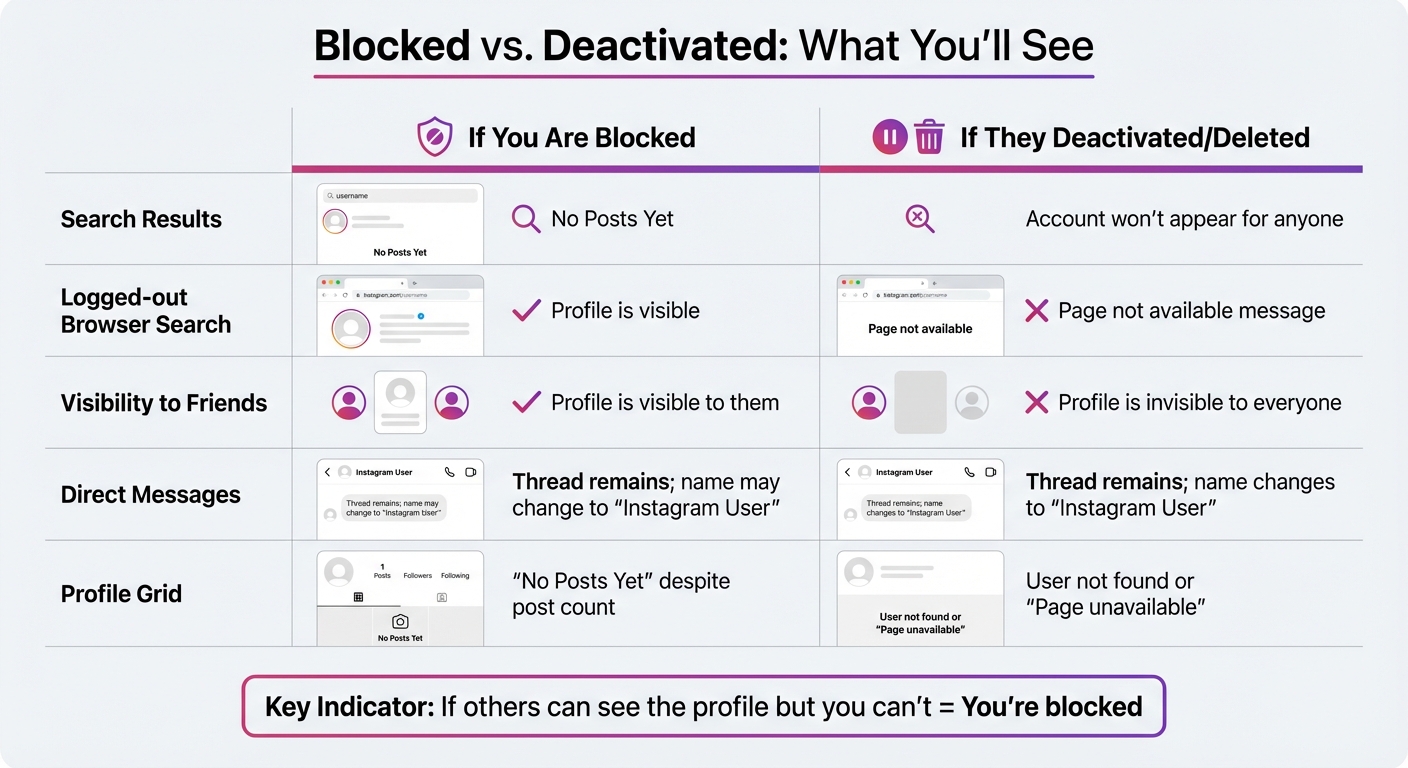
How to Tell If You're Blocked vs Account Deactivated on Instagram
Figuring out whether someone has blocked you or simply deactivated their account can feel tricky, but there are ways to tell. The key is to compare what you see with what others see. Let’s break it down.
Check With Mutual Followers
Start by asking a mutual follower to look up the account. If they can see the profile as usual - with posts, a profile picture, and follower counts - but you can’t, it’s a strong sign that you’ve been blocked. On the other hand, if they can’t find the account either, it’s more likely the account has been deactivated or deleted.
Search for the Username
Another method is searching for the profile in a web browser using incognito mode. Go to instagram.com/username. If the profile shows up when you’re logged out but disappears when you’re logged in, you’ve probably been blocked.
You can also check old posts where the person was tagged. If clicking the tag leads to an empty profile that still shows a post count, this is what Elena Cavender from Mashable describes as "the telltale sign of being blocked." This step can help confirm your suspicions.
Review Old DMs and Notifications
Your DMs can offer more clues. If the person’s name has changed to "Instagram User" and their profile picture is gone, it usually means they’ve either deactivated their account or blocked you. Tap "View Profile" within the DM thread - if you see "User not found" or an empty profile, it could mean either situation. Additionally, check old comments or interactions. If clicking their handle leads to a "Page not available" error but others can still access the account, it’s likely you’ve been blocked. When combined with other methods, these DM clues can help you figure things out.
| Feature | If You Are Blocked | If They Deactivated/Deleted |
|---|---|---|
| Search Results | Account may not appear or shows "No Posts Yet" | Account won't appear for anyone |
| Logged-out Browser Search | Profile is visible | "Page not available" message |
| Visibility to Friends | Profile is visible to them | Profile is invisible to everyone |
| Direct Messages | Thread remains; name may change to "Instagram User" | Thread remains; name changes to "Instagram User" |
| Profile Grid | "No Posts Yet" despite post count | "User not found" or "Page unavailable" |
What to Do Next as a Creator or Brand
Decide Whether to Wait or Move On
First, figure out whether the account was deactivated or if you've been blocked. This will guide your next move. If the account is likely to return, a brief wait might make sense. However, if you've been blocked, it's essential to respect that boundary. As Dave Johnson from Business Insider advises:
"If everything above fails, you should follow good social media etiquette – the individual probably doesn't want to interact with you, so respect that person's privacy and don't try to contact them or circumvent the block."
Keep in mind that when you're blocked, any new messages won't go through, and previous likes or comments will disappear permanently. If this account was once a key collaborator, decide whether to wait a reasonable period (like a week or two) or move forward without them.
In the meantime, safeguard your other communication channels to avoid similar disruptions in the future.
Keep Contact Information Outside Instagram
Relying solely on Instagram DMs for business communication is risky. Always save important contact details like emails or phone numbers, and track critical information - such as contracts and deadlines - in a spreadsheet or CRM. The Instagram Help Center notes:
"If the person you blocked sends you any messages in Direct, you won't receive those messages, and they won't be delivered later if you unblock them."
To protect your connections, record alternative contact details as soon as possible. If you're collaborating with multiple influencers or brand partners, consider connecting on additional platforms like LinkedIn. This way, if an account suddenly changes to "Instagram User", you won’t be left scrambling to reestablish communication.
Improve Your Growth Strategy
If you're repeatedly getting blocked, it may be time to rethink your engagement approach. Overusing DMs or posting repetitive comments can come across as spammy and push people away. Instead, focus on genuine interactions.
Instagram also offers a "Restrict" feature, which can help you manage engagement more discreetly. As Instagram explains:
"This feature is ideal if you prefer not to engage directly but still want to manage what's visible on your account."
Shift your efforts toward building authentic connections rather than chasing numbers. Tools like Outfame can help you target the right audience, ensuring your interactions feel meaningful and respectful while avoiding overstepping boundaries.
If a block cost you an engaged follower, replace that reach with people who want your content: Outfame's organic Instagram growth service engages the followers of accounts you choose.
Conclusion
Seeing "Instagram User" in your DMs or search results doesn’t automatically signal a major issue - it’s worth digging deeper to understand the situation. This label can pop up when an account is deactivated, deleted, suspended, or if you’ve been blocked. Pinpointing the exact reason helps you handle the situation appropriately while safeguarding your connections.
To get clarity, revisit the earlier steps for confirming if you’ve been blocked. If others can view the account but you can’t, chances are you’ve been blocked. On the other hand, if no one can locate the account, it’s likely been deleted or suspended. These steps make it easier to quickly figure out what’s going on.
If you discover you’ve been blocked, it’s important to respect that boundary. As Freelance Writer Dave Johnson advises, “If everything above fails, you should follow good social media etiquette - the individual probably doesn’t want to interact with you, so respect that person’s privacy”. Trying to bypass a block not only violates Instagram’s policies but can also harm your reputation.
For creators and brands, this situation highlights the importance of diversifying your communication channels. Always keep backup contact information like email addresses or phone numbers saved outside of Instagram. That way, if a collaborator’s account disappears, you won’t lose touch entirely. Taking these precautions ensures you’re prepared for unexpected changes.
FAQs
How do I know if someone blocked me on Instagram?
If you think someone might have blocked you on Instagram, there are a few ways to find out. Start by searching for their username in the app. If their profile doesn’t show up, it might mean they’ve blocked you. To double-check, log out of your account or use a different one to search for their profile. If you can see it when logged out or from another account, but not when logged into yours, that’s a strong hint you’ve been blocked.
Another way to investigate is by looking at any old Direct Messages (DMs) you’ve exchanged. If their profile shows as “User not found” or redirects to a different username, they may have blocked you or changed their account. You can also try tagging them in a post or story. If their username doesn’t appear as an option, it’s another sign they’ve likely blocked you. By piecing together these clues, you can figure out if you’ve been blocked on Instagram.
What does it mean when someone’s account shows as 'Instagram User,' and what should I do?
When you see an account labeled as 'Instagram User', it typically means the account is no longer accessible to you. This could happen for several reasons: the user might have deactivated, deleted, or suspended their account - or they might have blocked you. Here’s how to figure out what’s going on:
- Search for their username while logged into your account. If you can’t find their profile, it’s possible they’ve either blocked you or deleted their account entirely.
- Try logging out or using another account to search for them. If their profile shows up, it’s a good indication that you’ve been blocked on your original account.
- Review your direct messages. If their profile picture is missing and their name appears as 'Instagram User,' it’s likely their account has been deactivated, deleted, or they’ve blocked you.
If you’ve been blocked, it’s important to respect their choice. If you need to contact them urgently, consider alternative methods like email or phone. On the other hand, if their account is deactivated or deleted, you’ll need to wait for them to reactivate or create a new account.
If you suspect you’ve accidentally blocked someone, you can easily fix it by navigating to Settings → Privacy → Blocked Accounts and unblocking them. It’s always a good idea to have additional ways to stay in touch with key contacts, especially for professional or time-sensitive situations.
What’s the difference between being blocked and an account being deactivated on Instagram?
When you’re blocked, another user has deliberately restricted your access to their account. This means you won’t be able to view their profile, posts, or stories. You also can’t search for their account or send them messages. While their account still exists and remains visible to others, you’ll be removed from each other’s followers, and any past interactions - like comments or tags - will no longer appear.
A deactivated account, however, is different. This happens when the account owner temporarily disables their profile. In this case, the account becomes invisible to everyone, not just you. It might show up as “Instagram User” or disappear entirely. The good news? The owner can bring it back anytime by simply logging in.
To sum it up, being blocked affects only you, while a deactivated account is hidden from everyone.


