
TikTok Live is a powerful tool for turning casual viewers into an engaged community. By leveraging TikTok's Interest Graph and interactive features, you can boost visibility and build trust through real-time interactions. Here’s how to get started:
- Engage Early: Viewers are 40x more likely to follow if you interact within the first minute of your stream.
- Use Tools: Features like Q&A, polls, and pinned comments keep audiences engaged.
- Plan Ahead: Schedule Lives 24–72 hours in advance to increase attendance by up to 210%.
- Optimize Timing: Use analytics to go live when your audience is most active.
- Structure Your Session: Divide it into four phases - hook, interaction, value, and call-to-action.
Consistency and interaction are key. A predictable schedule, personal acknowledgments, and interactive elements help build a loyal following. Use analytics to refine your approach and keep your audience growing over time.
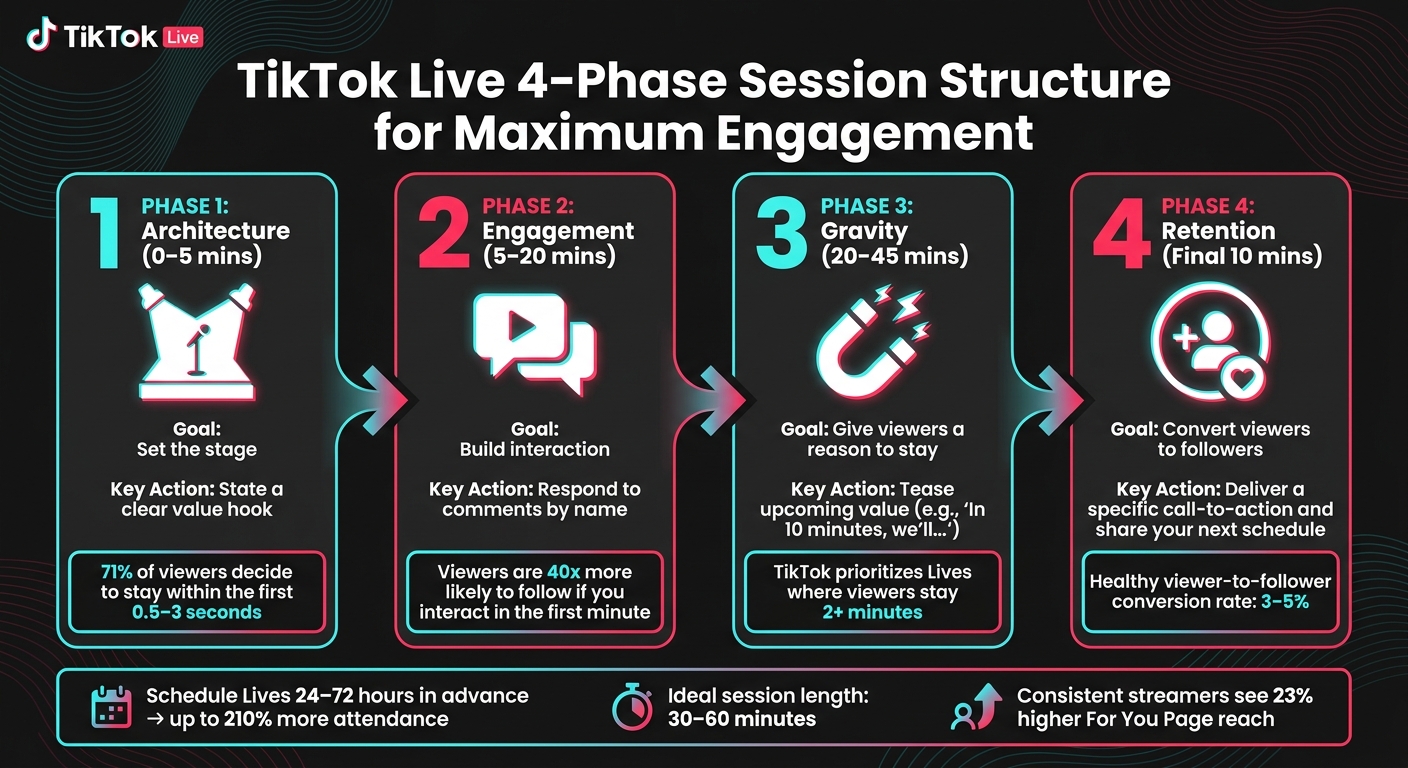
TikTok Live 4-Phase Session Structure for Maximum Engagement
How Real TikTok LIVE Communities Get Built (Not Just Viewers)
How to Prepare for a TikTok Live Session
Good preparation can turn a Live session into a polished and engaging experience. With just a little planning, you can create a session that feels intentional and connects with your audience. Both technical setup and understanding your audience are key to a successful Live.
Technical Setup for a Smooth Live Session
A reliable technical setup is the backbone of any successful Live session. You don’t need a fancy studio, but a few essentials can make a big difference. At the very least, you’ll need a smartphone, a stable tripod, and a ring light or desk lamp to ensure your face is well-lit.
"Bad sound is rarely forgiven by viewers, but shaky video is." - Akash Patil
To improve your setup, consider an external USB microphone for better sound quality. Make sure your internet connection is stable - Wi‑Fi is usually better than mobile data - and keep your device plugged in to avoid running out of battery mid-stream. For those looking to take things up a notch, TikTok LIVE Studio, a free app for Windows and Mac, offers features like screen sharing, overlays, and multi-camera setups. Advanced creators can even use tools like OBS or Streamlabs with a Stream Key for custom graphics and professional-level production.
Before going Live, test everything using Practice Mode. This step can help you catch potential issues with audio or lighting ahead of time.
How to Research Your Audience Before Going Live
Timing is everything when it comes to Live sessions. TikTok’s Business Suite offers a "Followers" tab that shows when your audience is most active by hour and day. This data is far more reliable than global averages, so use it to plan your session. While global peak times typically fall between 6–11 AM and 7–11 PM EST, your account’s activity trends should guide your schedule.
In addition to timing, dig into your analytics to identify your most engaged viewers. If your audience spans multiple time zones, consider adjusting your schedule to accommodate them. Reading through video comments and community discussions can also help you identify recurring questions or themes, which can serve as great content ideas for your Live.
Another smart move is to schedule your Live up to 10 days in advance using TikTok Studio. This creates a "Live Event" card that followers can register for, which triggers push notifications and increases attendance. Scheduling your session 24–72 hours ahead can boost attendance by as much as 210%. By tailoring your timing and content to your audience, you can build stronger connections with your community.
How to Plan a Live Format That Encourages Participation
A well-structured format can keep your viewers engaged and encourage them to stick around. One effective strategy is to divide your session into four phases:
| Phase | Timing | Goal | Key Action |
|---|---|---|---|
| Architecture | 0–5 mins | Set the stage | State a clear value hook |
| Engagement | 5–20 mins | Build interaction | Respond to comments by name |
| Gravity | 20–45 mins | Give viewers a reason to stay | Tease upcoming value (e.g., "in 10 minutes, we'll…") |
| Retention | Final 10 mins | Convert viewers to followers | Deliver a specific call-to-action and share your next schedule |
The ideal length for a Live session is 30–60 minutes. To avoid awkward silences, script the first five minutes of your session. Even a simple prompt like “Type 1 if you agree” can spark early engagement and signal activity to TikTok’s algorithm.
"Live is not a podcast. It's a conversation. The algorithm tracks engagement - comments, shares, gifts, time watched - and all of those spike when viewers feel like participants, not spectators." - Bear Minimum
A great example of this is creator @BudgetBitesBianca, who grew her following from 1,200 to 84,000 by hosting weekly "Pantry Raid Lives." During these sessions, viewers suggested ingredients, and she cooked with them in real time. This interactive format led to a 63% increase in average watch time. The key to her success? Viewers weren’t just watching - they were actively participating.
TikTok Live Features That Drive Engagement
How to Use TikTok Live Tools Effectively
TikTok Live comes packed with tools designed to keep audiences engaged. For example, the Q&A feature allows viewers to submit questions in a dedicated panel, making it easier to address important queries without losing them in a chaotic chat stream. This is especially handy for tutorials or AMA (Ask Me Anything) sessions.
Pinned comments are another great tool. They act as a quick reference point for your audience. You can pin prompts like "Type 1 if you're new here" or highlight the session's main topic to help latecomers catch up. Interactive polls are a fun way to spark quick engagement while signaling activity in the chat. If you're managing a larger audience, assigning a moderator early on can make a huge difference. Moderators help keep the chat organized, repeat key points, and surface important questions from viewers.
Acknowledging virtual gifts by name is also crucial. Reacting to these gifts in real-time creates a deeper connection with your audience. As creator coach Bear Minimum puts it:
"Gift acknowledgment is the engine that drives more gifting. When a viewer sees you genuinely react to and appreciate a gift... the gifter feels seen and gifts more." - Bear Minimum
These tools not only keep the energy alive but also help you build a stronger, more connected community. On top of this, features like co-hosting and guest appearances can take your sessions to the next level.
How Co-Hosting and Guest Features Add Value
Once you're comfortable with TikTok Live's tools, consider inviting a co-host or special guest. The split-screen format introduces your audience to new people, while also exposing you to their followers. It’s a win-win for both creators and audiences. Features like Multi-Guest Battles, where creators compete for audience gifts, have become particularly popular for adding a playful, competitive edge to live sessions.
Take tech creator @CodeWithCal as an example. During his "Debugging Lives", he used the Q&A feature to troubleshoot viewers' coding issues in real time. This interactive and helpful format helped him grow his following from 300 to 28,000 in just five months. Collaborative efforts like this not only boost engagement but also build trust and strengthen bonds within and across communities.
How to Set a Positive Tone in the First Few Minutes
The opening moments of your TikTok Live are critical. TikTok initially sends a small test audience, so you’ll want to grab their attention immediately. Start with a clear and confident hook that outlines what your session is about and what viewers can expect.
Greet early viewers by name to make them feel welcomed and valued. Use on-screen text to display the session's topic - like "LIVE Q&A" or "COOKING DEMO" - so late joiners can quickly understand what’s happening. A simple prompt like "Drop a 👋 if you just joined" encourages immediate interaction and sets a friendly, engaging tone right from the start.
How to Keep Your TikTok Live Community Growing Over Time
How to Build Rituals and a Shared Community Identity
One standout Live session isn’t enough to build a loyal community. What keeps viewers coming back is consistency - they need to know when you’ll go live and what to expect when they join.
Streaming on a regular schedule, like Monday, Wednesday, and Friday at 8 PM, helps create a routine. People start planning their time around your sessions, and TikTok’s algorithm picks up on this pattern, which can help expand your reach. To boost attendance even further, schedule your Lives 24–72 hours in advance and use countdown stickers - this strategy has been shown to increase attendance by up to 210%.
Consistency is key, but structure matters just as much. A great framework for your sessions involves four phases: start with a value-packed hook, actively engage with your audience, give them reasons to stick around, and end with a clear call-to-action. For example, wrapping up each session by announcing the exact date, time, and topic of your next Live encourages casual viewers to make a mental note to return.
"A TikTok Live without structure is a conversation that nobody knows when to join, how long to stay for, or why they should come back." - Searchlight Social
Interactive elements like call-and-response moments, vibe checks, and shared inside jokes can also help build a sense of community and belonging.
Ways to Recognize and Reward Loyal Viewers
Acknowledging your viewers is one of the simplest ways to strengthen your community. Greet returning viewers by name, celebrate their milestones, and respond meaningfully to their comments or contributions.
For example, if someone sends their third gift during a session, call it out: “That’s your third gift tonight, [Name]! You’re amazing!” This not only shows appreciation but also highlights the value of loyalty for others to see. TikTok also offers tools like Fan Club and Live Subscriptions, which give your most dedicated viewers perks like exclusive badges, custom emotes, and private group chats. These features create a sense of belonging and encourage deeper engagement.
When viewers feel seen and valued, they’re more likely to stick around - and their loyalty can inspire others to participate more actively.
How to Use Analytics to Improve Your Live Content
Once you’ve nailed down consistent rituals, analytics can help you refine your approach. These insights reveal what’s working and what needs tweaking. One of the most important metrics to monitor is average watch time. TikTok prioritizes Lives where viewers stay for more than two minutes. On the flip side, Lives with an average watch time under 60 seconds are less likely to get algorithmic support.
After each session, review your retention graph to identify where viewers drop off. If most viewers leave within 30–40 seconds, it could mean your opening hook needs work. A sudden dip in viewership may indicate that the energy has dipped - try introducing a new topic or using pattern interrupts every 3–5 minutes to keep things engaging.
"Viewer drop-off is not a verdict on your content. It is feedback about your structure. Fix the structure and the same content performs completely differently." - Vince Dwayne, Influencer Marketing Consultant, Searchlight Social
Another key metric is your viewer-to-follower conversion rate, which typically ranges from 3%–5% for a healthy TikTok Live session in 2026. If your rate is lower, try experimenting with different calls-to-action and analyze which moments in your retention graph lead to new follows. Also, check your traffic sources - if most of your viewers are existing followers, it might be time to focus on strategies to reach new audiences.
How Outfame Can Help You Grow Your TikTok Live Audience
Outfame connects your TikTok Live sessions with the right audience by leveraging advanced AI targeting and real-time analytics. Let’s dive into how Outfame’s tools can improve targeting, analytics, and safety to help grow your TikTok Live audience.
How Outfame's AI Targeting Attracts the Right Viewers
Outfame’s AI works by analyzing niche interests, similar accounts, browsing behavior, and engagement patterns. This ensures your content reaches viewers who are more likely to follow and engage with your profile. Since TikTok’s algorithm prioritizes engaged and quality followers, this approach helps expand your reach effectively. Many users report gaining new followers within just 24 to 48 hours of activating Outfame’s service.
How Real-Time Analytics Drive Smarter Growth Strategies
Outfame doesn’t stop at targeting; it also provides real-time analytics to help you refine your strategy. You can track follower growth and engagement as it happens, giving you the tools to adjust your content strategy on the fly. With an average engagement rate of 4.8% tracked through the platform, you’ll see how well your Live sessions convert viewers into followers. While TikTok’s native data shows where viewers drop off, Outfame complements this by helping you understand whether your overall audience is moving in the right direction.
How Outfame Ensures Safe and Secure Growth
Outfame prioritizes your account’s safety by using an API-based approach, meaning you never have to share your password or risk losing control of your account. The platform doesn’t post on your behalf, send spam, or trigger security warnings. This is especially beneficial if you’re working toward TikTok’s 1,000-follower threshold, as it promotes steady and secure growth.
"You maintain full control of your content and interactions. We simply help increase your visibility so the right people can discover what you are already creating." - Siegfried, Outfame Help Center
With over 65,000 creators and brands trusting the platform and a stellar 4.9/5 rating from more than 2,140 reviews, Outfame is designed to deliver sustainable growth that lasts.
Key Takeaways for Building Community on TikTok Live
Creating a strong TikTok Live community requires thoughtful preparation, active interaction, and giving viewers a clear reason to stick around.
To make your sessions more effective, follow the four-phase approach: Architecture, Engagement, Gravity, and Retention. This method, as explained earlier, helps keep viewers engaged longer and increases the likelihood of turning them into followers. In fact, 71% of viewers decide whether to stay or scroll within the first 0.5 to 3 seconds of joining a Live. When done right, this approach can boost follower conversion by 40 times.
Consistency is the secret to turning casual viewers into loyal regulars. Scheduling your Lives 24–72 hours in advance can increase attendance by up to 210%. Plus, creators who stick to a steady streaming schedule tend to see a 23% higher reach on the For You Page with their next regular video post. A predictable schedule helps establish a sense of rhythm and builds a distinct community identity.
"Consistency matters more than frequency. A three-times-per-week live schedule maintained for three months builds a more reliable audience than a daily schedule that creates burnout."
Small touches, like referring to your audience as "our regulars" instead of "viewers", incorporating recurring rituals, and personally acknowledging loyal followers by name, make your Lives feel more like a welcoming community than just another broadcast. These interactive elements encourage viewers to feel like they belong.
Finally, combining strong hosting skills with tools like Outfame - which offers AI-powered targeting and real-time analytics - ensures your hard work reaches the right audience and delivers the impact it deserves.
FAQs
How do I get more people to join my TikTok Live?
To draw more viewers to your TikTok Live sessions, begin with a compelling hook that immediately grabs attention. Announce your live streams 24–72 hours in advance and share the details across your social media platforms to build anticipation. While streaming, consider teaming up with other creators as co-hosts to reach a broader audience. Don’t forget to include clear calls-to-action, like encouraging viewers to follow your account or share the stream. For long-term audience growth, tools like Outfame can be a helpful resource.
What should I do if my Live chat is slow or quiet?
If your TikTok Live chat feels sluggish, don't let the silence linger - it might give off the impression of low engagement. Instead, try to spark activity with a few simple tactics. For example, you can run a quick Q&A session, ask viewers to share their favorite emojis, or play interactive games like "this or that."
Make sure to read comments aloud and respond in real-time to show you're paying attention. You can also use polls to involve your audience and keep the energy upbeat to encourage more participation.
How can I tell if my TikTok Lives are actually growing my community?
When it comes to measuring the success of your TikTok Lives, don't just look at the number of views. Instead, pay close attention to engagement metrics - these offer a clearer picture of how well you're connecting with your audience. Here are some key indicators to track in your LIVE Center:
- Average watch time: Streams where viewers stay for more than 2 minutes tend to perform better, showing that your content is holding their attention.
- Conversion rate: Keep an eye on how many unique viewers turn into followers. A solid goal is between 3% and 5%.
- Chat activity: High levels of interaction, like shares, comments, and gifts, suggest you're fostering a strong sense of community.
These metrics can help you understand if your Lives are resonating with your audience and encouraging them to stick around.


