
If you want more loyal Instagram followers, ask for feedback, use it, and show people what changed. That’s the short version.
I’d boil the whole process down to this:
- Collect input from comments, DMs, story polls, sliders, quizzes, and question stickers
- Look for patterns, not one loud opinion
- Turn repeat requests into posts, Reels, carousels, and Story series
- Build routines like weekly polls and check-ins
- Track what happens with saves, shares, DMs, watch time, and follows
- Set limits for what kind of feedback gets your attention
- Close the loop by telling followers what you heard and what you changed
A few numbers from the article stand out: replying to comments within 2–6 hours and DMs within the same day can help keep conversations moving, and 43% of customers stop sharing feedback because they think brands don’t care. That’s the gap you can fix.
At a basic level, this is how I’d think about it: ask, sort, post, measure, repeat. If people can see their input shaping your account, they’re more likely to stick around.
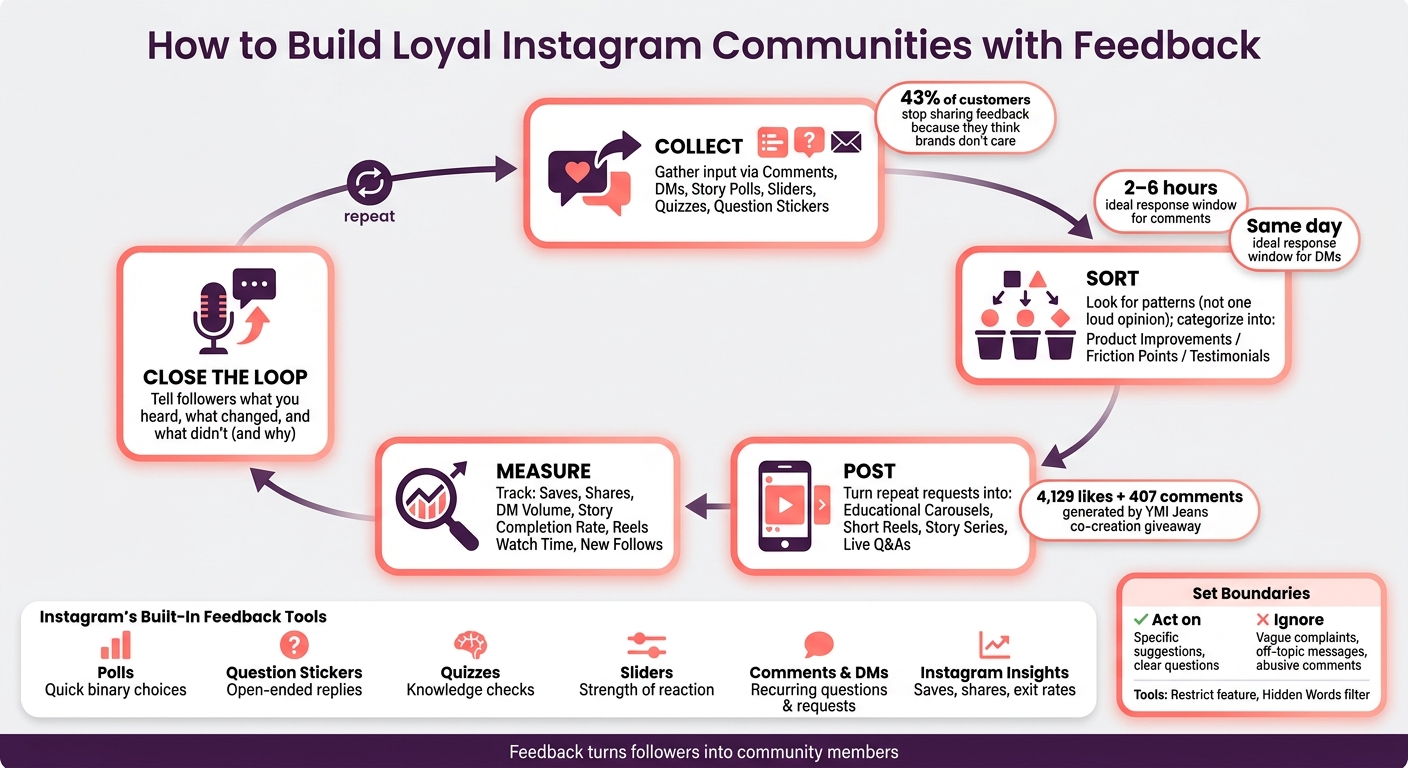
Instagram Feedback Loop: Ask, Sort, Post, Measure, Repeat
How to collect feedback using Instagram's built-in tools
Use comments and DMs to spot recurring questions and content requests
Start with comments and DMs. That’s where people tell you, in plain language, what they want.
The main job here is spotting patterns. One person asking a question shows interest. Five people asking the same thing is a sign that the topic likely deserves its own post, Reel, or carousel. When the same request keeps coming up, add it to your content backlog.
As volume picks up, put comments, DMs, and mentions in one place so interactions don’t slip through the cracks. It also helps to set a response rhythm instead of checking Instagram all day. A practical benchmark is replying to comments within 2–6 hours and DMs within the same day. If DMs start piling up, point people to one clear support channel in your bio or Highlights.
Then group repeat requests by topic. That makes it much easier to turn audience input into future content.
Use story polls, sliders, quizzes, and question stickers to get fast audience input
Instagram Stories gives you four simple ways to gather input, and each one does a different job:
- Polls: quick choices
- Question stickers: open-ended replies
- Quizzes: knowledge checks
- Sliders: strength of reaction
Sephora uses poll stickers with bold templates to let followers vote on cosmetics, then turns that input into market research for future campaigns and product updates. HubSpot often uses the question sticker to ask followers for thoughts on products, customer support, and business ideas. Those prompts often bring in dozens of detailed replies that shape their strategy.
A simple weekly rhythm works well here: run a poll, follow it with a question sticker, then use a quiz. After that, share the result in Stories so people can see their input mattered.
This helps you sort quick preferences from deeper community needs.
Use Instagram Insights to tell loud opinions apart from real patterns
One loud opinion can feel bigger than it is. Instagram Insights helps you check whether that reaction is an outlier or part of a real trend.
Saves and shares are two of the clearest signals of audience interest. A high save count usually means people found the post useful enough to come back to later. Shares show it connected enough for someone to send it to another person. Story exit rates help too. If one frame keeps causing people to leave, that’s a clear sign something isn’t working.
Review Insights every week to spot trends instead of reacting to one-off comments. Compare each post against your own baseline so you can tell the difference between a real shift and random noise. If a loud DM or comment clashes with the numbers, trust the bigger pattern.
Use those patterns to guide what you post next.
sbb-itb-3b12fba
How to turn audience feedback into content and community habits
Turn repeated feedback into posts, reels, carousels, and story series
When you start seeing the same question pop up in comments, DMs, or polls, don't let it sit there. Turn it into content in the format that fits best.
A question with a few steps usually works well as an educational carousel. A quick “how did you do that?” question is often better as a short Reel. And if a topic keeps coming back over a few weeks, that’s a good sign it deserves a Story series.
This does two things at once. First, it gives people the answer they asked for. Second, it shows them their input leads somewhere. That matters more than many brands think. When followers watch their questions become posts, they stop feeling like passive viewers and start feeling like part of the group.
Live Tinted uses Q&A boxes and polls to shape content and product decisions.
After you turn one question into a post, make the ask repeatable so people know they can keep contributing.
Build recurring rituals like weekly check-ins and topic voting
Feedback works better when it becomes part of a routine. A weekly topic poll, a Friday check-in, or a simple “what should we post next?” Story gives followers a clear pattern to join.
The best part? These formats are easy on both sides. They take little effort for followers, and they’re simple for your team to keep up with. More than anything, they show people when their input can affect future content.
That signal matters. Over time, 43% of customers refrain from sharing feedback because they believe businesses do not care about their opinions. A steady ritual pushes back against that. It tells people, in plain terms: we’re paying attention.
The strongest routines also feel two-way, not like a brand asking for help and then disappearing. If people keep showing up, bring them a little closer to the process.
Bring top followers into co-creation and highlight their contributions
Your most engaged followers are often the best people to build with. Think of the ones who comment often, tag friends, reply to Stories, or send thoughtful DMs. Those are the people most ready to co-create.
You can invite them in through simple asks:
- Suggest topics for future posts
- Submit photos you can feature
- Share testimonials or product stories
- Add ideas through polls, comments, or DMs
Public collaboration gives these followers a visible role in the community. They’re not just watching from the sidelines anymore.
A strong example came in May 2025, when YMI Jeans partnered with influencer Nazanin Kavari on a giveaway that required followers to share product feedback as an entry requirement. That single post generated 4,129 likes and 407 comments, giving the brand hundreds of direct insights into customer preferences. The feedback requirement made participation feel meaningful, not transactional.
When you feature someone’s input, be clear about it. Pin their comment. Repost their Story. Add their photo to a UGC carousel. Most of all, credit them and thank them in a way that feels honest. Public recognition gives participation social weight, and that can pull more people in over time.
It also helps to rotate who gets featured, so the same few names don’t take over the spotlight.
How to manage feedback at scale with a simple system
Sort feedback into categories and prioritize by volume, value, and fit with your voice
Once feedback starts coming in on a steady basis, you need a simple way to sort it fast.
A good starting point is to place everything into four buckets: content ideas (repeat questions or topic requests), product or service improvements (ideas about what you offer), friction points (things that frustrate people or get in their way), and testimonials (good experiences worth sharing). In most cases, feedback will fall into one of these four groups without much debate.
Then move through a basic five-step workflow: capture, categorize, decide, schedule, and review. When feedback shows up in DMs, comments, or mentions, log it right away and drop it into the right bucket. Review it each week, then rank ideas based on volume, value, and fit with your voice.
Track whether feedback-based content improves engagement and retention
Once you know what matters most, look at what changes.
Don’t stop at likes. Saves show that people found the post useful enough to come back to. Shares show it was worth sending to someone else. DM volume gives you a sense of relationship depth. Story completion rate and Reels average watch time show whether people keep paying attention over time. You can also track follows from content to see whether feedback-based posts are turning profile visitors into new community members.
A simple way to test this is to try two audience-requested angles in separate posting windows, then compare engagement, DMs, and profile visits.
If saves are high but follows are low, your content may be doing its job, but your bio or CTA may need work. If Reels get views but almost no comments, add a direct, easy-to-answer question at the end so people have a lower bar to jump over.
Use Outfame analytics to support feedback-driven Instagram growth
Analytics help you confirm which feedback-based posts lead to deeper engagement. Outfame analytics can help you spot which feedback-driven posts bring in the most DMs, saves, and shares.
How to set boundaries, handle criticism, and reward good participation
As feedback picks up, boundaries keep things under control. Without them, every comment, DM, and complaint starts pulling at your attention. Set the line early so feedback stays useful as your community gets bigger.
Set clear rules for comments, DMs, and the feedback you will act on
Be direct about the kind of feedback you’ll use. Specific suggestions and clear questions are worth your time. Vague complaints, off-topic messages, and abusive comments are not - and they shouldn’t shape your content plan.
A simple rule works well here: "Talk about the experience, not the person. Cross that line, and you lose access." Enforce it the same way every time so people know the boundary isn’t just for show.
It also helps to sort feedback into a few simple buckets:
- Urgent issues
- Useful requests
- Noise
That makes it easier to focus on what actually moves things forward.
Respond to valid criticism calmly and moderate harmful behavior quickly
Once the rules are in place, deal with criticism without letting one comment thread run the whole day. In most cases, the line between valid criticism and harassment is pretty clear: valid criticism focuses on facts and experiences, while harassment leans on personal attacks and emotional outbursts. They shouldn’t get the same response.
With valid criticism, acknowledge it in public, ideally within 24 hours. Then move the details to DMs. That keeps your comments from turning into a never-ending support line, while still showing everyone else that you take feedback seriously.
If someone’s upset, ask what happened and what outcome feels fair. Those two questions can shift a heated exchange into something more useful.
For repeat offenders, Instagram’s Restrict feature is often a better first move than blocking. Their comments become invisible to others without telling them, which can stop things from getting worse. If you need broader protection, turn on Hidden Words to filter offensive language, spam, and specific triggers before they show up in your comments.
Recognize helpful followers with shoutouts, pinned comments, and story mentions
Once you act on feedback, show people what changed. Pin thoughtful comments, repost Story ideas, and save community wins to a Highlight. That sends a clear message: engagement leads somewhere real.
The biggest form of recognition is simple. Close the loop. Share what you heard, what you changed, and what you didn’t change - and why. When people can see their input shaping the feed, they’re more likely to stick around.
Conclusion: Make feedback a regular part of community building
Once you've collected feedback and sorted it, the hard part is sticking with it. Feedback needs to be routine: collect it, act on it, and turn it into habits people can take part in. That's how an account goes from something people scroll past to something they look for on purpose.
This matters because people stay engaged when they can see their input reflected back. When you close the loop - sharing what you heard, what changed, and what didn't - you show followers that their input matters.
Feedback helps turn passive followers into active members. Clear boundaries, steady moderation, and a close look at saves, shares, DM volume, and comment quality can show whether your community is building loyalty over time.
Followers grow loyal when their input shapes the account. At that point, they become your community, not just your audience.
FAQs
How much feedback is enough to act on?
It depends on the context and on how steady the responses are, but even a small amount of useful feedback can be enough when it gives you clear direction. Quality matters more than quantity.
Pay attention to patterns and repeated themes. Acknowledge the responses you get, then watch how your community reacts when you make changes. If the feedback helps you respond in a more human way and fine-tune your approach, it’s worth using.
What if my followers don’t respond to polls or questions?
If your followers don’t respond to polls or questions, try other ways to build a stronger connection and show that their input matters.
Reply with care to comments and DMs, share behind-the-scenes moments, and ask for opinions in your captions. Consistency counts here. When you show up often, interact on a regular basis, and make people feel seen, engagement can grow over time.
How do I show followers their feedback led to changes?
Close the feedback loop by telling followers what you heard, what you changed, and what you chose not to change - and why.
Share updates in posts or Stories that tie their feedback to specific decisions. That makes people feel heard, builds trust, and gives them a reason to keep engaging.


