
Yes, but only under certain conditions. Story Highlights on Instagram don’t directly attract new followers, but they help convert profile visitors into followers by showcasing key content and building trust. Here’s why they work:
- Conversion Tool: Highlights increase profile-to-follow conversion rates by up to 42%.
- Visitor Retention: Profiles with Highlights get 34% more visits than those without.
- Trust Building: Categories like FAQs and Testimonials boost visitor trust and engagement.
- Navigation Aid: Well-organized Highlights simplify profile browsing for first-time visitors.
However, Highlights alone won’t grow your audience. They’re most effective when paired with strong content, a clear niche, and consistent posting. If your profile lacks traffic or focus, Highlights won’t make a difference. Keep them updated, visually appealing, and limited to 4–7 categories for the best results.
How to Use Instagram Story Highlights For Growth
What Research Shows About Story Highlights and Follower Growth
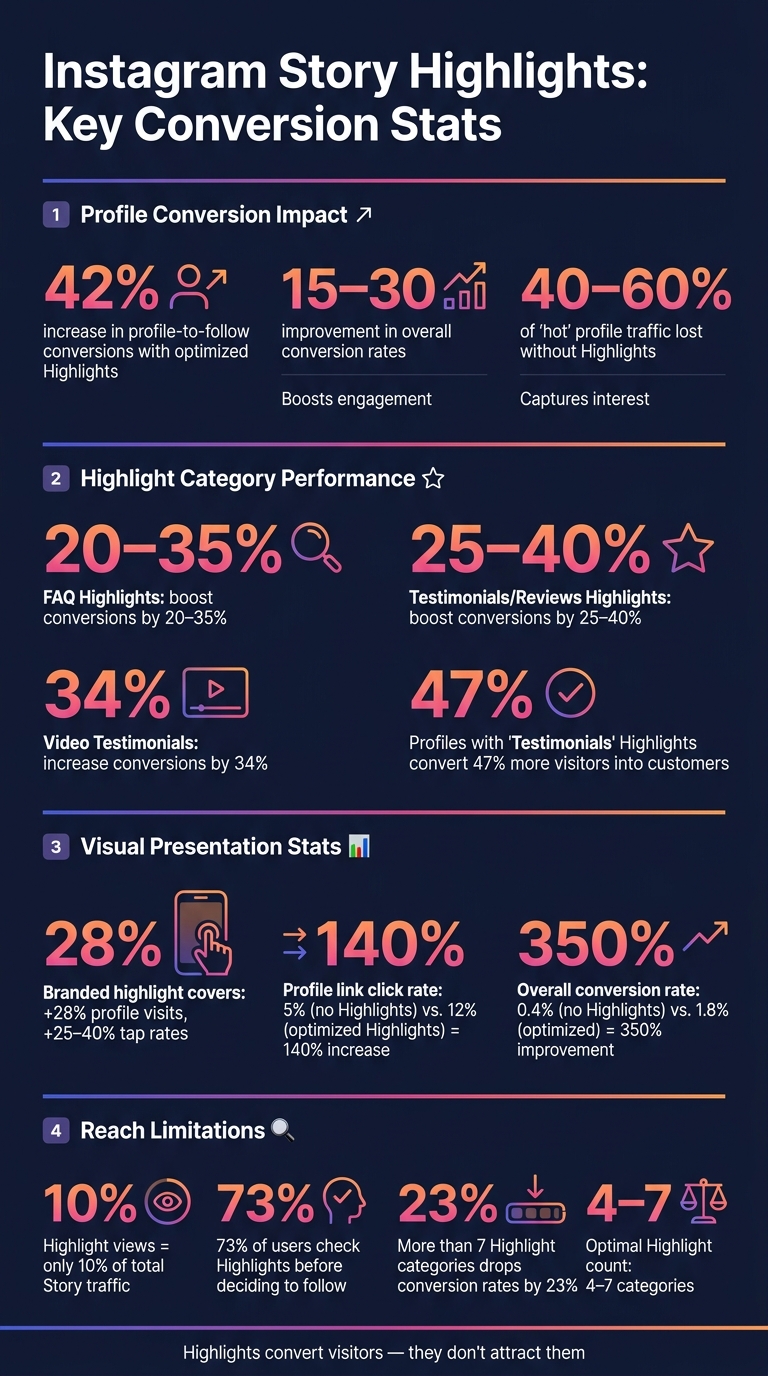
Instagram Story Highlights: Key Stats That Prove Their Conversion Power
Key Metrics for Evaluating Story Highlights
When it comes to measuring the effectiveness of Story Highlights, certain metrics stand out: profile visits, follow conversion rates, overall follower growth, and engagement. Among these, the follow conversion rate is where Highlights show the most noticeable impact.
For example, optimized Highlights can increase profile-to-follow conversions by 42% and improve overall conversion rates by 15–30%. On the flip side, skipping Highlights entirely can cost accounts dearly - potentially losing 40–60% of "hot" profile traffic, which refers to visitors already interested enough to view your profile.
These numbers highlight the role of Highlights as a tool for converting visitors into followers, a point explored in more detail below.
Highlights as a Profile Conversion Tool
Research clearly shows that Highlights function as a conversion tool rather than a discovery mechanism. They won’t push your content into new feeds or the Explore page, but they do help make the most of the visitors who already land on your profile.
Certain categories of Highlights, like FAQ and Testimonials, are particularly effective. For instance:
- FAQ Highlights: Boost conversion rates by 20–35%.
- Reviews or Testimonials Highlights: Increase conversions by 25–40%.
Even the visual presentation of Highlights matters. Using branded and cohesive highlight covers can lead to a 28% increase in profile visits and a 25–40% improvement in tap rates, compared to profiles with inconsistent visuals.
"Highlights don't directly impact algorithm reach like Reels do. But they improve profile quality, reduce follower loss, and increase conversions." - InfluenceFlow
The data speaks volumes: profiles without Highlights average a 5% click rate on profile links, while optimized Highlights boost this to 12%, which is a 140% increase. Similarly, the overall conversion rate - from profile visit to follow or subscription - can jump from 0.4% to 1.8%, representing a 350% improvement.
While these benefits are compelling, it’s important to distinguish between correlation and causation.
Correlation vs. Causation in Growth Data
Although optimized Highlights significantly enhance conversions, they work best as part of a broader strategy. Profiles with strong content, consistent posting schedules, and well-defined niches tend to grow faster. While active and organized Highlights often correlate with high growth, they aren’t the sole factor driving it.
As HubSpot’s Instagram marketing data puts it: "Highlights are primarily a profile optimization tool, not a reach tool." They maximize the value of the traffic brought in by other tactics, such as Reels, feed posts, or ads. Without a steady stream of visitors, even the most polished Highlights won’t move the needle much.
How Story Highlights Influence Follower Conversion
Better Profile Navigation for First-Time Visitors
When someone visits your profile for the first time, they decide in just seconds whether to stick around or move on. Story Highlights act as a visual menu, giving a quick snapshot of who you are and what you offer - no need for them to scroll endlessly through your feed. Think of it as a built-in website for your profile.
Keeping your Highlights well-organized (ideally five to seven categories) helps guide visitors without overwhelming them. Studies show that offering more than seven options can drop conversion rates by 23%. Placing your most important Highlight - like "Services" or "Results" - in the first spot can increase client inquiries by up to 42%. This simple structure makes it easier for visitors to engage with your content.
Keeping Stories Visible Beyond 24 Hours
Stories are great for engagement, but they vanish after 24 hours. That’s where Highlights come in. They allow you to save your best-performing content - FAQs, service details, success stories - and keep it available on your profile indefinitely. Essentially, Highlights turn temporary Stories into a 24/7 resource. Interestingly, about 70% of users save their Stories to Highlights once they expire.
Using Highlights to Build Trust and Credibility
Story Highlights do more than just organize content; they help build trust, which is crucial for turning visitors into followers. For instance, profiles with "Testimonials" or "Reviews" Highlights convert 47% more visitors into customers. Video testimonials are even more effective, boosting conversions by 34% thanks to their authenticity. Adding case studies, press mentions, or certifications to your Highlights further showcases your expertise, saving visitors from hunting for proof of your credibility.
As Wedex Blog puts it:
"Highlights should be viewed not as a decorative part of the profile, but as a permanent navigation system that helps quickly explain what you offer [and] why you can be trusted."
Including a Highlight like "About Me" or "My Story" can also personalize your brand and give visitors a sense of whether your values align with theirs. This human touch often makes a lasting impression.
When Story Highlights Have the Most Impact
Accounts With High Profile Traffic
Story Highlights are all about converting visitors who already land on your profile - they're not designed to attract new ones. As HubSpot puts it:
"Highlights are primarily a profile optimization tool, not a reach tool."
If your profile already pulls in consistent traffic through discovery channels, Highlights can make a big difference. By organizing and showcasing key content, they help turn casual visitors into followers or even customers. This works best when your content connects strongly with a specific audience.
Accounts With a Clear Niche or Value Proposition
Highlights shine the brightest when your profile has a clear focus. Without a defined niche, even the best-organized Highlights can feel directionless. But if your niche is well-defined - like sustainable fashion, financial tips for millennials, or B2B copywriting - Highlights become a quick and effective way to communicate your identity.
Creator @DesignWithLena illustrates this perfectly:
"My 'Services' highlight books 5 clients monthly without pitching. It's my silent sales machine."
When your value proposition is clear, Highlights help visitors instantly understand what you're about. They can showcase your expertise, services, or products, making it easier for the right audience to engage. By 2026, 76% of top creators were using Highlights strategically, often as a portfolio tool.
Using Highlights Alongside Other Growth Tactics
While Highlights are impactful, they work best as part of a larger strategy. Think of them as a multiplier rather than a standalone tactic. When paired with a compelling bio and consistent content, Highlights amplify your profile's overall effectiveness. Here’s how it breaks down: Reels and feed posts bring people in, your bio grabs their attention, and Highlights help seal the deal.
Even the small details, like cohesive, branded Highlight covers, can make a difference. Profiles with branded covers see a 28% boost in visits, especially when the overall profile is well-organized. As Iryna Voitovych, Copywriter at WEDEX, explains:
"The strongest Instagram profile isn't the one with lots of Stories, but the one where information is organized into a clear system."
Limitations of Story Highlights for Follower Growth
No Direct Evidence That Highlights Drive Growth Alone
Story Highlights have a limited role when it comes to attracting new followers. They don’t show up in Instagram feeds or on the Explore page - meaning they’re only visible to people who already visit your profile. This makes their reach inherently restricted.
As PostPlanify explains:
"Highlights don't push content into anyone's feed. If you're relying on them for reach, you're missing the point. Use Stories for reach; use Highlights for retention."
To put it in perspective, Highlight views make up just 10% of total Story traffic. That stat alone shows they can't drive growth on their own. Without other formats like Reels or feed posts bringing people to your profile, even the best-curated Highlights will go unnoticed. This sets the stage for how niche-specific strategies can influence their effectiveness.
Effectiveness Varies by Niche and Audience
Not all accounts see the same results from Highlights. For service-based or educational accounts, Highlights like "Testimonials" or "Tips" can boost conversions. But for entertainment or meme-focused accounts, followers often base their decision on the feed, leaving Highlights as an afterthought.
Account size also plays a role. Larger, established accounts can afford to maintain extensive Highlight archives without overwhelming visitors. On the other hand, smaller or growing accounts risk creating decision fatigue with too many options. Social media expert Mikheil Mchedlishvili points out:
"New visitors typically spend only 3–5 seconds on a profile, and your Highlights are their shortcut... Excessive or ambiguous Highlight titles increase decision fatigue."
To avoid this, keeping the Highlight row streamlined - ideally 4–7 clearly labeled categories - can make a big difference. Ultimately, the effectiveness of Highlights depends heavily on the audience and the overall strength of the profile.
Highlights Depend on Overall Profile Strength
Story Highlights can't make up for a weak profile. If your bio is unclear, your posts lack consistency, or your content doesn’t resonate with a specific audience, visitors won’t spend time exploring your Highlights.
There’s also a trust factor to consider. Outdated Highlights - like old pricing, expired promotions, or irrelevant branding - can hurt your credibility and undo the trust you’ve built elsewhere on your profile.
In short, Highlights work best as a tool to enhance an already strong profile. They can’t fix underlying issues or create growth on their own. Instead, they amplify what’s already working.
How to Measure the Impact of Story Highlights
Tracking Performance Before and After Adding Highlights
One of the most effective ways to evaluate your Highlights is by analyzing your profile visit-to-follower conversion rate. To do this, compare your conversion rate over a 30-day period before and after updating your Highlights. Studies suggest that creators with well-optimized Highlights often see a 15–30% boost in their conversion rates compared to those who don’t use them. To refine your analysis, you can add UTM parameters to your link stickers. This helps identify which Highlight categories are driving website traffic and conversions. These initial metrics set the foundation for more detailed evaluations using advanced tools.
Using Analytics Tools to Monitor Growth
Instagram Insights offers a useful feature to track direct profile follows after a specific Story frame, with data retention for up to two years. For more in-depth tracking, platforms like Outfame provide real-time growth monitoring and advanced analytics dashboards. These tools go beyond Instagram’s native capabilities, allowing you to monitor changes in follower growth on a daily or even hourly basis. With Outfame’s detailed tracking, you can spot patterns, such as when follower growth speeds up or slows down, and link these changes to specific updates in your Highlights. This level of detail helps you separate surface-level engagement from genuine follower conversions.
Separating Engagement Gains From Follower Growth
It’s important to distinguish between engagement and actual follower growth. A Highlight might generate plenty of interactions - such as taps, replies, and sticker clicks - without effectively converting viewers into followers. To get a clear picture, break your metrics into these categories:
| Metric Category | Key Data Points | Insights Provided |
|---|---|---|
| Engagement | Sticker taps, replies, shares | Shows how much your current audience is interacting |
| Conversion | Profile visits, new follows | Indicates whether viewers are turning into followers |
| Navigation | Taps forward, taps back, exits | Highlights where you might be losing potential followers |
If your Highlights have high engagement but low follower conversion, it could mean there’s an issue with your profile funnel. On the other hand, if over 70% of viewers complete a Highlight sequence, it’s a good sign that your content is maintaining their attention. Completion rates below 50% might suggest the sequence is too long or loses momentum early on. Reviewing exit rates for each frame can help you pinpoint where viewers are dropping off. If you notice consistent drop-offs at a specific point, try removing or adjusting that frame to see if it improves your conversion rates.
Conclusion: Do Story Highlights Actually Boost Follower Growth?
Story Highlights play a key role in follower growth, but their impact lies in converting profile visitors, not driving discovery. Unlike Reels or hashtags that attract new audiences, Highlights work by turning those who already land on your profile into followers. This distinction is crucial.
The numbers back this up: 73% of users check a profile's Highlights before deciding to follow. When Highlights are well-optimized, they can significantly improve conversion rates. Over time, as more people visit your profile, these small gains can add up in a big way.
Think of Highlights as your profile’s quiet closer. They answer common questions, build credibility, and give first-time visitors a reason to hit "Follow" - all without requiring any active effort. As @DesignWithLena shared:
"My 'Services' highlight books 5 clients monthly without pitching. It's my silent sales machine."
This example shows how Highlights can act as a behind-the-scenes conversion tool. But here’s the catch: they’re not a growth engine. If you expect Highlights to bring in new followers on their own, you’ll likely be disappointed.
That said, Highlights can only work their magic if the rest of your profile is strong. A compelling bio, consistent content, and high-quality posts are non-negotiable. Without these elements, even the best Highlights won’t deliver results. They’re most effective when integrated into a broader strategy, as outlined earlier in this article.
To measure the impact of your Highlights, track the right metrics over time. Tools like Outfame can help you monitor follower growth and connect Highlight updates to improvements in conversions.
FAQs
Which Highlight categories convert best for my niche?
The most effective Instagram Highlight categories depend on your niche, but the key is to create a clear path for visitors to follow. Some common categories that perform well include:
- About: Share your brand's story and identity.
- Products/Services: Showcase what you offer in an engaging way.
- Testimonials/Reviews: Provide social proof with customer feedback.
Adding an FAQ section can also be helpful for addressing common questions or concerns.
For more specific needs, it’s smart to customize your Highlights. For example, restaurants might feature menus, while educators could organize content by course or topic. Tailoring your Highlights ensures they resonate with your audience and fit your goals.
How often should I update my Story Highlights?
Regularly updating your Story Highlights ensures they stay relevant and engaging for your audience. Here’s how often you should refresh different types of content:
- Promotions: Update these to match your current campaigns so they remain timely and effective.
- Product Catalogs, Testimonials, and Tutorials: Aim to refresh these monthly to keep the information fresh and useful.
- FAQs: A quarterly update works well to ensure answers reflect any changes or new questions.
- About Us: Only update this when there are changes in your brand or company story.
One bonus? Instagram automatically moves recently updated Highlights to the front of your profile. So, keeping them fresh doesn’t just improve the content - it can also help boost your profile’s visibility!
What metrics prove Highlights increased my follows?
Instagram doesn’t provide built-in analytics for Highlights, so tracking their performance requires a bit of creativity. You can start by keeping an eye on profile visits and follower growth after refining your Highlight categories. To dig deeper, try using UTM parameters to track link clicks directly from your Highlights. Another option? Reach out to new followers via DMs to ask what prompted them to follow you.
For a more scalable solution, tools like Outfame can step in. They offer real-time analytics, helping you measure how your curated Highlights contribute to follower growth and engagement.


