
If you want more saves, write captions people can use later. The article’s main point is simple: save-heavy captions lead with value, stay easy to scan, and end with one direct save CTA.
Here’s the full takeaway in plain English:
- Saves happen when a caption feels worth revisiting
- The first line matters most because it shows the payoff before “more”
- Formatting matters: short paragraphs, lists, and spacing help people scan
- Carousels are the main format for save-focused education
- Reels can help with reach, but carousels tend to do more for saves
- The article gives 8 caption formulas:
- Checklist
- Step-by-Step
- Mistakes-to-Fixes
- Rules
- Before-and-After
- Problem-Solution
- Resource
- Nested Framework
- It also gives a simple review system:
- 150–300 words for deeper captions
- 3–5 hashtags
- track saves per reach
- One stat stands out: saves account for about 15% of ranking weight for educational feed posts in the article’s 2026 model
What I’d keep from this article is the process, not just the formulas:
- Pick 1–2 formulas
- Use them for 30 days
- Compare results by saves per reach
- Keep using the one that gets the most return
Quick Comparison
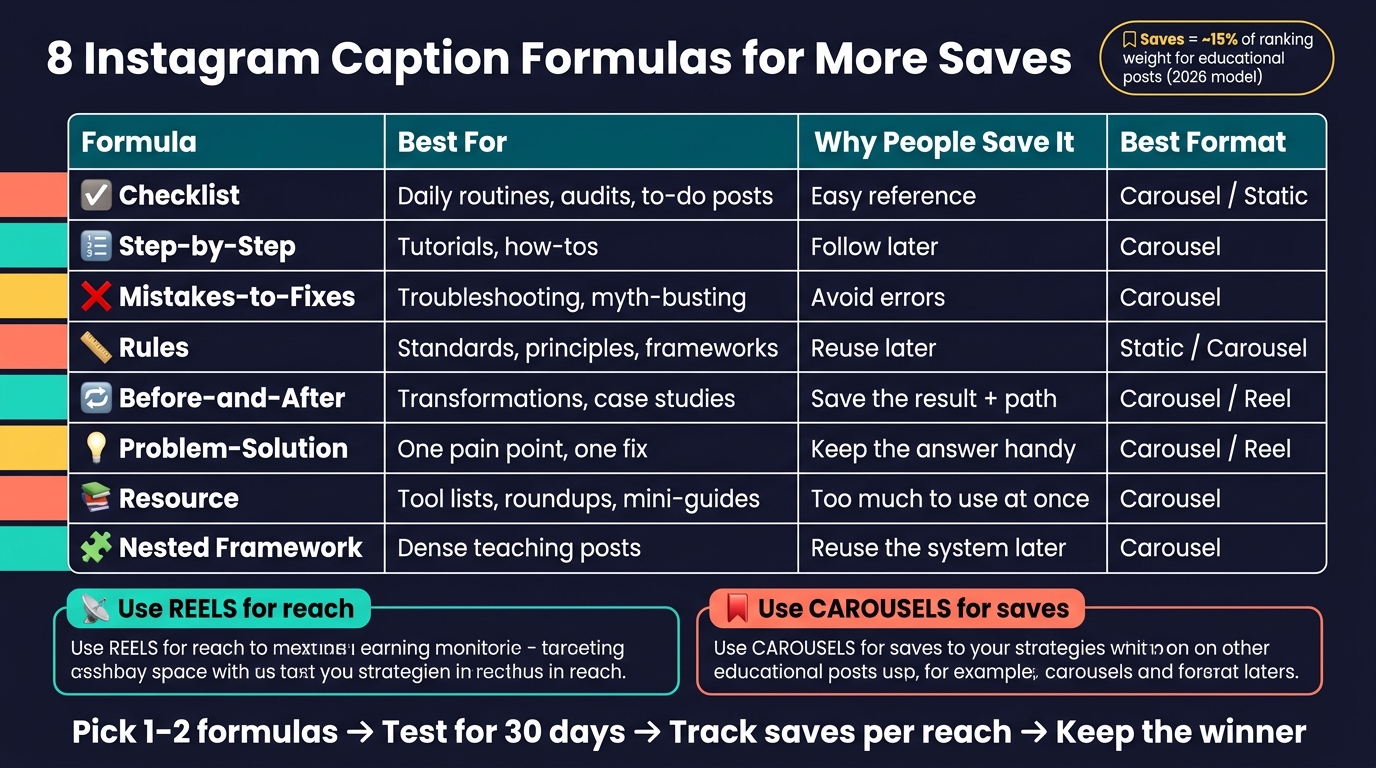
8 Instagram Caption Formulas for More Saves: Quick Comparison Guide
| Formula | Best for | Why people save it | Best format |
|---|---|---|---|
| Checklist | Routines, audits, to-do posts | Easy reference | Carousel / Static |
| Step-by-Step | Tutorials, how-tos | Follow later | Carousel |
| Mistakes-to-Fixes | Troubleshooting | Avoid errors | Carousel |
| Rules | Standards, principles | Reuse later | Static / Carousel |
| Before-and-After | Transformations, case studies | Save the result + path | Carousel / Reel |
| Problem-Solution | One pain point, one fix | Keep the answer handy | Carousel / Reel |
| Resource | Tool lists, roundups, mini-guides | Too much to use at once | Carousel |
| Nested Framework | Dense teaching posts | Reuse the system later | Carousel |
Bottom line: this article says saves do not come from clever wording alone. They come from useful structure, clear payoff, and one reason to come back later.
sbb-itb-3b12fba
What Makes a Caption Worth Saving
People save captions they want to come back to.
That’s why the first line matters most. Put the main value there, before someone taps “more.”
The way you format the caption matters just as much as what you say. Short paragraphs, numbered points, and clean spacing make the post easier to scan and easier to save.
Saves also matter to Instagram’s ranking system. In the 2026 ranking model, saves carry roughly 15% weight for educational feed posts.
Then close with one clear save prompt: "Save this for the next time you write captions."
Those three signals - fast value, clear structure, and a direct save prompt - show up in every formula below.
How to Use These Formulas
Each formula below shows four things: the structure, the best post type, the order of the information, and why people save it. Pick the formula that matches your post format, then plug in your topic.
These formulas can work in almost any niche. You’re not starting from scratch each time. You’re using the same setup and swapping in a new subject, examples, and keywords. The next eight sections break down exactly how each one works.
Format and formula need to match. Carousels tend to work best for step-by-step posts, checklists, and resource lists. That part matters even more when the caption is built for saves.
Use search terms your audience would type into Instagram or Google. The formula gives you the shape of the post. Keywords help people find it. Once you have both in place, the first formula is the simplest place to begin.
1. The Checklist Formula
The checklist formula works best when a post is fast to scan and easy to come back to later.
Best-fit post type
Carousels are the best match for this formula. People can move through the list fast, save it, and pull it up again when they need it.
Information sequence
Use a simple three-part structure.
- Start with a clear benefit or consequence
- List the items in short, easy-to-scan lines
- End with a save prompt
If the post needs a stricter order, use the step-by-step formula next.
End with one save prompt
Close with one direct line: "Save this before your next [task]."
2. The Step-by-Step Formula
Use this formula for tutorials, mini-guides, and any caption that teaches a process. It works best when the caption needs to explain things in order.
Best-fit post type
Carousels are the best fit here because they let you split the lesson into clear, easy-to-scan steps and spread more detail across up to 20 slides.
Information sequence
Match the caption to the slide order. Use this sequence: hook, value promise, steps, save prompt.
Start with a first line that mirrors the visual hook. Then add 2–4 short sentences for setup or move straight into the steps. Keep it tight. The reader should feel like they can follow along without effort.
Close with one direct save prompt tied to the action the reader is about to take: "Save this for the next time you need it."
Why it earns saves
Step-by-step captions are a strong match for educational posts because saves show clear intent.
3. The Mistakes-to-Fixes Formula
This formula works by calling out a specific mistake your audience is probably making, then showing them the fix. The point is simple: show what’s going wrong, then show how to fix it. That sense of cost creates urgency.
Best-fit post type
Carousels are a strong fit here because each slide can match one mistake with one fix. That makes the post easy to follow and easy to save.
Information sequence
Start with a hook that shows the cost of the mistake. Something like "Why your Reels are dying after 200 views" works because it speaks to a frustration people already feel.
Then move through each pair in a simple rhythm:
- the mistake
- the fix
- repeat across the rest of the slides
Aim for 5–8 slides so the post feels packed, but not overloaded. Put the most important fixes in the middle.
Use this formula when the goal is correction, not explanation.
Single save prompt
End with one direct prompt tied to action: "Save this so you stop repeating these mistakes."
4. The Rules Formula
If mistakes show you what to fix, rules show you what to follow.
That’s the idea behind this formula. You use authority to frame the post as a standard people want to keep. Instead of walking readers through a concept step by step, you give them a clear set of rules. That tone makes the post feel like a reference worth saving.
Best-fit post type
Carousels are the best fit here because each slide can hold one rule. That keeps the post easy to scan.
Information sequence
Start with a direct, rule-based hook. Then share one rule per slide. End with a clear CTA.
This structure keeps the caption simple, firm, and easy to save.
Why people save it
Rules-based captions feel like a reusable standard. Readers save them so they can come back later.
Single save prompt
End with one save-first CTA: "Save this before your next post."
5. The Before-and-After Formula
Use this formula when a post shows a clear before and after. On Instagram, transformation is one of the strongest save triggers. People save these posts because they want the result and the steps that led to it. This format works especially well for tutorials, case studies, and mini-guides where the change is easy to spot.
Best-fit post type
The format needs to make the change obvious at a glance. Carousels work well here because they let you show the shift step by step, almost like flipping through a mini story.
Information sequence
Your caption should follow the same transformation shown in the carousel. Start with the after on slide 1 - the main result or promise. Then use the middle slides to walk through what changed and how it happened. Finish with one clear save prompt tied to that result.
Leading with the result gives people a reason to keep swiping right away.
Why it gets saved
This formula gets saved because it gives readers two things at once: the outcome and the path to reach it.
Single save prompt
End with a direct CTA tied to something the reader may want to do later, such as: "Save this for the next time you want this result."
6. The Problem-Solution Formula
This formula works best when you start with a clear problem or a stakes statement, then give people a fix they can come back to later. Lead with the problem, move right into the answer, and finish with a direct save prompt. It works best when the post has one clear pain point and one clear fix.
Best-fit post type
Carousels are a strong fit here because they give you enough space to show both the problem and the answer without making the post feel cramped. Aim for 5–8 slides so the reader gets one solid reason to save it.
Information sequence
Start with the problem in plain language. No fluff, no slow build. The first line should feel instantly relevant, like you get what the reader is dealing with.
State the problem in one line, then go straight to the fix. After that, use the middle slides to break down the solution in short, focused sentences. Each slide should be easy to scan at a glance. Give useful detail, but don't crowd the slide.
Single save prompt
End with a CTA that links straight back to the problem you opened with: Save this so you know what to do next time.
7. The Resource Formula
Use this when the topic is too packed for a checklist or step-by-step post. This formula turns your caption into a go-to reference people want to save. It works best for resource-heavy captions like tool lists, data roundups, and detailed mini-guides - content that's too dense to take in at a glance.
Best-fit post type
Carousels are the best fit here because they give you room to add more useful detail in a format people can scan fast. They support up to 20 slides, which gives you enough space to share content people can use without squeezing everything into a single frame.
Information sequence
Start with a bold promise that tells the reader exactly what they’ll get. Then spread the value across 5–8 slides, with each slide covering one clear point. Keep it easy to scan. In the caption, add context or searchable terms so the post stays findable over time.
Reference value for saves
Resource posts earn saves because they include more useful information than someone can act on in one sitting. Tool lists and detailed mini-guides work especially well. People see the post and think, I’ll need this again later.
Single save prompt
Close with a direct save prompt tied to the content, not a bland generic ask. "Save this list for your next post" works well because it gives readers a clear reason to bookmark it.
8. The Nested Framework Formula
If a resource post still feels too broad, put one reusable framework inside another.
This works well for educational posts that teach one framework inside another to drive Instagram growth. The post needs a main method, but it also needs something people can use again later. That inner piece might be a checklist, a 3-step process, or a template.
Best-fit post type
Carousels work best here because they give you room to split the main framework and the smaller sub-framework across slides.
Information sequence
Start with a strong hook. Then move from the main framework into the mini-framework without making the post hard to scan.
In the caption text, use this flow:
- One hook line
- One value promise
- 2–4 lines that introduce the framework in a conversational way
- A single CTA at the end
Reference value for saves
People save this kind of post because they can come back and reuse both parts later: the outer framework and the inner template.
Single save prompt
Save this post to reuse the framework and the template.
Quick Comparison of All 8 Formulas
Picking the right formula gets a lot easier when you match it to the kind of post you’re making. The table below shows where each one works best, why people save it, and which format gives it the best shot.
| Formula | Best Use Case | Why Users Save It | Best Post Type |
|---|---|---|---|
| 1. Checklist | Daily routines or essential audits | Utility - save to reference later | Carousel / Static |
| 2. Step-by-Step | Tutorials and how-to guides | Education - save to follow the process | Carousel |
| 3. Mistakes-to-Fixes | Myth-busting or troubleshooting | Correction - save to avoid common errors | Carousel |
| 4. Rules | Non-negotiable principles or frameworks | Authority - save to apply again | Static / Carousel |
| 5. Before-and-After | Proof and transformation stories | Inspiration - save for aspiration | Carousel / Reel |
| 6. Problem-Solution | Addressing specific audience pain points | Relief - save the specific fix provided | Carousel / Reel |
| 7. Resource | Curated tools, links, or listicles | Curation - save to access later | Carousel |
| 8. Formula-Within-a-Formula | Complex strategies or dense educational content | Density - save to unpack deep value | Carousel |
The next call is format. In most cases, carousels do the heavy lifting for save-focused posts. They’re a strong fit for these formulas because they make educational content easy to scan and revisit later.
Reels work best when the hook lands fast. They can drive reach, especially when the idea is easy to grasp in seconds.
A simple way to think about it:
- Use Reels for reach
- Use carousels for save-heavy education
If your post teaches something people will want to revisit, carousels usually win.
Formatting and Testing Standards for Every Formula
Once you’ve picked a formula, run the caption through this checklist before you publish. It’s a simple gut check that can make a good caption hit harder.
- Hook: Does your first line stop the scroll? Start with a bold statement, a curiosity gap, or something people don’t expect.
- Value/payoff: Does line 2 make the takeaway obvious? Readers should know right away why the post is worth saving.
- Structure: Is the caption easy to scan? Keep the flow clean: hook → payoff → body → CTA → hashtags.
- Length: Aim for 150–300 words when the topic needs more depth.
- SEO: Does your first line include your primary keyword? Then weave in 2–3 related variations naturally through the rest of the caption.
- Save instruction: Do you clearly tell people to save it? Use a direct CTA like "Save this for later" or "Save this before your next post."
- Hashtags: Stick to 3–5 niche-specific hashtags at the bottom. Think of them as topic labels, not growth hacks.
After the caption goes live, pay attention to which formulas get the most saves per reach. Start with saves, then look at shares, reach, profile visits, and follows each week. Likes are nice, but they’re a weaker signal than actions that show deeper interest.
A tracking tool can help you see which patterns keep paying off over time. Outfame can help you track saves, reach, and follower growth as you refine your caption system.
Conclusion
Saves happen when a caption gives people something worth coming back to.
Start with one or two formulas and stick with them. The Checklist and Step-by-Step formulas are good places to begin because they fit the kind of posts that often earn saves. Then use the next 30 days as a simple test window.
Give each formula a full 30 days before you judge it. That gives you enough data to compare results without jumping to conclusions too early.
Once the test period ends, compare performance by saves per reach. Then use the better-performing formula more often.
That’s the whole play: use the formula, track saves, and make the winner your default while you keep refining it.
FAQs
Which caption formula should I start with?
Start with the Hook, Context, Insight, and CTA formula. It gives your post a clear shape and makes it easier for people to save and come back to later.
Pick one goal for the post, such as “save this for later,” then make sure your CTA lines up with that goal. If the post is an educational carousel, longer captions often do the job better. A range of 1,200 to 2,000 characters tends to work well because it gives you enough room to teach without losing the thread.
One more thing: put your hook in the first 125 characters. That’s the part people are most likely to see before mobile truncation kicks in, so it needs to do the heavy lifting.
Why do carousels usually get more saves than Reels?
Carousels often earn more saves because they’re built for useful, educational posts people want to come back to later.
Reels usually do a better job with reach and discovery. Carousels, on the other hand, push people to swipe through each slide, and that kind of engagement can signal quality.
They’re also a strong fit for step-by-step tips, checklists, and sharp insights. That gives users something worth bookmarking. And when you pair that with a longer, value-packed caption, people often spend more time on the post.
How long should I test a caption formula before changing it?
Check caption performance every week to spot patterns in saves, profile visits, and follows. Try different hooks and writing styles week by week to see what moves the needle.
For a fuller read, stick with the same strategy for at least 30 days before making big changes. Outfame’s real-time analytics can help you track trends and make smarter adjustments.


