
If you're looking to browse Instagram without creating an account, there are still ways to do so in 2026, despite Instagram's tightened restrictions. Public profiles allow limited access to posts and profile information before prompting you to log in, but tools like web viewers can help you bypass these limits. Here's what you need to know:
- What You Can See Without Logging In: Public profiles show up to 12 recent posts, bio, profile picture, and follower/following counts. Stories, Highlights, and private accounts remain inaccessible.
- How to Browse Anonymously: Use trusted web viewers like Picuki, Inflact, or DolphinRadar to access public content without leaving a trace.
- Direct URL Access: Visiting
instagram.com/usernamelets you view public profiles directly. Right-clicking post thumbnails and opening them in a new tab can sometimes bypass login prompts. - Search Engine Cached Pages: Google’s cached results can display older Instagram content without requiring a login.
- Risks: Be cautious of third-party tools that ask for login credentials or promise access to private profiles - they are often scams.
For basic research or anonymous browsing, web viewers and direct URLs are helpful. However, creating an account is necessary to fully engage with Instagram's features like liking, commenting, and following. Choose the method that best fits your needs.
How To Browse Instagram Without Account 2025 (iPhone & Android)
How Instagram Login Requirements Work in 2026
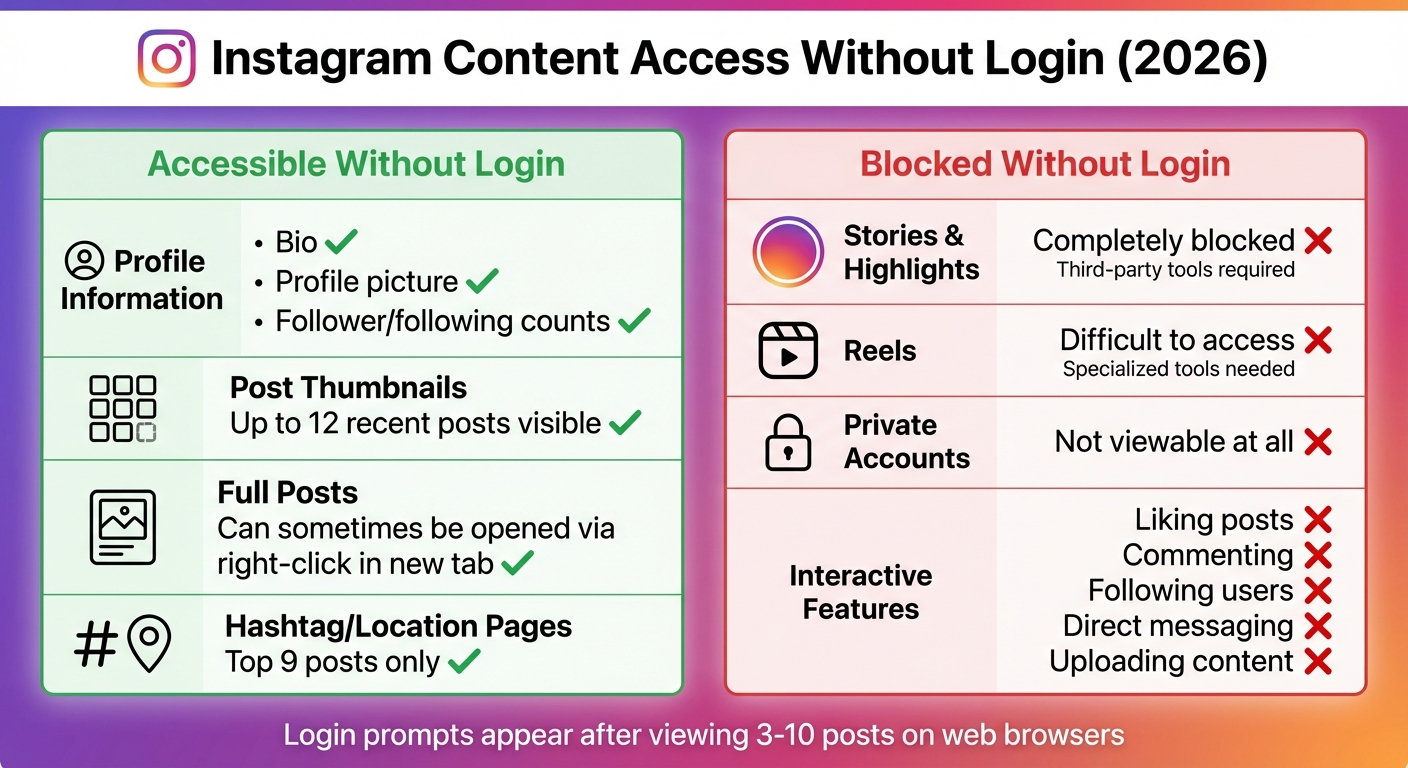
Instagram Content Access Without Login: What You Can and Cannot View in 2026
Instagram's login policies have tightened significantly by 2026, making it harder to browse the platform without an account. The mobile apps for Android and iOS now require immediate authentication, meaning you can't view any content without logging in. If you're determined to browse without creating an account, your only option is to use a web browser on either desktop or mobile. However, even on the web, Instagram enforces login prompts, limiting how much you can see before being asked to sign in.
For those using the web, Instagram tracks your browsing activity and often interrupts your session with login pop-ups after you view a handful of profiles or scroll through more than a few posts. Clearing your browser cookies or switching to incognito mode can temporarily reset these limits, but the restrictions remain consistent across devices.
What You Can View Without Logging In
If you visit a public Instagram profile directly via instagram.com/[username] in a web browser, you can still access some basic information. This includes the user's bio, profile picture, post count, and their follower/following numbers. You'll also be able to see a limited number of post thumbnails - usually around 12 - before hitting the login wall[4,6].
Here’s a breakdown of what’s accessible on public accounts without logging in:
| Content Type | Access Level |
|---|---|
| Profile Information | Bio, profile picture, and follower/following counts |
| Post Thumbnails | Up to 12 recent posts are visible |
| Full Posts | Can sometimes be opened by right-clicking and opening in a new tab |
| Stories & Highlights | Completely blocked; third-party tools are required |
| Reels | Difficult to access; may need specialized tools |
| Private Accounts | Not viewable at all |
Beyond profiles, unauthenticated users face additional restrictions. For example, hashtag or location pages only display the top 9 posts, and private accounts remain entirely off-limits.
Privacy and Legal Guidelines
With these stricter measures in place, it's important to understand the legal and ethical guidelines surrounding Instagram browsing. Viewing public profiles via a browser or using legitimate third-party tools is legal, as you're accessing content that users have chosen to make public. However, all content - photos, videos, and stories - remains the property of its original creators. As Florian Kastner emphasizes:
"The copyrights always remain with the respective accounts."
Be cautious of websites claiming to unlock private profiles. These are typically scams designed to steal your data or infect your device with malware. Trustworthy tools and services for viewing public profiles adhere to a clear rule, as Inflact explains:
"We respect privacy - only public content is available."
Lastly, avoid sharing your Instagram login credentials with any third-party site. Doing so could expose you to significant security risks, including account compromise. Public profiles and posts are often indexed by search engines like Google, allowing you to discover some content without visiting Instagram directly.
Using Web Viewers to Browse Instagram Anonymously
Web viewers act as intermediaries between you and Instagram, allowing you to access publicly available data like profile pictures, bios, posts, Stories, Reels, and Highlights without logging in. These tools pull data directly from Instagram's API and display it for you to browse anonymously.
The main benefit? Anonymity. Since the requests are routed through the viewer's server instead of your device, Instagram doesn't capture your IP address. However, keep in mind that these tools only work with public profiles. They may also experience occasional glitches or downtime when Instagram updates its API.
Here’s how you can use these tools effectively.
Step-by-Step Instructions for Web Viewers
- Copy the Instagram username (e.g., @username) or the full profile URL from your browser.
- Visit trusted sites like Picuki.tv, Inflact.com, or DolphinRadar.com.
- Paste the username or URL into the search bar and hit "Enter" or click the search button.
- Once the profile appears, navigate to the specific tab for the content you want to view, such as Stories, Reels, or Posts.
- Use the download button to save any photos or videos in high resolution.
Before using any tool, double-check that the website is legitimate to avoid falling victim to phishing scams.
Web Viewer Tool Comparison
| Tool | Features | Pricing |
|---|---|---|
| Picuki | Access Stories, Reels, Highlights, and more | Free |
| Inflact | Profile analysis, story tracking, auto-save | $4.80/month (Premium) |
| DolphinRadar | View posts, Stories, and track profiles | $6.99/month (Premium) |
After choosing your preferred tool, follow these essential safety tips to protect your data.
Safety Tips for Using Third-Party Viewers
Stick to browser-based tools from reputable sources. Avoid downloading apps or browser extensions that promise Instagram viewing features, as these can sometimes carry malware or phishing risks. Always confirm the site’s security by checking for an SSL certificate (look for the padlock icon) and reviewing its privacy policy.
For added security, consider using a privacy-focused browser or a VPN. Keep in mind that a significant data breach in January 2026 exposed 17.5 million Instagram user records through API scraping. To protect your account, enable multi-factor authentication and use an authenticator app instead of SMS.
Browsing Instagram Directly Without External Tools
You can check out Instagram content directly through your web browser while staying anonymous. This approach works best for public profiles and doesn’t require any downloads or account sign-ups.
Viewing Public Content Through Direct URLs
Instead of relying on third-party tools, you can access public Instagram profiles directly by typing their URL. Simply go to instagram.com/username to view a public profile. Here, you’ll find the profile picture, bio, follower and following counts, and a grid displaying the most recent 6 to 12 posts. If Instagram’s login prompt appears, look for the small "X" in the top-right corner to dismiss it temporarily.
To view specific posts or Reels without triggering the login screen, right-click on a post thumbnail and select "Open Link in New Tab." Alternatively, you can use the direct URL format for posts and Reels, such as instagram.com/reels/REELCODE, and open it in a new tab.
You can also explore hashtag or location pages by going to URLs like instagram.com/explore/tags/HASHTAG or instagram.com/explore/locations/LOCATION-ID. However, these pages generally show only the top 9 posts.
Using Search Engine Cached Pages
Another option is to leverage Google’s indexed Instagram content to browse profiles without logging in. Use search operators like site:instagram.com "username" or site:instagram.com "keyword" to find specific profiles or posts. When you find a result, click the three dots next to the URL and select "Cached" to view a snapshot of the page as it was last indexed.
While cached pages completely bypass Instagram’s login requirement, they come with a major limitation: the content is outdated. You might be looking at posts that are several days or weeks old, and you won’t see recent updates, Stories, or real-time interactions. This method is most useful for verifying older content or when the live page forces you to log in.
Limitations and Risks of Browsing Without an Account
Features Not Available Without an Account
When you browse Instagram without an account, you’re missing out on some of its most popular features. You can’t like posts, leave comments, follow users, send direct messages, or upload your own content. Private profiles are completely off-limits, and even public browsing comes with tight restrictions - Instagram typically limits guest users to viewing just 3 to 10 posts before prompting a login. Features like the "Explore" page or advanced hashtag searches are also unavailable. Additionally, Stories and Highlights can’t be accessed directly through the site. If you’re hoping to browse anonymously, you’ll need to stick to a web browser since the Instagram app for iOS and Android requires a registered account to function. These restrictions, combined with frequent login prompts, make navigating Instagram without an account a frustrating experience.
Security Risks to Watch For
Anonymous browsing comes with more than just limited features - it also carries security risks. One of the biggest concerns is the use of third-party web viewers. Some of these sites may attempt to steal your Instagram credentials or harvest personal data. As Multilogin explains:
Legitimate anonymous Instagram viewers NEVER ask for your login credentials. If a site requests your password, it's a scam - avoid immediately.
Websites claiming to grant access to private profiles often install malware or engage in data harvesting. Even seemingly legitimate free viewers can bombard you with ads, redirect you to malicious sites, or track your browsing habits, IP address, and device information. Instagram itself also tracks logged-out users using techniques like canvas, WebGL, and audio fingerprinting. To stay safe, consider using ad blockers, never input your Instagram password on any third-party site, and check recent reviews before using a tool. Keep in mind that trying to bypass protections on private accounts could violate computer fraud laws in certain areas.
When You Should Create an Instagram Account
Why Having an Account Matters for Growth
If you're just scrolling through Instagram casually, anonymous browsing might seem fine. But here's the catch: without an account, you're locked out of key features like liking, commenting, messaging, or following others. Essentially, you're watching from the sidelines.
For creators and business owners, having an account isn't optional - it’s a must. It allows you to post content, track engagement metrics, monitor follower growth, and analyze audience demographics. These insights are crucial if you're serious about building a presence on the platform.
An account also opens up additional features like the Explore page, full hashtag searches, and the ability to follow private profiles. These tools can help broaden your network and uncover new opportunities.
As technology writer Bryan M. Wolfe explains:
"Ideally, you should have an Instagram account to maximize your use of the service. But if viewing profiles is all you want to do... [anonymous viewing] should have you covered."
If you’re aiming for more than just casual browsing, shifting from anonymous viewing to an active account is the logical next step.
How Outfame Helps You Grow Your Instagram
Anonymous browsing might work for quick research, but creating and maintaining an active account is where real growth begins - and that’s where Outfame comes in.
Once your account is set up, growing your presence becomes the next challenge. Outfame simplifies this process by using AI-powered audience targeting. It filters by location, age, gender, language, interests, and hashtags to help you connect with the right people. This automated engagement runs around the clock, ensuring consistent growth.
What makes Outfame stand out is its commitment to authenticity. It focuses on attracting real, engaged followers instead of bots or fake accounts. With access to a database of over 300 million verified creators in 195+ countries, it connects you with users genuinely interested in your niche.
Outfame also prioritizes security. It operates through secure API connections, meaning you don’t need to share your Instagram password. Fully compliant with Instagram’s policies, the service starts at $39/month and includes a Growth-Guarantee. Plus, you get real-time analytics to monitor your progress. With a stellar 4.98/5 rating from 58,000 reviews, Outfame has proven itself as a trusted partner for creators and brands alike.
If you do create an account to grow it, Outfame's organic Instagram growth service engages people in your niche without ever asking for your password.
Conclusion
Yes, you can browse Instagram without an account in 2026, but how you do it depends on your goals. Web viewers like Picuki are among the simplest ways to check out public profiles, posts, and stories while staying anonymous. These tools are free, require no sign-up, and don’t leave a trace. For quick access, you can also type instagram.com/username directly into your browser. Just be aware that Instagram will prompt you to log in after scrolling through a few posts. This method works well for quick lookups or even basic market research.
For more detailed tasks like market research or competitor analysis, tools such as Inflact (starting at $4.80/month) offer extra features like engagement metrics and profile tracking. These allow you to collect insights while keeping your anonymity intact. However, beware of any site claiming it can give you access to private accounts - Instagram’s security features make that impossible.
That said, anonymous viewing has its limits. You can’t fully explore the app’s features, like the Explore page, complete hashtag feeds, or interacting with creators. As tech writer Justin Pot notes:
Imginn is perfect for people who don't have - and don't want - an Instagram account.
If passive observation meets your needs, web viewers are enough. For more in-depth insights, consider advanced tools or even a burner account. But if you want to fully engage with Instagram - whether it’s interacting with creators or building your presence - you’ll need to sign up and craft a growth strategy. Ultimately, the choice between anonymous browsing and active participation hinges on your specific goals.
FAQs
How do Instagram web viewers ensure I stay anonymous while browsing?
Instagram web viewers function as a middleman between you and Instagram’s public servers. When you search for a profile or content, the web viewer retrieves the information directly from Instagram and presents it on its own platform. This setup ensures that Instagram can’t monitor your activity, as your IP address, cookies, or login details aren’t shared with the platform.
Since you’re not logging in or providing any personal details, Instagram can’t link your actions to a specific user account or count your views. However, it’s worth noting that while Instagram doesn’t get your data, the web viewer itself might gather some limited information for purposes like analytics or advertising. Be sure to review the platform’s privacy policy to understand how your data might be used.
What are the risks of using third-party tools to view Instagram without an account?
Using third-party tools to explore Instagram without an account can expose you to privacy, security, and legal issues. These platforms often gather personal information, such as your IP address and browsing habits, which may not fall under Instagram’s privacy protections. Even if a service promises anonymous browsing, your data is processed on their servers, leaving it vulnerable to potential misuse or data breaches.
On top of that, many of these tools breach Instagram’s Terms of Service, especially if they allow access to private profiles or restricted content. This could lead to consequences like temporary IP blocks or other restrictions, which could affect you if you decide to create an Instagram account in the future.
Some of these services also rely on ads or have weak security measures, increasing the chances of encountering intrusive ads, malware, or phishing scams. Moreover, the content they display is often outdated, incomplete, or altered, which can lead to a frustrating experience. Be sure to carefully consider these risks before opting to use such tools.
Why can’t I see private profiles or stories on Instagram without logging in?
Instagram has measures in place to safeguard users' privacy by limiting access to private profiles and stories. Only followers who have been approved by the account owner can see this content. Additionally, the platform requires users to be logged into their accounts to confirm these permissions, ensuring private posts stay accessible only to those explicitly authorized.


