
When you see "Story Unavailable" on Instagram, it doesn’t always mean you’ve been blocked. Here’s why this happens:
- Story Expired or Deleted: Instagram Stories vanish after 24 hours unless saved to Highlights. If the user deletes it early, you’ll see this error.
- Privacy Settings: You might not be on their Close Friends list, or they’ve hidden their story from you.
- Account Changes: If their account is private and you’re not following them, or if they deactivate or block you, the story becomes inaccessible.
- App or Network Issues: Outdated apps, corrupted cache, or poor internet can cause glitches.
To fix it, refresh your feed, update the app, clear the cache, or check Instagram Web. If privacy settings are the issue, you might need to follow the account or ask a mutual friend to confirm. This error is often technical or due to platform behavior, not personal reasons.
How to fix “This Story Is Unavailable” on Instagram
Why You See "Story Unavailable" on Instagram
The "Story Unavailable" message can pop up for several reasons. Knowing why it happens can help you understand whether it’s just a platform quirk or something more specific.
The Story Expired or Was Deleted
Instagram Stories only last 24 hours. So, if someone posted a story yesterday afternoon and you’re trying to view it now, it’s already gone. Similarly, if the user deletes their story before the 24-hour mark, you’ll encounter this error when clicking an old notification or direct link.
To clear out any lingering story icons that might still show up, swipe down on your home screen to refresh your feed. If you're curious about what you missed, check the user’s profile. They might have saved the story to their Highlights, where it can be viewed beyond the usual 24-hour window.
Privacy Settings Limit Who Can View the Story
Instagram gives users control over who sees their stories. Features like Close Friends allow people to share stories with a select group. If you’re not on that list, the story won’t show up for you.
There’s also the "Hide Story From" setting, which lets users block specific followers from viewing their stories. If someone has hidden their stories from you, you won’t see their story ring, even though you can still access their profile and posts.
| Privacy Setting | What It Does | How You’ll Know |
|---|---|---|
| Close Friends | Limits story visibility to a custom list | Story ring appears green instead of the usual gradient |
| Hidden Story | Blocks certain users from viewing stories | Their story rings won’t appear for you |
| Private Account | Restricts content to approved followers | Profile shows "This Account is Private" |
The Account Is Private, Deactivated, or Blocked
Changes to an account’s status can also make stories inaccessible. If someone switches their account to private and you’re not following them, you won’t be able to view their stories - even with a direct link. In this case, you’d need to send a follow request and wait for approval.
Deactivation is another possibility. When someone deactivates their account, all their content, including active stories, becomes unavailable instantly. Similarly, if you’ve been blocked, you’ll lose access to their profile entirely - not just their stories.
App Bugs and Connection Problems
Sometimes, the issue isn’t about privacy or account settings - it’s technical. Outdated versions of the app, corrupted cache files, or connectivity issues can all cause "Story Unavailable" errors. Poor Wi-Fi or mobile data might prevent stories from loading, and if Instagram’s servers are having trouble, stories won’t load for anyone.
To troubleshoot, update the app, clear your cache (on Android: Settings > Apps > Instagram > Storage > Clear Cache; on iOS: Offload and reinstall via Settings > General > iPhone Storage > Instagram), or switch to a different network. You can also try using Instagram on a desktop browser to see if the issue is app-specific.
Next, we’ll explore how to tell if you’re blocked or if it’s just a technical glitch.
How to Tell if Someone Blocked You
Instagram Story Unavailable: Causes and How to Identify Each Issue
Seeing "Story Unavailable" on Instagram doesn’t always mean you’ve been blocked. Since Instagram doesn’t notify users about blocks, you’ll need to look for specific clues to figure out what’s really going on.
What Happens When You're Blocked on Instagram
When someone blocks you, their profile essentially vanishes from your view. Searching for their username might result in a "User not found" message. If you try accessing their profile through an old DM thread, you’ll likely see "No Posts Yet", even if their post count indicates otherwise.
Another telltale sign is how the follow button behaves. If you tap "Follow", nothing happens - it either remains unresponsive or briefly switches before reverting back. While your previous DM conversations with them will still exist, their profile picture, messaging options, and "Active Now" status will disappear. In some cases, their name may even change to "Instagram User" in the chat.
"If you can't see the person's regular posts or stories, you've likely been blocked." - Darlene Antonelli, MA, wikiHow Technology Writer
The most reliable way to confirm a block is to check their profile using a different account or while logged out. You can type instagram.com/username into an incognito browser. If their profile shows up there but not when logged into your account, you've been blocked. Another option is to ask a mutual friend if they can see the person’s story. If they can view it but you see "Story Unavailable", it’s likely you’ve been blocked or specifically excluded from their stories.
To be certain, it’s important to differentiate between being blocked and other possible issues.
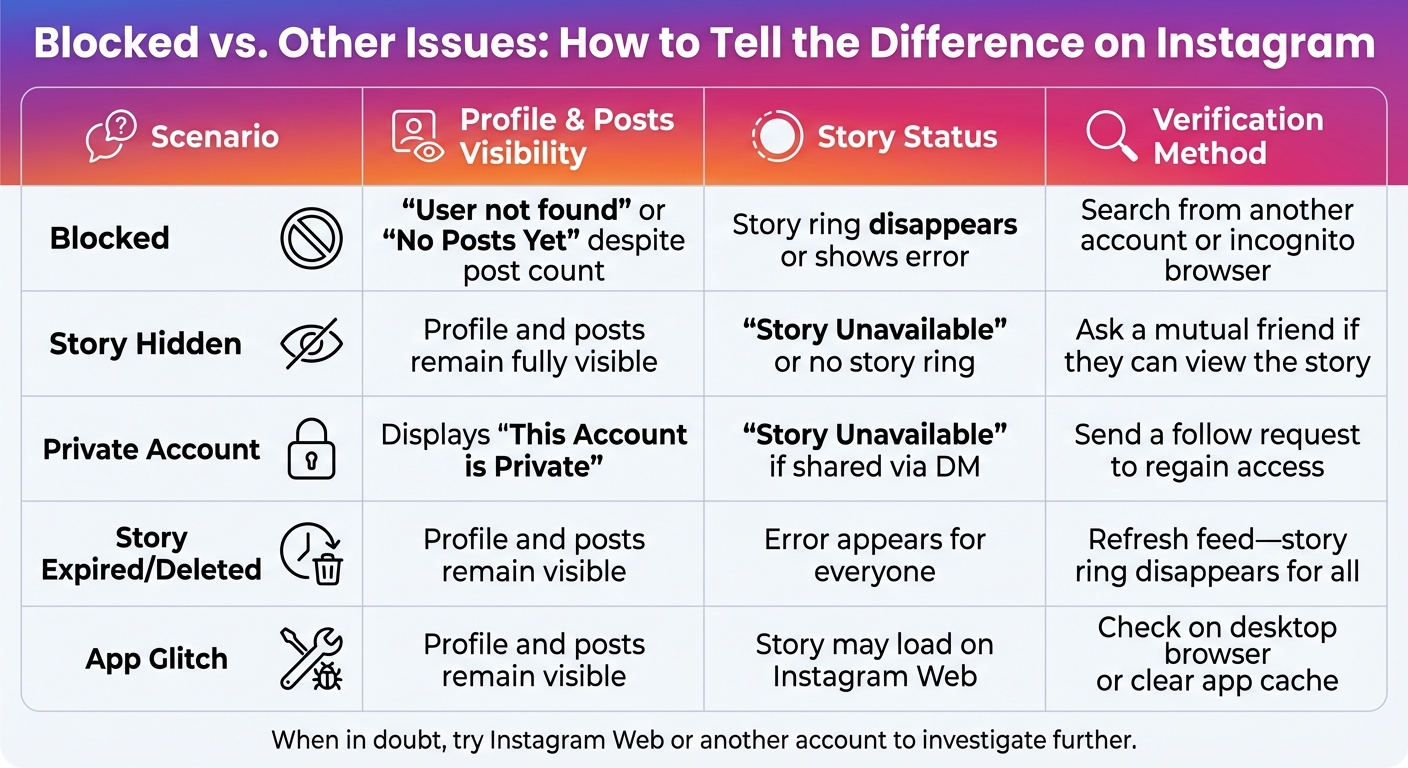
Blocked vs. Other Issues: How to Tell the Difference
Different scenarios on Instagram can produce similar symptoms, so it’s helpful to break down the possibilities. Here’s a quick comparison of common situations and how to verify what’s happening:
| Scenario | Profile & Posts Visibility | Story Status | Verification Method |
|---|---|---|---|
| Blocked | "User not found" or "No Posts Yet" despite post count | Story ring disappears or shows error | Search from another account or incognito browser |
| Story Hidden | Profile and posts remain fully visible | "Story Unavailable" or no story ring | Ask a mutual friend if they can view the story |
| Private Account | Displays "This Account is Private" | "Story Unavailable" if shared via DM | Send a follow request to regain access |
| Story Expired/Deleted | Profile and posts remain visible | Error appears for everyone | Refresh feed - story ring disappears for all |
| App Glitch | Profile and posts remain visible | Story may load on Instagram Web | Check on desktop browser or clear app cache |
When in doubt, try switching to Instagram Web or use another account to investigate further. If the story or content loads elsewhere, it’s likely a technical glitch rather than a block.
How to Fix 'Story Unavailable' Errors
Once you understand why you're seeing the "Story Unavailable" error, you can take the right steps to fix it. The solution will depend on whether you're dealing with a technical issue, privacy settings, or account-related problems.
Fix Technical and App Issues
Start by refreshing your feed with a quick downward swipe. This clears cached data and removes expired story icons. If that doesn't help, check if Instagram is experiencing a platform-wide outage by visiting websites like Down Detector or IsItDownRightNow.
Connection problems are another common culprit. Try switching between Wi-Fi and mobile data, or toggle Airplane mode on and off to reset your network. If the issue persists, open Instagram in a web browser to rule out app-related glitches.
For more stubborn issues, update Instagram to the latest version. On Android, clear the app's cache (Settings > Apps > Instagram > Storage & Cache > Clear cache). On iOS, offload and reinstall the app (Settings > General > iPhone Storage > Instagram). Afterward, log out and back in to refresh your session.
Also, ensure your device's date and time are set to automatic. If none of these steps work, report the issue through Instagram by going to Settings > Help > Report a Problem, and include a screenshot of the error.
If technical fixes don’t solve the problem, it’s likely due to privacy or access restrictions.
Address Privacy and Access Restrictions
When technical fixes don’t work, privacy settings might be the reason. For instance, if the account sharing the story is private and you’re not following it, you’ll need to send a follow request to view their stories. Similarly, stories shared through direct messages may be limited to a "Close Friends" group, which you might not be part of. If you suspect someone has hidden their stories from you, you could ask a mutual friend to check if they can see the content.
For creators, managing privacy settings carefully can prevent accidental restrictions that block your audience.
Keep Your Stories Accessible to Followers
If you’re a creator or brand, making sure your stories are accessible is crucial for keeping your audience engaged. Avoid deleting stories right after posting, as broken links can trigger the "Story Unavailable" error. Instead, save important stories to your Highlights so they stay available after the standard 24-hour period.
Regularly review your "Hide Story From" and "Close Friends" settings to ensure you’re not unintentionally limiting your audience. If you frequently switch between private and public account settings, remember that non-followers could lose access to your stories. Lastly, ensure your stories follow Instagram’s guidelines. Avoid using copyrighted music unless you’re using the official music sticker, and steer clear of any content that violates platform rules to prevent removal.
Track and Improve Your Story Performance with Outfame
After resolving visibility issues, keeping tabs on your Story performance becomes essential. That’s where Outfame's AI-powered tool steps in, offering round-the-clock analytics to monitor how your Stories are doing. You’ll get detailed insights into who’s engaging with your content, pinpoint where viewers drop off, and tweak your approach in real time. Since Instagram Stories vanish after 24 hours, having instant access to this data means you can make the most of your content before it’s gone.
Outfame’s growth dashboards take it a step further by centralizing all your performance metrics. This makes it easy to identify trends and figure out what’s working. Want to know which Stories bring in the most profile visits? Or which ones keep viewers hooked until the last second? You’ll even see how your Story strategy ties into overall follower growth. This level of insight helps you separate real engagement challenges from technical glitches - like the dreaded "Story Unavailable" message.
What’s more, Outfame offers AI-generated post suggestions to take your Stories to the next level. The platform studies what clicks with your audience and recommends content ideas designed to boost both engagement and visibility. With features like automated audience targeting and secure API operations, this all-in-one growth tool is available for only $39 a month.
Armed with these insights, you can ensure your Stories stay engaging and effective long after fixing any technical hiccups.
Want more of the right people watching your own Stories? Outfame's organic Instagram growth service engages people in your niche, including viewing their Stories, so more of them find your profile.
Conclusion
When you see the message "Story Unavailable", it doesn't automatically mean you've been blocked. More often than not, it happens because the story has expired, the user deleted it, or privacy settings are in play. Since stories only last 24 hours, expired posts are a common culprit. Other times, users might delete their stories, limit who can view them through privacy settings, or share them exclusively with their Close Friends list.
Technical hiccups can also be to blame. Things like app glitches, outdated versions, corrupted cache files, or poor internet connections might prevent stories from loading properly. Additionally, Instagram itself may remove content that violates its guidelines or copyright rules, leading to the same "unavailable" message for everyone trying to view the story.
Understanding these possibilities can help you avoid unnecessary assumptions about your relationships. For example, if a story doesn't show up in your feed, check the user's Highlights or try accessing it through Instagram's web version. Tech journalist Anshuman Jain from Beebom explains it well:
"The time limitation of stories is what makes them enticing to us users. And having to miss out on one can be a big bummer... understanding these reasons can help you troubleshoot or deduce why you can't view a particular story".
If you suspect privacy settings are the issue, you could ask a mutual friend to check if they can see the story. If they can but you can't, it likely means you've been excluded from that specific post - not blocked entirely. For private accounts, sending a follow request is a straightforward way to regain access. By recognizing the different causes behind this error message, you can troubleshoot effectively and navigate Instagram with less confusion.
FAQs
How can I tell if a story was deleted or if I’m not on someone’s Close Friends list?
If you notice that others can view a story on Instagram, or it appears in the creator’s Highlights, but you can’t see it, chances are you’re not part of their Close Friends list. However, if the story has vanished for everyone and doesn’t show up in Highlights, it’s likely been deleted.
Also, don’t forget that Instagram stories automatically disappear after 24 hours unless the creator saves them. So, it’s possible the story just expired.
How can I fix the 'Story Unavailable' error on Instagram?
If you’re seeing the 'Story Unavailable' error on Instagram, don’t worry - it’s often fixable with a few simple steps. Here’s what you can do:
- Check your internet connection: A weak or unstable connection can disrupt Instagram’s functionality. Make sure you’re connected to a reliable Wi-Fi or cellular network. If needed, try switching networks or restarting your router.
- Refresh the app: On Instagram’s home screen, swipe down to refresh the Stories section. This often helps the app load the most up-to-date content.
- Update Instagram: Using an outdated version of the app can lead to errors. Head to the App Store (iOS) or Google Play Store (Android) to check for updates and install the latest version.
- Log out and log back in: Sometimes, signing out of your account and logging back in can resolve temporary glitches. If that doesn’t work, try viewing the story from a different account.
If these steps don’t solve the problem, uninstalling and reinstalling Instagram might do the trick. This clears out any corrupted files or cache that could be causing the issue.
Why does Instagram say 'Story Unavailable,' and how can I tell if I’ve been blocked?
If you can still view someone’s profile, posts, and bio but their story displays "Story Unavailable", it’s likely tied to their privacy settings rather than being blocked. They might have chosen to hide their story from you, shared it only with their Close Friends list, or set their account to private. In these situations, you’ll still have access to their profile and posts, but their story won’t be visible to you.
On the other hand, if their profile is entirely missing - like when searching their username results in "User not found", their posts disappear, and the Follow button either doesn’t work or stays on "Requested" - it’s a strong sign that you’ve been blocked. When blocked, you won’t see their profile picture, bio, or any content, and attempting to view their story will also show the "Story Unavailable" message.
To figure out what’s going on, here are a couple of things you can try:
- Check their profile: If their profile and posts are still visible but their story isn’t, it’s likely due to a privacy setting.
- Use another account: Log in with a different account or ask a friend to check if their story is visible. If it is, your original account has likely been restricted or blocked.
These methods can help you determine whether you’re dealing with a block or just privacy restrictions.


