
Your TikTok profile is your digital storefront, and optimizing it is key to growing your followers. Here's what you need to focus on:
- Profile Photo: Use a clear, centered image (400x400 PNG). Profiles with face-forward photos get 35% more engagement.
- Username & Display Name: Keep usernames simple and searchable. Add niche keywords to your display name for better visibility.
- Account Type: Choose between Business (immediate link access) or Creator (full music library) based on your goals.
- Bio: Use 80 characters to clearly state who you are, what you offer, and a call-to-action. Emojis can guide users to your link.
- Pinned Videos: Pin three videos strategically - intro, top-performing content, and audience FAQs. Update them regularly.
- Thumbnails: Create custom, consistent thumbnails with clear visuals and text to make your profile grid visually appealing.
- Link in Bio: Use a link aggregator for multiple destinations. Ensure links are mobile-friendly and functional.
- Analytics: Track profile visits, follower growth, and conversion rates. Adjust your bio, content, and pinned videos based on data.
Quick Tip: Profiles optimized for clarity and niche focus convert viewers to followers at a rate of 5.8%, compared to 2.3% for unoptimized profiles. Regular updates and alignment with your content strategy can significantly improve your growth.
How To Optimize Your TikTok Profile
Profile Foundations Checklist
Set yourself up for success by refining your profile's appearance, discoverability, and categorization.
Profile Photo and Visual Branding
Your profile photo is more than just a picture - it’s your first impression and a key tool for passive discovery. It shows up everywhere, from your profile page to comment sections.
For creators and personal brands, a clear, face-forward headshot works wonders. For businesses, a clean and recognizable logo is best. The key is ensuring the image is effective even at very small sizes - sometimes as tiny as 40x40 pixels in feeds. Make sure the subject is still identifiable at these reduced dimensions.
To get the sharpest result, upload your image at 400x400 pixels in PNG format. Since TikTok crops square images into circles, center your subject perfectly. Avoid text overlays, busy patterns, or intricate gradients - they lose clarity at thumbnail sizes. Fun fact: profiles with clear face shots see 35% more engagement than those without.
Using the same profile photo across TikTok, Instagram, YouTube, and other platforms builds instant recognition and strengthens trust across your audience.
Once your visual branding is set, it’s time to fine-tune your username and display name for better searchability.
Username and Display Name
Your username and display name are not interchangeable - each serves a specific purpose.
"Your name field is searchable. Your bio text is not." - Hopp by Wix
Your username (the @handle) is your unique identifier. It’s part of your profile URL and is used when others tag you. Meanwhile, your display name is what TikTok’s search algorithm indexes. This makes your display name a powerful SEO tool. A format like "Lauren | Private Chef" or "Sarah | Home Workouts" places a keyword right where the algorithm can find it.
Keep your username simple and easy to type - no long strings of numbers or tricky symbols. TikTok allows 2–24 characters, and you can only change your username once every 30 days. If your brand caters to a local audience, adding a location keyword (e.g., @AlexFitnessNYC) can help attract nearby followers.
Account Type and Category
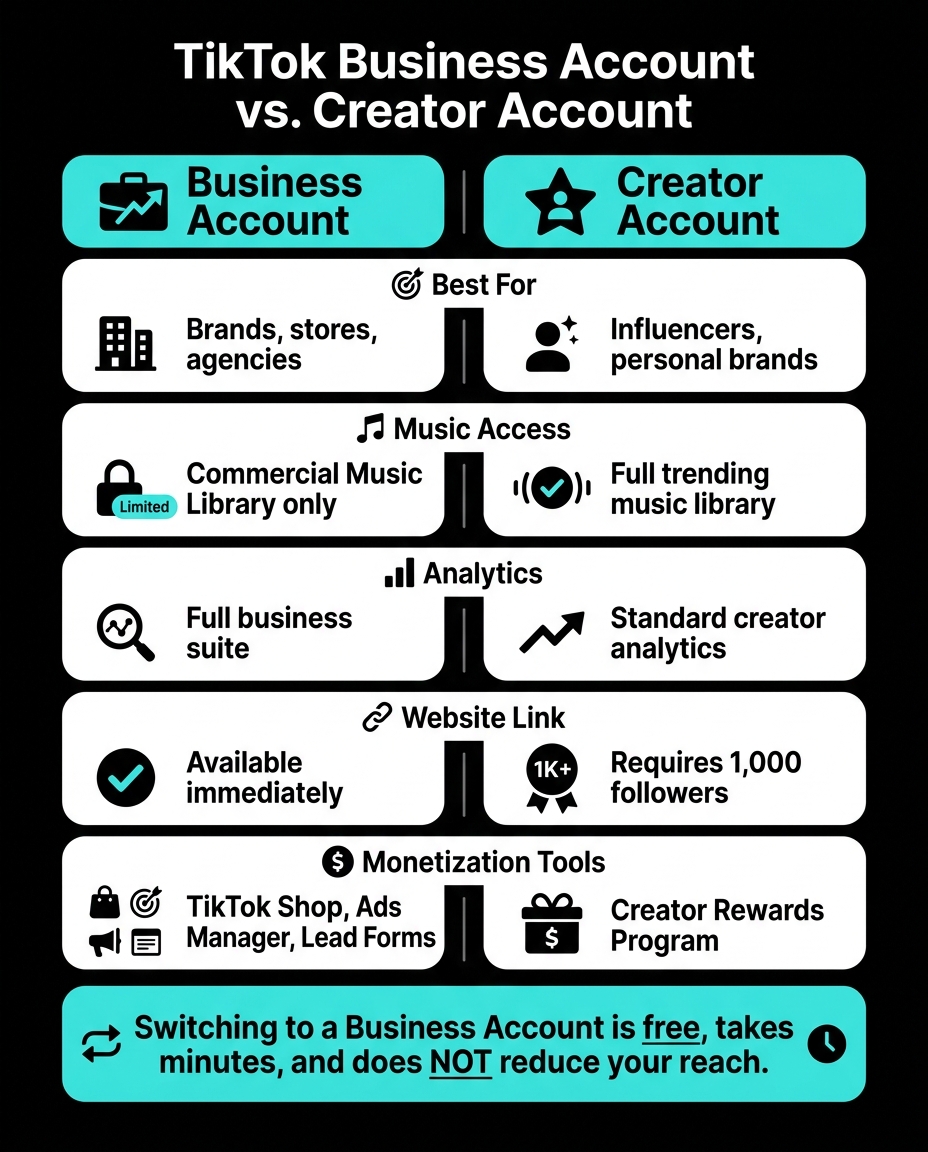
Deciding between a Business Account and a Creator Account depends on your goals. Here’s a quick comparison:
| Feature | Business Account | Creator Account |
|---|---|---|
| Best For | Brands, stores, agencies | Influencers, personal brands |
| Music Access | Commercial Music Library only | Full trending music library |
| Analytics | Full business suite | Standard creator analytics |
| Website Link | Available immediately | Requires 1,000 followers |
| Monetization Tools | TikTok Shop, Ads Manager, Lead Forms | Creator Rewards Program |
Switching to a Business Account doesn’t reduce your reach.
"TikTok serves your content based on quality and relevance. Zero followers? Doesn't matter. If the video is good, people will see it." - Michaela Kufelová, Content Writer, Kontentino
Finally, choose the most specific category for your account. This helps TikTok understand your niche and target the right audience.
With these foundational elements in place, you’re ready to move on to optimizing your bio and links to drive even more growth.
Bio and Link Optimization Checklist
TikTok Business Account vs Creator Account: Feature Comparison
How to Write a TikTok Bio That Gets Followers
Your TikTok bio gives you 80 characters to grab someone's attention - so every word has to work hard.
"When someone lands on your profile from a viral video, they spend fewer than 3 seconds deciding whether to follow you. Your bio is the deciding factor." - Monolit
A strong bio tells people who you are, what you offer, and includes a clear call to action. For example, a fitness creator might write: "Nutrition coach | Lost 50lbs | Free meal plan 👇". Skip vague descriptions like "content creator" or "lover of life." Specificity builds trust fast.
To guide people to your link, use emojis like a downward arrow (👇) or pointing finger (👉). Keep in mind that standard single-codepoint emojis count as 2 characters toward your limit, so use them sparingly - stick to one or two.
Once your bio is polished, focus on optimizing your clickable link.
Link in Bio Setup
TikTok allows one clickable link, which can limit you if you’re trying to promote multiple destinations like a shop, newsletter, or YouTube channel. A link aggregator solves this problem by creating a single landing page with all your links. Plus, you can track traffic using UTM parameters.
Make sure your landing page loads quickly and works well on mobile devices. Test it after updates - slow or broken links can hurt your conversions.
For clickable links, Personal and Creator accounts need 1,000 followers, but Business accounts can add a link right away. Switching to a Business Account is free and only takes a few minutes.
Contact Buttons and Social Connections
After fine-tuning your bio and link, add direct contact options to boost your profile’s credibility. Business accounts can include email and phone contact buttons, so you don’t have to display your email directly in your bio. These options make it easier for brands and collaborators to reach out.
You can also link your Instagram and YouTube accounts directly from your TikTok profile. Once connected, clickable icons will appear below your bio. To set this up, go to Edit Profile, find the Social section, and authorize each platform. If the Instagram button doesn’t show up on your Business Account, try switching to a Personal account temporarily, linking the profile, and then switching back.
"A clickable link on your TikTok profile page signals credibility. When you showcase your online presence like other major brands, you broadcast that you're running a reputable business." - Michael Keenan, Shopify
Adding these connections not only enhances your credibility but also encourages viewers to follow you across multiple platforms.
Content Presentation and Profile Layout Checklist
Pinned Videos Strategy
After fine-tuning your bio and links, the next thing visitors notice is your video grid. The top three spots on TikTok are crucial since you can pin up to three videos, marked with a "Pinned" sticker. Think of these as the storefront window of your profile.
"Pinned videos are the first row of your profile grid. These three covers are the most valuable real estate on your entire TikTok profile. They should feature your best cover designs and represent your strongest, most converting content." - Miraflow AI
Here’s a strategy: pin three videos that serve distinct purposes. Start with an introductory "start here" video to welcome new viewers. Then, include your top-performing content to establish credibility. Finally, add a video addressing common audience questions or reasons to follow you. Refresh these pins monthly or whenever your content focus shifts.
Consistent Video Thumbnails
Once your pinned videos are set, focus on creating a visually cohesive grid with custom thumbnails. A consistent thumbnail style transforms a chaotic grid into a polished, branded look. TikTok’s default auto-selected frames often don’t do your videos justice - they’re usually blurry or poorly timed. Instead, always upload a custom cover image.
Design thumbnails at 1080 x 1920 (9:16), but keep the key visuals and text within the center 1080 x 1080 area to avoid cropping issues.
"Your profile grid is the visual pitch. It tells visitors what kind of content you create, how consistent you are, and whether exploring your older videos is worth their time." - Jay Kim, Author
Stick to 2–3 brand colors and one bold font for your covers to create a signature style. Limit text to three words or fewer so it’s easy to read even at thumbnail size. Check your grid by glancing at it quickly - if the key details aren’t immediately clear, simplify your design. And remember, you can update cover images on older videos without republishing them, so there’s always room to clean up inconsistencies.
On-Profile SEO Tips
TikTok is becoming a major search tool. By 2026, 49% of US consumers will use TikTok for searches, a number that jumps to 65% among Gen Z. This makes on-profile SEO a powerful way to grow your reach.
TikTok indexes content using audio (via speech recognition), on-screen text (thanks to optical character recognition), and captions. A quick tip: say your target keyword within the first three seconds of a video and display it as a text overlay in the opening frame. This approach ensures both audio and visual indexing are covered.
Additionally, TikTok indexes playlist titles, so organizing your videos into keyword-focused playlists like "Budget Meal Prep" or "Beginner Yoga Flows" can make your content easier to find. As of 2026, TikTok’s algorithm also gives more weight to pinned comments from creators. Adding a keyword-rich pinned comment to your top-performing videos can further boost your discoverability.
Analytics and Profile Performance Checklist
Tracking Profile Visits and Follower Growth
Start by evaluating whether your profile effectively converts visitors into followers. TikTok's built-in analytics, available for free with Business or Creator accounts, provides key data to help you make informed decisions.
Two crucial metrics to focus on are Profile Views and Net Follower Growth. Profile Views indicate how many people visit your profile, while Net Follower Growth (new followers minus unfollows) shows whether your content is connecting with your audience. Avoid relying solely on your total follower count - it can mask important trends.
To dig deeper, calculate your Profile Visit Rate by dividing profile views by video views. If the ratio is low, it might mean your videos lack a compelling call-to-action or that your bio is not aligned with your content. A conversion rate above 0.5% from views to followers is a strong sign that your content resonates.
"A follower graph is not a scorecard. It's a clue. Use it to diagnose content fit, not to validate your ego." - Viral.new
You can also calculate your monthly growth rate using this formula:
((New Followers - Lost Followers) / Starting Followers) x 100.
For emerging creators in 2026, a healthy growth rate ranges between 5% and 15%. Allow at least 48 hours before analyzing a video's performance since TikTok's algorithm often takes 24–72 hours to fully distribute content.
Use these metrics to tweak your profile and align it with the type of content that resonates most with your audience.
Matching Your Profile to Your Top Content
Once you've gathered a few weeks of data, dive into the Content tab in TikTok Analytics and sort your videos by New Followers. This will highlight which videos are most effective at converting viewers into followers.
After reviewing the data, update your profile elements - like your display name, bio keywords, and pinned videos - to reflect the themes of your best-performing content. For example, if your top videos focus on "debt payoff tips", but your bio is generic, it's time to make adjustments. Additionally, check the Search Terms section in your analytics to ensure your profile includes the keywords people are using to find your videos.
If less than 50% of your views come from the For You Page, your content might not be reaching new audiences. In this case, reevaluate your hooks and hashtags to improve visibility.
Fine-tuning these elements will help you better align your profile with your audience's interests.
Tools for Deeper Profile Insights
TikTok's native analytics provide a solid foundation, but if you're looking for more detailed insights, the desktop dashboard (analytics.tiktok.com) allows you to export data as CSV files for trend analysis.
For creators seeking real-time growth tracking and advanced audience insights, tools like Outfame can be a game-changer. Outfame offers 24/7 growth monitoring and automated audience targeting. Its real-time dashboard lets you track follower growth immediately after a video is posted. Plans start at $39/month, and a free trial includes a growth guarantee.
Another helpful feature is the "What Your Followers Watch" section in the Followers tab. This tool reveals adjacent interests - like a finance audience also engaging with productivity content. Bridging these topics in hybrid videos can increase watch time by 20–30%. These insights are invaluable for refining both your content strategy and profile positioning.
Advanced Growth Optimization Checklist
Niche Clarity and Keyword Consistency
Posting content on more than three unrelated topics can slash your reach by 45% compared to accounts focused on a single niche. To grow effectively, stick to a specific niche.
Instead of going broad with topics like "Fitness" or "Cooking", zoom in on something more specific, such as "home workouts for people over 40" or "5-ingredient dinner recipes for working parents." These ultra-focused micro-niches make it easier for the algorithm to categorize your content and connect you with the right audience. A good guideline is the 80/20 split - dedicate 80% of your content to your main niche and 20% to closely related subjects.
Consistency in keywords is just as crucial. Use your niche keywords across your profile, including your bio, video titles, captions, and even spoken content. TikTok’s algorithm picks up on these signals, especially through auto-captions. And here’s a tip: use TikTok's native text editor for on-screen titles, as the platform prioritizes its own tools for categorization.
"Algorithmic distribution on TikTok favors creators with consistent niche signal plus hook-first edits - the two factors together explain 70 percent of follower growth variance in our 200-creator panel." - Sprout Social Creator Economy Index 2026
Take a moment to review your last 10 videos. If they cover more than five different topics, the algorithm might struggle to match your account with a steady audience. By refining your niche and keywords, you'll create a stronger foundation for growth and set the stage for testing content that converts followers.
Audience Targeting and Testing
After locking in your niche, use the 70-20-10 rule to structure your content strategy: dedicate 70% of your posts to proven formats, 20% to slight variations, and 10% to experimental ideas. This balance keeps your content reliable while allowing room for innovation.
Experiment with profile updates by rotating pinned videos and tweaking your bio's call-to-action. Then track your Profile Visit to Follow conversion rate using TikTok Analytics. Dive deeper with Creator Search Insights (found in Creator account settings) to identify what your audience is searching for, and use that data to align your content with their interests.
Here’s a framework to guide your growth through different follower milestones:
| Growth Phase | Follower Range | Primary Strategy | Key Metric |
|---|---|---|---|
| Foundation | 0 – 1,000 | Test 3–4 content formats; find niche voice | Watch time % |
| Momentum | 1,000 – 10,000 | Focus on top 2 formats; start series | Share rate |
| Scale | 10,000 – 100,000+ | collaborate with top travel influencers or other niche creators; test longer content | Profile visits |
Most accounts need about 20–30 videos in a consistent niche before TikTok’s algorithm can confidently match your content to the right audience. Stick with your strategy until the algorithm identifies your niche.
Profile Hygiene and Regular Updates
Once your content strategy is optimized, keeping your profile updated is essential to maintain growth.
A neglected profile - outdated links, irrelevant pinned videos, or an unclear bio - can hurt your follower conversion rate. Since 73% of TikTok users visit a creator's profile before deciding to follow, what they see matters.
Set up a regular review schedule to keep your profile in top shape. For example:
- Bio & CTA: Review monthly to ensure clarity and include a specific next step for visitors.
- Link in Bio: Check monthly to confirm the URL works and aligns with your current offer.
- Pinned Videos: Rotate quarterly to showcase your best-performing or most relevant content.
- Name Field: Update quarterly with niche-specific keywords to improve searchability.
- Search Terms: Monitor weekly through analytics to ensure your content matches the keywords you want to rank for.
| Element | Review Frequency | Key Action |
|---|---|---|
| Bio & CTA | Monthly | Ensure niche clarity and actionable steps |
| Link in Bio | Monthly | Verify functionality and relevance |
| Pinned Videos | Quarterly | Highlight your best or funnel-focused content |
| Name Field | Quarterly | Add niche-relevant, searchable keywords |
| Search Terms | Weekly | Track analytics for alignment with keywords |
For easier management, tools like Outfame’s real-time dashboard can help automate tracking. It monitors shifts in your follower growth rate and connects profile updates to performance outcomes. Plans start at $39/month, with a free trial and a growth guarantee.
Conclusion: Build a TikTok Profile That Grows Your Following
Every element of your TikTok profile plays a role in turning visitors into followers. While no single tweak will deliver instant results, consistently refining your profile can make a big difference. In fact, optimized profiles see a 5.8% follow-through rate, compared to just 2.3% for those left untouched.
The key is to treat your profile as a living document - something you update and refine regularly, not just once. Many TikTok users judge a creator’s profile before deciding to follow, so keeping it clear, relevant, and up-to-date is crucial. Outdated pinned videos or broken links can quietly chip away at your conversion rate over time.
"Your TikTok profile is where discovery becomes a decision. What they see next determines whether they follow you, click your link, or move on." - Hopp by Wix
Make it a habit to use this checklist as a tool for regular audits. Aim to review your profile at least once a month to ensure it aligns with your current content and insights from your analytics. If your visit-to-follow rate drops below 10%, take a closer look at your bio, pinned videos, and visual grid. Small, consistent updates can lead to steady growth, as even minor improvements add up over time.
For ongoing growth, tools like Outfame can help you stay ahead. With features like real-time growth tracking and AI-powered audience targeting, it supports the work you’re doing to optimize your profile. Plans start at $39/month, including a free trial and a growth guarantee. While the checklist helps you set the foundation, consistent effort paired with the right tools will keep your profile growing.
FAQs
Should I switch to a Business or Creator account?
If you're promoting products, services, or professional content, a Business account is the way to go. It provides access to tools like advanced analytics, TikTok Ads Manager, and contact buttons. However, there are some trade-offs - you'll only have access to the Commercial Music Library, and your account must remain public.
On the other hand, if your goal is organic growth, leveraging trending audio and building strong community connections, a Personal account might be a better fit. For those looking to grow effectively across different niches, tools like Outfame’s AI solutions can make a big difference.
What should I pin as my three pinned videos?
To increase engagement and attract more followers, consider pinning your top three videos. Here's a strategy to get the most out of this feature:
- Introduce Yourself: Pin a video where you share who you are and what your content is all about. This helps new visitors quickly understand what they can expect from your page.
- Highlight Your Viral Hit: Showcase your most popular video - the one that grabbed the most attention. It’s a great way to demonstrate your ability to create content that resonates.
- Show Your Value: Pin a video that clearly illustrates what you offer to your followers, whether it’s tips, advice, or entertainment.
Alternatively, you can focus on evergreen content. Tutorials, inspiring stories, or timeless posts are perfect for keeping your profile fresh and appealing, no matter how active you’ve been lately.
How do I measure my visit-to-follow conversion rate?
To figure out your visit-to-follow conversion rate, take the total number of new followers and divide it by the total number of profile visits within a specific time frame. Then, multiply the result by 100 to get the percentage. You can access these numbers in TikTok's analytics dashboard under the Creator Tools section. For a simpler way to grow, platforms like Outfame provide automated audience targeting and real-time analytics, making it easier to convert profile visits into active followers.


