
Social media security is critical for protecting your brand, reputation, and finances. In 2025 alone, over 1.4 billion accounts were compromised, costing businesses millions in damages. Yet, 85% of teams still share passwords through insecure methods like email or messaging apps, exposing themselves to risks like phishing, credential stuffing, and insider threats.
Key takeaways for protecting your accounts:
- Stop sharing passwords: Use password managers and role-based access controls.
- Enable Multi-Factor Authentication (MFA): Use tools like Google Authenticator or hardware keys for extra security.
- Audit third-party tools: Regularly review app integrations and OAuth tokens.
- Train your team: Simulate phishing attacks and teach best practices to reduce human errors.
- Implement clear policies: Define password standards, access controls, and incident response steps.
Disney's 2025 account hack shows the risks: attackers stole $50,000 in minutes by promoting a crypto scam. Protecting your accounts isn't just an IT issue - it's a team-wide responsibility. Start by auditing your accounts, enforcing MFA, and creating a robust security policy.
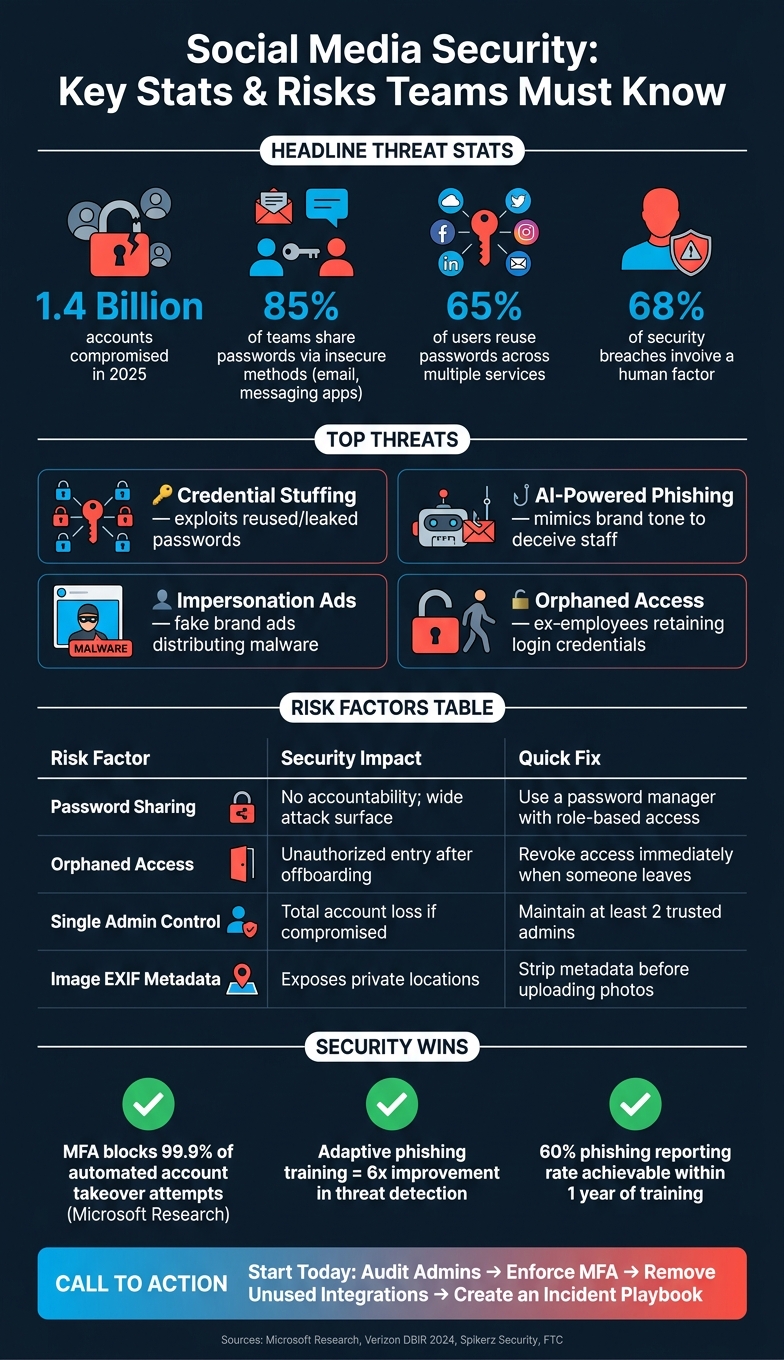
Social Media Security: Key Stats & Risks Teams Must Know
Cybersecurity & Social Media: Ignorance is NOT Bliss
The Social Media Security Landscape
Social media accounts are a unique mix of public exposure and team collaboration, yet they’re often not given the same level of protection as internal systems. This is risky because just one breach can instantly impact millions of people. To protect your accounts, it’s essential to understand both external threats and internal weak points. Let’s break down the key challenges.
Common Threats to Shared Social Media Accounts
One of the biggest threats in 2026 is credential stuffing, which involves using leaked login credentials to gain access. Why does it work? Because 65% of users reuse passwords across multiple services. This means that if an old password from one breach is still in use, an attacker could easily gain access to a current account.
Phishing attacks are also becoming harder to detect. With AI, attackers can now mimic a brand’s tone and style by analyzing its public content, creating phishing messages that feel eerily authentic.
"Targeting a social media manager used to require effort... AI has eliminated it. Today, an attacker can scrape a brand's LinkedIn and Instagram, analyze months of campaign content, clone the tone and style of internal communications, and generate a phishing message... in minutes." - Ron Storfer, Co-Founder and CPO, Spikerz Security
Impersonation is another growing concern. In May 2025, a group called UNC6032 ran paid social ads that looked like official posts from Luma AI and Canva Dream Lab. These ads tricked users into downloading malware.
Human Errors and Insider Risks
The biggest weak link in social media security? People. Most breaches can be traced back to everyday mistakes, like sharing credentials carelessly, failing to remove admin access for contractors, or relying on one person to manage a critical account without a backup plan. These internal missteps can amplify the damage caused by external attacks.
Two common issues - orphaned access and single admin control - often go hand in hand. When former employees, freelancers, or agencies retain login credentials after offboarding, they leave a door wide open for potential breaches. If that access is tied to billing or ad accounts, the fallout can be devastating.
Even something as simple as posting a photo can pose a risk. Smartphone photos often contain GPS coordinates and timestamps in their metadata (EXIF data). If this metadata isn’t removed, you might accidentally reveal sensitive locations, like a private office or someone’s home address.
| Risk Factor | Security Impact | Quick Fix |
|---|---|---|
| Password sharing | No accountability; wide attack surface | Use a password manager with role-based access |
| Orphaned access | Unauthorized entry after offboarding | Revoke access immediately when someone leaves |
| Single admin control | Total account loss if that person is compromised | Always maintain at least two trusted admins |
| Image EXIF metadata | Exposes private locations and routines | Strip metadata before uploading any photos |
Platform-Specific Risks on Instagram and TikTok
While security is paramount, teams must also balance protection with growth strategies. For the latest Instagram growth insights, staying updated on platform changes is key.
Each platform has its own set of vulnerabilities, and addressing these requires tailored security measures.
On Instagram, a major vulnerability surfaced in June 2026 when hackers exploited Meta’s AI support bot using a "confused deputy" attack. They tricked the bot into adding new email addresses to accounts, bypassing two-factor authentication entirely. This method was used to deface high-profile Instagram accounts, including those of the Obama White House and U.S. Space Force Chief Master Sergeant John Bentivegna.
"Meta's bot verified nothing about who was asking; it just helpfully did what it was told to do, up to and including sending the attacker a confirmation code to make sure the new email address was valid." - Dan Moore, Senior Director, FusionAuth
Another Instagram issue involves the Meta Accounts Center, which links Instagram and Facebook. A compromise on one platform can serve as a backdoor into the other. Stale OAuth tokens and third-party app connections add to the problem, as apps with API access can continue to post or read data without needing your password.
On TikTok, the most common threat is social engineering through fake collaboration offers. Attackers send messages that look like brand deals or partnership requests but contain malware-laced files or ask for a 6-digit verification code. Teams often fall for these under the pressure to respond quickly. The FTC offers a simple rule:
"If a message asks you to act fast, that's the signal to slow down. Legitimate platforms don't demand immediate action through DMs." - FTC
Core Security Practices for Team-Managed Accounts
Understanding potential threats is just the beginning. The real challenge lies in implementing safeguards to prevent issues before they arise. These steps directly address risks like credential stuffing, phishing, and insider errors, offering a proactive defense.
Setting Up Strong Access Controls
The first rule? Stop sharing passwords. Avoid using Slack, email, or spreadsheets to distribute login credentials. These methods create accountability gaps and increase vulnerabilities. Instead, rely on password managers such as 1Password, Bitwarden, or Psono to generate and store unique passwords. Aim for passwords that are at least 12 characters long.
Another critical measure is multi-factor authentication (MFA) - it’s not optional. Opt for robust MFA methods like authenticator apps or hardware keys. Tools like Google Authenticator or Authy provide stronger protection compared to SMS-based codes, which are susceptible to SIM-swapping attacks. For administrators with elevated privileges, hardware keys like YubiKey or Google Titan offer the highest level of security.
"MFA blocks over 99.9% of automated account takeover attempts, making it the most effective security measure you can use." - Microsoft Research
Strengthen recovery processes by using a dedicated recovery email secured with its own MFA. This step ensures attackers can’t exploit the "forgot password" feature as a backdoor.
Finally, limit exposure by assigning access based on roles.
Role-Based Permissions and Limiting Account Access
Not every team member needs the same level of access. Following the principle of least privilege - granting only the access necessary for a specific role - minimizes risks if an account is compromised. For example, a content coordinator might only need permission to post, not full administrative control, while a finance team member would need billing access but not the ability to change account settings.
"If one person holds the only admin access to a critical account, you don't have access management. You have a hostage situation waiting to happen." - Bill Roberts, Founder, Handles
Here’s a quick guide to aligning roles with permissions:
| Role | Meta (Business Suite) | TikTok | YouTube |
|---|---|---|---|
| Executive | Analyst | Analyst | Viewer |
| Marketing Manager | Employee | Operator | Editor |
| Content Coordinator | Employee | Operator | Editor |
| Agency (Active) | Advertiser | Advertiser | Editor |
| Finance | Finance Editor | - | - |
(Source: Handles Blog, 2026)
Two key rules: always have at least two or three trusted admins across different departments to avoid a single point of failure, and immediately revoke access when someone leaves the team. For external agencies, set automatic expiration dates for access to ensure permissions don’t linger unnecessarily.
Using Third-Party Tools Safely
Third-party tools - like scheduling platforms, analytics dashboards, and chatbots - are convenient, but they can also introduce vulnerabilities. A single compromised integration can jeopardize all linked accounts. Before connecting any tool, confirm it uses secure API connections and avoids storing passwords.
Tools that rely on scoped OAuth tokens are much safer. They only request the permissions they need and don’t store your login credentials. For example, Outfame connects to Instagram and TikTok through secure APIs, protecting your credentials even if the tool itself is breached.
Make it a habit to perform a quarterly audit of all connected apps. On Instagram, check "Business Integrations" in your settings; on TikTok, review "Permitted Services" in the Business Center. Remove any tools no longer in use. Stale OAuth tokens from inactive tools are an easy risk to eliminate.
Building Social Media Security Policies and Training Programs
Creating effective security practices goes beyond implementing technical safeguards - it also requires clear policies and consistent training. While technical measures like access controls can address system vulnerabilities, human-related risks demand a structured approach through policies and education. Even the best access controls are only effective if everyone adheres to the same guidelines, which is why a formal security policy is essential.
Writing a Clear Security Policy
A good security policy should be straightforward and actionable. At a minimum, it needs to address six key areas:
- Password standards: Require unique passwords with at least 12 characters, stored in an approved password manager.
- MFA (Multi-Factor Authentication): Mandate its use for all accounts.
- Acceptable use rules: Define what is and isn’t allowed.
- Third-party tool approval: Outline processes for evaluating and approving external tools.
- Account lifecycle management: Include procedures for account creation, updates, and deactivation.
- Incident response: Provide a clear reference for handling security breaches.
An often-neglected detail is assigning ownership for enforcing these policies. For example, the CISO can oversee the program, IT can handle technical controls, HR can manage training and enforcement, Legal can ensure compliance, and community managers can oversee daily account management. This way, everyone knows their role before a breach occurs, avoiding confusion during a crisis.
"Without a plan, your response will likely be reactive, inconsistent, and potentially damaging." - Sprout Social
The policy should also emphasize securing personal profiles. Attackers frequently exploit public profiles to craft social engineering tactics, so personal privacy settings must be addressed alongside account access management.
With these guidelines in place, transitions like onboarding and offboarding become more manageable and secure.
Onboarding and Offboarding Procedures
Social media access should never be an afterthought during onboarding or offboarding. Access must be granted through a documented approval process and always tied to company-owned credentials. Using personal or contractor email accounts creates unnecessary risks - if the account is tied to a personal email, the company doesn’t truly control it.
When an employee departs, access should be revoked immediately on their last day. This includes:
- Removing platform permissions.
- Rotating shared passwords.
- Resetting API keys.
- Auditing third-party tools for lingering access tied to that individual.
Incorporating these steps into the HR exit checklist ensures no critical tasks are overlooked. Additionally, always maintain at least two or three admins from different departments for each vital account to avoid single points of failure.
Running Regular Security Training
Even the best policies are ineffective if the team doesn’t understand them. That’s why regular, role-specific training is crucial. In 2024, 68% of security breaches involved a human factor - such as social engineering, weak passwords, or simple errors. Training directly addresses these vulnerabilities.
The most effective programs go beyond annual compliance videos. They are frequent, tailored to roles, and realistic. Phishing simulations are particularly impactful, mimicking common social media threats like fake DMs, bogus partnership offers, or "ad account suspended" notices. Studies show adaptive phishing training can lead to a 6x improvement in threat detection and a 60% reporting rate within a year. Any failures in simulations should be followed up with targeted training.
For broader teams, tabletop exercises are invaluable. These simulations of real-world account takeovers - bringing in marketing, legal, HR, and finance - highlight process gaps and prepare teams for actual incidents. Running these exercises once or twice a year can make a significant difference.
| Training Element | Best Practice | Objective |
|---|---|---|
| Phishing Simulations | Use platform-specific lures (DMs, alerts) | Enhance awareness of social media threats |
| Tabletop Exercises | Include cross-functional teams | Test and improve incident response |
| Content Format | Concise, interactive modules | Boost engagement and retention |
| Frequency | Monthly or quarterly | Maintain high levels of security awareness |
| Reporting | One-click reporting tools | Reduce detection and response times |
To measure the effectiveness of your training, track two key metrics: Mean Time to Detect (MTTD) and Mean Time to Remediate (MTTR). These figures provide a clear picture of how well your team is responding to threats and help justify continued investment in security training.
Monitoring Accounts and Responding to Security Incidents
Keeping a Close Watch on Account Activity
Monitoring your accounts is like having an early warning system - it helps you spot trouble before it spirals out of control. In 2025, over 1.4 billion social media accounts were compromised globally. Unfortunately, many teams only realize there's an issue after the damage is done. The goal? Catch potential threats early.
Start by setting up login alerts for new devices and locations. Watch for signs like "impossible travel", where logins occur from geographically distant locations within a short time frame - this often suggests stolen credentials. Another red flag is a sudden spike in password-reset emails landing in your corporate inbox, which could signal a takeover attempt. These alerts can guide your team toward deeper investigations, such as checking app integrations or unusual posting behaviors.
Pay close attention to OAuth app approvals. If a new third-party app suddenly gains access to your account, it’s worth digging deeper. Establish a baseline for your typical posting frequency and ad spend, then set up alerts for unusual activity. For example, mass outbound DMs or unexpected ad charges are often signs of a compromised account.
Platforms like Instagram and TikTok benefit from tools offering real-time analytics. Outfame’s 24/7 growth monitoring, for instance, provides continuous visibility, helping teams identify irregular patterns before they escalate into major breaches.
Another often-overlooked threat is impersonation. Shockingly, 56% of CISOs don’t monitor social media for brand impersonation. Automated tools that scan for lookalike handles or unauthorized use of your logo can help you catch these attempts early, protecting your reputation and audience trust.
Once monitoring is in place, being prepared to act quickly is just as important.
Building an Incident Response Playbook
When a breach happens, confusion can make things worse. A pre-planned playbook eliminates guesswork and keeps your team focused.
"Preparation is often the difference between a manageable incident and a true brand-level emergency." - Ericka Johnson, Partner, Nelson Mullins
A solid playbook lays out clear roles. For example:
- Marketing: Freezes all content and ad campaigns immediately to limit financial loss.
- Security: Confirms the breach and starts containment efforts.
- PR: Manages external communication to reassure your audience.
- Legal: Handles compliance and documentation needs.
Containment steps should happen fast: revoke active sessions, rotate passwords, reset multi-factor authentication (MFA), and pause all ad spend and billing access. High-profile breaches have shown that acting quickly can minimize the fallout. Having a documented plan with assigned responsibilities ensures your team responds efficiently.
Don’t overlook platform-specific reporting requirements for services like Meta and TikTok. These platforms often have unique evidence needs and timelines, so knowing these details ahead of time can save valuable hours during a crisis.
| Team | Role During an Incident |
|---|---|
| Marketing | Freezes content and ads immediately |
| PR / Comms | Handles external communication |
| Security / IT | Verifies breaches and takes containment actions |
| Legal | Manages compliance and documentation |
Post-Incident Reviews and Improving Over Time
Containing a breach is only the first step. To truly secure your systems, you need to analyze what went wrong and make improvements. Conduct a post-incident review within 72 hours to prevent similar issues in the future.
Start with a root-cause analysis. Was the breach due to reused passwords, missing MFA, or a compromised app? Check for unauthorized "shadow" admins added to your account and inspect email settings for hidden forwarding rules left by attackers.
Next, create a 30/90-day remediation plan. The first 30 days should focus on immediate fixes, like rotating shared credentials, updating access controls, and switching high-risk accounts to hardware-based security keys (FIDO2/WebAuthn). Over the next 90 days, address structural improvements, such as updating security policies, revising team training, and running a tabletop exercise to simulate the attack scenario your team faced.
"It isn't about being 'unhackable' - it's about being prepared to lead through the crisis." - Jerry W. Swartz, Krypto IT
Finally, use metrics like Mean Time to Detect (MTTD) and Mean Time to Remediate (MTTR) to track your progress. If these numbers aren’t improving after each review, it’s a sign that your post-incident process needs refining.
Conclusion: Building a Stronger Security Posture for Your Team
Establishing effective security practices and clear team protocols is critical for safeguarding your social media presence. Social media security isn't just an IT issue - it requires a team-wide commitment. As Naveh Ben Dror, CEO of Spikerz, aptly states:
"Social media security is no longer a technical afterthought, it's a core measure of brand credibility."
The reality is clear: breaches are costly, and human error is a major factor, contributing to 68% of incidents. This highlights the importance of combining technical safeguards with well-crafted policies and ongoing training. Together, these elements - technical controls, role-based access, and continuous education - create a stronger defense against threats.
As your team grows, so does your exposure to potential attacks. Tools like Outfame help mitigate these risks with secure, password-free API connections and 24/7 real-time monitoring, reducing vulnerabilities tied to credential sharing. Security doesn't have to come at the expense of growth; you can protect your accounts while pursuing your goals.
Now is the time to take action. Start by auditing your accounts: check admin access, remove unused third-party integrations, enforce multi-factor authentication, and deactivate legacy accounts. These steps can go a long way in closing common security gaps.
FAQs
What’s the safest way for a team to access social accounts without sharing passwords?
The best approach is to use built-in platform roles or third-party social media management tools. These tools use secure delegation methods like OAuth, which let you grant access without exposing passwords. This setup ensures that actions are traceable to specific individuals, access can be revoked instantly, and permissions are managed effectively. To keep your accounts safe, avoid sharing passwords through email, messaging apps, or spreadsheets.
How can we prevent former employees or agencies from retaining access after offboarding?
To ensure security after an employee or team member leaves, it’s crucial to revoke their access right away on their departure date. Tools like Meta Business Suite or YouTube Studio make it easier to manage permissions without the need to share login credentials.
Here’s a quick checklist for offboarding:
- Remove any platform invitations or access.
- Disconnect third-party apps tied to your accounts.
- Update shared passwords to prevent lingering access.
- Delete any API keys that were issued to them.
Additionally, make it a habit to run quarterly audits. These reviews can help you spot and eliminate any permissions that might’ve been missed during offboarding.
What should we do first if our Instagram or TikTok account gets hacked?
If your account gets compromised, it's important to act fast. If you can still access it, take these steps immediately: create a strong, unique password, enable two-factor authentication (2FA), log out of all devices, and revoke access to any suspicious third-party apps.
If you're locked out, check your email for security alerts from the platform. Follow their recovery instructions, which might include verifying your identity through a video selfie or providing specific account details. Time is of the essence to regain control and secure your information.


