
Cross-promoting Stories between Instagram and TikTok is a smart way to reach both platforms' audiences without creating entirely new content. TikTok is great for discovery, especially among Gen Z, while Instagram helps deepen connections with Millennials. Here's a quick guide to make it work:
- Why it works: Stories are short-lived (24 hours), creating urgency. TikTok is discovery-focused, while Instagram builds engagement.
- Prep your accounts: Use Business/Creator profiles for Instagram and ensure TikTok content is public.
- Content tips:
- Sharing workflows:
- Download TikTok videos, remove watermarks, and upload manually to Instagram.
- Save Instagram Stories without stickers or music to repurpose for TikTok.
- Platform differences:
- Instagram Stories: Interactive stickers, captions, polished visuals.
- TikTok Stories: Shorter captions, trending audio, casual style.
Timing matters - post on Instagram in the morning and TikTok in the evening for better engagement. Use tools like Outfame to track cross-platform performance and refine your strategy.
How to Cross-Promote Content on Every Social Platform (TikTok, IG, YT, LinkedIn, FB in 2025)
Why Cross-Promoting Stories Works
Stories disappear after 24 hours, creating a sense of urgency that encourages immediate action. This short-lived format pushes followers to engage quickly, whether it’s tapping through, clicking a link, or visiting your profile.
"One Story concept, but three distinct audiences... cross-posting saves time, extends your reach, and helps you meet audiences where they are." - Lydia Sargent, Customer Success at Storrito
This urgency, combined with the temporary nature of Stories, makes them a powerful tool for driving engagement.
The Role of Temporary Content
Temporary content, like an Instagram teaser - perhaps a behind-the-scenes clip hinting at a full TikTok video - entices followers to seek out the complete story. This kind of teaser encourages exploration and keeps your audience curious.
What makes Stories even more effective are interactive features like link stickers, polls, and question boxes. These tools allow you to redirect traffic with just a single tap - something that regular feed posts can’t achieve as easily.
Building Traffic Between Platforms
Cross-promoting Stories works especially well because of overlapping audiences. For instance, about 54% of Instagram users are also active on TikTok. Many followers are already familiar with both platforms and only need a clear path to move between them.
TikTok excels at discovery, while Instagram focuses on deepening engagement. By using one platform to tease content on the other, you can keep your audience connected across platforms instead of losing them after a single interaction.
"That one tap from TikTok to Instagram could be the difference between a casual viewer and a loyal follower, or even a customer." - Masfa Ejaz, Content Writer, Social Champ
What You Need Before You Start
Before transferring content between platforms, it's important to have everything set up correctly to avoid unnecessary complications.
Active Accounts and Content
First, make sure you have active Instagram (Business or Creator) and TikTok accounts, along with at least one Story or video ready to repurpose. If you're using Instagram, your account must be switched to a Business or Creator profile. Personal accounts lack access to certain third-party scheduling tools and API features. Switching is quick, free, and can be done in your account settings.
TikTok, on the other hand, is more versatile. Most tools work with both personal and business accounts. Regardless of the platform, ensure your content is set to Public. TikTok videos marked as Private can't be shared using the in-app share button. For smoother manual sharing, link your Instagram account to TikTok by navigating to Edit Profile > Social > Instagram.
Technical Requirements
Your content should use a 9:16 aspect ratio (1080×1920 pixels) to fit seamlessly on both platforms. Always record or export your videos in this resolution to avoid issues like letterboxing or cropping. Export your files as MP4s encoded with H.264 video and AAC audio for optimal compatibility.
Pay special attention to audio licensing. As Jamie Partridge, Founder of PostEverywhere, explains:
"A song cleared on TikTok's Commercial Music Library is not cleared on Instagram, and vice versa. Meta's blanket licence does not cover audio downloaded from another platform."
To avoid licensing headaches, use original audio or royalty-free tracks embedded directly into your video before uploading. Also, make sure to remove the TikTok watermark before posting on Instagram. Since 2026, Instagram's "Originality Score" system has been flagging and downranking content with non-Meta watermarks almost instantly. Apps like CapCut and InShot are great tools for quickly removing watermarks.
How to Share TikTok Content to Instagram Stories
Step-by-Step Workflow
You’ve got two ways to share a TikTok video to Instagram Stories: the quick direct method or a manual upload. The direct option is super fast - just tap the Share icon on any public TikTok, choose Instagram Stories, and the app will take care of the rest by redirecting you automatically. However, there's a catch: this method includes a TikTok watermark, which can hurt your reach.
For better results, go with the manual upload method. First, download the TikTok video using tools like CapCut or Circleboom to remove the watermark. Then, upload the cleaned-up video through Instagram's Story interface. It might take an extra 30–60 seconds, but this small effort can significantly improve your Instagram growth.
Keep in mind that Instagram Stories max out at 60 seconds. If your TikTok video is longer, Instagram will automatically split it into multiple Story segments. To keep viewers engaged, aim for shorter videos - between 15 and 30 seconds works best.
Once your video is watermark-free and trimmed to the ideal length, it’s time to give it some visual flair.
Improving Visual Appeal
TikTok videos can look a bit out of place on Instagram if left untouched. To make your content feel at home, take advantage of Instagram's native features. Add interactive elements like polls, "Add Yours" stickers, location tags, or even a link sticker to guide viewers back to your TikTok profile.
Text overlays are particularly important. As William Gasner, CMO of Stack Influence, explains:
"Instagram has explicitly stated that blurry or recycled videos with other app logos won't be promoted as much to users."
Since many people watch Stories with the sound off, captions or on-screen text are a must. When adding text, be mindful of Instagram’s interface. Avoid placing text too close to the top or bottom edges of the 1080×1920 frame to keep it clear of UI elements like the profile icon and reply bar.
How to Share Instagram Stories to TikTok
Want to take your Instagram Stories to TikTok? Here's how to make sure your content fits perfectly on both platforms.
Saving and Editing Stories
Instead of downloading your finished Instagram Story, save the original video file from your editing app - whether it’s CapCut, InShot, or another tool - before adding Instagram-specific elements like stickers, fonts, or music. This way, you’ll have a clean video file in the ideal 1080×1920 resolution without any platform branding.
If you must use a finished Story, remove Instagram overlays to avoid TikTok’s algorithm flagging your content as a repost.
Another important step: use royalty-free audio during editing. Instagram’s music library isn’t licensed for TikTok, so embedding your own audio ensures your content is safe to post.
Keep in mind that Instagram Stories automatically chop up videos longer than 60 seconds into smaller segments. TikTok Stories, however, are typically 15–60 seconds long, so make sure the clip you upload fits TikTok’s time limits.
Once your video is polished and ready, it’s time to optimize it for TikTok.
Posting on TikTok
With a clean video file and proper audio in place, you can now tailor your post for TikTok’s audience and algorithm. Start by creating a new caption. Unlike Instagram, TikTok prefers shorter captions with fewer hashtags. Jamie Partridge, Founder & CEO of PostEverywhere, explains:
"TikTok favors fewer, broader, trending hashtags (3-5 max), placed inline within the caption."
Keep your caption short, casual, and kick it off with a strong, attention-grabbing hook. When adding text overlays to your video, use TikTok’s native editor instead of embedding text into the video file. TikTok indexes its native text for internal searches, which can improve your content’s visibility.
Timing also plays a big role in engagement. Aim to post between 6:00 PM and 10:00 PM to maximize your reach.
Adjusting Story Format for Each Platform
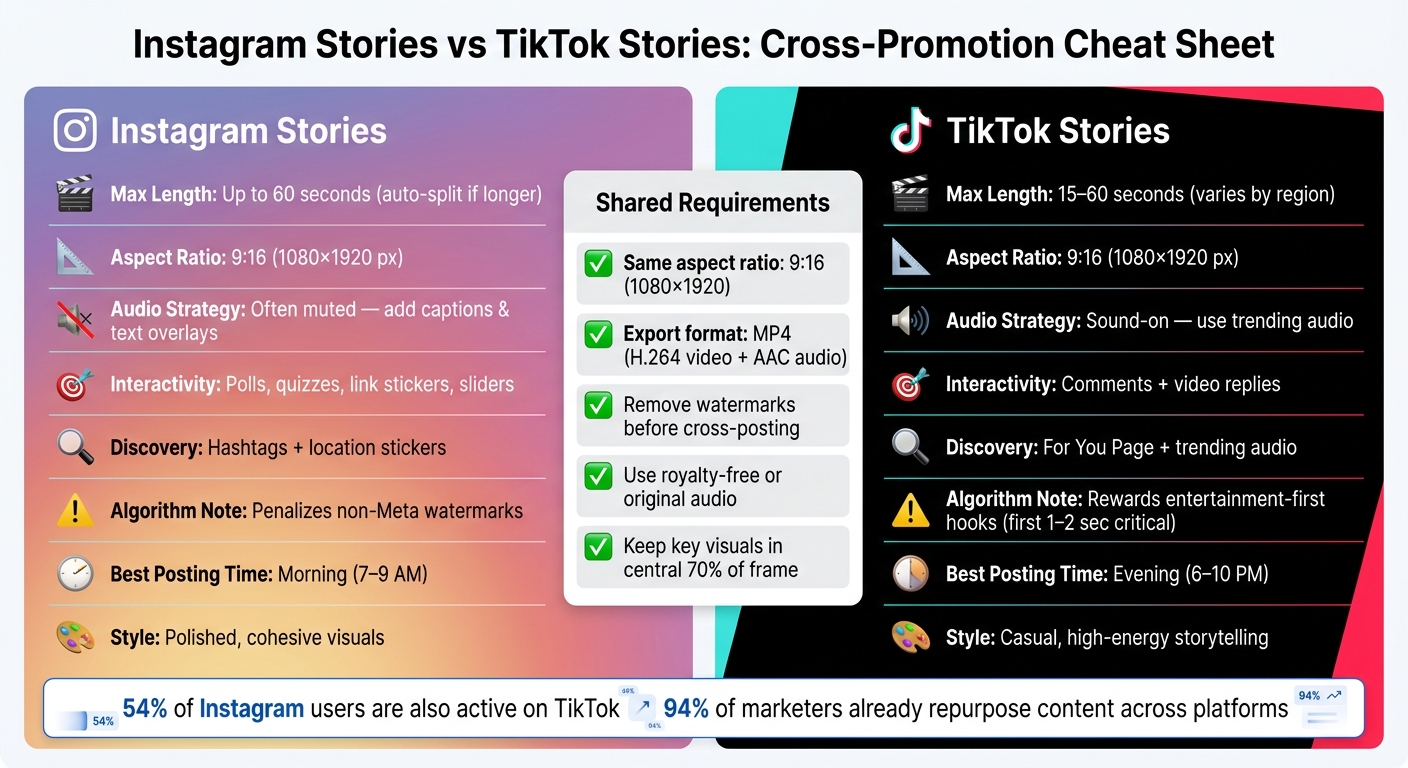
Instagram Stories vs TikTok Stories: Cross-Promotion Cheat Sheet
Once your content is ready and you understand the differences between platforms, it’s time to fine-tune your Story format for each one. Tailoring your approach to fit the unique expectations of each platform can help boost engagement. For instance, while both Instagram and TikTok use a 9:16 aspect ratio (1080×1920 pixels), the way audiences interact with Stories on each platform can vary significantly.
Format Requirements Compared
The main differences between Instagram and TikTok Stories lie in how users consume audio, interact with content, and how each platform’s algorithm operates. Instagram Stories are frequently watched on mute, making captions and text overlays a must-have. TikTok, on the other hand, thrives in a sound-on environment, where trending audio plays a major role in grabbing attention.
Here’s a quick comparison of the two formats:
| Feature | Instagram Stories | TikTok Stories |
|---|---|---|
| Max Length | Up to 60 seconds (split automatically) | 15–60 seconds (varies by region) |
| Aspect Ratio | 9:16 (1080×1920) | 9:16 (1080×1920) |
| Audio Strategy | Often muted; use captions | Sound-on; trending audio is key |
| Interactivity | Polls, quizzes, link stickers, sliders | Comments and video replies |
| Discovery | Hashtags and location stickers | For You Page and trending audio |
| Algorithm Priority | Penalizes watermarked content* | Rewards entertainment-first hooks |
*Instagram’s algorithm penalizes content with non-Meta watermarks.
Once you’ve got these format differences in mind, it’s crucial to adjust your visuals so that important elements aren’t hidden by the platform’s user interface.
Optimizing Visuals and Placement
Although Instagram and TikTok share the same 1080×1920 frame size, their on-screen interface elements can obscure parts of your content. On Instagram, the profile icon and reply bar show up at the top and bottom of the screen, while TikTok places buttons along the right side and bottom edge. To avoid these areas, keep key visuals and text within the central 70% of your frame.
Style also matters. Instagram users often prefer polished, cohesive visuals, while TikTok audiences are drawn to more casual, high-energy storytelling. You don’t necessarily need to create entirely different videos for each platform - sometimes, small tweaks like switching out a sleek graphic for a more relaxed text overlay can make the same content feel natural on both.
Review Before Publishing
Before hitting "publish", take a moment to review your Story for common mistakes that could hurt its performance. Issues like watermarks or broken links can significantly limit your content's reach. Here's a quick guide to help you get it right.
Key Checks to Run
Start by ensuring watermarks are removed. Watermarks, especially TikTok logos, can harm your content's visibility. Instagram, for instance, actively suppresses posts with visible TikTok branding. To avoid this, use tools like CapCut or InShot to create a clean, watermark-free version before uploading.
Next, test all links in your Story. If you're using Instagram's link sticker, make sure to tap it on a mobile device to confirm it works and leads to the correct destination. Broken links waste valuable engagement opportunities.
Additionally, verify that your audio is licensed for the platform. Using unlicensed tracks could lead to your content being muted or removed.
Once these basics are covered, turn your attention to platform-specific tweaks.
Platform-Specific Adjustments
Different platforms come with their own quirks, so tailoring your content to each one is crucial.
For Instagram, check that your account is set to public. If you're using interactive stickers like polls, quizzes, or sliders, add them directly within the Instagram app. Imported elements, such as screen-recorded polls from TikTok, won't function properly on Instagram. Since many users watch Stories with the sound off, include captions or text overlays that are easy to read and positioned to avoid being cut off by Instagram's interface.
On TikTok, the first 1–2 seconds of your video are critical. TikTok's algorithm prioritizes content that grabs attention immediately, so if your intro feels sluggish, trim it before posting. Keep captions concise and focused on relevant keywords. To maximize reach, stagger your posting times based on platform activity - Instagram tends to perform better in the morning and evening, while TikTok sees peak engagement between 6–10 PM.
Using Outfame to Track Cross-Platform Growth

Once you've polished your Stories for Instagram and TikTok, the next step is tracking their performance. This isn't just about keeping tabs on likes or views; it's about understanding which platform is truly driving your growth. Posting consistently is important, but knowing where your audience is most engaged is the key to scaling your efforts. That’s where Outfame comes into play, offering the tools to uncover these insights.
Outfame is an AI-driven growth platform designed specifically for Instagram and TikTok. It helps you attract engaged followers through automated audience targeting while offering a clear view of how your cross-promotion strategies are performing over time.
Tracking Audience Trends
Engagement metrics vary by platform. For instance, Instagram's algorithm prioritizes saves and shares, while TikTok leans heavily on comments and shares to determine content reach. Outfame simplifies this by presenting these metrics side by side in its unified analytics dashboard. This makes it easier to see which platform is driving more meaningful engagement.
Interestingly, even with balanced posting, one platform often accounts for 70–80% of total conversions. Spotting this early allows you to double down on the channel delivering the best results.
Beyond just cumulative data, having access to immediate insights means you can adjust your strategy in real time.
Real-Time Analytics for Growth
Outfame provides 24/7 monitoring, which means you can respond to trends as they happen. For instance, if a cross-posted Story performs exceptionally well on TikTok but barely moves the needle on Instagram, you’ll know within hours. These insights allow you to act quickly. A high rewatch rate on TikTok might indicate a strong hook, while elevated exit rates on Instagram could highlight a weak point in your narrative that needs tweaking - perhaps with a tighter storyline or an interactive element like a poll.
What sets Outfame apart is its proprietary AI tool, Outfame Max™, which takes these insights a step further. It helps accelerate follower growth by targeting the right audience on each platform - all without needing access to your account password. Plans start at $39/month, and you can try it out with a free trial to see how it fits your strategy.
Conclusion
Cross-promoting Stories between Instagram and TikTok is straightforward, but it requires careful attention to detail. The main steps are clear: remove watermarks, ensure your format matches the 9:16 vertical aspect ratio (1080x1920), customize captions and hashtags for each platform, and handle audio rights properly to avoid copyright issues.
Timing plays a big role too. Posting on Instagram during morning hours (7–9 AM) and on TikTok in the evening (6–10 PM) can help your content connect with the right audience. Small tweaks like these can make a noticeable difference without requiring additional content creation.
As Lydia Sargent, Customer Success at Storrito, explains:
"Cross-posting saves time, extends your reach, and helps you meet audiences where they are."
The creative work is already done - cross-promotion ensures your content reaches as many relevant people as possible. With 94% of marketers already repurposing content across multiple platforms, the focus shifts from whether to cross-promote to how efficiently it’s done.
Once your process is set, tools like Outfame can help monitor your cross-platform performance. With features like real-time analytics and the Outfame Max™ AI tool, you can identify which platform drives growth and fine-tune your strategy. Plans start at $39/month, with a free trial available for new users.
FAQs
How do I repost without watermarks?
To share content without watermarks, skip using apps' direct share buttons since these often include platform branding. Instead, save your video directly from your editing software before uploading it anywhere. If you're working with TikTok videos, try saving them using TikTok's save option (if it's available). Alternatively, you can edit the video with tools like CapCut to remove any watermarks. Another option is to use a third-party scheduler with official API connections, which lets you upload clean, native files to multiple platforms seamlessly.
What audio can I legally use on both apps?
You can safely use audio you've created yourself - like your voice or personal recordings - on both TikTok and Instagram without worrying about copyright issues. However, keep in mind that licensed music doesn't carry over between these platforms. A song approved for TikTok use, for example, won't automatically be cleared for Instagram.
To avoid problems like muted videos or copyright strikes, make sure to add music directly through each app’s library. Alternatively, you can upload royalty-free tracks to stay on the safe side.
Which metrics prove cross-promotion is working?
To evaluate how well your cross-promotion strategy is working, keep an eye on the right metrics for each platform. On Instagram, pay attention to reach, engagement, clicks, taps forward, exits, and sticker taps. For TikTok, focus on metrics like rewatches, comments, saves, and views. Watching trends in these numbers can help you fine-tune your strategy over time. Tools like Outfame’s real-time analytics can make this process easier by helping you optimize your content and drive steady, organic follower growth.


