
If you're trying to locate someone on Instagram using their phone number, here's how it works: Instagram doesn't allow direct phone number searches, but its Contact Syncing feature can help. When enabled, Instagram matches phone numbers saved in your contacts with linked accounts. Here's what you need to do:
- Save the number in your contacts: Include the correct country code (e.g., +1 for the U.S.).
- Enable Contact Syncing: Go to Profile > Menu > Settings & privacy > Follow and invite friends > Connect contacts and allow Instagram to access your contacts.
- Look for matches: Synced profiles will appear in the "Discover People" section of the app.
This method only works if the account has a linked phone number and contact discovery enabled. Note the privacy trade-offs: syncing gives Instagram access to your contacts and may make your profile visible to others. If this concerns you, you can disable syncing anytime in your settings. Avoid third-party apps, as they may compromise your data security.
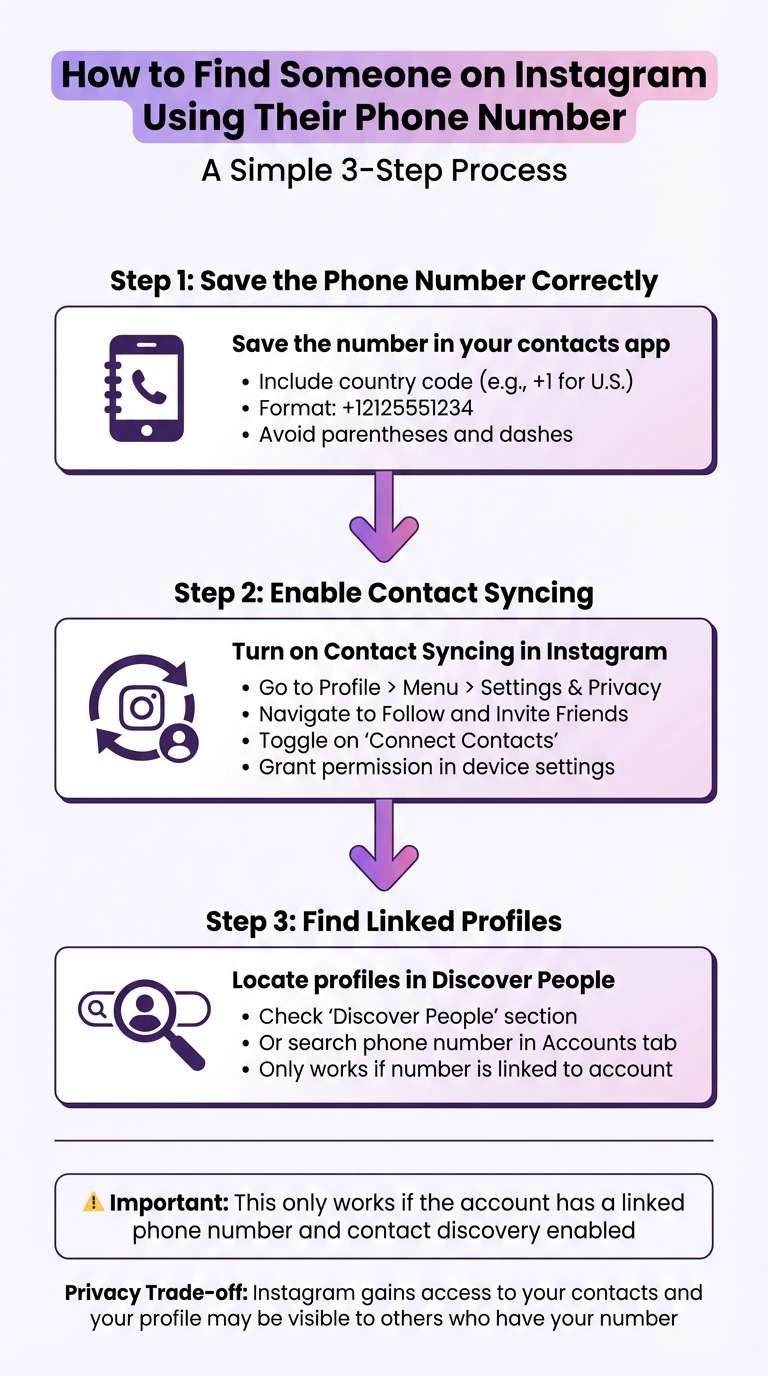
How to Find Someone on Instagram Using Their Phone Number: Step-by-Step Guide
Can You Find Someone on Instagram by Their Phone Number? (explained)
What You Need Before You Start
Before syncing your contacts with Instagram, make sure everything is set up correctly. Here's what you need to do:
Save the Phone Number in the Correct Format
Start by saving the phone number in your device's default contacts app. Instagram can only access numbers stored there.
Always include the country code at the beginning of the number. Use a plus sign (+) followed by the country code (e.g., +1 for the U.S. or +44 for the U.K.), then the area code and local number. For example, a properly formatted U.S. number would look like this: +12125551234. Avoid formats like (212) 555-1234, as parentheses, dashes, and extra spaces can cause issues with Instagram's matching process.
Once the number is saved correctly, ensure it’s linked to the Instagram account you're trying to find.
Check if the Number Is Linked to Instagram
Instagram only shows profiles that have a phone number actively linked to their account. If the person hasn’t linked their number or has used a different one, their profile won’t appear.
To check, go to Instagram's search bar, select the "Accounts" tab, and type in the full phone number, including the country code. If their profile pops up, the number is linked. If not, they may be using a different number or haven’t linked one to their account.
Enable Contact Syncing on Instagram
To sync your contacts, you’ll need to allow Instagram to access your device's contact list.
Go to Profile > Menu > Settings & privacy > Follow and invite friends > Connect contacts (or through the Accounts Center). Turn on the "Connect Contacts" option. Once enabled, Instagram will match the phone numbers in your contact list with linked accounts, and any matches will appear in the "Discover People" section of the app.
How to Sync Contacts and Find Profiles
Add the Phone Number to Your Contacts
Start by opening your phone's contacts app and saving the phone number you want to use. Make sure the number is added correctly, including the appropriate country code. Instagram relies on the numbers stored directly in your device's contact list, so numbers saved in third-party apps or unsynced cloud services won’t work.
Once the number is saved, Instagram will use it during the next sync to match it with any profiles linked to that number.
Enable Contact Syncing in Instagram Settings
After saving the number, you'll need to enable contact syncing in Instagram. Here's how:
- Open your Instagram profile and tap the menu icon (the three horizontal lines).
- Go to Accounts Center > Your Information and Permissions > Upload Contacts and toggle on Connect Contacts.
- Alternatively, you can navigate to Follow and Invite Friends > Follow Contacts and tap Allow Access when prompted.
You’ll also need to grant Instagram permission to access your contacts through your phone’s system settings. Once this is done, Instagram will periodically sync your contacts to keep recommendations up to date.
Locate Linked Profiles in the App
Once your contacts are synced, you can find any linked profiles in Instagram’s Discover People section. Head to your profile and tap See All under the Discover People heading to view a full list of suggested accounts.
This list prioritizes users who have linked their phone numbers to their accounts. Alternatively, you can manually search for a profile by entering the phone number in Instagram’s search bar and selecting the Accounts tab. Keep in mind, profiles will only appear if the person has linked that specific number to their account.
Fixing Common Problems
If you're having trouble finding linked profiles, try these troubleshooting steps to resolve the issue.
Make Sure Contact Syncing Is Enabled
If no profiles show up, first check if contact syncing is turned on. Open your profile, tap the menu icon, and go to Accounts Center > Your Information and Permissions > Upload Contacts. Ensure that the Connect Contacts option is switched on. Also, confirm that Instagram has permission to access your contacts in your device settings. Without this, Instagram won't be able to sync your contacts.
Resync Contacts If Profiles Still Aren't Showing
If profiles are still missing, try resyncing your contacts. Turn Connect Contacts off and then back on by navigating to Accounts Center > Your Information and Permissions > Upload Contacts. If that doesn’t work, you can delete all previously synced contacts and start fresh. Log in to Instagram using a web browser, go to your profile's Edit Profile section, and under Accounts Center, select Your Information and Permissions > Manage Contacts, then click Delete All. Once you've done this, re-enable contact syncing in the app. Keep in mind that Instagram may take up to 90 days to fully process the deletion of contacts.
Consider Private Accounts or Unlinked Numbers
If a profile doesn’t appear, it might be due to the user’s settings. They may not have linked their phone number, or they could have disabled contact discovery. Additionally, private accounts or unlinked numbers won't show up in your synced contacts. If your contact list remains empty, it’s possible the person has blocked you, deactivated their account, or doesn’t use Instagram. In such cases, try searching for their full name in the search bar or check the follower lists of mutual friends for clues.
Limitations and Privacy Concerns
Searching for someone on Instagram using their phone number comes with notable restrictions and privacy risks. Let’s break down the key limitations and potential trade-offs involved in this process.
How User Privacy Settings Impact Discovery
Instagram’s design prioritizes user privacy, which directly affects how accounts are discovered. For instance, you can’t simply type a phone number into the search bar to find someone. Instead, Instagram relies on contact syncing, where only accounts linked to a phone number and with contact discovery enabled will appear. Even then, users can choose to opt out of linking their phone number or disable contact syncing altogether. This means the method is far from guaranteed to work.
Why Some Accounts Won't Appear
There are several reasons why a profile might not show up in your synced contacts. For one, the user might have registered their account with a different number or updated their phone number since signing up. It’s also possible they never linked a phone number to their account in the first place. Additionally, if the phone number lacks the correct international country code, it won’t be recognized. While private accounts can still show up in synced results, you won’t be able to see their content unless they approve your follow request.
Privacy Risks of Contact Syncing
Syncing your contacts with Instagram isn’t without its risks. When you enable this feature, Instagram gains access to your entire address book. This data is then used to suggest accounts to follow and to tailor advertisements. On the flip side, syncing also means your profile might be suggested to others who have your phone number in their contacts. If this feels like an invasion of privacy, you can turn off contact syncing anytime by navigating to Accounts Center > Your Information and Permissions > Upload Contacts.
Want to grow beyond the people in your contacts? See how Outfame brings real Instagram followers who match the niche you choose.
Conclusion
Finding someone on Instagram using their phone number is straightforward if you follow the right steps. First, save the contact with the correct country code (like +1 for the U.S.). Then, enable contact syncing in your Instagram app settings and grant the app access to your contacts. Once this is done, matching profiles will show up in the "Discover People" or "Follow Contacts" section of the app. Keep in mind, this feature is only available on the mobile app - not the desktop or web versions.
However, this method only works if the account you're looking for has a linked phone number and has enabled contact discovery. It's also important to consider the privacy implications. Syncing your contacts gives Instagram access to them and may make your profile visible to others. If you're uncomfortable with this, you can disable contact syncing anytime by navigating to Accounts Center > Your Information and Permissions > Upload Contacts.
Lastly, if someone doesn't appear in your synced contacts, they may have chosen to keep their profile private or undiscoverable. Avoid using third-party apps or websites that promise to find Instagram profiles through phone numbers - these are often risky and can compromise your data security. Always prioritize privacy and safety when using this method.
FAQs
How can I use contact syncing to find the right Instagram account?
To boost your chances of finding the right Instagram account through contact syncing, here's what you need to do:
- Add your phone number to Instagram: Head to Settings → Personal Information and link your phone number to your profile. This helps Instagram associate your account with your contacts.
- Enable contact syncing: Open your profile, tap the three-line menu, select Follow and Invite Friends, and choose Follow Contacts. You'll need to allow Instagram access to your phone's contact list.
- Save the number correctly: Double-check that the person's phone number is saved in your contacts with the proper country code (e.g., +1 for U.S. numbers) and is free of errors.
- Manually refresh contact syncing: Update the Discover People section or restart the app to prompt Instagram to process any changes in your contact list.
By following these steps and ensuring your contact details are accurate, Instagram can better match accounts. If you're concerned about privacy, you can always turn off contact syncing in the app settings once you're done.
What privacy concerns should I know about when syncing my contacts on Instagram?
When you turn on contact syncing in Instagram, the app automatically uploads the phone numbers and email addresses stored in your phone’s contacts to its servers. This process happens regularly, ensuring your contact list stays updated on Instagram’s platform.
As a result, your account might be suggested to people who have your contact details, even if you’ve never interacted with them on Instagram. Similarly, their profiles could show up in your recommendations. Instagram also stores this contact information as part of your Personal Information, which may be used for things like targeted ads or enhancing its services.
This approach can unintentionally expose your social connections to a wider audience than you intended and merges your contact list into Instagram’s larger data network, which could raise privacy concerns.
Why can’t I find someone on Instagram even if I have their phone number?
There are several reasons why someone might not show up on Instagram when you search using their phone number. For one, they may not have linked their phone number to their account. Another possibility is that they’ve adjusted their privacy settings to prevent others from finding them this way. It’s also possible that they’ve completely removed their phone number from their profile. These options give users more control over their privacy and how they can be discovered on the platform.


