
When you see "User Not Found" on Instagram, it means the account you’re trying to view is unavailable. This can happen for several reasons:
- You’ve Been Blocked: The account is active but hidden from you. Mutual friends can still access it.
- Account Deactivated: The user temporarily hid their profile. It’s invisible to everyone but can be restored later.
- Account Deleted or Banned: The account no longer exists or was removed by Instagram for violating guidelines.
- Username Changed: The account is still active but now uses a new handle. Searching the old one won’t work.
- Technical Issues: Errors or typos in the username can also trigger this message.
To figure out what’s going on, ask a mutual follower, search from another account, or check past messages. If mutual friends can see the profile, you’ve likely been blocked. If no one can access it, the account is likely deactivated, deleted, or banned.
Key Differences:
- Blocked: The account exists but is hidden from you.
- Deactivated: The account is hidden from everyone.
If you’re managing a business or influencer account, stay proactive by maintaining updated contact lists and using tools to monitor changes in follower activity.
What Does User Not Found Mean On Instagram?
Why You See 'User Not Found' on Instagram
The "User Not Found" message on Instagram can pop up for several reasons, and understanding these scenarios can help you figure out whether you need to take action or not. This message might appear due to a temporary deactivation, being blocked, account deletion or banning, username changes, or even technical hiccups.
The Account Is Temporarily Deactivated
When someone temporarily deactivates their Instagram account, their profile essentially vanishes from the platform. If you try to search for them, you'll see the "User Not Found" message. However, this isn’t permanent - they can reactivate their account anytime by logging back in, which will restore their posts and followers. People often deactivate their accounts to take a break from social media.
You've Been Blocked
If you’ve been blocked, the account is still active and visible to everyone else - but not to you. Thomas Moore, an Instagram Marketing Expert at Viralyft, explains:
"If your friend can access the profile but you see 'User Not Found,' it's safe to assume you've been blocked."
Instagram also erases any likes or comments you’ve previously left on that user’s posts, making it seem as though you never interacted with them.
The Account Was Deleted or Banned
When an account is permanently deleted, it disappears entirely from Instagram. This happens when a user decides to remove their profile, and there’s no way to recover it. On the other hand, Instagram bans accounts that violate its community guidelines. These bans can last around 48 hours or be permanent, depending on the severity of the violation. In either case, the profile becomes inaccessible.
Username Changed or Technical Glitches
If someone changes their username, their old handle stops linking to their active account. While Instagram often redirects users to the new username, this doesn’t always work perfectly. Dave Johnson, a Technology Journalist at Business Insider, explains:
"Instagram usually forwards users to the new destination [after a username change], this might not always happen."
Technical issues or simple typos - like mixing up '0' and 'O' - can also lead to the "User Not Found" message when searching for someone. These small errors can make it seem like the account no longer exists.
How to Figure Out Why You See "User Not Found"
If you're seeing the "User Not Found" message, there are a few ways to determine what's going on. These methods can help you figure out if the account has been deactivated, deleted, banned, or if you've been blocked.
Ask Mutual Followers
One of the quickest ways to check if you've been blocked is to ask a mutual follower to search for the account. If they can access the profile while you can't, it's a strong sign you've been blocked. Elena Cavender, a Tech Reporter at Mashable, explains:
"When you click the tag of an account that blocked you in a comment, their profile will come up. You will be able to see their number of posts, but where posts are usually found it says, 'No Posts Yet' which is the telltale sign of being blocked."
However, if your mutual friend also sees "User Not Found", it’s more likely that the account has been deactivated, deleted, or banned. For further confirmation, you can try searching for the account from a different profile.
Search from a Different Account
Another way to check is by opening a browser in incognito or private mode and visiting instagram.com/[username] while logged out. If the profile shows up when logged out but not when you're logged in, this indicates you've been blocked. Cavender elaborates:
"If the account comes up [in a browser] but did not appear when you searched for it while you were logged into your account, you were blocked."
You can also try searching for the account using another Instagram account. However, remember that Instagram allows users to block not just one account but also "this account and any other accounts they may create."
If you're still unsure, checking past interactions can provide more clues.
Look at Past Messages and Tags
Your direct messages can reveal important hints. If a chat shows "Instagram User" instead of the person’s username, the account is likely deactivated or deleted. On the other hand, if the username is still visible but tapping "View Profile" leads to "User Not Found" or a profile with a post count but no visible posts, it’s likely you’ve been blocked.
You can also revisit old posts or comments where the user was tagged to see if their profile still exists. These traces can help confirm whether the account is active or gone for good.
Blocked vs. Deactivated: Key Differences
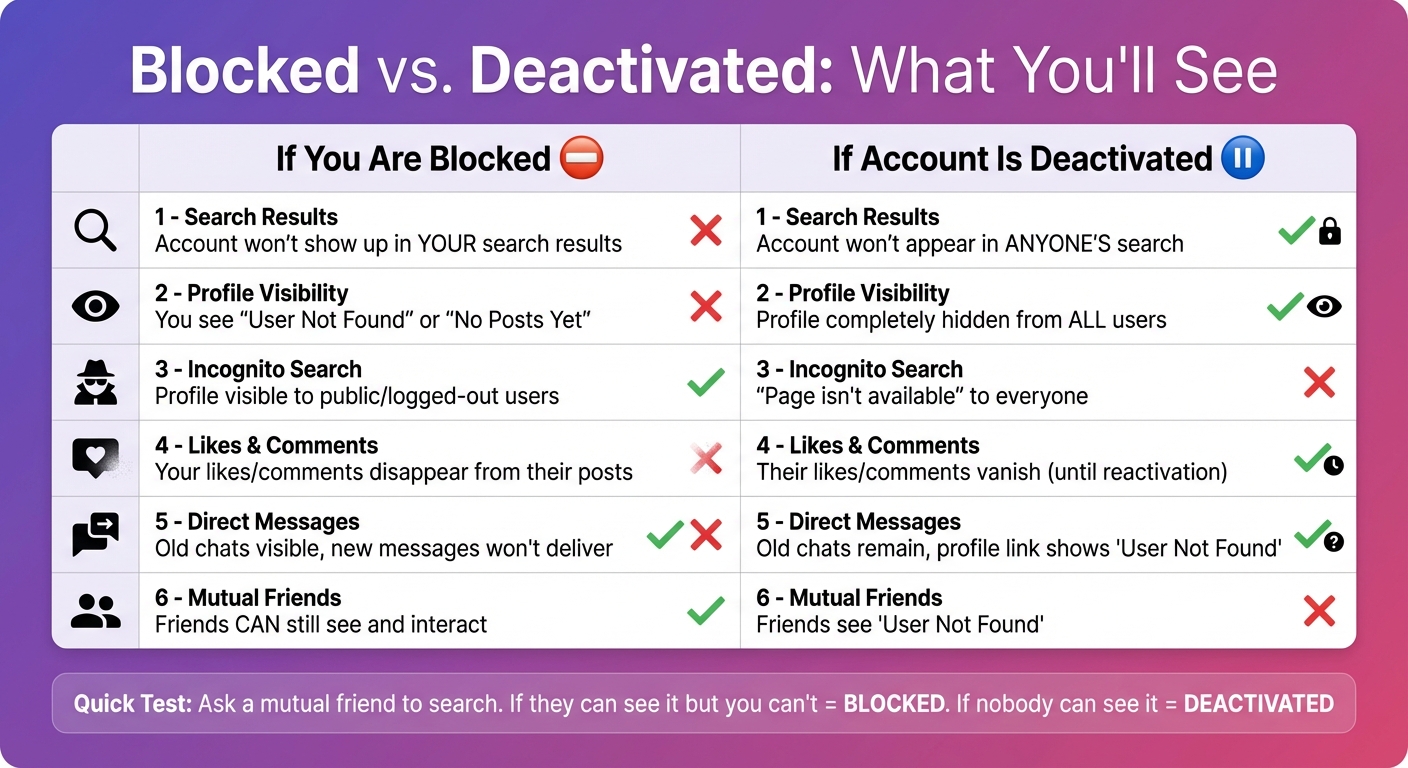
Instagram Blocked vs Deactivated Account Comparison Chart
The main distinction lies in visibility: when you're blocked, the account remains active and visible to others, but when an account is deactivated, the profile is hidden from everyone.
To clarify further, here's a quick breakdown of what happens in each situation:
| Feature | If You Are Blocked | If Account Is Deactivated |
|---|---|---|
| Search Results | The account won't show up in your search results. | The account won't appear in anyone's search. |
| Profile Visibility | You'll see "User Not Found" or "No Posts Yet" when visiting their profile. | The profile is completely hidden from all users. |
| Incognito Search | The profile remains visible to public or logged-out users. | The profile shows "Page isn't available" to everyone. |
| Likes & Comments | Any likes or comments you left on their posts will disappear. | Their likes and comments vanish until the account is reactivated. |
| Direct Messages | Old chats are still visible, but new messages won’t be delivered. | Old chats remain, but the profile link leads to "User Not Found." |
| Mutual Friends | Friends can still see and interact with the account. | Friends will see "User Not Found" or no results at all. |
Tech writer Dave Johnson offers a helpful tip:
"If you see a page that says 'Sorry, this page isn't available,' then either the individual has deleted the account or you have likely been blocked."
The easiest way to figure it out? Check if others can still access the profile. That’s the definitive clue.
How to Maintain Engagement Despite Account Issues
Keep Your Profile Optimized
An optimized and discoverable profile is essential, especially when dealing with account disruptions. Make it a habit to check your DMs for updated handles and reconnect with contacts. Instagram conveniently updates chat headers when someone changes their username, making it easier to stay in touch.
If an Instagram collaborator deactivates, don’t let that connection slip away. Use other platforms like Facebook, X (formerly Twitter), or Snapchat to maintain communication. You can also review tagged photos on mutual friends’ accounts to locate rebranded or renamed profiles.
Be cautious about using third-party block-checkers. These tools might seem helpful, but they can trigger Instagram's AI to flag your account. Meta’s enforcement actions in early 2024 led to restrictions on millions of content pieces. Staying compliant with Instagram’s policies is a safer bet.
Pair these efforts with effective growth strategies to keep your profile thriving.
Use Outfame's AI Growth Tools
Outfame offers an AI-driven approach to help you grow a diverse and engaged follower base - without resorting to risky automation tools. Their targeting methods focus on connecting you with real followers who are genuinely interested in your content.
One standout feature is the ability to track follower shifts in real time. This lets you spot account changes early, so you can address any potential impact on engagement. Plus, Outfame’s operations are API-based and don’t require your password, ensuring your account’s security while supporting steady growth.
Plans start at $39 per month and come with a Growth-Guarantee, making it a reliable option for creators looking to expand their reach.
Lost a few followers to blocks or deactivated accounts? The steadier fix is adding real Instagram followers who chose to follow you, which is what Outfame's organic Instagram growth service is built for.
Conclusion
The reasons behind the "User Not Found" message are straightforward when you break them down. It could mean you’ve been blocked, the account is deactivated, or the username has changed. To clear up any confusion, check with a mutual follower - if they can access the profile while you can’t, it’s likely you’ve been blocked.
Profiles that become unsearchable can disrupt Instagram's algorithm, leading to reduced engagement with your content. This can directly hinder growth, especially if your strategy depends on consistent interaction with your audience. Blocking also stops message delivery and removes your likes and comments, making it essential to shift focus to followers who genuinely engage with your content.
Be cautious of third-party block-checking tools, as they can trigger Instagram's AI. In the first half of 2024, Meta restricted access to over 149 million pieces of content globally due to policy violations. Staying within Instagram’s guidelines is key to keeping your account safe and visible.
FAQs
How do I know if someone blocked me or if their account is deactivated on Instagram?
If you’re greeted with the User Not Found message while trying to view an Instagram profile, it might mean one of three things: the account has been deactivated, deleted, or you’ve been blocked. Here’s how you can figure out what’s going on:
- Search for the username from your account. If the profile doesn’t show up but others can still find it, chances are you’ve been blocked.
- Log out or switch accounts and search again. If the message persists across different accounts, the user may have deactivated or deleted their profile.
- Look at past interactions, like comments or tags. If the account is gone for everyone, it’s likely deactivated. If it’s only inaccessible to you, you’ve likely been blocked.
When someone blocks you, their profile picture, posts, follower counts, and any comments or tags they’ve left on your content will vanish from your view. On the other hand, deactivated accounts appear completely offline and show the User Not Found message to everyone.
Why am I seeing the 'User Not Found' message, and could it be a technical issue?
If you think the 'User Not Found' message is caused by a technical issue rather than a blocked or deactivated account, there are a few things you can try to fix it. First, restart your device - this can often clear up temporary glitches. Next, check that your Instagram app and your device's operating system are updated to their latest versions. Sometimes, outdated software can cause compatibility problems.
Still having trouble? Try switching between Wi-Fi and cellular data to see if a weak network connection might be the culprit. If that doesn't help, uninstall and reinstall the Instagram app. This can refresh the app's data and remove any corrupted files that might be causing the issue.
Another option is to check the profile on a different device or through the Instagram website. If it works there, the problem is likely tied to your original device. And if none of these steps solve the issue, you might want to contact Instagram's Help Center for further support.
What happens to account visibility when you change your Instagram username?
When you update your Instagram username, your profile stops being accessible under the old handle. If someone attempts to search for or visit your former username, they’ll encounter a message like "User Not Found." Your profile will now only appear under the new username, so it’s a good idea to let your followers know about the change to prevent any mix-ups.


