
Your TikTok account is more than just a profile - it’s your identity online. If someone gains access without your permission, the consequences can be serious, from losing followers to having your account banned. Look out for these five warning signs to catch a potential breach early:
- Changed credentials: If your password, phone number, or email is updated without your knowledge, it’s a major red flag.
- Unfamiliar videos: New videos you didn’t post or your content disappearing could mean someone else has control.
- Messages you didn’t send: Hackers often send phishing links or scams from compromised accounts.
- Login alerts: Notifications about logins from unknown devices or locations can indicate unauthorized access.
- Recovery details altered: Changes to your email, phone number, or two-factor authentication settings make it harder to regain control.
Act fast if you notice any of these signs. Change your password, secure your email, and enable two-factor authentication to protect your account. If locked out, use TikTok’s “My account was hacked” feature and provide proof of ownership to recover your profile. Staying vigilant can save you from losing your account and reputation.
1. Your Password, Phone Number, or Username Was Changed
If your TikTok password, phone number, or username changes without your knowledge, it’s a red flag - your account might be compromised. Any unexpected email or text from TikTok about changes to your account should be treated as urgent. Hackers often target your recovery methods, like your email or phone number, while altering your credentials.
Once attackers gain access, they typically update your linked email and phone number, and even disable two-factor authentication. This makes the usual "Forgot password?" process ineffective, as the reset codes are sent to accounts you no longer control.
"By the time you realize anything is wrong, the account's recovery surface has already been rewritten." - Diego Fernández, Trust & Safety Operations Lead, YRS
You might notice changes to your username or display name, either on your profile or as seen by your followers. This is a common tactic used by attackers to repurpose accounts for scams or phishing.
Act fast. If you're still logged in, immediately remove unfamiliar devices and undo unauthorized changes before the attacker locks you out completely. If you’re already locked out, skip the usual login recovery steps and go straight to TikTok’s "My account was hacked" option. Be prepared to verify your identity using a government-issued ID.
| Access Status | First Action | Key Recovery Step |
|---|---|---|
| Still logged in | Change your password and verify contact info | Remove unrecognized devices under "Manage devices" |
| Locked out | Use "Forgot password" or "Report a problem" | Provide proof of ownership (previous email/phone/devices) |
| Email compromised | Secure your email account first | Enable 2FA on both your email and TikTok |
Finally, keep an eye on your account for any unauthorized posts or deletions, as these could indicate further attempts to misuse your profile.
2. Videos Were Posted or Deleted Without Your Knowledge
If you notice videos on your profile that you never uploaded - or find your original content has vanished - it’s a clear sign someone else has accessed your account. Hackers often delete existing videos to "clean" the profile before using it for their own purposes.
Take the case of "Olive", a TikTok account hijacked in November 2025. Chase Varga, Director of Growth & Brand Strategy at ListenFirst, shared how the attacker gained access through a leaked password. In just one night, they posted spam videos and used bots to inflate the follower count from 1,434 to 5,398. This not only tanked the account’s trust score but also slashed video reach to about 20 views per post. Varga explained the aftermath:
"The part nobody warns you about comes after [recovery], when the algorithm still thinks you are the person who posted the scam videos, bought the bots, and triggered every monetization flag in sight." - Chase Varga, Director of Growth & Brand Strategy, ListenFirst
Such unauthorized activity can cause serious consequences. TikTok may flag your account for monetization violations, potentially barring you from the Creator Fund or TikTok Shop. Worse, if the hacker posts content that breaches Community Guidelines, your account could face a permanent ban - even though you weren’t responsible.
If you regain control of your account, act quickly. Delete any unauthorized posts and notify your followers to prevent them from falling for scams. When appealing strikes, be precise and provide evidence that the violations occurred during the breach. Diego Fernández, Trust & Safety Operations Lead at YRS, advises:
"A specific, factually grounded description... routes the appeal to a human reviewer faster than a vague 'I got hacked.' Reviewers have a finite queue and a triage system; specificity wins triage." - Diego Fernández, Trust & Safety Operations Lead, YRS
You might also consider requesting an "Account Integrity Reset" from TikTok support. This process can help restore your account’s reach after a compromise. From here, it’s essential to distinguish between normal account activity and signs of a security breach.
3. Messages or Comments Were Sent From Your Account
Hackers often take advantage of your account by sending messages to your followers. Why? Because a message from someone familiar, like a trusted creator, feels more legitimate than one from a stranger. This tactic makes it easier for attackers to deceive your audience. It’s a reminder of how important it is to keep an eye on your account activity.
Check your chat history for any unauthorized DMs or ask if followers have reported unusual messages. Hackers often send phishing links, fake copyright violation notices, or bogus offers from brands. In fact, surveys show that 70% of users have encountered scams on social media, with credential phishing making up 19% of these cases.
A major example happened in June 2024, when a zero-day flaw exposed several high-profile TikTok accounts through direct messages. This exploit was especially alarming because victims didn’t need to do anything - just opening the DM handed over access to the attackers. TikTok spokesperson Alex Haurek addressed the issue:
"Our security team is aware of a potential exploit targeting a number of brand and celebrity accounts. We have taken measures to stop this attack and prevent it from happening in the future." - Alex Haurek, Spokesperson, TikTok
If you suspect your account has sent unauthorized messages, act fast. Start by reviewing your DM history and recent comments for anything suspicious. Also, check for third-party apps linked to your account and revoke access to any you don’t recognize. You can do this under Settings and Privacy > Security. McAfee’s editorial team advises:
"If your account posted or messaged others without your permission... let people know your account was compromised so they don't engage with scam links or requests." - McAfee
A quick post or bio update warning your followers can go a long way in protecting them - and your account’s reputation. From there, focus on identifying what’s normal activity versus clear signs of a breach.
4. You Received Login Alerts or See Unfamiliar Devices
TikTok notifies you via email or in-app alerts whenever there's a login from a new device or location. If you get one of these notifications and it wasn’t you, it’s a major red flag that your account might be at risk.
"If you receive a notification that your account has been signed in to from a device that you don't recognize, be sure to go to your TikTok app and check your settings right away." - Alex Banaga, Author
These alerts are your first line of defense against unauthorized access. To act quickly, open TikTok and navigate to Settings and Privacy > Security > Manage Devices. Here, you can review all logged-in devices. If you spot one you don’t recognize, tap the three-dot menu next to it and select Log out. Timing is critical - security data shows that users who remove unfamiliar devices within 30 minutes have an 81% chance of recovering their account. However, if an attacker has already changed your linked email or phone number, recovery rates drop significantly to just 31%.
After logging out suspicious devices, immediately change your password and enable two-step verification (2FA). While SMS-based 2FA is convenient, security experts recommend switching to an authenticator app, as SMS codes are vulnerable to SIM-swap attacks, which account for 9% of TikTok account breaches.
The Federal Trade Commission also shares a straightforward yet effective tip:
"Sign out of all devices. That way anyone who's logged in to your account on another device will get kicked out." - Federal Trade Commission
To stay ahead of potential threats, periodically review your Manage Devices section and turn on Login Alerts under Security and Permissions. This will help you catch unauthorized access early, even in cases of advanced attacks like malicious OAuth grants that can bypass basic notifications.
5. Your Recovery Options or Privacy Settings Were Changed
One of the first things hackers do after gaining access to an account is change the recovery email and phone number. This locks you out of your account by altering the recovery methods you’d typically use to regain control.
They might also disable two-factor authentication (2FA), leaving your account vulnerable to access with just a password. Even worse, hackers may grant malicious OAuth access to third-party tools. This tactic is behind 14% of TikTok account takeovers. What’s alarming is that this access can remain active even if you update your password, creating a hidden backdoor into your account. Combined with other changes, these actions make it much harder to recover your account.
Hackers don’t stop there - they often target your primary email account, which acts as the central hub for your online presence. If your email gets compromised, TikTok could be just the beginning of a much larger security issue.
If you still have access to your TikTok account, start by checking your inbox for any security emails from TikTok. Some of these emails may include options to reverse changes or report unauthorized activity, such as an "I didn’t authorize this" link. Next, navigate to Settings and Privacy > Privacy > Connected apps and revoke access for any apps or tools you don’t recognize. Additionally, update the password for your linked email account and enable 2FA there. Securing your email ensures hackers can’t intercept future recovery codes, even if they’ve tampered with your TikTok settings.
Normal Activity vs. Compromise Indicators
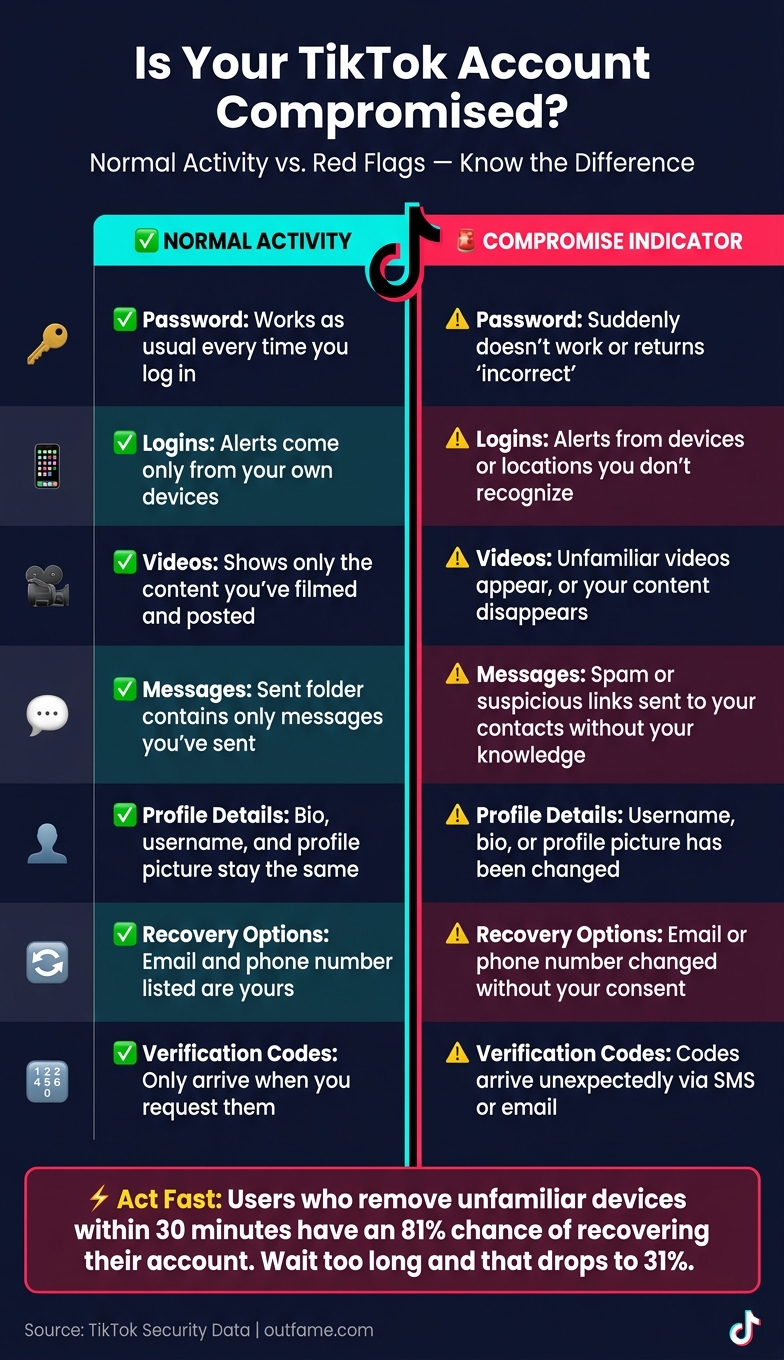
TikTok Account Compromise: Warning Signs vs. Normal Activity
Let’s break down how to tell the difference between normal account activity and signs of a potential compromise. Just because something looks unfamiliar doesn’t always mean your account has been hacked. For instance, using a VPN might trigger an "unrecognized location" alert, or an app update could temporarily log you out. However, when multiple unexpected changes happen all at once, it’s time to pay attention.
Here’s a quick comparison of normal activity versus potential red flags:
| Account Area | Normal Activity | Compromise Indicator |
|---|---|---|
| Password | Works as usual every time you log in. | Suddenly doesn’t work or returns "incorrect." |
| Logins | Alerts come only from your own devices. | Alerts from devices or locations you don’t recognize. |
| Videos | Shows only the content you’ve filmed and posted. | Unfamiliar videos appear, or your content disappears. |
| Messages | Sent folder contains only messages you’ve sent. | Spam or suspicious links sent to your contacts without your knowledge. |
| Profile Details | Bio, username, and profile picture stay the same. | Username, bio, or profile picture has been changed. |
| Recovery Options | Email and phone number listed are yours. | Email or phone number is changed without your consent. |
| Verification Codes | Only arrive when you request them. | Codes arrive unexpectedly via SMS or email. |
Timing is everything when it comes to spotting and addressing suspicious activity. For example, catching unusual behavior while you’re still logged into your account increases your chances of recovery to 81%. But the longer you wait - especially if you get locked out - the harder it becomes to regain control.
If you notice several of these warning signs at the same time, assume your account has been compromised. Act fast by navigating to Settings and Privacy > Security > Manage Devices and immediately remove any sessions or devices you don’t recognize.
Conclusion
Pay attention to these warning signs and act quickly to protect your TikTok account. Red flags like unexpected changes to your credentials, unfamiliar login alerts, unsolicited posts or messages, and altered recovery settings require immediate attention.
Don't wait - delays can make recovering your account much harder. If you're still logged in, change your password right away, sign out from any unrecognized devices, and enable two-factor authentication (2FA) using an authenticator app. If you're locked out, use TikTok's "Report a problem" feature and gather any evidence of unauthorized changes as proof.
Your linked email is another critical layer of security. Update its password and enable 2FA to keep it secure. As Divine Element aptly points out:
"Your email is basically the master key to everything. If that's compromised, TikTok is just the beginning."
Take steps to secure your email - it’s essential for protecting not just TikTok but your overall online presence.
Lastly, be cautious with third-party tools. Many account takeovers - 14%, to be exact - result from malicious OAuth grants to third-party apps. If you're serious about growing your TikTok account safely, consider tools like Outfame. They help you grow your audience without ever requesting your password or login credentials, ensuring your account stays secure as you expand your reach.
FAQs
What should I do first if I think my TikTok was hacked?
If you suspect your TikTok account has been compromised, take action right away. Start by logging in and changing your password to something strong and unique. Next, check your email for any TikTok notifications about changes to your account. It's also a good idea to secure your email by updating its password and enabling two-factor authentication. If you're unable to log in, head over to the TikTok Help Center to report the issue.
How can I tell a real TikTok security alert from a scam?
To identify a genuine TikTok security alert, always check your notifications directly within the TikTok app. Authentic alerts will show up in your in-app inbox. Scammers often try to create a sense of urgency - like warning about account suspension - to lure you into clicking suspicious links. Instead of falling for these tactics, navigate to your account settings manually to review your security activity. Outfame prioritizes safe growth services by never requesting your account password, ensuring your account remains protected.
Can a hacker still access my account after I change my password?
Yes, even after changing your password, a hacker can still access your account if their active session isn't terminated. To secure your account, head to Settings and Privacy > Security > Manage devices or Active sessions, and make sure to remove any devices you don’t recognize. Don’t stop there - review linked emails, phone numbers, or third-party accounts for anything suspicious. Finally, enable two-factor authentication to add an extra layer of protection against future breaches.


