
Your bio link is your social media profile's most important exit point. Whether you're an influencer, small business, or e-commerce brand, optimizing this link can drive more clicks, conversions, and revenue. Here's what you need to know:
- What is a Link-in-Bio? A clickable URL in your profile that directs users to a landing page with multiple destinations (shop, blog, sign-ups, etc.).
- Why it Matters: 10–15% of profile visitors click the link, but cluttered or confusing pages lose users fast. Clean, focused designs with 3–5 options see 22% higher click-through rates.
- Key Features: Use a three-tier link hierarchy (priority links at the top), branded domains (boost clicks by 31–34%), mobile-friendly design, and fast load times (under 2 seconds).
- Tools to Use: Choose between hosted platforms (quick setup but limited branding) or custom solutions (more control but higher effort).
- Advanced Tips: Rotate seasonal links, use analytics to track performance, and include email capture for long-term growth.
Key Components of High-Performing Link-In-Bio Pages
Must-Have Features for Your Link-In-Bio Page
A well-designed bio page does more than list links; it’s a tool to drive action. Every element should serve a clear purpose.
The best pages follow a three-tier link hierarchy. At the top, feature your most important promotion or offer. The middle is for evergreen links, like your shop or newsletter. Finally, place supporting links, like other social profiles, at the bottom. Why this setup? The first three links on a page get about 130% more clicks than the next seven.
Since most bio link traffic (90–95%) comes from smartphones, your page must be mobile-friendly. This means buttons should be at least 48px tall, and font sizes no smaller than 16px. Speed is also crucial: a 100ms delay can reduce conversions by 7%. To avoid this, aim for a load time under two seconds on a 4G connection.
Another detail to keep in mind: use a branded domain. A URL like links.yourbrand.com instead of a generic subdomain can boost click-through rates by 31–34%. It signals professionalism and builds trust immediately.
Design Tips for Better Engagement
"Your bio link page is a funnel, not a sitemap. Structure it like this: Hero block, Primary CTA, Supporting links, Social proof, and Email capture." - BlinkURLs Team
Design plays a huge role in whether visitors stay and engage or leave. People form opinions about a brand in just 0.05 seconds, and your bio page has only 2.6 seconds to capture their attention. That’s not much time.
Make your primary call-to-action (CTA) button stand out by using a high-contrast color. Avoid vague labels like "Website" and opt for specific, action-oriented text instead. For example, "Watch: 14-min review of Sonos Era 300" tells users exactly what to expect, which performs better than generic alternatives.
Avoid clutter at all costs. While a "NEW" badge on your top link can boost clicks, overusing it will make it less effective. To build trust quickly, consider adding a short testimonial or a follower count near the top of the page. These elements provide instant social proof without overwhelming the design.
Using Analytics to Improve Over Time
Many creators set up their bio page once and leave it untouched. That’s a missed opportunity. Analytics can transform your page into a tool that improves week by week.
Focus on these four metrics: profile-to-bio CTR (how many profile visitors click your link), bio-page CTR (how many of those visitors click a link on the page), click-to-lead, and click-to-sale. While average bio pages convert at 2–5%, optimized ones can achieve 15–25%. That’s a big difference, and data is the key to closing the gap.
Set aside 30 minutes each Friday to review your analytics. Remove any link that hasn’t been clicked in the past 30 days - dead links only add clutter and distract users. For better tracking, add UTM parameters to every link. This way, you can use Google Analytics to see which posts drive revenue, not just clicks. Stick to a consistent, lowercase naming format to keep your data organized in GA4.
The Link in Bio Mistake Almost Everyone Makes (And How to Fix It)
Choosing the Right Link-In-Bio Tools
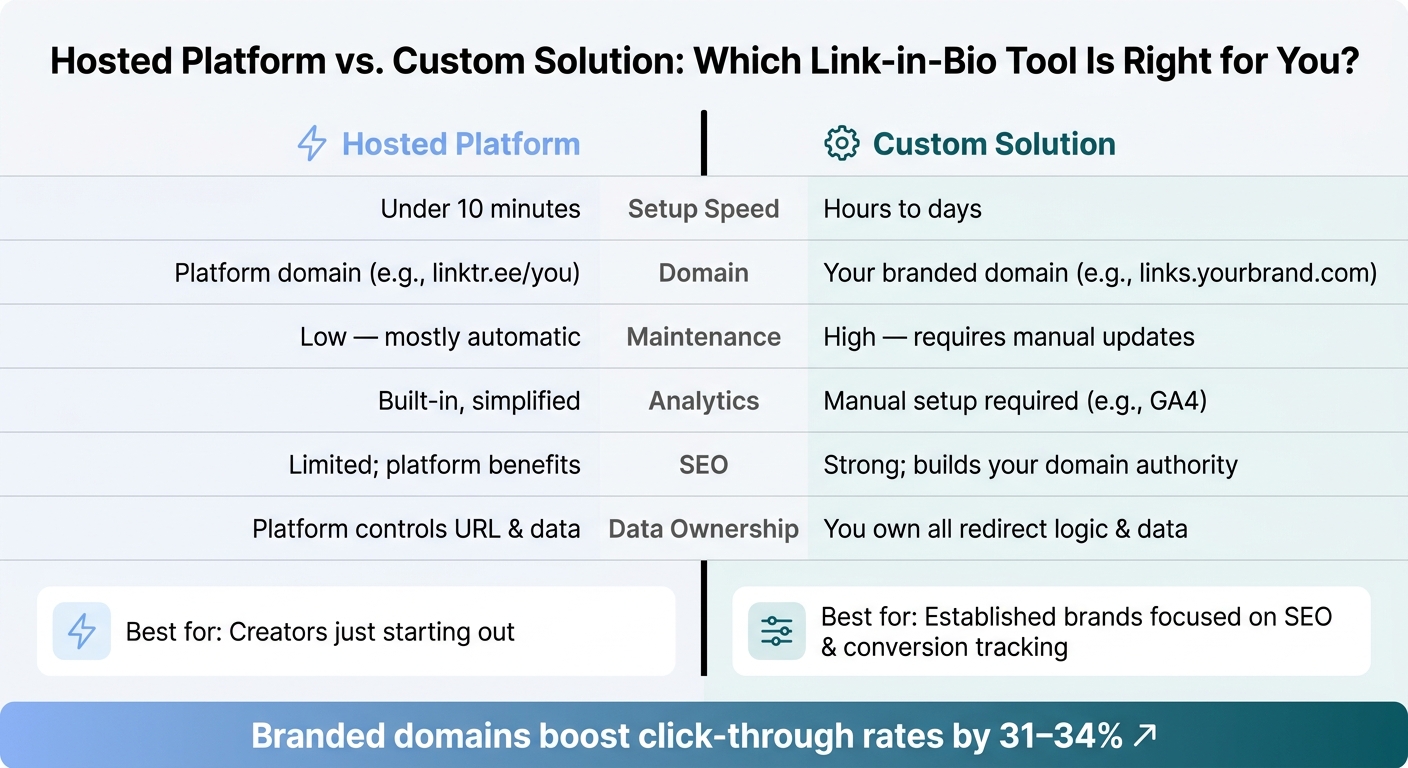
Hosted Platform vs. Custom Solution: Link-in-Bio Tool Comparison
Hosted Platforms vs. Custom Solutions
Choosing between a hosted platform and a custom solution depends on your specific needs. Hosted platforms are quick and easy to set up - most can have you live in under 10 minutes. They handle hosting, updates, and basic analytics, making them an appealing choice for beginners. However, your URL will live on their domain (e.g., linktr.ee/yourname), which limits your branding opportunities and gives the platform control over your URL data.
On the other hand, custom solutions - built on your own domain using tools like Carrd or a dedicated landing page - give you full control over design, SEO, and data. While this approach offers more flexibility and personalization, it requires more time and effort to set up and maintain. The choice you make will directly impact the user experience and your ability to drive conversions, which is the ultimate goal of optimizing your link-in-bio.
| Feature | Hosted Platform | Custom Solution |
|---|---|---|
| Setup Speed | Under 10 minutes | Hours to days |
| Domain | Uses the platform's domain (e.g., linktr.ee) | Uses your branded domain |
| Maintenance | Low; mostly automatic | High; requires manual updates |
| Analytics | Built-in and simplified | Requires manual setup (e.g., GA4) |
| SEO | Limited; platform benefits | Strong; builds your domain authority |
| Data Ownership | Platform controls URL and data | You own the redirect logic |
For creators just starting out, a hosted platform is a practical choice. However, if you're an established brand or focused on conversion tracking and SEO, investing in a custom solution - or at least using a branded short link (like links.yourbrand.com) - is worth the extra effort. Once you've chosen your platform, evaluate its features to maximize your performance.
Key Features to Look For in a Link-In-Bio Tool
To achieve high conversion rates, focus on these essential features when selecting your tool:
- Per-Platform Analytics: Track which platform - Instagram or TikTok - drives more clicks and conversions. Using distinct short links for each profile (e.g., "/ig" for Instagram, "/tt" for TikTok) helps you keep your data organized.
- Load Speed: Make sure the tool uses a global CDN to ensure fast loading times, especially on mobile.
- Custom Branding and Domain Support: Branded short links can boost clicks by up to 39%, and 81% of consumers say trust in a brand is critical when making a purchase.
Additionally, look for features like built-in email capture to grow your revenue, UTM support for tracking campaigns, e-commerce integrations, and AI-generated themes that align with your brand identity.
Using Outfame to Grow Your Audience
Once you've selected the right tool, the next step is driving quality traffic. A well-optimized link-in-bio tool sets the stage, but growing an engaged audience is what truly drives results.
"The bio link is where social engagement becomes website traffic, newsletter sign-ups, purchases and bookings." - Cuttly
Outfame can help you grow your audience with its AI-powered platform designed specifically for Instagram and TikTok. It uses automated audience targeting to attract real, engaged followers who are more likely to click through to your bio link. Its proprietary Outfame Max™ AI tool accelerates growth, while 24/7 real-time monitoring keeps your strategy on track. Plans start at $39/month and come with a growth guarantee: grow your followers or get your money back.
To make the most of your link-in-bio page, you need a large, engaged audience. Expanding your following on Instagram and TikTok increases the top of your funnel, driving more traffic to every link on your page.
Advanced Tactics for Link-In-Bio Monetization
Once you've optimized your bio page and chosen the right tools, it's time to step things up. These advanced strategies ensure that every click works harder for you.
How to Prioritize Revenue-Driving Links
To maximize revenue, focus on placing your most important offer front and center. Using the inverted pyramid strategy, reserve the Tier 1 slot for your primary revenue action - like a product purchase, booking form, or paid download. Tier 2 can house evergreen destinations, while Tier 3 supports less urgent links. This approach keeps your key revenue driver in the spotlight without overwhelming visitors.
Make sure to link directly to specific products or checkout pages rather than generic landing pages like "Shop" or "Collections." Every additional click can lose up to 15% of your audience, and 64% of social media users abandon purchases if they have to click more than three times. Swap vague calls-to-action (CTAs) like "Shop Now" for action-oriented prompts, such as "Get 10% Off Your First Order." These tweaks can significantly boost conversions.
"Rule of thumb: If someone lands on your bio page and has to decide between more than 3 options, they'll decide to leave." - BlinkURLs
Updating Links for Seasonal Campaigns
Your Tier 1 slot should act as a rotating spotlight for seasonal campaigns, such as limited-time drops, holiday sales, or event registrations. Update this link before posting on social media about the campaign - traffic typically spikes within 30–60 minutes of publishing, so a mismatched link can waste your best engagement window.
Use time-sensitive language in your link labels to create urgency, such as "Sale ends Sunday" or "Limited spots available." This approach encourages immediate action without sounding pushy. Once a promotion ends, remove the link right away to keep your page current.
"A Link in Bio page where the top link points to a promotion that ended three weeks ago tells every visitor that the account is not actively managed." - Cuttly Link in Bio Guide
For tracking performance, attach unique UTM parameters to each seasonal link (e.g., utm_campaign=summer_sale_2026). These parameters help you measure exactly how much revenue each campaign generates from your bio. Beyond short-term promotions, use your bio page to collect contact information for long-term revenue opportunities.
Adding Email Capture and Lead Magnets
Social media platforms control your reach, but an email list is something you own outright. This is a core principle of Instagram growth strategies that prioritize long-term audience ownership. That makes email capture a critical part of your monetization strategy.
"Followers are rented; an email list is owned." - Flyn Team
Embed an email capture form directly on your bio page to streamline the process, especially for mobile users. Offer a specific lead magnet to encourage sign-ups - like a 10% discount code, early access to a launch, or a free resource such as a template pack. Concrete offers tend to drive higher opt-in rates compared to vague promises like "Subscribe for updates".
Once someone joins your list, they enter a nurture funnel that works independently of social algorithms. This is particularly useful for selling high-ticket offers - like courses, consulting services, or premium products - where buyers may need multiple touchpoints before committing. Your bio page becomes the gateway to building a deeper, more profitable relationship with your audience.
Optimizing for Instagram and TikTok
To make the most of your link-in-bio strategy, it’s important to recognize that Instagram and TikTok operate differently. Each platform has its own audience dynamics and user behaviors, so a one-size-fits-all approach won’t cut it. What drives engagement on Instagram might not resonate with TikTok users, and vice versa.
Instagram-Specific Tips
Instagram tends to attract returning followers who are already familiar with your content. When someone visits your profile, it usually signals genuine interest, so your bio link needs to lead them to a clear and relevant destination.
- Update your Tier 1 link right before posting: This helps capture the spike in traffic that typically occurs within the first 30–60 minutes of a post going live.
- Optimize the "Name" field: This bolded line above your bio is indexed by Instagram’s search algorithm. Adding keywords like "LA Photographer" or "Miami Yoga Instructor" alongside your brand name can improve your discoverability by up to 24%.
- Use Story link stickers strategically: Place these stickers in the lower third of the screen - where thumbs naturally rest - for better engagement. Reserve Story links for time-sensitive promotions like flash sales or live events, while keeping your bio link focused on evergreen content that stays relevant beyond the 24-hour window.
TikTok-Specific Tips
TikTok operates differently, with its For You Page (FYP) constantly introducing your content to new users. This means many profile visitors are first-timers, so your link-in-bio strategy should focus on guiding these newcomers effectively.
- Feature a "Start Here" or "Most Popular" link: Place this in your top slot to help first-time visitors easily navigate your content.
- Leverage verbal calls-to-action and pinned comments: Encourage viewers to click your bio link by mentioning it directly in your videos or pinning comments that highlight its importance.
- Understand TikTok’s bio link limitations: Only Business accounts or Creator accounts with 1,000+ followers can use clickable bio links.
TikTok also has a higher bio click-through rate (3–8%) compared to Instagram’s 2–3%. While this might seem like an advantage, it’s important to consider conversion rates. Instagram’s conversion-to-sale rate is about 0.6%, while TikTok’s is roughly 1.2%.
"A 10,000-tap month at 0.4% sale rate produces 40 conversions; a 2,000-tap month at 3% produces 60. Fewer taps, more revenue." - Claire, trustypost.ai
Using Cross-Platform Analytics
Once you’ve tailored your strategies for each platform, use analytics to compare their performance. Create unique short link slugs (e.g., /ig for Instagram and /tt for TikTok) and apply consistent UTM tags to track platform-specific results.
"The creators who grow fastest are not the ones posting on the most platforms. They are the ones who measured which platform actually drives clicks, then stopped wasting time on the ones that do not." - Flyn Team
Conclusion: Key Takeaways for Link-In-Bio Success
Your link-in-bio page could be one of the most overlooked tools in your social media strategy. As Cuttly explains: "The bio link is the highest-traffic exit point on your entire profile - treating it as a simple link to your homepage wastes most of that traffic." Instead of a complete overhaul, focus on a few essential elements to maximize its potential.
Start by keeping your bio page simple and branded. A clean, focused design can significantly boost conversions. Use a custom domain for credibility, limit the number of links to avoid overwhelming visitors, and ensure your top link aligns with your current campaigns or goals.
Next, prioritize your primary call-to-action. Make it impossible to miss by placing it prominently and using clear, action-oriented labels. Also, don’t underestimate the importance of speed - your page should load in under 2 seconds to keep visitors from bouncing.
Analytics should become second nature. Tag every URL with UTM parameters to track performance, review click data weekly, and remove any links that show no activity for 30 days. If you're growing your audience on Instagram or TikTok, combining your link-in-bio strategy with tools like Outfame can help attract the right audience, making every tweak and adjustment even more impactful.
FAQs
What should I put in my top bio link right now?
Your top bio link is prime real estate for your most important call-to-action. This is where you can spotlight what matters most right now - whether it’s a new product, your latest video, or an ongoing campaign. Make it stand out with a high-contrast button and a clear, action-driven label like "Get the Free Guide" or "Shop Our Latest Drop." Keep it fresh by updating it regularly to match your current priorities and content.
How can I track sales from my bio link in GA4?
To monitor sales generated from your bio link in GA4, start by adding UTM parameters to your URL. These parameters help ensure traffic is accurately attributed. Be consistent when naming your source, medium, and campaign tags to avoid confusion.
In GA4, go to Reports > Acquisition > Traffic acquisition. From there, you can filter by Session source or Session campaign to analyze revenue data. Don't forget to test your links on mobile devices and check the real-time reports to make sure your UTM parameters are working as expected.
Do I need a custom domain for my link-in-bio page?
Using a custom domain isn’t mandatory, but it’s highly recommended if you want to establish brand authority and build trust. A branded URL, such as links.yourbrand.com, not only looks more professional but also helps you avoid being tied to shared platforms. Plus, it often leads to higher click-through rates. It gives your audience confidence that the link is secure and under your control. Setting one up is usually straightforward - it involves updating a CNAME record in your DNS settings.


