
If I want better Instagram growth, I should track actions - not just age, gender, or location. The strongest signs usually come from saves, shares, Reel watch time, profile visits, link taps, Story replies, DMs, and site visits.
Here’s the short version:
- Demographics tell me who a person is
- Behavior tells me what that person wants right now
- Warm audiences often beat cold audiences for leads and sales
- Retargeted users are 70% more likely to convert
- Adding tighter behavior filters can cut CPA by up to 62%
- The goal is not more followers alone - it’s more followers who act
If I were putting this into practice, I’d keep it simple:
- Track Instagram signals across discovery, consideration, high intent, and conversion
- Connect Instagram Insights, Meta Ads Manager, and Meta Pixel
- Build segments using recent time windows, like 14 days, 30 days, or 60 to 90 days
- Match each segment to one goal: follow, click, reply, book, or buy
- Test one variable at a time over 14 days
- Watch metrics like save rate, profile-to-follow rate, reply rate, conversion rate, and CPA
A few groups matter most at the start:
- Repeat profile visitors
- Reel viewers who watched 50%+ of 2 or more recent videos
- Story clickers
- DM starters and trigger-word commenters
- Lapsed engagers
I’d also keep the message tied to intent:
- Cold users: soft CTA, like “Follow for weekly tips”
- Mid-intent users: proof first, then ask for the click or follow
- High-intent users: direct offer, testimonial, or DM follow-up
- Lapsed users: new post angle and a “we miss you” message
Here’s a quick view of the full system:
| Stage | What I track | What I do next |
|---|---|---|
| Discovery | Views, likes | Show easy-to-consume posts |
| Consideration | Saves, shares, profile visits, link taps | Push profile visits, follows, and clicks |
| High intent | DMs, Story replies, repeat views | Send offers, proof, or DM follow-up |
| Conversion | Product views, cart adds, checkout visits | Retarget with offer or reminder |
The main idea is simple: I grow faster when I group people by what they did, give each group one clear next step, and keep testing until the numbers improve.
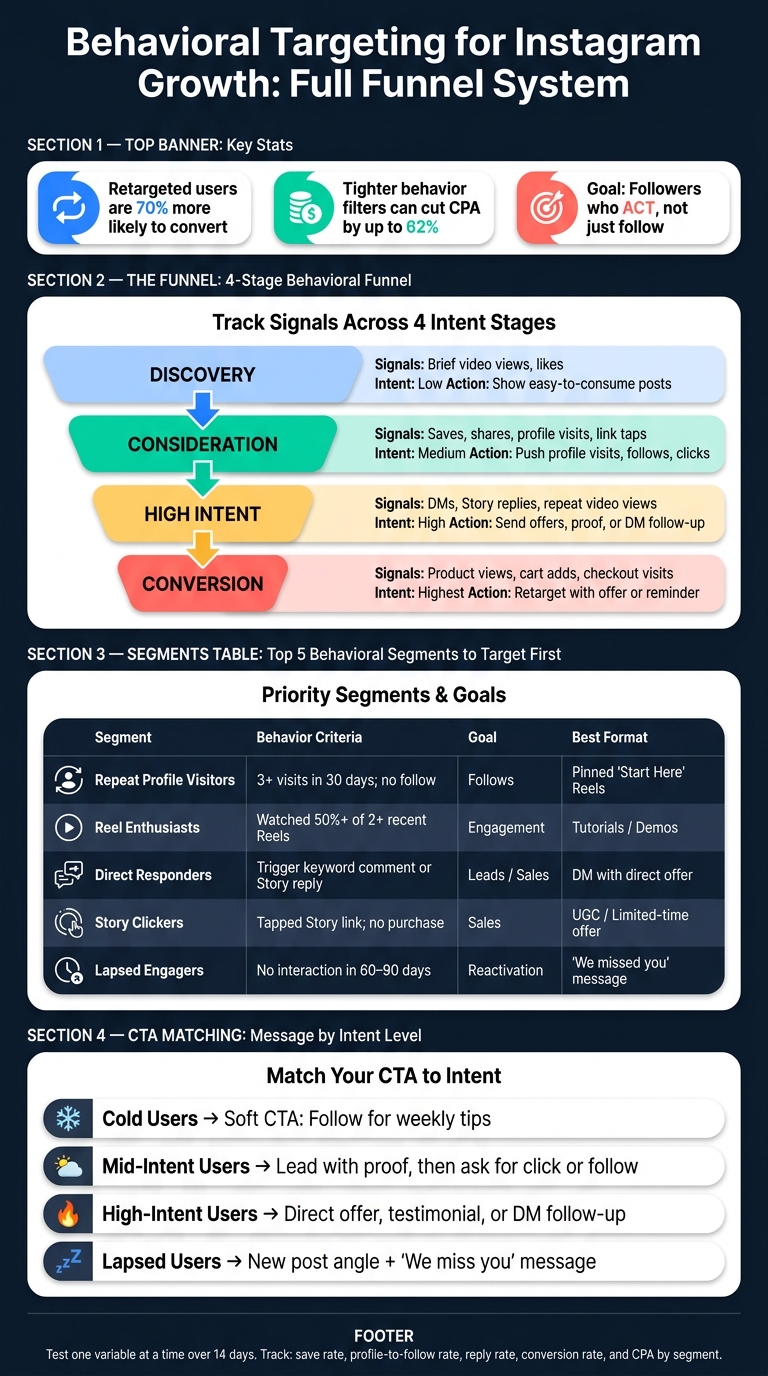
Behavioral Targeting for Instagram Growth: Full Funnel System
Set Up the Data and Tools You Need
Track Instagram actions across three tiers: discovery, consideration, and high intent. Those signals will become the audience segments you build next.
Core Instagram Behaviors That Signal Discovery and Intent
| Signal Type | Behavior | Intent Level |
|---|---|---|
| Discovery | Brief video views, likes | Low |
| Consideration | Saves, profile visits, shares, link taps | Medium |
| High Intent | DM senders, Story replies, repeat video views, comments that trigger a DM offer | High |
| Conversion | Product views, cart additions, checkout | Highest |
Once you define these signals, connect them to your Instagram, ad, and website data.
How to Combine Instagram Insights, Ad Data, and Website Events
Instagram's Professional Dashboard shows saves, shares, reach, and other content interactions. But that only gives you part of the story.
To see what happens after someone engages, connect your account to Meta Ads Manager and install the Meta Pixel on your website. That ties Instagram activity to off-platform actions like product views, cart additions, and checkout visits.
Don't rush this part. Wait until you have enough engaged users to spot repeat patterns. Then track repeat engagers, DM senders, and trigger-word responders in a spreadsheet. That list becomes your first high-intent seed audience.
With your data connected, you can turn each behavior tier into its own segment.
Use Outfame to Automate Targeting and Monitor Growth
If manual tracking starts to drag, use Outfame to automate behavior monitoring and audience targeting. Outfame Max™ supports 24/7 real-time growth monitoring through official APIs, without requiring your account password.
sbb-itb-3b12fba
Build Behavioral Segments From Real User Actions
Once you’ve got discovery, consideration, and high-intent signals, the next step is to turn them into segments you can actually use. Raw engagement can look busy without telling you much. The goal is simpler than it sounds: build audience groups around one behavior threshold, one time window, and one growth goal.
How to Define Segments Using Recent Engagement Windows
Build segments from recent behavior, because old engagement loses meaning fast. A solid starting point is the warm tier: people who engaged with 3 or more posts in the last 14 days, or watched at least half of 2 recent Reels. For profile visitors, a 30-day window tends to work well. If someone visited your profile 3+ times without following, that’s a strong sign of interest that still hasn’t turned into action.
You also need exclusion rules. Remove recent purchasers from conversion-focused segments so you’re not spending money on people who already bought.
From there, sort segments by how close they are to following, clicking, or buying.
Which Instagram Segments to Focus On First
Some segments sit much closer to action than others. Start there.
Repeat profile visitors - people who visited 3+ times in 30 days without following - are often one of the first groups worth pushing. Direct responders - users who commented a trigger keyword or replied to a Story - have already shown interest in something specific. Reel enthusiasts who watched at least half of 2 recent Reels are getting more familiar with your content.
Lapsed engagers - anyone with no interaction in 60 to 90 days - should go into their own reactivation campaign, not get lumped in with cold audiences.
Match Each Segment to a Clear Growth Goal
Each segment needs one clear objective. If the offer doesn’t match the intent, you waste reach and burn trust.
| Segment | Behavior Criteria | Primary Objective | Best Content Format |
|---|---|---|---|
| Repeat Profile Visitors | 3+ profile visits in 30 days; no follow | Follows | Pinned "Start Here" Reels |
| Reel Enthusiasts | Watched 50%+ of 2+ recent Reels | Engagement | Tutorials / How-it-works demos |
| Direct Responders | Commented trigger keyword or replied to Story | Leads / Sales | DM automation with direct offer |
| Story Clickers | Tapped link in Story; no purchase | Sales | UGC / Limited-time discounts |
| Lapsed Engagers | No interaction in 60–90 days | Reactivation | "We missed you" offers / New announcements |
You can also use DM initiators and other high-intent users as seed audiences for lookalike campaigns. That gives you a stronger base for growth than relying on one ad move alone.
These segments should guide your content, your offers, and your retargeting based on user intent.
Tailor Content and Campaigns to Each Segment
Once you’ve defined each segment, the next move is simple: use what people did to decide what they should see next.
Match Content Formats to User Behavior
The format should line up with the action that put someone in the segment in the first place.
Savers usually want content they can come back to, so educational carousels tend to work best. Think tutorials, checklists, and frameworks. Reel viewers tend to react better to short videos with a strong hook right away. Story responders already started a conversation, so your job is to keep that momentum going and guide them toward the next step. And if someone keeps visiting your profile but still hasn’t followed, pin your strongest proof point or your most useful post so it’s the first thing they see.
Once the format fits the behavior, the message needs to fit the intent.
Adjust Hooks, Offers, and Calls to Action by Intent Level
Intent should shape how direct you are.
Cold audiences usually need softer, low-friction CTAs. A line like "Follow for weekly [niche] tips" will often work better than pushing for a click too soon.
For mid-intent users - profile visitors, savers, and link tappers - lead with a stronger reason to pay attention. Trust comes first. Then ask for the follow or click.
High-intent users - repeat video viewers, DM initiators, and website visitors - already know your brand. At that point, they don’t need more top-level awareness. They need specifics. Use direct offers or social proof. If a group hasn’t engaged in 60 to 90 days, it usually responds better to new creative and a "we miss you" style message to pull them back in.
Then you can use retargeting to move each segment toward the next action.
Run Behavior-Based Retargeting and AI-Assisted Growth Campaigns
Retargeted users are 70% more likely to convert than cold audiences. That’s why warm segments are often the smartest place to put ad spend.
In Meta Ads Manager, build custom audiences from video viewers, profile visitors, and website visitors who didn’t convert. Then match the ad to the point where they dropped off. If they watched but didn’t follow, give them one clear reason to follow. If they visited your site but didn’t act, show them proof, a testimonial, or a direct offer that speaks to that gap.
For follow-focused campaigns, keep the ad tight:
- One clear reason to follow
- One CTA
For conversion-focused campaigns, use UGC-style video or testimonials so the ad feels natural in-feed.
Outfame can help surface the users most likely to follow or engage.
Measure Results and Improve the Targeting Cycle
Metrics That Show Behavioral Targeting Is Working
Once your segments are live, the next step is simple: watch what people do next. Follower count can be nice to look at, but on its own, it doesn't tell you much. What matters is whether people move closer to the action you want.
Track saves, DM shares, story replies, profile-visit-to-follow ratio, link taps, booked calls, conversion rate, and CPA by segment.
Here’s the idea: if lots of people visit your profile but don’t follow, your hook did its job. The problem is likely your bio or grid. It’s like getting someone to walk into a store, then losing them before they reach the checkout.
For business campaigns, focus on reply rates, booked calls, conversion rates, and CPA by segment. Engagement-rate benchmarks can still help as a quick gut check, but segment-level conversion tells you far more.
Use those signals to decide what to test next.
How to Test Creative, Timing, and Segment Definitions
Test one variable at a time over 14 days. That could be:
- creative angle
- posting window
- segment definition
Then compare claim rate, measured as claims divided by comments, response rate, and CPA by segment to see which segment performs best.
For timing, test posting windows like 7:00 a.m. to 9:00 a.m. against evening windows such as 8:00 p.m. to 10:00 p.m. based on when your own segments are active, not just generic best-practice tips. What works in one niche can fall flat in another, so your data should lead.
If a segment isn’t doing well, check the definition first. It may be too broad. Adding behavior layers - for example, targeting users who watched 70%+ of a specific Reel and have previously DMed a business account - can drop your Cost Per Acquisition by as much as 62%.
Outfame's real-time analytics can help you spot which segments are picking up momentum and which ones need a tune-up.
Then tighten the segment and repeat.
Conclusion: Track Actions, Segment Clearly, and Keep Optimizing
Track user actions, segment by intent, and measure each segment against one growth goal. Then tighten the definition or adjust the creative until the segment converts better.
FAQs
How do I know which Instagram behaviors matter most?
Prioritize high-intent signals over broad demographics. Pay close attention to actions that show real interest, like saves, DM shares, and story replies, because those carry strong weight in the 2026 algorithm.
It also helps to watch conversion-based behavior, such as profile visits that turn into a follow, DM inquiries, and comment-to-DM claimers. Outfame can help here by using AI to analyze engagement patterns and spot the users most likely to engage.
What’s the best window for building audience segments?
For effective behavioral targeting, build audience segments using a 30-day engagement window.
That time frame gives you a clear view of who keeps showing up. Look at DM activity, story replies, saves, and repeat engagement across those 30 days. Those signals help you spot your most loyal audience and the content niche that actually clicks.
To keep those segments accurate and relevant, use automation to track behavior in real time as people interact. Outfame helps with this by monitoring follower activity and engagement trends on a continuous basis.
How can I track Instagram actions all the way to sales?
Use conversion tracking with the Meta Pixel or Conversions API to track actions like add-to-cart events and purchases.
On top of that, apply the same UTM naming setup across all links so attribution in GA4 stays clean and easy to read. Unique discount codes can also help you spot delayed conversions that don’t happen right away.
Outfame can support this process by tracking follower activity and engagement quality. That gives you a clearer view of which audiences show stronger buying intent, so you can tighten targeting and spend more effort on the segments most likely to convert.


